Problem
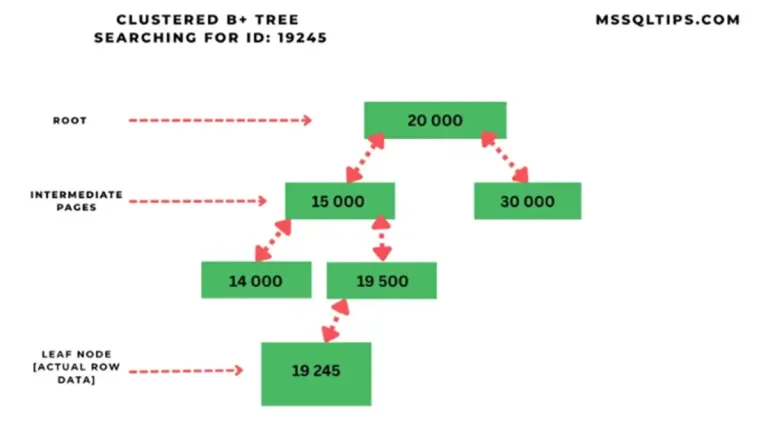
One very important design aspect when creating a new table is the decision to create or not create a clustered index. A table that does not have a clustered index is referred to as a HEAP and a table that has a clustered index is referred to as a clustered table.
A clustered table provides a few benefits over a heap such as controlling how the data is sorted and stored, the ability to use the index to find rows quickly and the ability to reorganize the data by rebuilding the clustered index. Depending on INSERT, UPDATE and DELETE activity against your tables, your physical data can become very fragmented. This fragmentation can lead to wasted space in your database, because of partly full pages as well as the need to read more pages in order to satisfy the query. So what can be done?
Solution
The primary issue that we want to address is the fragmentation that occurs with normal database activity. Depending on whether your table has a clustered index or not will determine if you can easily address the fragmentation problem down to the physical data level. Because a heap or a clustered index determines the physical storage of your table data, there can only be one of these per table. So a table can either have one heap or one clustered index.
Let’s take a look at the differences between a heap and clustered indexed table.
SQL Server HEAP
- Data is not stored in any particular order
- Specific data can not be retrieved quickly, unless there are also non-clustered indexes
- Data pages are not linked, so sequential access needs to refer back to the index allocation map (IAM) pages
- Since there is no clustered index, additional time is not needed to maintain the index
- Since there is no clustered index, there is not the need for additional space to store the clustered index tree
- These tables have a index_id value of 0 in the sys.indexes catalog view

source: SQL Server books online
SQL Server Clustered Indexed Table
- Data is stored based on the clustered index key
- Data can be retrieved quickly based on the clustered index key, if the query uses the indexed columns
- Data pages are linked for faster sequential access
- Additional time is needed to maintain the clustered index based on INSERT, UPDATE and DELETE activity
- Additional space is needed to store the clustered index tree
- These tables have a index_id value of 1 in the sys.indexes catalog view

source: SQL Server books online
So based on the above, you can see there are a few fundamental differences on when a table has a clustered index or does not.
SQL Server Fragmentation
A problem that occurs on all tables is the issue of becoming fragmented. Depending on the activity performed such as DELETEs, INSERTs and UPDATEs, your heap tables and clustered tables can become fragmented. A lot of this depends on the activity as well as the key values that are used for your clustered index.
- If your heap table only has INSERTs occurring, your table will not become fragmented, since only new data is written to new data pages.
- If your clustered index key is sequential, such as an identity value, and you only have INSERTs, again this will not become fragmented since the new data is always written at the end of the clustered index.
- But if your table is either a heap or a clustered table and there are a lot of INSERTs, UPDATEs and DELETEs the data pages can become fragmented. This results in wasted space as well as additional data pages to read to satisfy queries.
- When a table is created as a heap, SQL Server does not force where the new data pages are written. Whenever new data is written, this data is always written at the end of the table or on an available page that is assigned to this table. When data is deleted the space becomes free in the data pages and these pages may or may not be reused when new data is written. Also, when you delete data from a heap SQL Server does not always deallocate the space for the free pages.
- With a clustered index, depending on the index key, new records may be written to existing pages where free space exists or there may be need to split a page into multiple pages in order to insert the new data. When deletes occur the same issue occurs as with a heap, but this free space may be used again if data needs to be inserted into one of the existing pages that has free space.
- So based on this, your heap table could become more fragmented then your clustered table.
Identifying SQL Server Fragmentation
To identify whether your clustered table or heap table is fragmented you need to either run DBCC SHOWCONTIG (2000 or 2005) or use the DMV sys.dm_db_index_physical_stats. These commands will give you insight into the fragmentation problems that may exist in your table. For further information take at these Index Fragmentation and Maintenance Tips.
Resolving SQL Server Fragmentation
Below we will look at some ways to resolve fragmentation.
SQL Server Clustered Indexed Tables
Resolving the fragmentation for a clustered table can be done easily by rebuilding or reorganizing your clustered index. Take a look a this tip, Script to Manage SQL Server Rebuilds and Reorganize for Index Fragmentation.
SQL Server Heap Tables
For heap tables this is not as easy. The following are different options you can take to resolve the fragmentation:
- Create a clustered index and then drop the clustered index if you don’t want to keep the clustered index.
- Create a new table and insert data from the heap table into the new table based on some sort order
- Export the data, truncate the table and import the data back into the table
Additional Info
When creating a new table via SQL Server Management Studio when you specify a primary key for the table, SSMS automatically makes this a clustered index, but this can be overridden and it doesn’t always make sense that the primary key is the clustered index. Take a look at this tip Finding a better candidate for your SQL Server clustered indexes for more information. When creating a new table via scripts you need to identify that the table be created with a clustered index. So based on this, most of your tables are going to have a clustered index, because of the primary key, but if you do not specify a primary key or build a clustered index the data will be stored as a heap.
Next Steps
- Keeping table and index fragmentation under control is a key process to maintain optimum performance out of your database. Now that you can see how a heap vs. a clustered table differs and what needs to be done to address the fragmentation, take a look at your table structures to see if you need to address these issues.
- Even if you are doing a complete index rebuild on all of your tables once a week or whenever, your heap tables will never be de-fragmented, so you will need to come up with another strategy to handle fragmentation issues with heap tables.
- Based on the above, it seems that all tables should have a clustered index. For the most part this is the case, but there may be some reason that you do not want to have a clustered index. One reason could be a table that only has INSERTs, such as a log file. But if in doubt, it would be better to have a clustered index then to not have one.

Greg Robidoux has been working with databases for 35+ years with extensive hands on SQL Server experience from version 6.5 to 2025. He has authored over 250 technical articles and delivered several presentations online and at various conventions. Greg is also the President and founder of Edgewood Solutions, a technology services company delivering services and solutions for Microsoft SQL Server.