Problem
I have two triggers defined on my table which are set to fire on the same table actions (i.e. an INSERT, DELETE, UPDATE transaction). The second trigger that fires is dependent on the first fired trigger. How can I make sure that they fire in the correct order to enforce my business logic? In addition, as our system changes, what are some of the caveats that I need to be aware of when managing the trigger firing order?
Solution
By default, multiple triggers on a SQL Server table for the same action are not fired in a guaranteed order. However, it’s possible to declare the firing order for 2 AFTER triggers (i.e. triggers that fire after the database action has been completed) using system stored procedure sp_settriggerorder. This feature cannot be used with INSTEAD OF triggers and you will receive a database error if you attempt to define an order on these types of triggers.
The system stored procedure sp_settriggerorder is defined as follows:
-- sp_settriggerorder Parameters
exec sp_settriggerorder @triggername = ,
@order = [FIRST|LAST|NONE],
@stmttype = [INSERT|UPDATE|DELETE|],
@namespace = [DATABASE|SERVER|NULL]
Here is an explanation of the parameters:
- Parameter @triggername is self explanatory; it’s the trigger being ordered.
- Parameter @order indicates whether the trigger should fire FIRST or LAST. If NONE is specified, then no order is enforced.
- Parameter @stmttype indicates the trigger type i.e. whether it’s an INSERT trigger, for instance.
- Parameter @namespace is SQL Server 2005 specific and indicates whether a DDL trigger was created on the database or on the server. If set to NULL, it indicates that the trigger is a DML trigger
Example 1 – Trigger Firing Order
Let’s create a sample table called customer that has two insert triggers defined on it. The business rule is that when a new customer is inserted, trigger 1 must always fire before trigger 2.
--Create the sample table
set nocount on
go
create table dbo.customer (customerid int identity primary key)
go

--Create trigger 1
create trigger dbo.tr_customer_1 on dbo.customer
for insert
as
set nocount on
print 'firing original trigger 1'
go

--Create trigger 2
create trigger dbo.tr_customer_2 on dbo.customer
for insert
as
set nocount on
print 'firing original trigger 2'
go

--Sample insert statement
insert into dbo.customer default values
go
As we can see, the triggers do in fact fire in the expected order.
Example – Trigger Firing Order
Let’s assume that a code change is required to trigger 1. Let’s make the change and insert a new customer into the table.
--Drop trigger 1
drop trigger dbo.tr_customer_1
go

--Create trigger 1
create trigger dbo.tr_customer_1 on dbo.customer
for insert
as
set nocount on
print 'firing modified trigger 1'
go

--Sample insert statement
insert into dbo.customer default values
go
As we now see, our business rule has been violated. Trigger 2 fired before trigger 1. Using sp_settriggerorder, we can correct this condition.
--Corrective code
exec sp_settriggerorder @triggername = 'tr_customer_1',
@order = 'first',
@stmttype = 'insert',
@namespace = null

exec sp_settriggerorder @triggername = 'tr_customer_2',
@order = 'last',
@stmttype = 'insert',
@namespace = null
go

--Sample insert statement
insert into dbo.customer default values
go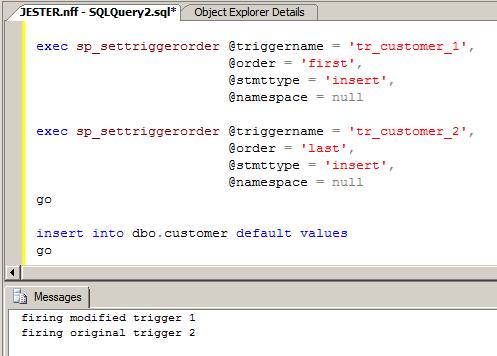
The trigger firing order has been corrected.
Firing More Than 3 Triggers
If you have more than 2 triggers, you can actually order all 3 if you specify the FIRST and the LAST trigger to fire. By default, any triggers that fire between the FIRST defined trigger and the LAST defined trigger are not fired in a specific order. As a result, a three trigger set up can be configured to fire in 1-2-3 order by declaring which trigger should fire FIRST and which trigger should fire LAST. If you have 4 or more triggers, you’re out of luck. In these cases, the FIRST trigger will fire, the unordered triggers will fire in non-guaranteed order, and then finally, the LAST trigger will fire.
Trigger Caveats
There is a gotcha to watch out for: If you DROP the trigger and re-create it, or if you ALTER the trigger, the attribute assigned to the trigger is dropped and you will have to redefine it by re-executing sp_settriggerorder. Also, for replicated sites, SQL Server Replication will create a FIRST trigger on replicated tables. In this case, these triggers should not be changed otherwise you may end up with unpredictable replication results.
Alternative – OBJECTPROPERTY
Lastly, determining the firing attribute of a trigger can be done with the OBJECTPROPERTY function using one of the available properties such as ExecIsFirstInsertTrigger or ExecIsLastInsertTrigger. Read more about the trigger attribute options available with the OBJECTPROPERTY function.
Next Steps
- Examine your tables that contain multiple triggers for the same action and consider condensing them into a single trigger, if possible.
- Read more about sp_settriggerorder in greater detail in SQL Server Books Online.
- Read more about INSTEAD OF triggers in SQL Server Books Online.
- Check out these other trigger related tips:

For 20+ years, MSSQLTips.com has been delivering comprehensive technical solutions on a daily basis for the Microsoft SQL Server platform. In that time, an innovative team of over 300 authors from around the globe have delivered over 7000 articles and 1000 webcasts ranging from beginner topics to advanced solutions. Our community prides itself on delivering human only generated content.
