By: Armando Prato | Comments (5) | Related: > Indexing
Problem
I'm trying to design indexes on a new Customer table and I have three separate query searches to satisfy. One query search is by lastname. The 2nd query search is by last name and first name. The last query search is by lastname and an active flag. How should I create my indexes?
Solution
I've come across more instances than I'd like of data models where the original database developer would solve this problem by creating three separate indexes as follows:
| create index ix_customer_lastname on dbo.Customer(lastname) GO create index ix_customer_lastname_firstname on dbo.Customer(lastname, firstname) create index ix_customer_lastname_activesw on dbo.Customer(lastname, activesw) |
The reality is, in this case you only need one!
The following queries
| select * from dbo.Customer where lastname = 'Washington' GO select * from dbo.Customer where lastname = 'Washington' and activesw = 1 select * from dbo.Customer where firstname = 'George' and lastname = 'Washington' select * from dbo.Customer |
can all be satisfied using the following single index
| create index ix_customer_lastname on dbo.Customer(lastname, firstname, activesw) GO |
The lead column of each index is lastname and this is the most important one. SQL Server keeps frequency distribution statistics in the form of a histogram on the lead column of every index. It will also keep secondary selectivity information for the additional index column permutations.
Having redundant indexes in your database wastes SQL Server system resources because the database engine has to maintain more data structures than it needs to. Consider a new Customer being added to the database. The new last name inserted would have to be accounted for in the logical ordering of each index resulting in unnecessary overhead to maintain each of these indexes. Furthermore, redundant indexes waste disk space.
Let's create a Customer table and some indexes to illustrate these concepts. This script will create the table and 10,000 customer rows.
| set nocount on go create table dbo.Customer (customerid int identity primary key, firstname char(40), lastname char(40), address1 char(500), city char(40), state char(20), activesw bit) declare @counter int, @id varchar(4) select @counter = 1 while (@counter <= 10000) begin select @id = cast(@counter as varchar) insert into customer(firstname, lastname, address1, city, activesw) select 'f'+@id, 'l'+@id, 'a'+@id, 'c'+@id, 1 select @counter = @counter + 1 end create index ix_customer_lastname on dbo.Customer(lastname) create index ix_customer_lastname_firstname on dbo.Customer(lastname, firstname) create index ix_customer_lastname_activesw on dbo.Customer(lastname, activesw) go |
Now let's examine the space used by the table's indexes
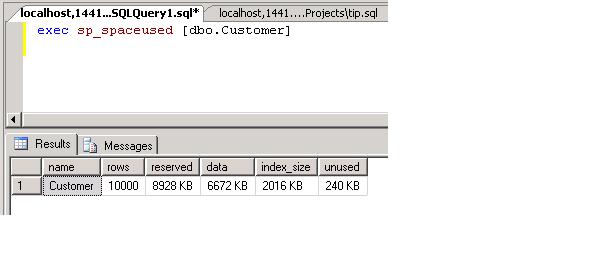
We see that the indexes take up 2kb of disk space
Now let's run the following queries and examine the optimizer's index selections
| set showplan_text on go select customerid from dbo.Customer where lastname = 'l22' select customerid from dbo.Customer where lastname = 'l22' and activesw = 1 select customerid from dbo.Customer where firstname = 'f22' and lastname = 'l22' select customerid from dbo.Customer where firstname = 'f22' and lastname = 'l22' and activesw = 1 |
Your query plans may look similar to the following:
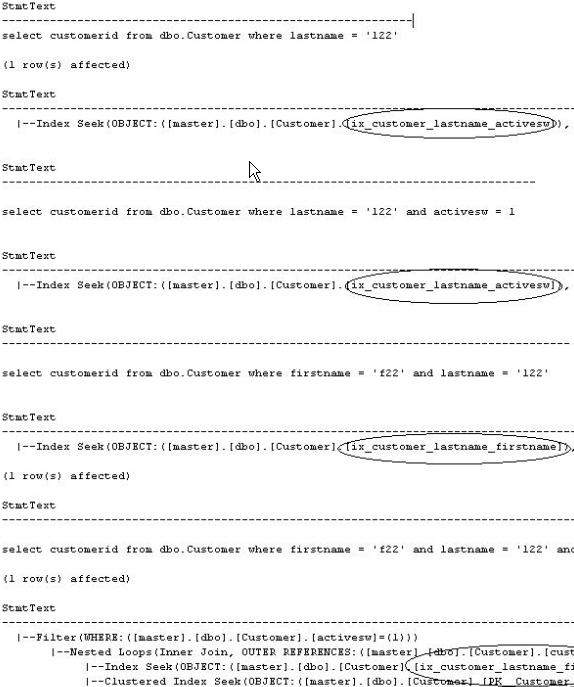
Now these are interesting. The first and second queries used index ix_customer_lastname_activesw. The third query used index ix_customer_lastname_firstname. For the last query, the optimizer decided to use ix_customer_lastname_firstname as well and decided to do a lookup to get the activesw value. If you haven't noticed yet, index ix_customer_lastname was not used to satisfy any of these queries. It's just sitting around, literally taking up space.
Now let's drop these indexes and add a single index to satisfy the same four queries
| drop index dbo.Customer.ix_customer_lastname drop index dbo.Customer.ix_customer_lastname_firstname drop index dbo.Customer.ix_customer_lastname_activesw create index ix_customer_lastname on dbo.Customer(lastname, firstname, activesw) |
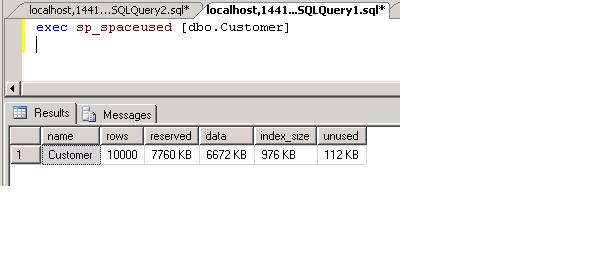
If we now re-run sp_spaceused, we'll see that the index space used by the table has been reduced by over 100%
Now let's re-run the queries we ran earlier and examine the new execution plans
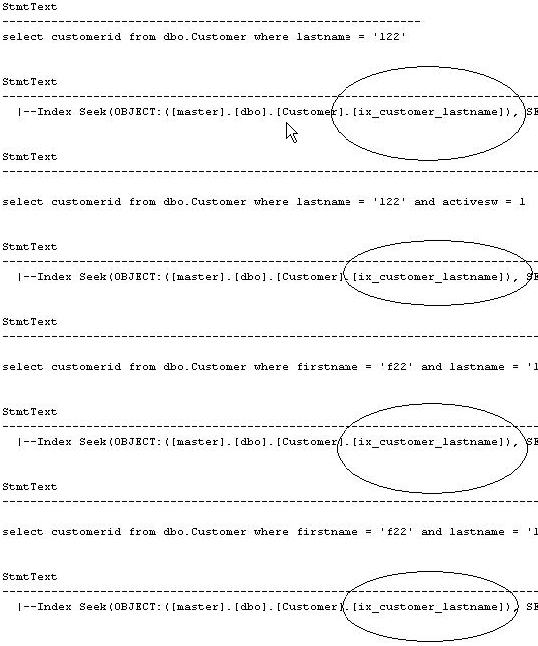
As we now see, the single index satisfies all four queries. In addition, the last query that performed a lookup for the activesw now reads it directly from the index and does not resort to searching the clustered table for the value.
By carefully defining your indexes you can save the database engine some work, save some space on your disks, and still have high performing queries.
Next Steps
- Examine your data model for redundant indexes and consider an investigation into the elimination of these redundancies
- Read more about sp_spaceused in the SQL tips archive - Using DBCC UPDATEUSAGE to get accurate space allocation information in SQL Server
- Read Creating Indexes with Included Columns in the SQL Server 2005 Books Online






About the author
 Armando Prato has close to 30 years of industry experience and has been working with SQL Server since version 6.5.
This author pledges the content of this article is based on professional experience and not AI generated.
View all my tips
