By: Armando Prato | Comments (4) | Related: More > Database Administration
Problem
From time to time, I am called in to troubleshoot and diagnose database issues. I often find that someone has modified the database tables or database source code which forces me to comb through the database to find any changes made since it was created. Is there an easier way to figure out if anything has changed?
Solution
I run into this quite frequently. Changes would get
made, they would never get communicated, and I'd find myself going down rabbit holes
only to discover that a change was made after creation of the database.
To help myself, I now maintain my own "system tables" which describe what makes up my
database. I am diligent about naming every single object in my schema whether it
is a CHECK constraint, a DEFAULT constraint, etc. If it goes into the database,
it gets a name. Allowing a SQL Server system generated name to enter my model is unacceptable!
In this tip, I will create custom tables which contain the objects that make
up an simple database (table, stored procedure). I will then execute a stored procedure that
I've written that compares my database against SQL Server's
INFORMATION_SCHEMA views to get an idea of what differences (if any) have been made to the database.
The following simple script creates 2 tables which are populated with data based on a table
and stored procedure related to a Customer table.
-- create our own system
table to hold all our tables
CREATE
TABLE dbo.MyTables

(

table_name
VARCHAR(50)
NOT NULL, -- name of table

column_name
VARCHAR(50)
NOT NULL, -- column name


)

GO

CREATE UNIQUE CLUSTERED INDEX
uq_MyTables
ON dbo.MyTables(table_name,column_name)

GO


-- create
our system table to hold all our procs
CREATE
TABLE dbo.MyProcs

(

proc_name
VARCHAR(255)
NOT NULL, -- name of proc

proc_size int NOT NULL

)

GO

CREATE UNIQUE CLUSTERED INDEX
uq_MyProcs
ON dbo.MyProcs(proc_name)

GO


-- create user table

CREATE TABLE
dbo.Customer

(

customerid
INT
IDENTITY(1,1)
NOT NULL,
firstname
VARCHAR(255)
NOT NULL,
lastname
VARCHAR(255)
NOT NULL
)
GO

ALTER TABLE
dbo.Customer

ADD CONSTRAINT
pk_customer
PRIMARY KEY
(customerid)

GO


-- create user stored procedure

CREATE PROCEDURE
dbo.GetCustomer

AS
SET
nocount
ON
SELECT
firstname,
lastname

FROM dbo.customer

GO

-- load
our system tables

INSERT INTO
dbo.MyTables
(table_name,
column_name)

SELECT
'Customer'
,
'customerid'
-- customerid


INSERT INTO
dbo.MyTables
(table_name,
column_name)

SELECT
'Customer'
,
'firstname'
-- firstname


INSERT INTO
dbo.MyTables
(table_name,
column_name)

SELECT
'Customer'
,
'lastname'
-- lastname


INSERT INTO
dbo.MyProcs
(proc_name,
proc_size)

SELECT
'GetCustomer'
,
282
-- the proc size


GO
I will now create a check procedure that can be used to read these tables and determine if the database has changed from when it was first installed. I will check to make sure the table exists and that the stored procedure has not changed.
CREATE
PROCEDURE dbo.CheckMyDatabase

AS
SET
NOCOUNT
ON

CREATE TABLE
#table
(table_name
VARCHAR(50))

CREATE TABLE
#proc
(proc_name
VARCHAR(255))


-- check if all tables present

INSERT INTO
#table
(table_name)

SELECT
table_name

FROM dbo.MyTables
db
WHERE NOT EXISTS (SELECT
1

FROM
INFORMATION_SCHEMA.TABLES i

WHERE
i.TABLE_NAME
= db.table_name


AND
i.TABLE_TYPE
= 'BASE
TABLE')


IF EXISTS
(SELECT
1 FROM
#table)

BEGIN
   PRINT
'Missing Tables!'

   PRINT
'----------------'

   SELECT
table_name
FROM
#table

END
ELSE

PRINT 'All tables accounted for'


-- check if procedures changed

INSERT INTO
#proc
(proc_name)

   SELECT
proc_name

FROM dbo.MyProcs
db
   INNER JOIN
INFORMATION_SCHEMA.ROUTINES i
ON
i.ROUTINE_NAME
= db.proc_name

   AND
i.ROUTINE_TYPE
= 'PROCEDURE'

   AND
DATALENGTH(OBJECT_DEFINITION(OBJECT_ID(ROUTINE_NAME)))
<> db.proc_size


IF
EXISTS (SELECT
1
FROM
#proc)

   BEGIN

PRINT 'The following procedures may
have changed'

PRINT '-----------------------------------------'


SELECT
proc_name
FROM
#proc

END
   ELSE

       PRINT
'All stored procedures appear consistent'

GO


-- Check the database
-- Change
your Results Pane output to "Results To Text"

EXEC CheckMyDatabase

GO
You should see the following output
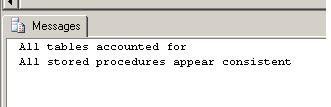
Now, let's assume that a developer modified the GetCustomer stored procedure
to accept a passed in customerid. Re-running our database check procedure, we can
capture that something has changed in the database.
ALTER
PROCEDURE dbo.GetCustomer
@customerid
INT
AS

SET
NOCOUNT
ON
SELECT
firstname,
lastname

FROM dbo.customer

WHERE
customerid
=
@customerid


GO


-- Re-check the database
-- Change your
Results Pane output to "Results To Text"

EXEC CheckMyDatabase

GO
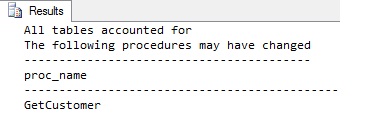
As you can see, you can get a good idea of any database changes that have occurred
before you dig into a problem which can save you a lot of wasted investigative time.
Next Steps
- Consider renaming any SQL Server specific generated object names in your model to specific, static names
- Consider recording all the objects that make up your database
- Read more about the OBJECT_DEFINTION function in the SQL Server Books Online






About the author
 Armando Prato has close to 30 years of industry experience and has been working with SQL Server since version 6.5.
This author pledges the content of this article is based on professional experience and not AI generated.
View all my tips
