Problem
One of the balancing acts of SQL Server is the use of indexes. Too few indexes can cause scans to occur which hurts performance and too many indexes causes overhead for index maintenance during data updates and also a bloated database. So what steps can be taken to determine which indexes are being used and how they are being used.
Solution
In a previous tip, How to get index usage information in SQL Server, we talked about how to get index usage information by using the DMVs sys.dm_db_index_operational_stats and sys.dm_db_index_usage_stats. The one issue with these views is that it only gives you part of the picture and you still need to dig deeper to get all of the information you need to determine which indexes are not used.
In this tip we will take it a step further and provide some additional queries that will shed some much needed light on the issue.
We will be using the DMV sys.dm_db_index_usage_stats which keeps track of each index that has been used and how it has been used. This was covered in the tip mentioned above. These stats are collected whenever an object is accessed. SQL Server resets these values if SQL Server is restarted or if you detach and reattach the database.
There are seven queries below and each one builds upon the others to give you more and more information. If you can’t wait you can just skip right to Query 7. To select the code you should be able to triple click in the table cell to select all of the code.
Note: the information below was collected by restarting SQL Server and then doing selected queries on the AdventureWorks database. For a more heavily used database your numbers and index usage will be much higher.
Query 1
In this first query we are just using sys.dm_db_index_usage_stats and sys.objects to get a list of the indexes that have been used and how they are being used.
SELECT DB_NAME(DATABASE_ID) AS DATABASENAME,
       SCHEMA_NAME(C.SCHEMA_id) AS SCHEMANAME,
       OBJECT_NAME(B.OBJECT_ID) AS TABLENAME,
       INDEX_NAME = (SELECT NAME
                     FROM   SYS.INDEXES A
                     WHERE  A.OBJECT_ID = B.OBJECT_ID
                       AND  A.INDEX_ID = B.INDEX_ID),
       USER_SEEKS,
       USER_SCANS,
       USER_LOOKUPS,
       USER_UPDATES
FROM   SYS.DM_DB_INDEX_USAGE_STATS B
       INNER JOIN SYS.OBJECTS C ON B.OBJECT_ID = C.OBJECT_ID
WHERE  DATABASE_ID = DB_ID(DB_NAME())
       AND C.TYPE = 'U'

Query 2
In this query we are listing each user table and all of the tables indexes that have not been used by using a NOT EXISTS against sys.dm_db_index_usage_stats.
SELECT DB_NAME() AS DATABASENAME,
       SCHEMA_NAME(A.SCHEMA_id) AS SCHEMANAME,
       OBJECT_NAME(B.OBJECT_ID) AS TABLENAME,
       B.NAME AS INDEXNAME,
       B.INDEX_ID
FROM   SYS.OBJECTS A
       INNER JOIN SYS.INDEXES B ON A.OBJECT_ID = B.OBJECT_ID
WHERE  NOT EXISTS (SELECT *
                   FROM  SYS.DM_DB_INDEX_USAGE_STATS C
                   WHERE DATABASE_ID = DB_ID(DB_NAME())
                     AND B.OBJECT_ID = C.OBJECT_ID
                     AND B.INDEX_ID = C.INDEX_ID)
       AND A.TYPE = 'U'
ORDER BY 1, 2, 3

Query 3
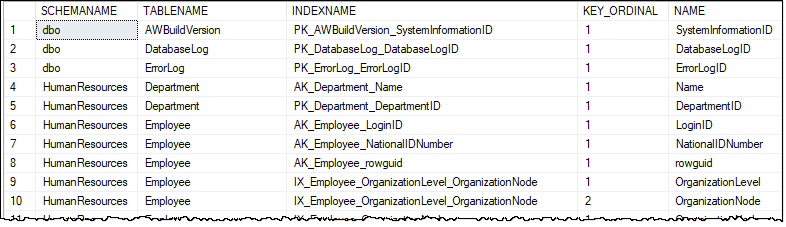
In this query we are listing each user table, all of its indexes and the columns that make up the index. The issue with this query is that you have a row for each column in the index which could get confusing if you have a lot of indexes.
SELECT SCHEMA_NAME(A.SCHEMA_id) AS SCHEMANAME,
       A.NAME AS TABLENAME,
       B.NAME AS INDEXNAME,
       C.KEY_ORDINAL,
       D.NAME
FROM   SYS.OBJECTS A
       INNER JOIN SYS.INDEXES B ON A.OBJECT_ID = B.OBJECT_ID
       INNER JOIN SYS.INDEX_COLUMNS C ON B.OBJECT_ID = C.OBJECT_ID AND B.INDEX_ID = C.INDEX_ID
   INNER JOIN SYS.COLUMNS D ON C.OBJECT_ID = D.OBJECT_ID AND C.COLUMN_ID = D.COLUMN_ID
WHERE  A.TYPE = 'U'
ORDER BY 1, 2, 3, 4
Query 4
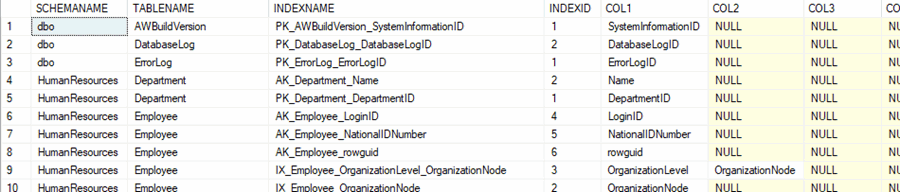
In this query we use most of Query 3, but we are doing a PIVOT so we can see the index and the index columns in one row. This only accounts for 7 index columns, but it could easily be increased to handle more in the PIVOT operation. Here is another tip related to the use of PIVOT, Crosstab queries using PIVOT in SQL Server. if you would like to better understand how PIVOT works.
SELECT SCHEMANAME, TABLENAME, INDEXNAME, INDEXID, [1] AS COL1, [2] AS COL2, [3] AS COL3, [4] AS COL4,  [5] AS COL5, [6] AS COL6, [7] AS COL7
FROM   (SELECT SCHEMA_NAME(A.SCHEMA_id) AS SCHEMANAME,
               A.NAME AS TABLENAME,
               B.NAME AS INDEXNAME,
               B.INDEX_ID AS INDEXID,
               D.NAME AS COLUMNNAME,
               C.KEY_ORDINAL
        FROM   SYS.OBJECTS A
               INNER JOIN SYS.INDEXES B ON A.OBJECT_ID = B.OBJECT_ID
               INNER JOIN SYS.INDEX_COLUMNS C ON B.OBJECT_ID = C.OBJECT_ID AND B.INDEX_ID = C.INDEX_ID
               INNER JOIN SYS.COLUMNS D ON C.OBJECT_ID = D.OBJECT_ID AND C.COLUMN_ID = D.COLUMN_ID
        WHERE  A.TYPE = 'U') P
       PIVOT
       (MIN(COLUMNNAME)
        FOR KEY_ORDINAL IN ( [1],[2],[3],[4],[5],[6],[7] ) ) AS PVT
ORDER BY SCHEMANAME, TABLENAME, INDEXNAME;
Query 5
In this query we tie in our PIVOT query above with sys.dm_db_index_usage_stats so we can look at only the indexes that have been used since the last time the stats were reset.
SELECT SCHEMANAME, TABLENAME, INDEXNAME, INDEX_ID, [1] AS COL1, [2] AS COL2, [3] AS COL3, [4] AS COL4, [5] AS COL5, [6] AS COL6, [7] AS COL7
FROM   (SELECT SCHEMA_NAME(A.SCHEMA_id) AS SCHEMANAME,
               A.NAME AS TABLENAME,
               A.OBJECT_ID,
               B.NAME AS INDEXNAME,
               B.INDEX_ID,
               D.NAME AS COLUMNNAME,
               C.KEY_ORDINAL
        FROM   SYS.OBJECTS A
               INNER JOIN SYS.INDEXES B ON A.OBJECT_ID = B.OBJECT_ID
               INNER JOIN SYS.INDEX_COLUMNS C ON B.OBJECT_ID = C.OBJECT_ID AND B.INDEX_ID = C.INDEX_ID
               INNER JOIN SYS.COLUMNS D ON C.OBJECT_ID = D.OBJECT_ID AND C.COLUMN_ID = D.COLUMN_ID
        WHERE  A.TYPE = 'U') P
       PIVOT
       (MIN(COLUMNNAME)
        FOR KEY_ORDINAL IN ( [1],[2],[3],[4],[5],[6],[7] ) ) AS PVT
WHERE EXISTS (SELECT OBJECT_ID, INDEX_ID
              FROM  SYS.DM_DB_INDEX_USAGE_STATS B
              WHERE DATABASE_ID = DB_ID(DB_NAME())
                AND PVT.OBJECT_ID = B.OBJECT_ID
                AND PVT.INDEX_ID = B.INDEX_ID)
ORDER BY SCHEMANAME, TABLENAME, INDEXNAME;

Query 6
This query also uses the PIVOT query along with sys.dm_db_index_usage_stats so we can also see the stats on the indexes that have been used.
SELECT PVT.SCHEMANAME, PVT.TABLENAME, PVT.INDEXNAME, [1] AS COL1, [2] AS COL2, [3] AS COL3, [4] AS COL4, [5] AS COL5, [6] AS COL6, [7] AS COL7, B.USER_SEEKS, B.USER_SCANS, B.USER_LOOKUPS
FROM   (SELECT SCHEMA_NAME(A.SCHEMA_id) AS SCHEMANAME,
               A.NAME AS TABLENAME,
               A.OBJECT_ID,
               B.NAME AS INDEXNAME,
               B.INDEX_ID,
               D.NAME AS COLUMNNAME,
               C.KEY_ORDINAL
        FROM   SYS.OBJECTS A
               INNER JOIN SYS.INDEXES B ON A.OBJECT_ID = B.OBJECT_ID
               INNER JOIN SYS.INDEX_COLUMNS C ON B.OBJECT_ID = C.OBJECT_ID AND B.INDEX_ID = C.INDEX_ID
               INNER JOIN SYS.COLUMNS D ON C.OBJECT_ID = D.OBJECT_ID AND C.COLUMN_ID = D.COLUMN_ID
        WHERE  A.TYPE = 'U') P
       PIVOT
       (MIN(COLUMNNAME)
        FOR KEY_ORDINAL IN ( [1],[2],[3],[4],[5],[6],[7] ) ) AS PVT
INNER JOIN SYS.DM_DB_INDEX_USAGE_STATS B ON PVT.OBJECT_ID = B.OBJECT_ID AND PVT.INDEX_ID = B.INDEX_ID AND B.DATABASE_ID = DB_ID()
ORDER BY SCHEMANAME, TABLENAME, INDEXNAME;

Query 7
This last query allow us to see both used and unused indexes. Since the DMV sys.dm_db_index_usage_stats only tracks when an index is used it is hard to compare the used and unused indexes. The query below allows you to see all indexes to compare both used and unused indexes since the stats were collected by using a UNION.
SELECT PVT.SCHEMANAME, PVT.TABLENAME, PVT.INDEXNAME, PVT.INDEX_ID, [1] AS COL1, [2] AS COL2, [3] AS COL3, [4] AS COL4,  [5] AS COL5, [6] AS COL6, [7] AS COL7, B.USER_SEEKS, B.USER_SCANS, B.USER_LOOKUPS
FROM   (SELECT SCHEMA_NAME(A.SCHEMA_id) AS SCHEMANAME,
               A.NAME AS TABLENAME,
               A.OBJECT_ID,
               B.NAME AS INDEXNAME,
               B.INDEX_ID,
               D.NAME AS COLUMNNAME,
               C.KEY_ORDINAL
        FROM   SYS.OBJECTS A
               INNER JOIN SYS.INDEXES B ON A.OBJECT_ID = B.OBJECT_ID
               INNER JOIN SYS.INDEX_COLUMNS C ON B.OBJECT_ID = C.OBJECT_ID AND B.INDEX_ID = C.INDEX_ID
               INNER JOIN SYS.COLUMNS D ON C.OBJECT_ID = D.OBJECT_ID AND C.COLUMN_ID = D.COLUMN_ID
        WHERE  A.TYPE = 'U') P
       PIVOT
       (MIN(COLUMNNAME)
        FOR KEY_ORDINAL IN ( [1],[2],[3],[4],[5],[6],[7] ) ) AS PVT
INNER JOIN SYS.DM_DB_INDEX_USAGE_STATS B ON PVT.OBJECT_ID = B.OBJECT_ID AND PVT.INDEX_ID = B.INDEX_ID AND B.DATABASE_ID = DB_ID()
UNION
SELECT SCHEMANAME, TABLENAME, INDEXNAME, INDEX_ID, [1] AS COL1, [2] AS COL2, [3] AS COL3, [4] AS COL4, [5] AS COL5, [6] AS COL6, [7] AS COL7, 0, 0, 0
FROM   (SELECT SCHEMA_NAME(A.SCHEMA_id) AS SCHEMANAME,
               A.NAME AS TABLENAME,
               A.OBJECT_ID,
               B.NAME AS INDEXNAME,
               B.INDEX_ID,
               D.NAME AS COLUMNNAME,
               C.KEY_ORDINAL
        FROM   SYS.OBJECTS A
               INNER JOIN SYS.INDEXES B ON A.OBJECT_ID = B.OBJECT_ID
   INNER JOIN SYS.INDEX_COLUMNS C ON B.OBJECT_ID = C.OBJECT_ID AND B.INDEX_ID = C.INDEX_ID
               INNER JOIN SYS.COLUMNS D ON C.OBJECT_ID = D.OBJECT_ID AND C.COLUMN_ID = D.COLUMN_ID
        WHERE  A.TYPE = 'U') P
       PIVOT
       (MIN(COLUMNNAME)
        FOR KEY_ORDINAL IN ( [1],[2],[3],[4],[5],[6],[7] ) ) AS PVT
WHERE  NOT EXISTS (SELECT OBJECT_ID,
                          INDEX_ID
                   FROM   SYS.DM_DB_INDEX_USAGE_STATS B
                   WHERE  DATABASE_ID = DB_ID(DB_NAME())
                          AND PVT.OBJECT_ID = B.OBJECT_ID
                          AND PVT.INDEX_ID = B.INDEX_ID)
ORDER BY SCHEMANAME, TABLENAME, INDEX_ID;

Next Steps
- The above queries should give you a jump start to determine how indexes are being used and which indexes are being used. This will allow you to remove unused indexes as well as look for duplicate indexes that can be removed.
- Based on the information collected you can determine which indexes can safely be dropped. Just make sure you collect stats long enough to have a good sampling of queries that are run against your database.
- Now that you know how to determine which unused indexes you can get rid of, stay tuned for future tips on how to determine which indexes are needed

Greg Robidoux has been working with databases for 35+ years with extensive hands on SQL Server experience from version 6.5 to 2025. He has authored over 250 technical articles and delivered several presentations online and at various conventions. Greg is also the President and founder of Edgewood Solutions, a technology services company delivering services and solutions for Microsoft SQL Server.