![]() |
|
|
|
By: Edwin Sarmiento | Read Comments (18) | Related Tips: More > Windows Internal Database |
Solution
The Windows Internal Database is an embedded data service that can only be used by a handful of Windows Services. It is designed in such a way that you are not allowed to connect to and use this particular database service for non-Microsoft products. By default, installing either WSUS 3.0 or WSS 3.0 will create the databases on the C:\ partition and will cause administration issues such as insufficient disk space. It is quite confusing to manage this SQL Server instance as it does not appear as a SQL Server service nor are there management tools included with the products. The easiest way is to use SQL Server Management Studio Express. You can install a copy of SQL Server Management Studio Express on the server running your WSUS 3.0 or WSS 3.0. You then register this instance using Named Pipes as this is the only configuration for connectivity. Use this server name when you register this instance
\\.\pipe\MSSQL$MICROSOFT##SSEE\sql\query
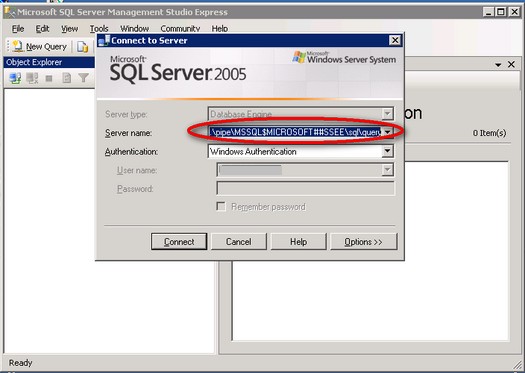
Once you've managed to register this instance in SQL Server Management Studio Express, you can now administer the WSUS 3.0 and WSS 3.0 databases like shrinking the database files or moving them to a different disk partition dedicated for them to avoid insufficient disk space issues.
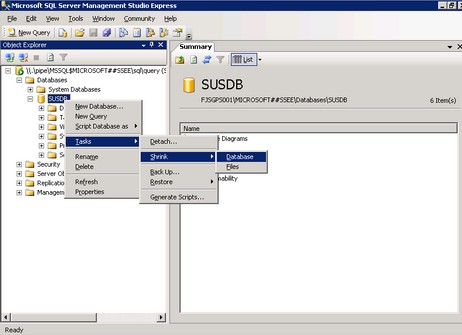
If you prefer to use scripts to manage these databases, you can download and install the SQL Server 2005 Command Line Query Utility - sqlcmd . This tool will be installed, by default, on this directory
C:\Program Files\Microsoft SQL Server\90\Tools\binn
To connect to the database instance, you need to run the sqlcmd.exe utility, passing the instance name and your credentials
sqlcmd -S \\.\pipe\MSSQL$MICROSOFT##SSEE\sql\query –E
You can then run your administrative T-SQL scripts once connected to this database instance.
Considerations
While these are possible reasons to administer the Windows Internal Database, it is not recommended to do anything beyond performing backups, moving or shrinking the database files. Modifying database schema or database properties would break supportability of these products. Plus, any changes made to these databases can be overwritten by the products' service packs or cumulative updates.
Next Steps
| Sunday, September 07, 2008 - 9:18:15 AM - Preethi | Read The Tip |
|
Very good topic. Good to know the internals and the fact that Micorsoft has increased the usage of SQL Server in many of its products. |
|
| Sunday, September 07, 2008 - 12:03:18 PM - DDS | Read The Tip |
|
Great Tip but I was unable to connect with (\.\pipe\MSSQL$MICROSOFT##SSEE\sql\query) and result was: "An error has occurred while establishing a connection to the server. When connecting to SQL Server 2005, this failure may be caused by the fact that under the default settings SQL Server does not allow remote connections. (provider: SQL Network Interfaces, error: 25 - Connection string is not valid) (.Net SqlClient Data Provider)" |
|
| Sunday, September 07, 2008 - 12:20:56 PM - DDS | Read The Tip |
|
Got it. The instructions were missing one leading "\". \\.\pipe\MSSQL$MICROSOFT##SSEE\sql\query |
|
| Wednesday, October 27, 2010 - 7:38:12 PM - Joel | Read The Tip |
|
Edwin, Thank you! You've brought an answer to my issue after hours of searching! |
|
| Thursday, March 10, 2011 - 12:38:35 AM - Wally | Read The Tip |
|
This is brilliant - I have been stuck trying to connect to the instance of Sharepoint and couldn't work out why I couldn't connect. I am now in and can shrink the DB - many thanks for such a useful post..shame I couldn't find this on MS this easily. Wally |
|
| Saturday, March 12, 2011 - 3:50:08 AM - bass_player | Read The Tip |
|
Hi Wally, Be aware that shrinking SQL Server databases - including SharePoint-related ones - is not recommended due to internal fragmentation both for the data files and the log file. If you are concerned about your log file growing and are not concerned about point-in-time recoverability for your SharePoint databases, set the database RECOVERY model to SIMPLE, shrink the log file to the smallest size possible and resize it to a size that you think would be enough for it to contain the active transactions without growing unexpectedly. You can resize your log file to 4GB and monitor accordingly. This process minimizes the amount of virtual log files while the recovery model truncates your log, thus, keeping it from growing |
|
| Tuesday, March 27, 2012 - 7:51:48 AM - Alwin | Read The Tip |
|
Hi Edwin, is it possible to create a linked server in Windows Internal Database |
|
| Friday, November 30, 2012 - 10:10:23 PM - Ram | Read The Tip |
|
Thanks a ton, you have provided very clear instructions, i was searching for it for a while. Thanks agian.
|
|
| Monday, December 17, 2012 - 7:34:17 AM - EdVassie | Read The Tip |
|
It is designed in such a way that you are not allowed to connect to and use this particular database service for non-Microsoft products I am not sure this is true. Any appilcation that can connect using Named Pipes can use the Windows Internal Database. It has the same operational characteristics as SQL Express (1 CPU, limited memory, etc), except that database size is unlimited. Before you think you can run your 1TB database on WID and avoid the Standard Edition license, remember that the CPU cores and memory avalable to Standard Edition are there to give performance, so don't expect WID to be fast if your DB is large. |
|
| Monday, December 17, 2012 - 10:32:43 AM - bass_player | Read The Tip |
|
You are correct. However, from a licensing and support perspective, you are not allowed to connect any line-of-business application to the WID aside from those sanctioned by Microsoft. |
|
| Friday, January 04, 2013 - 6:36:17 AM - Stanislav | Read The Tip |
|
Thank you for this post, it was a solution for our problem! |
|
| Wednesday, February 06, 2013 - 8:31:27 AM - Mike Hinds | Read The Tip |
|
I have two of these for SharePoint, and four for VMM management. I am unable to make myself SysAdmin on these, as the only two logins are "sa" which is disabled, and BUILTIN\Users, which is crippled. Not being a SysAdmin, it's not possible to keep these patched. |
|
| Wednesday, February 06, 2013 - 7:10:39 PM - bass_player | Read The Tip |
|
If you are a local Administrator on the machine running these SQL Server instances, you can still regain access to them even when the sa account is disabled or even when you do not have access. Here's how you can do it http://msdn.microsoft.com/en-us/library/dd207004(v=sql.100).aspx |
|
| Thursday, February 21, 2013 - 10:30:24 AM - Gene | Read The Tip |
|
When trying to do a backup of the WSUS DB, it defaults to a non-existent disk location at D:\WSUS\{2AE3D45E-09F4-4B90-B694-22AAFE208AD1}\SUSDB.bak. When I create another backup location and try to run the backup if fails with an error pointing to D:\WSUS\{2AE3D45E-09F4-4B90-B694-22AAFE208AD1}\SUSDB.bak as not being found. Is it safe to delete this default location? We use a centralized backup solution (Tivoli Storage Manager) that cannot do a normal SQL backup of the WSUS DB remotely. The file backup fails as being in use leaving us with no way to backup the WSUS DB. I'd like to script the backup within SQL and then capture a backup of the backup file with Tivoli. Any ideas? |
|
| Friday, March 01, 2013 - 4:08:05 AM - Stephan | Read The Tip |
|
Just if someone runs into the same problem: I've tried to use your connector: \\.\pipe\MSSQL$MICROSOFT##SSEE\sql\query on a Windows Server 2012 internal database and it doesn't work. Now it seems to be a new connector string you have to use with 2012: \\.\pipe\MICROSOFT##WID\tsql\query best regards |
|
| Friday, March 08, 2013 - 2:59:34 PM - Tolits | Read The Tip |
|
Thanks Edwin! After so many hours of searching for solution, good thing i found this website. It works like a charm!! |
|
| Tuesday, March 26, 2013 - 1:59:46 PM - Neil | Read The Tip |
|
A shot in the dark here but I'm trying to connect to the Windows Search Server 4.0 'database' and can't with the above examples. So I'm either barking up the wrong tree or WSS4.0 has a completely different connection model. Anyone offer anything in the way of enlightenment? |
|
| Tuesday, March 26, 2013 - 3:33:23 PM - bass_player | Read The Tip |
|
Hi Neil, I don't think Windows Search Server uses SQL Server under-the-covers. I couldn't find anything in the documentation on TechNet that specifically points to a SQL Server database. So, the steps outlined above will not work. I might also be wrong in my assumptions |
|
|
privacy | disclaimer | copyright | advertise | about authors | contribute | feedback | giveaways | user groups Some names and products listed are the registered trademarks of their respective owners. Edgewood Solutions LLC | MSSharePointTips.com | MSSQLTips.com |