By: Jugal Shah | Comments (1) | Related: > Security
Problem
Many times developers want to put logic into their code or SSIS/DTS package to check the SQL Server authentication mode. How can this be done programmatically?
Solution
Before we get started, I want to cover the two ways that SQL Server authenticates logins. The two ways are:
- Windows Authentication Mode
- Windows and SQL Server Authentication Mode (Mixed Mode)
Windows Authentication Mode
In Windows authentication mode, we can only use Windows logins to connect to SQL Server. Windows Authentication utilizes the Kerberos security protocol .In enterprise environments, Windows login credentials are normally Active Directory domain credentials
Mixed Mode Authentication
In Mixed mode authentication, we can use either Windows authentication or SQL Server authentication to connect to SQL Server.
Windows Authentication Mode is much more secure than Mixed Mode. SQL Server Authentication is provided for backward compatibility only. Whenever possible use Windows Authentication.
Check Using SSMS
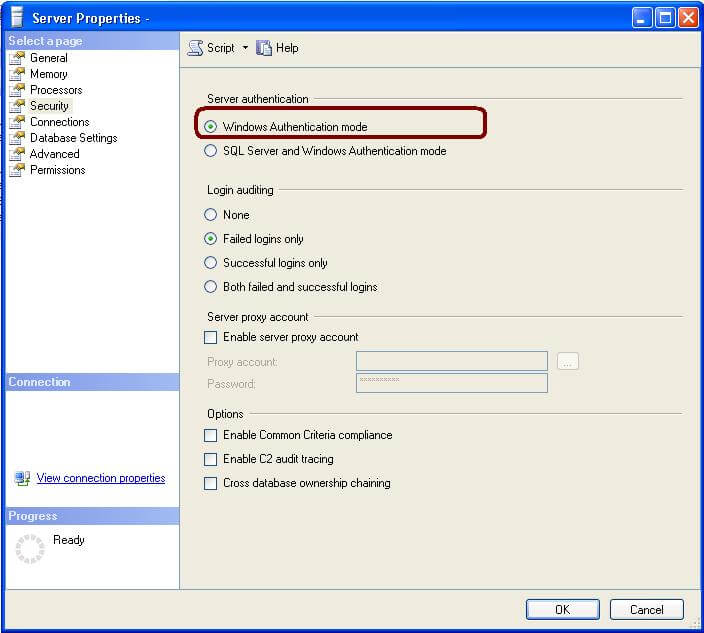
In SQL Server Management Studio Object Explorer, right-click on the server name, click Properties and go to Security page to check the SQL Server Authentication. In this case we can see that it is Windows Authentication mode.
Check Using xp_instance_regread
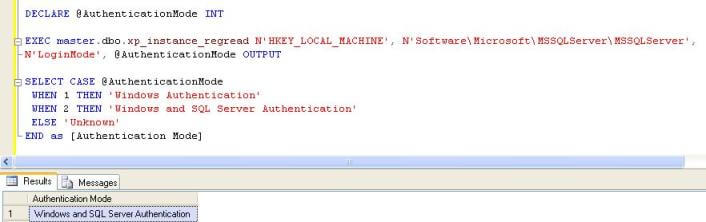
Using xp_instance_regread system procedure, we can read the registry value. SQL Server stores a "1" for Windows Authentication and a "2" for SQL Server authentication (Mixed Mode) in the windows registry. You can execute the below query to check the SQL Server Authentication.
DECLARE @AuthenticationMode INT
EXEC master.dbo.xp_instance_regread N'HKEY_LOCAL_MACHINE',
N'Software\Microsoft\MSSQLServer\MSSQLServer',
N'LoginMode', @AuthenticationMode OUTPUT

SELECT CASE @AuthenticationMode
WHEN 1 THEN 'Windows Authentication'
WHEN 2 THEN 'Windows and SQL Server Authentication'
ELSE 'Unknown'
END as [Authentication Mode]
Output
Check Using Server Property
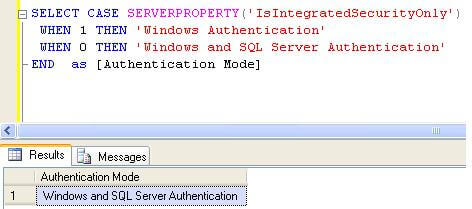
The Server Property function will return "1" for Windows authentication and "0" for Windows/SQL Authentication (Mixed Mode). It would be nice if these values were consistent from what is stored in the registry.
SELECT CASE SERVERPROPERTY('IsIntegratedSecurityOnly')
WHEN 1 THEN 'Windows Authentication'
WHEN 0 THEN 'Windows and SQL Server Authentication'
END as [Authentication Mode]
Output
Check Using xp_logininfo
Another option is to use xp_loginfo. This returns a value of "Windows NT Authentication" for Windows Authentication and "Mixed" for Windows/SQL Authentication (Mixed Mode).
EXEC master.sys.xp_loginconfig 'login mode'
Next Steps
- You can also check the Windows registry by using the regedit application
- So if you need to check the type of authentication that is being used on your SQL Server use these various methods
- Read these additional security related tips.






About the author
 Jugal Shah has 8+ years of extensive SQL Server experience and has worked on SQL Server 2000, 2005, 2008 and 2008 R2.
This author pledges the content of this article is based on professional experience and not AI generated.
View all my tips
