By: Kun Lee | Comments (3) | Related: > SQL Server Agent
Problem
As a production Database Administrator, I do not want to give Developers direct access to the SQL Server Agent job log especially for servers in the DMZ. Another problem we have is that when there is a lot of log data for a job, the default job log doesn't contain the full log detail and that makes it harder to troubleshoot. Most of all, we are trying not to use a different code set for deployment based on the environment. Basically we want to use the same methods to deploy our jobs to Development, Test and Production.
Solution
I was able to solve the full detail logging issue with help from this article How to store longer SQL Agent Job Step output messages, which helps with troubleshooting, but still the problem was to provide the log to SQL developers. So we used an output file instead to capture more detail, you can take a look at this article Verbose SQL Server Agent Logging for more information.
Now using verbose SQL Agent logging, we can save the output file locally or to a shared folder and provide Read Only permissions for Developers. Another thing we did was to use SQL Tokens, so with the same code we could pick up the server name and other variables to dynamically generate the output file name.
What is SQL Token?
Here is the definition from books online. "SQL Server Agent allows you to use tokens in Transact-SQL job step scripts. Using tokens when you write your job steps gives you the same flexibility that variables provide when you write software programs. After you insert a token in a job step script, SQL Server Agent replaces the token at run time, before the job step is executed by the Transact-SQL subsystem". You can find more information about Tokens here Use Tokens in Job Steps.
IMPORTANT NOTE: The format of Tokens was changed in SQL 2005 SP1 and later, so be aware of the formatting differences as shown below.
Pre-requisite - Turn on Token Replacement
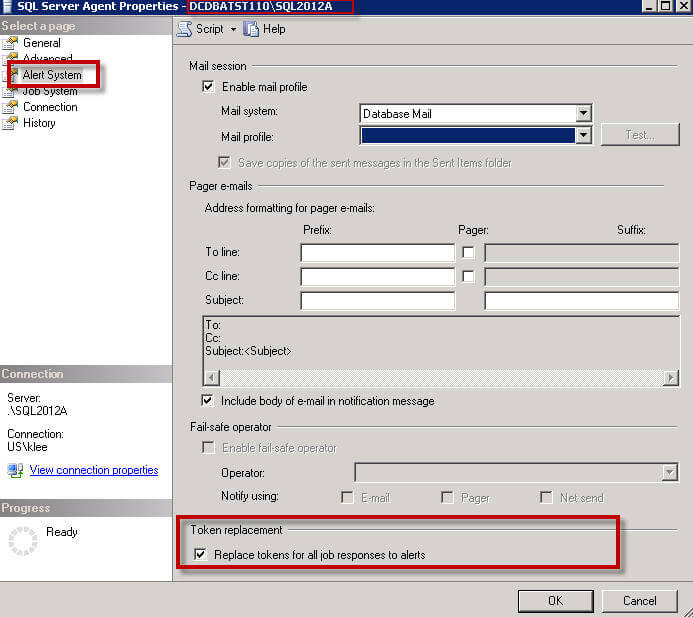
Before you use Tokens, you must turn on the "Token Replacement" property.
You can easily do this from a T-SQL Script"
USE [msdb]]GO
EXEC msdb.dbo.sp_set_sqlagent_properties @alert_replace_runtime_tokens=1
GOGO
Or via SSMS, by right clicking on SQL Server Agent and selecting Properties and then change as shown below:
Implementation - SQL Server Management Studio
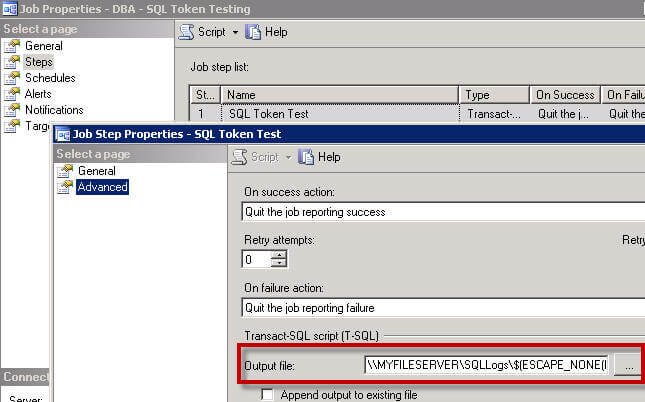
When you create a job step, click the "Advanced" page and you will see Transact-SQL script (T-SQL) Output file as shown below.
Here is an example job setup, notice the difference for SQL 2005 and higher and SQL 2000.
- Server name: SQLTIP1\SQL2012A
- Job name: DBA - SQL Token Testing
- Step name: SQL Token Test
- Output file format SQL 2005 SP1 or higher\\MYFILESERVER\SQLLogs\$(ESCAPE_NONE(MACH))_$(ESCAPE_NONE(INST))\SQLTokenTest_Step1_$(ESCAPE_NONE(DATE)).log
- Output file format - SQL 2000
\\Myfileserver\SQLLogs\[MACH]_[INST]\SQLTokenTest_Step1_[DATE].log
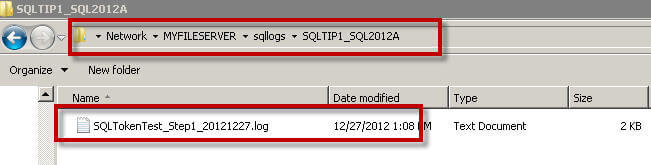
The output file will be generated in \\Myfileserver\sqllogs\SQLTIP1_SQL2012A\ folder and as you can see I didn't need to specify the server name, but it was dynamically generated by the "\$(ESCAPE_NONE(MACH))_$(ESCAPE_NONE(INST))\" token.
And the file name also includes the [year], [month] and [day] as shown below.
Implementation - T-SQL Script (SQL 2005 sp1 or higher)
Here is T-SQL code to create a job. This script includes the Tokens, so that I can run this same script on multiple servers without having to make any changes and the tokens will be replaced with the actual values from the server when the job is run.
USE [msdb]]GO
DECLARE @jobId BINARY(16)
EXEC msdb.dbo.sp_add_job @job_name=N'DBA - SQL Token Testing',
@enabled=1,
@notify_level_eventlog=0,
@notify_level_email=0,
@notify_level_netsend=0,
@notify_level_page=0,
@delete_level=0,
@description=N'SQL Token Testing',
@category_name=N'[Uncategorized (Local)]',
@owner_login_name=N'sa', @job_id = @jobId OUTPUT
EXEC msdb.dbo.sp_add_jobstep @job_id=@jobId, @step_name=N'SQL Token Test',
@step_id=1,
@cmdexec_success_code=0,
@on_success_action=1,
@on_success_step_id=0,
@on_fail_action=2,
@on_fail_step_id=0,
@retry_attempts=0,
@retry_interval=0,
@os_run_priority=0, @subsystem=N'TSQL',
@command=N'select @@version',
@database_name=N'master',
@output_file_name=N'\\MYFILESERVER\SQLLogs\$(ESCAPE_NONE(MACH))_$(ESCAPE_NONE(INST))\SQLTokenTest_Step1_$(ESCAPE_NONE(DATE)).log',
@flags=0
Limitation when using SQLCMD and SQL Tokens
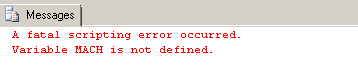
If you use SQLCMD mode from a SSMS query window you may see an error similiar to the below error. This is because you cannot mix SQLCMD mode with SQL Tokens.
This also applies if you use SQLCMD from the command line and try to use SQL Tokens as shown below.

That's it. I hope this helps to manage your SQL servers. Also, I want to give the credit to my colleagues Robert and Ed as they started this process, so kudos to them.
Next Steps
- You can customize SQL Job Notification by using Tokens to reduce unnecessary email in your inbox.
- Setting up Job Deployment via Visual Studio Database Project with Token as post script
- Read these related articles






About the author
 Kun Lee is a database administrator and his areas of interest are database administration, architecture, data modeling and development.
This author pledges the content of this article is based on professional experience and not AI generated.
View all my tips
