By: Ben Snaidero | Comments (6) | Related: > Maintenance
Problem
Ever wondered what the SQL Server explain plan for you query would look like if there were millions of records in the tables of your SQL Server database. This is a question that SQL Server database administrators (DBAs) as well as developers often ask and in most cases what they do is load a bunch of dummy data into the tables and check the explain plan that is generated. If there is a lot of referential integrity defined on the SQL Server database this can become a very time consuming task. In other cases you may not have the necessary disk space in your development environment to load massive amounts of data into the tables. This tip will look at an alternative to this method.
Solution
Available since SQL Server 2005 have been the undocumented options of the UPDATE STATISTICS command, WITH ROWCOUNT and WITH PAGECOUNT. Using these options allows you to trick the optimizer into thinking the tables have many more records and pages than they actually do. Let's use a simple example to illustrate how these options work.
Sample table setup
-- Table creation logic
CREATE TABLE testtable ([col1] [int] NOT NULL primary key,
                        [col2] [int] NULL,
                        [col3] [int] NULL,
                        [col4] [varchar](50) NULL);

CREATE NONCLUSTERED INDEX [IX_testtable] ON testtable ([col2] ASC);

-- Populate table
DECLARE @val INT
SELECT @val=1
WHILE @val <= 2000
BEGIN
   INSERT INTO testtable (col1, col2, col3, col4)
       VALUES (@val,@val % 10,@val,'TEST' + CAST(@val AS VARCHAR))
   SELECT @val=@val+1
END
Now that we have a small table with some data loaded into it, let's take a look at what the explain plan looks like for the following simple query.
SELECT * FROM testtable WHERE col2 = 6;
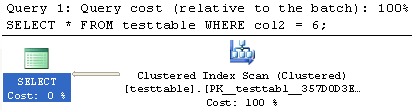
We can see from the explain plan that this query is going to do an index scan. Now let's update the statistics on both the table and index using the new options. Here is the syntax:
UPDATE STATISTICS testtable WITH ROWCOUNT = 50000000, PAGECOUNT = 500000
UPDATE STATISTICS testtable IX_testtable WITH ROWCOUNT = 50000000, PAGECOUNT = 500000
Before we take a look at the new explain plan let's take a look at the sys.partitions and sys.dm_db_partition_stats DMVs and see what effect the statistics update had on these objects. Note: The output below shows the DMVs before and after the UPDATE STATISTICS command was run. Only the relevant columns are displayed.
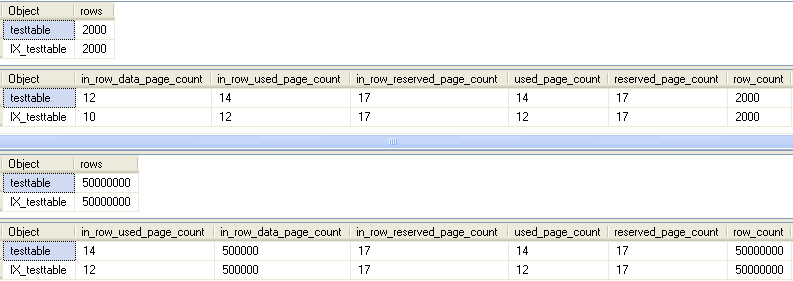
We can see from the output above that the row_count and in_row_data_page_count have been updated based on what we supplied to the UPDATE STATISTICS command. Now let's take a look and see if this has had any effect on the explain plan.
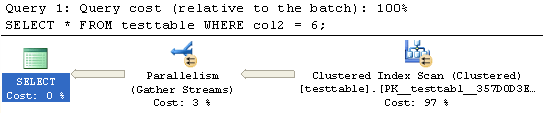
This explain plan shows that the optimizer has now chosen a parallel execution plan. Using these undocumented options we can get an idea of how the explain plan for a query may change due to larger data sets without having to load large amounts of data into our tables.
Next Steps
- Further reading on SQL Server statistics:
- More information on Explain Plans
- Other Performance Tuning tips






About the author
 Ben Snaidero has been a SQL Server and Oracle DBA for over 10 years and focuses on performance tuning.
This author pledges the content of this article is based on professional experience and not AI generated.
View all my tips
