![]() |
|
|
By: Greg Robidoux | Read Comments (13) | Print Greg is the President of Edgewood Solutions and a co-founder of MSSQLTips.com. Related Tips: More |
|
Problem
Have you ever wished you could get your backups to run faster? Well there may be a way, by writing to multiple files. Creating SQL Server backups is pretty simple to do; you can use the SQL Server management tools or you can use T-SQL commands to issue the backup. But sometimes with large databases it takes a long time to run and it is difficult to copy this very large file across the network or even to your backup tapes.
Solution
Write your database backup to multiple files. In addition to writing your database backup to one file you have the ability to write to multiple files at the same time and therefore split up the workload. The advantage to doing this is that the backup process can run using multiple threads and therefore finish faster as well as having much smaller files that can be moved across the network or copied to a CD or DVD. Another advantage to writing to multiple files is if you have multiple disk arrays you can write your backup files to different arrays and therefore get better I/O throughput. One thing to note is that to maintain the I/O throughput you should keep the writing of your backup files and the reading of the database file on different disk arrays.
Here are two ways of writing your backup to multiple files:
SQL Server Management Tools
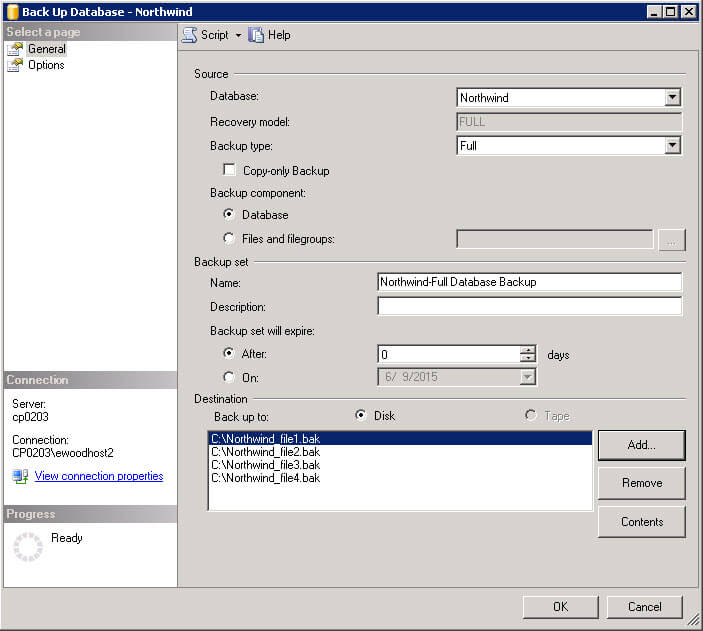
In SQL Server Enterprise Manager you have the ability to add additional destination files. Just click "Add" and you can add an additional output file. In the example below everything is going to the C:\ drive, but for faster I/O throughput you would want to write to different drives.
T-SQL
Using T-SQL you would write your backup command similar to the following:
BACKUP DATABASE [Northwind] TO
DISK = 'C:\Northwind_file1.bak',
DISK = 'D:\Northwind_file2.bak',
DISK = 'E:\Northwind_file3.bak',
DISK = 'F:\Northwind_file4.bak'
WITH INIT , NOUNLOAD , NAME = 'Northwind backup', NOSKIP , STATS = 10, NOFORMAT
Next Steps
| Share: | Share | Tweet |
|
![]() |
|
|
Free SQL Server Learning |
| Thursday, April 17, 2008 - 7:54:23 AM - Tripp | Read The Tip |
|
This is one of those forehead slapping, "duh" shouting, tips. I can't wait to test it out. So does the reverse apply to restores? If I span my nightly backups accross 4 files and that cuts the time that the backup takes to finish by, say, 50%, will the restore also take less time? |
|
| Friday, April 18, 2008 - 6:15:38 AM - grobido | Read The Tip |
|
The problem with the restore is that you still need to write the data, so you won't be saving any time on the write. It is possible that the reads will be faster if you are reading from multiple disks and therefore getting as much read IO throughput as possible. This would also be the case for writing the database files. If you are writing to multiple disks and can get more IO throughput your restores will run faster. |
|
| Friday, July 29, 2011 - 2:03:45 AM - Robert L Davis | Read The Tip |
|
A couple of corrections. First of all, you get 1 backup thread per LUN or mountpoint. So you do NOT get multiple threads simply by backing up to multiple files on the same drive. They must be segmented to different drives to get the benefit of multiple threads. The second correction is to the comment reply above. Yes, the same absolutely does apply to restores as well. Just like backups, you get 1 thread per LUN or mount point for the restore as well. This gives you the ability to read in multiple files on multiple threads. You may end up being bottlenecked by the write speed if everything is going to the same drive. You can improve this even more by using multiple data files on multiple dedicated LUNs. |
|
| Friday, July 29, 2011 - 11:06:15 AM - Rob Schripsema | Read The Tip |
|
Great tip -- but I just have to know how SQL divides up the data and decides what to write in which file. Is it simply random blocks/extents within the database, or does it divide it up by table/object somehow? I would also presume that if you lost any one of the files you backed up to, the entire backup would be unusable -- is that correct? |
|
| Friday, July 29, 2011 - 12:52:46 PM - Greg Robidoux | Read The Tip |
|
Hi Rob, not sure how it determines what goes in each file. In order to do a restore you would need all of the files. You can not just restore one of the files, so yes without one of the files the backup would be unusable. |
|
| Monday, August 01, 2011 - 4:12:51 AM - Eduard | Read The Tip |
|
- Actually multiple files to 1 drive can improve speed for situations where the disk is not the limiting factor. For larger db's we checked the time needed for back-up's and multiple files where faster. Think about compression/encryption type of back-up where the load on the cpu is limiting. Multiple threads -> multiple cpu's -> higher speed. - About your blog: an interesting use of this technique i saw in a scenario where a TB+ size db had to be backupped over a wan connection. They made like 10 networkdrives and each networkdrive pointed to a specific ip number with it's own subnet connecting to a specific connection to the other side. |
|
| Monday, August 01, 2011 - 9:00:07 AM - Robert L Davis | Read The Tip |
|
You don't get multiple threads if it is going to a single drive. You get 1 backup thread per LUN or mountpoint. Also, how often is CPU the limiting factor when performing a backup. Even when using compression and encryption, it is almost always disk that is the bottleneck. |
|
| Monday, February 20, 2012 - 6:01:42 AM - Wilfrid | Read The Tip |
|
Hi Nice post. thx. i put that in place on a 2008 sql server (also playing with other parameters explain there : http://www.mssqltips.com/sqlservertip/2539/options-to-improve-sql-server-backup-performance/) I got one question : as someone been able to delete backup inside backupset based on expiration time ? I've set my backup to expire after one day but which ever the settings i used it always append the new backup to the backup set, so I got files growing and growing...
Any idea ? thx |
|
| Monday, February 20, 2012 - 9:30:46 AM - Greg Robidoux | Read The Tip |
|
If you want to reuse the same file over and over again and don't want to append backups to the same file you will need to use the INIT option to initialize the backup file before the backup is created. |
|
| Monday, February 20, 2012 - 9:49:04 AM - Wilfrid | Read The Tip |
|
Thx for ur comment. We can use the init if we only want to keep one backup. That works. What about if we want to keep 2 days rolling backup. How to implement the Init option in that way ? thx a lot |
|
| Monday, February 20, 2012 - 1:57:00 PM - Greg Robidoux | Read The Tip |
|
Based on the info from Books Online if you use an expiration date for the backups the INIT only clears the backups where the backup has expired. This is from Books Online: INIT - Any backup set has not yet expired. For more information, see the EXPIREDATE and RETAINDAYS options.
|
|
| Monday, February 20, 2012 - 2:23:48 PM - Tripp Southern | Read The Tip |
|
Tripp here again (orginal reply from 2008). Just wanted to pass on that I did end up developing and deploying a "backup to multiple files" solution for a couple of 100+ GB databases. In my case I'm backing up directly to a DataDomain device (in the same datacenter on the same switch), bypassing the usual Tivoli "middle-man" due to licensing "constraints", so I couldn't just stripe the FULL backups across as many unique drives as I wanted to. I ended up striping the backups across two files on the same DataDomain share, and using a BUFFERCOUNT of 100, cut the individual databases' backup times from 2 hours down to 15-20 minutes. This did not change the recovery time one bit. Refreshes from those production backups to test and dev still take 30-45 minutes. Thanks for the article, and for maintaining the comments all this time.
|
|
| Wednesday, February 22, 2012 - 5:04:45 AM - Wilfrid | Read The Tip |
|
Thx for your answer Greg. So I think I have aprob with that or something I don't understand :Here is the backup command I'm running :
BACKUP DATABASE [edeal] TO DISK = N'H:\SQL_Backup\Edeal_Bak_3.bak', DISK = N'H:\SQL_Backup\Edeal_Bak_1.bak', DISK = N'H:\SQL_Backup\Edeal_Bak_2.bak', DISK = N'H:\SQL_Backup\Edeal_Bak_4.bak' WITH RETAINDAYS = 1, NAME = N'edeal-Full Database Backup', NOFORMAT, INIT, buffercount=47, maxtransfersize=4194304, BLOCKSIZE = 65536, NOSKIP, NOREWIND, NOUNLOAD, COMPRESSION, STATS = 10 And after 2 days of running job I got this error : Executed as user: xxxxxservice. DBCC execution completed. If DBCC printed error messages, contact your system administrator. [SQLSTATE 01000] (Message 2528) DBCC execution completed. If DBCC printed error messages, contact your system administrator. [SQLSTATE 01000] (Message 2528) The medium on device 'H:\SQL_Backup\Edeal_Bak_3.bak' expires on Feb 22 2012 8:48:22:000AM and cannot be overwritten. [SQLSTATE 42000] (Error 4030) BACKUP DATABASE is terminating abnormally. [SQLSTATE 42000] (Error 3013). The step failed.
Any help appreciate |
|
|
privacy | disclaimer | copyright | advertise | about authors | contribute | feedback | giveaways | user groups Some names and products listed are the registered trademarks of their respective owners. Edgewood Solutions LLC | MSSharePointTips.com | MSSQLTips.com |







