By: MSSQLTips | Comments (1) | Related: > Indexing
Problem
The concept of index creation has always been a tricky orchestration. To maximize performance and indexes by the optimizer, queries should be covered by an index-that is, the index should include all columns requested in the query. There are limitations to creating indexes that make covering queries difficult:
- A 900-byte size limit on indexes
- A maximum of 16 columns can be named in the index
- Columns with data types like nvarchar(max), text, and ntext cannot be used in indexes
Solution
A new type of index was developed in SQL Server 2005 that assists in covering queries: Indexes With Included Columns. Indexes with Included Columns are nonclustered indexes that have the following benefits:
- Columns defined in the include statement, called non-key columns, are not counted in the number of columns by the Database Engine.
- Columns that previously could not be used in queries, like nvarchar(max), can be included as a non-key column
- A maximum of 1023 additional columns can be used as non-key columns
As with traditional non-clustered indexes, the non-key columns are added to the leaf level of the index, meaning these indexes have the same affect on disk space, I/O (due to index maintenance), and cache efficiency. This should be taken into account when contemplating index creation using included columns.
How do I create an Index with Included Columns?
Using Microsoft SQL Server Management Studio
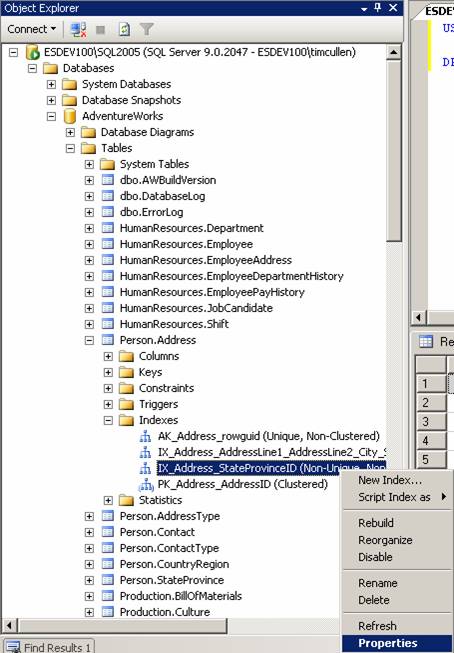
Navigate to the index to be modified. Right-click the index and choose Properties:
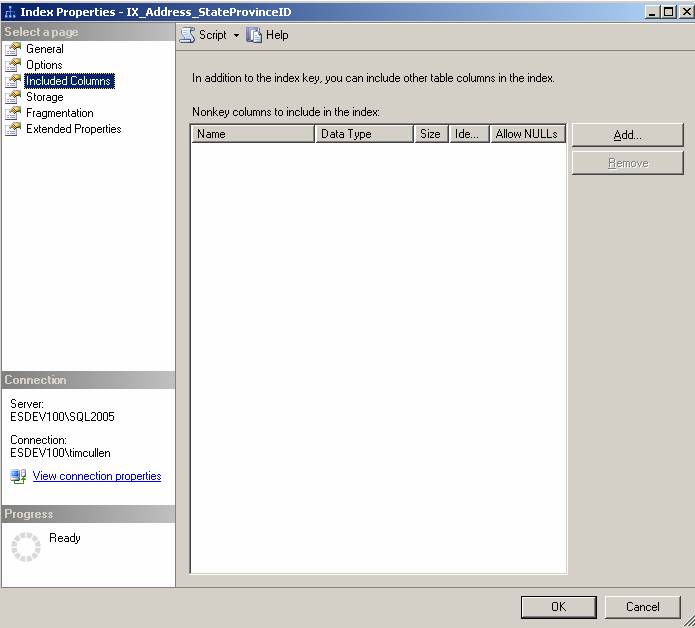
Click on Included Columns:
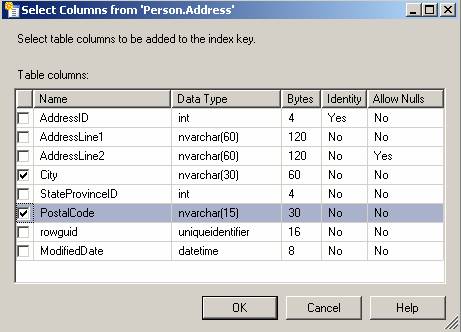
Check the columns you wish to include and click OK:
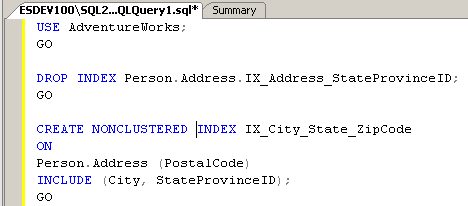
Using Transact-SQL:
Next Steps
- Review your queries when preparing to upgrade to SQL Server 2005
- Review your indexes used in queries to see if it makes sense to use Indexes with Included Columns
- Review the information on Index with Included Columns and Creating Indexes with Included Columns in SQL Server Books Online






About the author
 MSSQLTips.com was started in 2006 to provide SQL Server content about various aspects of SQL Server and other database platforms.
This author pledges the content of this article is based on professional experience and not AI generated.
View all my tips
