By: Rob Fisch | Comments (46) | Related: > Reporting Services Development
Problem
When using the standard Reporting Services drill-through navigation the new report is rendered in the current browser window, therefore overlaying the original report. There is no built in way to indicate you want the drill-through report to open a new window. In a standard web browser you can use the (shift-click) functionality to open the link in a new window, but in Reporting Services this functionality is disabled. So how can you launch a new window when you open a drill-through report?
Solution
Use a little javascript with a customized URL in the "Jump to URL" option of the Navigation tab.
Non-parameterized Solution
To get started, let's pop up a simple non parameterized report. Follow these instructions:
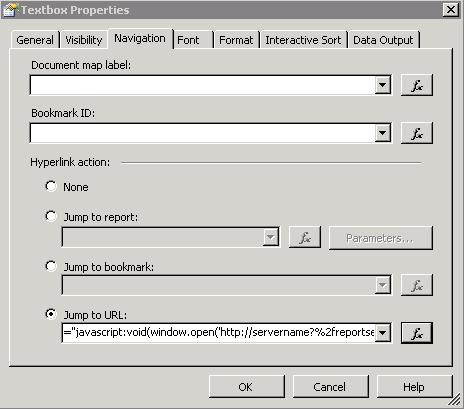
- Instead of using the "Jump to Report" option on the Navigation tab, use the "Jump to URL" option.
- Open the expression screen (Fx button).
- Enter the following:
="javascript:void(window.open('http://servername?%2freportserver%2fpathto%2freport&rs:Command=Render'))"
- Click OK twice, then save and deploy the report.
Note: The link will not work from the designer environment. You must deploy the report (hopefully to a test area) to try the link.
See screenshots below.

That's the easy part, ready for a more dynamic approach?
Parameterized Solution
Now, let's say you want to pass a variable to the drill through report. Let's also assume you have a field called ProductCode. Normally, you might hard code that like this:
http://servername/reportserver?%2fpathto%2freport&rs:Command=Render&ProductCode=123
In this case, you want to pass variables dynamically, using an available value from the source dataset.
You can think of it like this:
http://servername/reportserver?%2fpathto%2freport&rs:Command=Render&ProductCode=Fields!ProductCode.Value
The exact syntax in the "Jump to URL" (Fx) expression window will be:
="javascript:void(window.open('http://servername/reportserver?%2fpathto%2freport&rs:Command=Render&ProductCode="+Fields!ProductCode.Value+"'))"
Note - To avoid confusion between double and single quotes, double quotes are in red above.
Notice, that the static portion of the URL is delimited within double quotes.
Next Steps
- Next time you build drill-through report capabilities look at using this method to open a new browser instead of overlaying the original report
- Look at your existing reports to see if this method makes more sense for your report navigation
- Stay tuned for other Reporting Services tips from this author






About the author
 Rob Fisch has worked with SQL Server since version 6.5 as a dba, developer, report writer and data warehouse designer.
This author pledges the content of this article is based on professional experience and not AI generated.
View all my tips
