By: Ray Barley | Comments (3) | Related: > Stored Procedures
Problem
We occasionally come up with a requirement that would be a good fit for a CLR function or stored procedure. For instance we would like to call a stored procedure to get the list of files in a particular folder. How can we return the list of files as a standard result set (i.e. rows and columns) using the CLR?
Solution
SQL Server 2005 and later integrates the CLR (Common Language Runtime) which allows us to code stored procedures, triggers, user-defined functions, user-defined aggregates, and user-defined types using Microsoft .NET code; e.g. Visual Basic .NET or C#. The various T-SQL CREATE commands have been enhanced to allow us to define a database object (e.g. a stored procedure) and connect our .NET code to it. When you execute the stored procedure, the .NET code is executed.
When writing a stored procedure or function, the most natural way to return data is a result set. In this tip we will implement a stored procedure to retrieve the list of files from a folder and return the list as a standard result set with rows and a single column. We will walk through the following steps:
- Enable the CLR
- Review the C# code sample
- Deploy the CLR stored procedure
Enabling the CLR
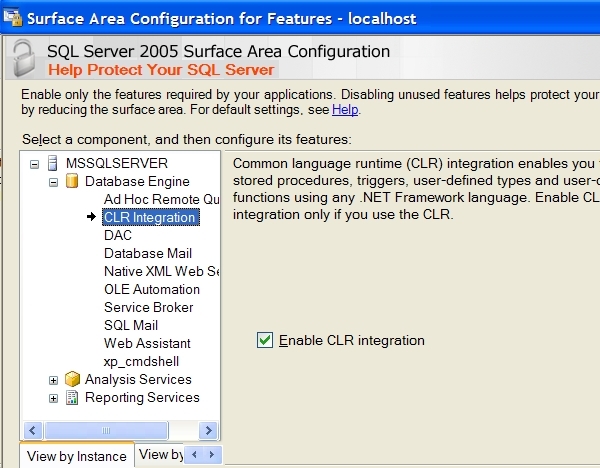
By default the CLR is not enabled in SQL Server 2005. You can enable the CLR either by running the Surface Area Configuration utility or sp_configure. In the Surface Area Configuration drill down to CLR Integration then click the checkbox to enable it as shown below:
To enable the CLR by using sp_configure, execute the following script:
sp_configure 'clr enabled', 1 GO reconfigure GO |
Code Sample
The following C# function will get the list of files from a folder and return the list as a result set. The function's parameters are as follows:
- path - folder name to retrieve the files from; e.g. C:\TEMP
- pattern - wildcards like *.* (all files), *.dat, etc.
- recursive - include files in subfolders; 1 if true, 0 otherwise
    public static void GetListOfFiles(
        SqlString path,
        SqlString pattern,
        SqlBoolean recursive)
    {
        SqlPipe pipe = SqlContext.Pipe;
        SqlMetaData[] cols = new SqlMetaData[1];
        cols[0] = new SqlMetaData(
            "FILE_NAME", SqlDbType.NVarChar, 1024);
        SearchOption searchOption;
        if (recursive == true)
            searchOption = SearchOption.AllDirectories;
        else
            searchOption = SearchOption.TopDirectoryOnly;
        string dir = path.ToString();
        if (Directory.Exists(dir) == false)
        {
            pipe.Send("Directory does not exist");
            return;
        }
        string[] files = Directory.GetFiles(
            dir, pattern.ToString(), searchOption);
        if (files.Length > 0)
        {
            SqlDataRecord rec = new SqlDataRecord(cols);
            pipe.SendResultsStart(rec);
            foreach (string file in files)
            {
                rec.SetSqlString(0, new SqlString(file));
                pipe.SendResultsRow(rec);
            }
            pipe.SendResultsEnd();
        }
        else
        {
            pipe.Send("No files");
        }
} |
Directory is a class in the .NET Framework. It is used to check whether the path exists and to get the list of files. The main points in the above code from the standpoint of CLR integration are:
- The SqlPipe object is used to send the results back to the caller. The SqlContext object is automatically available and provides the SqlPipe object.
- The SqlMetaData class is used to specify a column in the result set. We specify the column name, type and size. We are only returning a single column in this case but you can return multiple columns.
- The SqlDataRecord class is used to populate a single row in the result set. It is initialized with the array of SqlMetaData objects (i.e. the columns). The SetSqlString method is called to assign a value to each column based on the ordinal number (i.e. index in the array of SqlMetaData objects).
- The SendResultsRow method of SqlPipe sends a single row back to the caller via the SqlDataRecord object.
- The SendResultsEnd method of SqlPipe is used to indicate the end of the result set.
- The Send method of SqlPipe is used to send back a message to the caller.
Deploy the CLR Stored Procedure
The above sample code needs to be compiled in order to be called via a stored procedure. Execute the following from the command line to compile the code and create the class library DLL MSSQLTipsCLRLib.dll:
| CSC /target:library StoredProcedures.cs /out:MSSQLTipsCLRLib.dll |
Assuming version 2 of the Microsoft .NET framework, you can find CSC.EXE in the folder C:\WINDOWS\Microsoft.NET\Framework\v2.0.50727.
Execute the following T-SQL script to create the stored procedure:
ALTER DATABASE mssqltips SET TRUSTWORTHY ON GO USE mssqltips GO CREATE ASSEMBLY MSSQLTipsCLRLib FROM 'C:\mssqltips\MSSQLTipsCLRLib.dll' WITH PERMISSION_SET = EXTERNAL_ACCESS GO CREATE PROCEDURE dbo.GetListOfFiles @path NVARCHAR(256) , @pattern NVARCHAR(64) , @recursive BIT AS EXTERNAL NAME MSSQLTipsCLRLib.StoredProcedures.GetListOfFiles |
After compiling the code into a class library (.dll) the CREATE ASSEMBLY command is executed to associate the DLL with the ASSEMBLY database object. The FROM clause must point to the actual path of the DLL. PERMISSION_SET must be set to EXTERNAL_ACCESS because the .NET code is accessing the file system which is outside of SQL Server. The TRUSTWORTHY option is set on to allow the external access. Finally the EXTERNAME NAME of the CREATE PROCEDURE command associates the assembly, class and function to the stored procedure name.
To execute the stored procedure, execute the following script:
EXEC dbo.GetListOfFiles 'C:\mssqltips', '*.*', 0 |
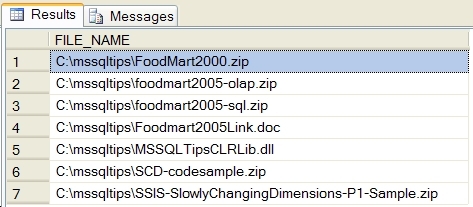
You will see output that looks something like this, depending on the contents of the folder you choose; i.e. a result set with a single column and a row for each file:
Next Steps
- Take a look at our earlier tips on CLR String Sort Function in SQL Server 2005 and CLR function to delete older backup and log files in SQL Server for additional details on CLR functions in SQL Server.
- Download the sample script here and experiment with returning result sets from a CLR stored procedure.
- Keep in mind that when there is a function in the Microsoft .NET framework that does what you need, using the CLR in SQL Server may be a good solution.
- Visual Studio 2005 has a SQL Server project template which simplifies the creation and deployment of the CLR integration code.






About the author
 Ray Barley is a Principal Architect at IT Resource Partners and a MSSQLTips.com BI Expert.
This author pledges the content of this article is based on professional experience and not AI generated.
View all my tips
