By: Armando Prato | Comments (28) | Related: > Dates
Problem
I need to write a function to determine if particular year is a leap year (i.e. February contains 29 days rather than 28 days). I know that there are various rules for calculating leap years. Is there an easy way to figure this out? Can you provide an example or two to validate various years?
Solution
Yes, there a few rules to consider when determining when a year is a leap year. For instance, contrary to popular belief not all years divisible by 4 are leap years. For instance, the year 1900 was not a leap year. However, you needn't bother yourself about leap year rules... you can let the SQL Server engine do the work for you!
The following scalar function takes in a year and returns a bit flag indicating whether the passed in year is a leap year or not.
create function dbo.fn_IsLeapYear (@year int) returns bit as begin return(select case datepart(mm, dateadd(dd, 1, cast((cast(@year as varchar(4)) + '0228') as datetime))) when 2 then 1 else 0 end) end go |
That's all there is to it! The function takes in the year, appends '0228' to it (for February 28th) and adds a day. If the month of the next day is a 2 (as extracted by the DATEPART function), then we're still in February so it must be a leap year! If not, it is not a leap year.
Here are a few examples:select dbo.fn_IsLeapYear(1900) as 'IsLeapYear?' select dbo.fn_IsLeapYear(2000) as 'IsLeapYear?' select dbo.fn_IsLeapYear(2007) as 'IsLeapYear?' select dbo.fn_IsLeapYear(2008) as 'IsLeapYear?' |
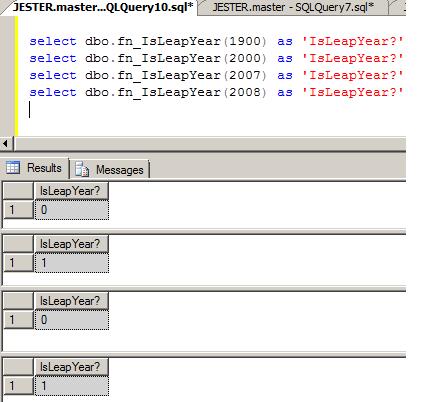
As you can see, sometimes you can leverage the SQL Server engine to do some heavy lifting for you!
Next Steps
- Read more about the DATEPART function and its parameters in the SQL Server Books Online
- Read more about the DATEADD function and its parameters in the SQL Server Books Online
- Read more about the User Defined Function types in the 2000 and 2005 Books Online
- Check out these related tips:
- Daylight Savings Time Functions in SQL Server
- Date/Time Conversions Using SQL Server
- Handling Weeks that Overlap Years in a Date Dimension in a SQL Server Data Warehouse
- Converting Invalid Date Formats Using SQL Server 2000 Data Transformation Services
- Transforming Invalid Data Formats in SQL Server 2000 DTS Using ActiveX Script






About the author
 Armando Prato has close to 30 years of industry experience and has been working with SQL Server since version 6.5.
This author pledges the content of this article is based on professional experience and not AI generated.
View all my tips
