By: Tim Cullen | Comments | Related: > SQL Server Configurations
Problem
DBA's and web developers at our company are experiencing issues with connecting to SQL instances using SQL Server Management Studio and other SQL tools using Windows Integrated Authentication. Our company is large, with well over 70,000 users and groups in Active Directory. When we look in the NT event log on the SQL Server we see both MSSQL and Kerberos errors. What could be causing this?
Solution
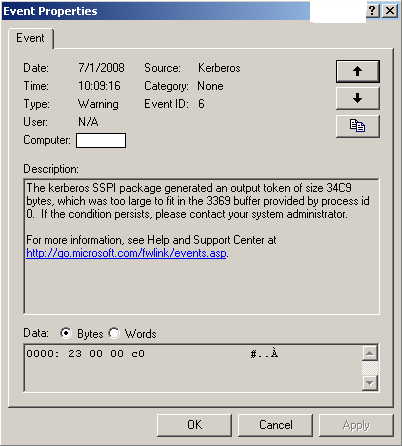
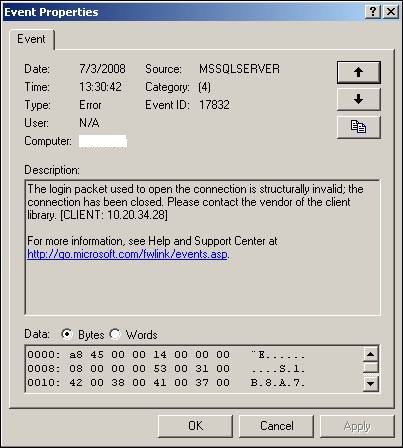
The issue occurs when a user has membership in many Active Directory groups, usually over 100 (this number includes explicit membership as well as inherited membership from other groups). The default value for the MaxTokenSize is 12000 decimal, although there is no registry entry for the default value. In the great majority of organizations this size is more than adequate; however, in large organizations users' tokens may be larger than the default. Since Kerberos won't accept broken tokens, authentication fails. If you are encountering this issue you will see two errors indicating that the default MaxTokenSize is not sufficient:
NT error log entry from the Kerberos service
NT error log entry from the MSSQL service
Microsoft has a utility called TokenSZ that can be used to determine the MaxTokenSize for a user. There are a number of switches that can be used with the utility, but the general syntax to calculate the max token size is:
Sample TokenSZ Syntax
E:\>tokensz /compute_tokensize /user:Administrator /domain:CULLENSOLUTIONS.com /password:OU812
Results of executing TOKENSZ
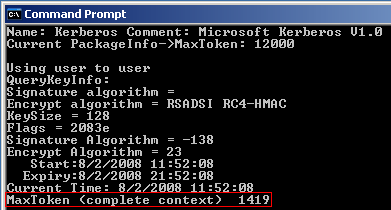
At the top of the window above you can see that the default token size is 12000. The text outlined in red is the actual Max Token size for the Administrator of the domain...well below the MaxToken default. The company I am currently assigned to is encountering MaxTokenSizes between 12000 to 15000 so a modification was required.
A registry entry modification or addition is required to modify the default MaxTokenSize allowed by the server. The location of the registry change is in the HKEY_LOCAL_MACHINE\System\CurrentControlSet\Control\Lsa\Kerberos\Parameters section. Note that the server on which TOKENSZ was executed does not have an entry for MaxTokenSize:
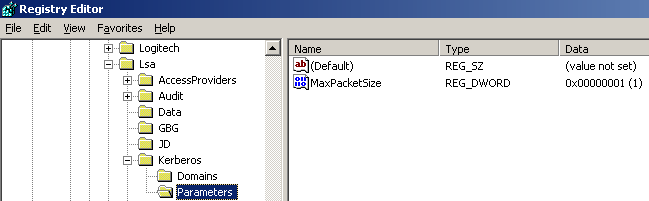
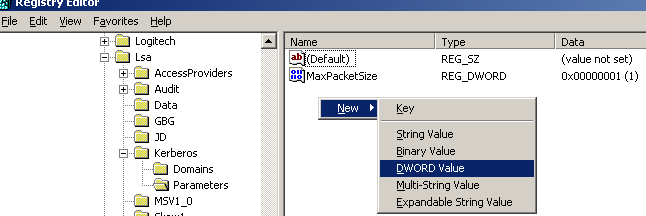
To create the registry entry, open Registry Editor by clicking Start -> Run, then typing regedit. Once Registry Editor is open navigate to the HKEY_LOCAL_MACHINE\System\CurrentControlSet\Control\Lsa\Kerberos\Parameters section. Right-click the white area on the right side and choose New -> DWORD value:
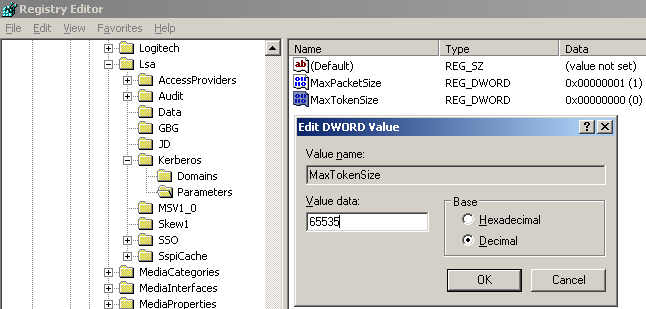
Rename the entry to "MaxTokenSize", double-click to edit it, choose Decimal, and enter 65535:
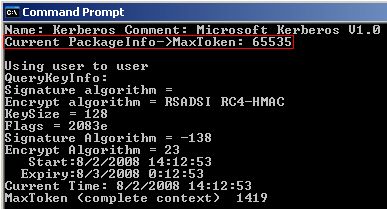
Any server workstation or server that interacts with SQL Server will require the registry entry. Also, the machine will require a reboot for the change to take effect. Once the reboot has occurred you can execute TokenSZ again to see if the MaxTokenSize value has changed:
Next Steps
- Review the Basic Overview of the Kerberos Authentication Protocol used in Windows 2000 and Windows 2003
- Read more information on Modifying the MaxTokenSize registry entry to support larger Kerberos token sizes, as well as an explanation of calculating the token size
- Read about available registry entries for the Kerberos protocol in Windows 2003
- Download the Tokensz utility from Microsoft
- Read a white paper from Microsoft on Addressing Problems Due to Access Token Limitation






About the author
 Tim Cullen has been working in the IT industry since 2003 and currently works as a SQL Server Reports Developer.
This author pledges the content of this article is based on professional experience and not AI generated.
View all my tips
