By: Edwin Sarmiento | Comments (2) | Related: More > Database Administration
Problem
SQL Server 2005 supports Database Instant File Initialization which skips zeroing out data pages that can reduce the time when performing operations like creating databases, adding files to an existing database, increasing the size of an existing database file manually or thru autogrowth or restoring a database or filegroup. But how do we make sure that SQL Server is using this feature?
Solution
In previous versions of SQL Server, data and log files are first initialized by filling the files with zeros when you perform one of the previously mentioned operations. This is very critical in disaster recovery and restore operations especially when dealing with very large databases.
With SQL Server 2005, instant file initialization is introduced. What this does is it skips the zeroing out of the data on disk, thereby, not overwriting the previous data written on the disk. The operating system just allocates the disk space, but the contents of the file is actually what is originally on the disk. This feature is available on all editions of SQL Server 2005 running on Windows Server 2003 or Windows XP on an NTFS file system.
Even though it is available, your instance might not be configured to use it. To do so, you should give your SQL Server service account or the local group SQLServerMSSQLUser$instancename the SE_MANAGE_VOLUME_NAME privilege. The SQLServerMSSQLUser$instancename local group is created when you install SQL Server 2005 and adds the SQL Server service account to it. To do this, the service account or local group has to be granted the "Perform Volume Maintenance Task" local security right. By default, the local Administrators group already has this permission so if your service account is a member of this group, you don't have to do anything.
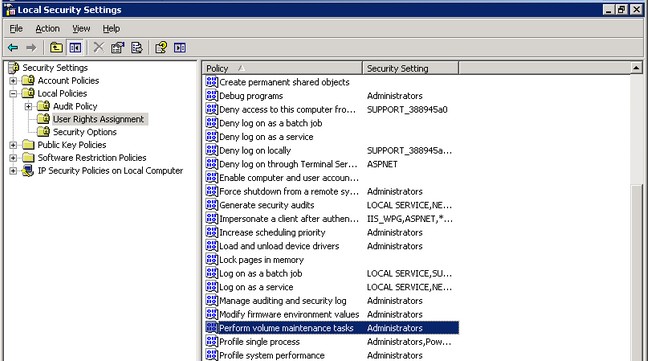
Note that this is only applicable to data files and not log files so if you have a large transaction log file as part of your database backups, the database files will be created instantaneously but not the log files. They have to be zeroed out first before being written to disk.
Considerations
Even though this improves file increase performance on autogrow events, this should not be used as a substitute for properly sizing your database files to minimize, if not prevent, autogrowth. Also, if you give this permission to the service account while the SQL Server service is running, you have to stop and restart the service in order for the feature to take effect. You can also run the command gpupdate /force to apply the modification in the security policy immediately.
There is also a security risk to doing this. There is a possibility of accessing the non-zeroed data on disk by an unauthorized account. Imagine a dropped database whose data file has not been zeroed out on disk. Any user can access the data if no discretionary access control list (DACL) is defined on the file since the DACL is only applied while the database files are being used by SQL Server. If the potential for disclosing deleted content is a concern, it is recommended that you explicitly apply restrictive DACLs on your database files and backups when they are detached to SQL Server. A good discussion of the security implications of instant file initialization is available on Microsoft's physical database storage design site.
Next Steps
- Configure your SQL Server 2005 instances to use instant file initialization
- Test it by trying to restore a large database (anything greater than 100GB)
on a SQL Server 2005 instance
- On a test server, without the permission, restore the database backup and measure the restore time
- Drop the restored database and stop the SQL Server service
- Grant the "Perform Volume Maintenance Task" permission on the SQL Server service account and restart the service
- Restore the database backup again and measure the restore time






About the author
 Edwin M Sarmiento is a Microsoft SQL Server MVP and Microsoft Certified Master from Ottawa, Canada specializing in high availability, disaster recovery and system infrastructures.
This author pledges the content of this article is based on professional experience and not AI generated.
View all my tips
