By: Divya Agrawal | Comments (4) | Related: > TSQL
Problem
This article is for newbies who have just started their career in SQL development. Everyone might have faced this problem when importing or inserting data into tables when they accidentally put the data in the wrong columns. The first thought would be to delete the data and start over, but in this tip we look at a simple solution to swap the data.
Solution
To illustrate this problem I am going to create a simple table with three columns that have the same data type as shown below.
CREATE TABLE SwapData(id int, value1 varchar(50), value2 varchar(50))
GO
Now that the table has been created, let's insert some values in the table. Here I am using a UNION ALL statement so I can do one INSERT, but this could also be done by issuing several insert statements.
INSERT INTO Swapdata
SELECT 1,10,100
UNION ALL
SELECT 2,20,200
UNION ALL
SELECT 3,30,300
UNION ALL
SELECT 4,40,400
UNION ALL
SELECT 5,50,500
UNION ALL
SELECT 6,60,600
UNION ALL
SELECT 7,70,700
UNION ALL
SELECT 8,80,800
UNION ALL
SELECT 9,90,900
UNION ALL
SELECT 10,11,110
This will insert ten rows having different values in "value1" and "value2" as shown in the image below.
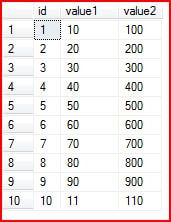
Now that are data is inserted we can see that the larger values should have been in "value1". So now we need to swap the values of "value1" and "value2".
There are various solutions to this problem. As discussed in the problem statement you could delete the data and start over again or you could create a new column and move the data, but there are easier options.
One of these easier options is shown below where a temporary variable is created which then allows you to update the data and swap the column values.
DECLARE @temp AS varchar(50)
UPDATE swapdata SET @temp=value2,value2=value1,value1=@temp
Instead of creating a temporary column in the table. this can be done by declaring a temporary variable to swap the data in the two columns. The code above is explained below.
- First create a temporary variable
- Then put the data of column "value2" in the @temp variable
- Then put the data of column "value1" in the "value2" column
- Finally take the value of @temp and put it in "value1" column
Now, try selecting the rows of the table.
SELECT * FROM swapdata
And we can see that our table has been updated correctly.
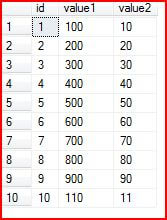
But the solution which I found the best is without the use of any temporary variable.
Just execute the following T-SQL and it will swap the columns data.
UPDATE swapdata SET value2=value1,value1=value2
This moves the data from value1 to value 2 and the data from value2 to value1 at the same time.
Now, try selecting the rows of the table and we can see the data has been swapped back to the original.
SELECT * FROM swapdata
I have tried the same solution for three columns.
Let's add a third column "value3" in the "swapdata" table.
ALTER TABLE swapdata ADD value3 varchar(50)
GO

UPDATE swapdata SET value3=value2+'0'

SELECT * FROM swapdata
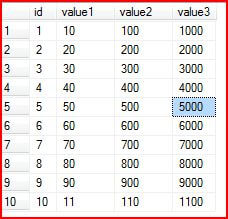
Let's interchange the values of the columns as:
- "value1" gets "value3" data
- "value2" gets "value1" data
- "value3" gets "value2" data
We will follow the second solution for attaining the result.
UPDATE swapdata SET value1=value3,value2=value1,value3=value2

SELECT * FROM swapdata
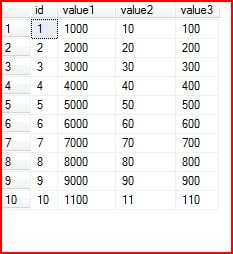
Note that the series of swapping columns can be given in any order. Just make sure the value is passed as per the requested output. I think this would be very helpful to everyone, just interchanging column values without having the headache of temporary columns and variables.
So next time you face the problem of having to swap data among columns in a table just remember this simple solution.
Next Steps
- This can be used for more columns as well and also by joining multiple tables.
- It can even be used by adding WHERE conditions in the update statement, so that whenever the data for a particular range has to be swapped it is possible






About the author
 Divya Agrawal's bio is coming soon...
This author pledges the content of this article is based on professional experience and not AI generated.
View all my tips
