By: K. Brian Kelley | Comments (2) | Related: 1 | 2 | 3 | > Security
Problem
I have heard of something called ownership chaining within SQL Server, but I don't know what that is or how it works. I'd like to know if it's a security risk or a security feature and if it's a feature, how do I use it. If it's a risk, I'd like to know how to defend against it.
Solution
Ownership chaining is a security feature in SQL Server, not a security risk. All objects, such as tables and views, have an owner. In SQL Server 2005 and above, that owner may come indirectly from the owner of the schema to which the object belongs. Let's look at this in more detail.
Every object is contained by a schema. Schemas are included in SQL Server 2005 and 2008 to allow for the grouping of objects into logical containers. For instance, for a particular application we might have two different types of users in a company, some from marketing and some from human resources. Some objects, like a table for personnel, logically fit within a container for human resources type objects. Other objects fit in a container for marketing related objects, such as a table which tracks advertising campaigns. By using schema, we can group objects together according to purpose. As an example, we can create two such schema:
CREATE SCHEMA Marketing; |
Schemas are required to have owners. If no owner is specified when the schema is created (the use of the AUTHORIZATION key word will set the owner), then the user creating the schema will be the owner. We can see the schemas in a database and the owners of those schemas using the following query:
SELECT |
Here is the output from the AdventureWorks database:
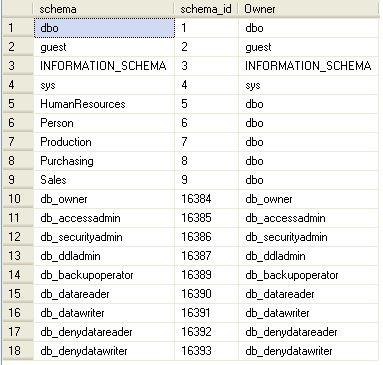
In SQL Server 2005/2008, when an object is created, an owner does not have to be specified. What SQL Server will do is assume that the owner of the object is the owner of the schema to which the object belongs. For instance, in the following object creation statements, no owner is specified. Therefore, the owners of those objects correspond to the owners of the schemas those objects belong to:
CREATE TABLE HumanResources.TestTable ( |
The first object, a table called TestTable, is created in the HumanResources schema. The second object, a stored procedure called QueryTestTable, is created in the Marketing schema. Since no other T-SQL commands are being executed to specify an owner for either object, SQL Server will use the owner of the respective schemas as the "owner" for the object when ownership chaining is considered. An object can have an explicit owner by using ALTER AUTHORIZATION on the object, as shown here (the CREATE USER statement creates a valid user to which to make the owner of the table being created):
CREATE USER TestUser WITHOUT LOGIN; |
We can see the objects, the schemas they belong to, and who the effective owner is for the object by query against sys.objects and sys.schemas. If no object owner is explicitly specified, then the principal_id column for sys.objects will be NULL. By using COALESCE, we can actually determine the owner by looking first at principal_id from sys.objects and then sys.schemas.
SELECT |
Here are the first few rows from the AdventureWorks database:
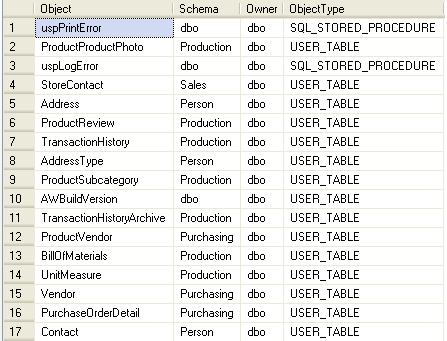
Once we understand who the effective owner of an object is, we can look at ownership chaining. Ownership chaining occurs when the following are true:
- One object refers to another object, like a stored procedure referring to a table.
- Both objects have the same owner.
In this case, a user only needs permission on the first object. Take, for example, the Marketing.QueryTestTable stored procedure from earlier. It queries the HumanResources.TestTable table. If the owner of those two objects are the same, then an ownership chain is formed. When an ownership chain forms, SQL Server will only check permissions on that first object. It assumes, because the owners are the same, that the reference was intentional and will not check permissions on the referred to object. Therefore, in the example given, if a user has the ability to execute Marketing.QueryTestTable, SQL Server will allow the query against HumanResources.TestTable, so long as the query is coming through the stored procedure.
For instance, if we want to control access to that table so that a user must come through the stored procedure, this example T-SQL creates a role and grants the needed permissions to the role:
CREATE ROLE GrantPermissions; |
Through the use of ownership chaining, we can force access through the stored procedure. This is helpful, for instance, if we want to control how data can be inserted, updated, or deleted in a table. A good example is where an application would delete one row at a time. Should a user be given explicit access to a table, that user could accidentally delete all the rows from the table by forgetting the WHERE clause. The solution is to create a stored procedure which deletes the appropriate row based on a parameter passed. The stored procedure only permits deleting that one row. Therefore, an end user could not accidentally delete all the rows, because the user has no permissions against the table. Should the user try, he or she would get an access denied error. However, the user can execute the stored procedure, but by doing so is restricted by what the stored procedure does. This is the benefit ownership chaining provides.
Next Steps
- Take a look at these other security related tips.
- Additional information in SQL Server Books Online






About the author
 K. Brian Kelley is a SQL Server author and columnist focusing primarily on SQL Server security.
This author pledges the content of this article is based on professional experience and not AI generated.
View all my tips
