By: Alan Cranfield | Comments (9) | Related: > Database Mirroring
Problem
The number of Database Mirror pairs in our enterprise is increasing at an alarming rate. With the ease of setup, resilience and ability to seamlessly failover and failback, database mirroring has taken over from log shipping as the DR solution of choice. We need a basic script that we can execute on all servers participating in mirroring that will alert us if any Principals or Mirrors are in an abnormal state. The script needs to work on both Principal and Mirror server.
Solution
The Catalog View sys.database_mirroring contains one row for each database in the instance of SQL Server and also contains state information of all mirrored databases. We'll query this Catalog View and raise an email alert for each mirrored database that we find in an abnormal state. We don't utilize a witness server in any of our mirrored pairs so we rely on manual failover.
Prerequisites
- A valid Database mail profile
- A valid login that has permission to send email i.e. a member of the DatabaseMailUserRole role in the msdb database
- At least one pair of mirrored databases to monitor
The Script
Substitute in the below script your Database Mail profile and a suitable email address to receive the alerts.
DECLARE @state VARCHAR(30)
DECLARE @DbMirrored INT
DECLARE @DbId INT
DECLARE @String VARCHAR(100)
DECLARE @databases TABLE (DBid INT, mirroring_state_desc VARCHAR(30))

-- get status for mirrored databases
INSERT @databases
SELECT database_id, mirroring_state_desc
FROM sys.database_mirroring
WHERE mirroring_role_desc IN ('PRINCIPAL','MIRROR')
AND mirroring_state_desc NOT IN ('SYNCHRONIZED','SYNCHRONIZING')

-- iterate through mirrored databases and send email alert
WHILE EXISTS (SELECT TOP 1 DBid FROM @databases WHERE mirroring_state_desc IS NOT NULL)
BEGIN
   SELECT TOP 1 @DbId = DBid, @State = mirroring_state_desc
   FROM @databases
   SET @string = 'Host: '+@@servername+'.'+CAST(DB_NAME(@DbId) AS VARCHAR)+ ' - DB Mirroring is '+@state +' - notify DBA'
   EXEC msdb.dbo.sp_send_dbmail 'valid_mail_profile', '[email protected]', @body = @string, @subject = @string
   DELETE FROM @databases WHERE DBid = @DbId
END

--also alert if there is no mirroring just in case there should be mirroring :)
SELECT @DbMirrored = COUNT(*)
FROM sys.database_mirroring
WHERE mirroring_state IS NOT NULL
IF @DbMirrored = 0
BEGIN
   SET @string = 'Host: '+@@servername+' - No databases are mirrored on this server - notify DBA'
   EXEC msdb.dbo.sp_send_dbmail 'valid_mail_profile', '[email protected]', @body = @string, @subject = @string
END
Practice
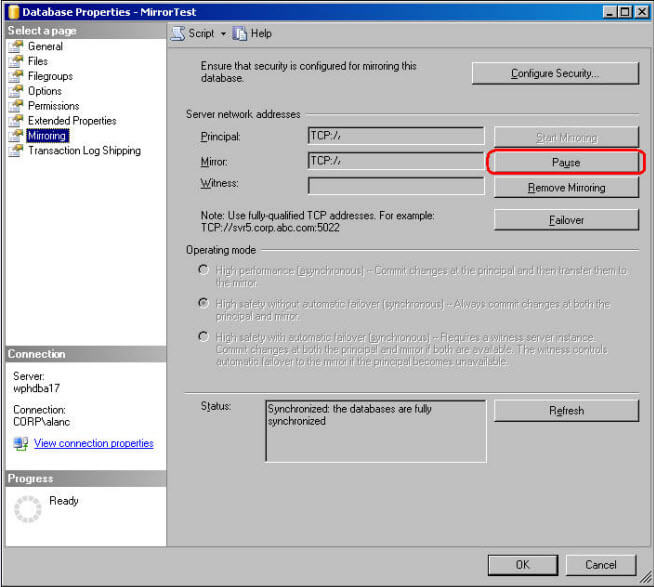
To verify the alert let's pause mirroring through the SQL Server Management Studio (SSMS). In Object Explorer right click your mirrored database > Properties > Mirroring option > Pause button as follows:
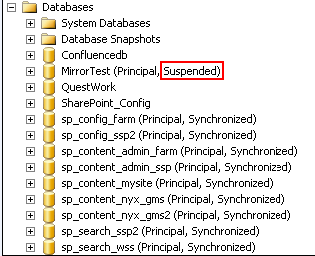
Now, if the query finds a mirrored database in an abnormal state as shown below, it will send out an alert email alert:
The script will also output the following information to notify you that an alert has been sent to be processed by Database Mail.
Mirroring Alert Message
-----------------------
Host: SERVERXXX.MirrorTest - DB Mirroring is Suspended - notify DBA

Mail queued.


Mirroring Alert Message
-----------------------
Host: SERVERXXX.sp_config_ssp2 - DB Mirroring is DISCONNECTED - notify DBA

Mail queued.
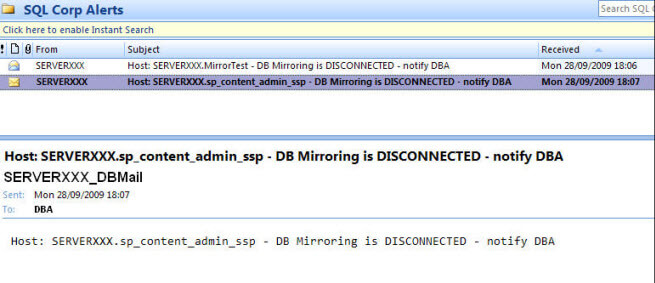
Email received that clearly shows the host name, database name and the abnormal state of the mirroring so that the DBA team can investigate further.
Next Steps
- You can schedule this simple script as a SQL job to run every few minutes to monitor and alert on the state of your mirroring.
- Use the Database Mirroring Monitor in SSMS to set various warning thresholds that will raise events to the Application Event Log. These events can be monitored by your enterprise monitoring tool or through SSMS.
- Review this excellent tip on automating database mirroring failover for multiple databases.
- Check out the following tips
- Database Mirroring Automating Failover for Multiple SQL Server Databases With No Witness
- Implementing Database Mirroring in SQL Server 2005 across domains
- Evaluating SQL Server Database Mirroring as a Disaster Recovery Solution
- Adjusting the automatic failover time for SQL Server Database Mirroring
- ADO.NET Connection Strings with SQL Server 2005 Database Mirroring






About the author
 Alan Cranfield is a versatile SQL Server DBA with over 10 years experience managing critical systems in large distributed environments.
This author pledges the content of this article is based on professional experience and not AI generated.
View all my tips
