By: MSSQLTips | Comments | Related: More > Database Administration
Problem
Row versioning, although not specifically documented under that phrase, was around in previous versions of SQL Server but was reserved for maintaining data integrity (i.e., during UPDATE statements) and replication. In SQL Server 2005 Microsoft implemented row versioning as a method of gaining access to data, known as Snapshot Isolation Level is a means for read transactions to not block write transactions.
Solution
Snapshot isolation works by maintaining versions of modified data in a store (version store) in TEMPDB. Read transactions that run under the snapshot isolation level do not acquire shared locks, although schema locks are acquired for a brief period. Accessing data using snapshot isolation decreases the possibility of blocking transactions attempting to modify data. In addition, this isolation level facilitates index maintenance using the ONLINE option because reads are performed on the snapshot, not the table itself.
Enabling snapshot isolation is a two-step process:
1. Enable the READ_COMMITTED_SNAPSHOT option
2. Enable the ALLOW_SNAPSHOT_ISOLATION option
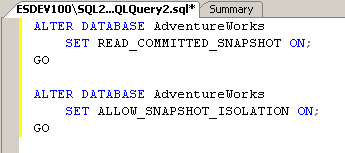
Both of these options must be ON in order to use the snapshot isolation level, otherwise you'll get the following error:
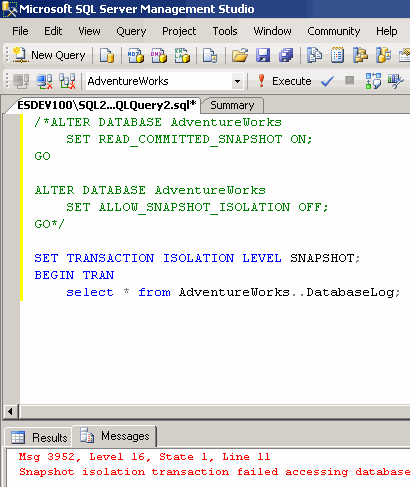
When coding to use the SNAPSHOT ISOLATION LEVEL, use the SET TRANSACTION ISOLATION LEVEL statement:
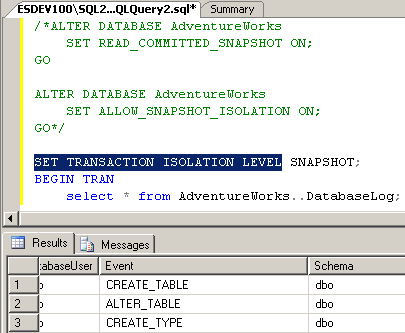
Dynamic management views (DMV's) are available that allow administrators to view information about row versioning:
- sys.dm_tran_top_version_generators (may affect system performance): Returns information on objects creating the most versions
- sys.dm_tran_active_snapshot_database_transactions: Returns information about processes that generate or could be accessing version rows
- sys.dm_tran_transactions_snapshot: Returns the sequence number of transactions active when each snapshot transaction starts
- sys.dm_tran_version_store: Returns all version records currently in the version store
- sys.dm_tran_current_transaction: Returns state information of the transaction in the current session
- sys.dm_tran_current_snapshot: Returns all active transactions at the time when the current snapshot transaction occurs
- sys.dm_db_file_space_usage: Returns information on the amount of space used by TEMPDB
- sys.dm_db_session_space_usage: Returns the number of pages allocated and deallocated by TEMPDB by session
- sys.dm_db_task_space_usage: Returns the number of pages allocated and deallocated by TEMPDB by task
Next Steps
- Review the current company policy on data access and evaluate whether the new isolation level could assist in reducing locks
- Weigh the benefits of maintaining row versions against concurrency issues
- Review information on Row versioning-based isolation levels and Enabling row versioning-based isolation levels.






About the author
 MSSQLTips.com was started in 2006 to provide SQL Server content about various aspects of SQL Server and other database platforms.
This author pledges the content of this article is based on professional experience and not AI generated.
View all my tips
