![]() |
|
|
|
By: Edgewood Solutions | Read Comments (15) | Related Tips: More > Integration Services Connection Managers |
Problem
In SQL Server 2000 DTS, creating a connection to an object is relatively straightforward, but limited. Making a connection to a file, particularly if you need a dynamic connection string, likely requires a global variable, a dynamic properties task, and ActiveX scripting. Using ActiveX scripts in DTS packages tends to slow the package down because the code needs to be compiled at run-time. In SQL Server 2005 SSIS a connection to a flat file is much easier and makes use of new programming techniques, making the package run more efficiently and smoothly.
Solution
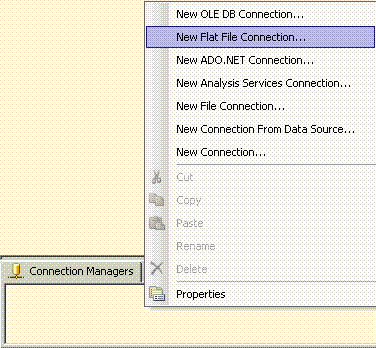
Connection Manager is a way of communicating with a variety of interfaces. It is located on the bottom portion of the Designer window after opening a new or existing package. You create flat file connections by right-clicking the Connection Manager area and choosing New Flat File Connection:
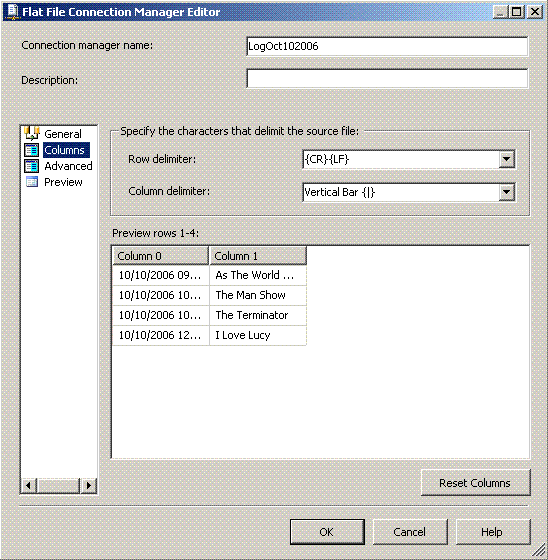
When you click on the Columns section you should see the actual data from the file (as well as in the Preview section):
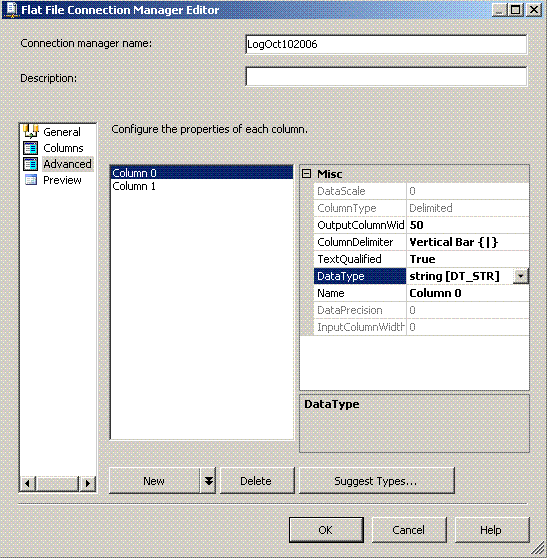
The Advanced section is the area where you can rename the incoming column, change the data type and length of string:
In addition to making a static connection, you can also create a dynamic connection using Expressions. In SQL Server 2000 DTS you had to create a global variable, use the Dynamic Properties task to get the value, and ActiveX scripting to assign the value to the connection.
Here is an example of creating a dynamic flat file connection in SSIS. Let's say that every morning we load a textfile from the Receiving Department's network share into a database (for this we will use C:\backups\). The file is always processed the day after the receiving process and is named "DataLoad"+"month"+ "day"+"year.txt" (i.e., DataLoad10112006.txt). We are setting up an SSIS package that retrieves the data from the file and moves it to the database.
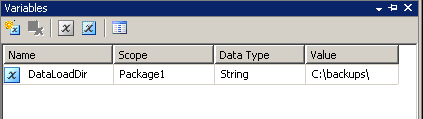
There are a couple of ways of doing this, but we decide to create a package variable called "DataLoadDir" to hold the folder location. We open the Variables window and click on Add Variable. The variables window may have to be expanded by dragging the right side of it out. We change the Data Type to String, then type in the string value "C:\backups\":
Right-click the new Flat File connection and choose Properties. The Properties window on the right side will open. There you will see an area called Expressions. Click the ellipse on the side and it will open the Property Expressions Editor:
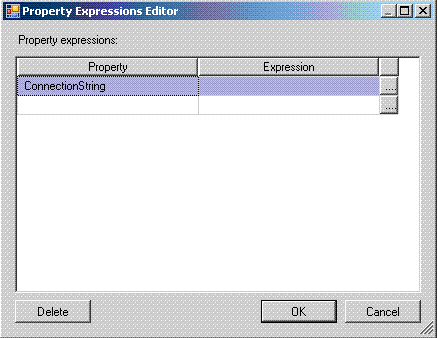
Select ConnectionString in the Property area and click the ellipse at the end of the row and the Expression Builder opens. You can drag expressions from the right side to the Expression textbox. The expression can be previewed once built by clicking Evaluate Expression:
With the Expression Builder open again, we will assign the variable for the ConnectionString property. We first add the package variable DataLoadDir by expanding the Variables tree on the left and then do a drag and drop into the Expression textbox. Then we had a + sign to concatenate. We add the string "DataLoad" in double quotes and another + sign. The next three phrases capture yesterday's date:
The above statements can either be typed in or dragged down from their respective location on the right side. In the case of DATEADD statements, when you drag and drop the statement into the text file it appears in the following way: "DATEADD( «datepart», «number», «date» )". We merely replace the various unknowns with the information we want.The last part is to add the extension ".txt" to the end of the string. Once we have everything in place we can click Evaluate Expression to see the results:
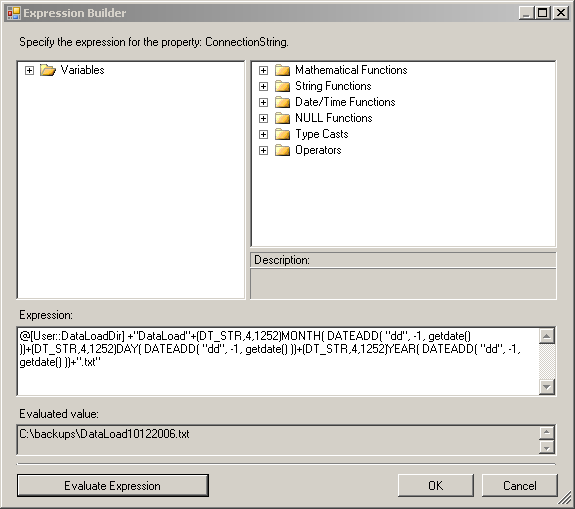
To save the Expression, click on OK and this expression will now be saved with your connectionString property and be resolved automatically each time it is run.
Next Steps
| Thursday, September 11, 2008 - 9:39:08 PM - VFRDavid | Read The Tip |
|
Very helpful code! However, I needed to create the filename with the date always 8 bytes. The sample chose 10/11 for a reason :-), if you use the code from January to September, and/or from the 1st to the 9th of the month, it either shortens the file name, or embeds spaces (for example - today is 2008911.txt, but I want 20080911.txt). @[User::FileDestination] + (DT_STR, 4, 1252) YEAR (DATEADD ( "dd", 0, getdate())) + RIGHT ("0" + LTRIM ((DT_STR, 4, 1252) MONTH (DATEADD ("dd", 0, getdate()))), 2) + RIGHT ("0" + LTRIM ((DT_STR, 4, 1252) DAY (DATEADD ("dd", 0, getdate()))), 2) + ".TXT" The basic logic is, take the RIGHT two characters of the resulting expression. When the month is 10 - 12, you'd get 010, and the RIGHT two of that is still "10". If the month is " 9", the result is "09" and you still get what you want. If anyone has an easier way, please let me know. I thought that I could just use the following: CONVERT(CHAR(8), GETDATE(), 112) but the TransactSQL expressions do not work in the SSIS Expressions builder. Thanks... |
|
| Monday, October 20, 2008 - 7:08:07 PM - Webman | Read The Tip |
|
This is a great recomendation, was lookign for this just the other day. My script appears to be broken to where the file cant be located? I keep getting I cant find the file error when the file is in this directory. |
|
| Wednesday, November 05, 2008 - 10:57:10 AM - PatMundy | Read The Tip |
|
VFRDavid, Thanks for posting this comment because I needed the exact same thing! However, I point out for future readers that at least as my system is configured, the "dateadd("dd", 0, getdate()) part of this is superfluous. The code works just as well without it as far as I can tell, hence: @[User::FileDestination] + (DT_STR, 4, 1252) YEAR (getdate()) + RIGHT ("0" + LTRIM ((DT_STR, 4, 1252) MONTH (getdate())), 2) + RIGHT ("0" + LTRIM ((DT_STR, 4, 1252) DAY (getdate())), 2) + ".TXT" I am guessing you left the dateadds in there since you, like me, may have tried the "dd" thing (which I also tried with DatePart) to get the leading zero. After that failed, you added the successful "right("0"+val, 2) logic, and then just kept the whole thing, since it does, after all, work.
|
|
| Saturday, July 25, 2009 - 8:13:38 PM - ghantabro | Read The Tip |
|
Great this is a great I was able to use variables for flat files and tables names; however, I have one issue though.. my flat file keeps changing the fields... it is a csv file with embedded comma. Variable for file and table worked fine but as soon as I changed the fields in the file and the staging table it did not work correctly as the mapping was dynamic? Any work around to import flat file with comma as delimiters and Quotes around fields that has embedded comma... Wish I could have used OpenRowSet, but it cannot be used in 64 bit machine. I am sure SSIS should handle dynamic mapping as well... any suggestion is appreciated. Thanks a lot.
|
|
| Tuesday, August 18, 2009 - 7:05:47 AM - ramdabburi | Read The Tip |
|
really helpful...but how to create a time stamp.. |
|
| Friday, September 17, 2010 - 4:55:06 AM - Sacchi | Read The Tip |
|
Hi, Great article. I would require this way. D:\test\filenameyyymmdd.txt But only require to look for D:\test\filename. Cheers. |
|
| Friday, October 15, 2010 - 1:07:29 AM - vinothraj | Read The Tip |
|
Hi all, This is very great and use full artical, this is same way how can i use in excel integration, i can use this steps for excel but experssion evaluvated. but showing error. pls explain how to use excel files for dynamic Thanks R.vinothraja i hope some one help me out this |
|
| Monday, February 20, 2012 - 1:19:34 PM - Quintin Mohale | Read The Tip |
|
@PatMundy to get the format c:\BackUp\TestFile_20120220 Use the below code the variable [User::DataDir] is a string which contains the foldername C:\BackUp\ @[User::DataDir]+"TestTextFile_"+SUBSTRING((DT_WSTR, 30)(DT_DBDATE) Try it out!!!! |
|
| Monday, February 20, 2012 - 1:23:30 PM - Quintin Mohale | Read The Tip |
|
Hi I am new to SQL server 2008 (I know 2012 is on the way but our company just moved to 2008, sad by its true! :-)) I was hoping perhaps you can direct me to interesting websites on Expressions and Tricks using Script Task??? Any reply on this question will be greatly appreciated! thank you! Regards, Quintin |
|
| Friday, March 23, 2012 - 2:42:27 AM - Ashok Pandey | Read The Tip |
|
@ Quintin , go through the website it has a lot as per your expectaion
http://www.sqlserver-training.com/featured-articles |
|
| Sunday, May 06, 2012 - 10:03:02 AM - Chedy | Read The Tip |
|
Thanks por posting the article, it's really helpful. I have to import from FoxPro tables from different folders. Each folder contails the same set of tables, so I know the names. What I have to pass the SSIS package is the folder pathname. Is there a way todo so? Thak you. |
|
| Thursday, May 24, 2012 - 7:01:00 AM - venkat | Read The Tip |
|
Hi, Iam New To Sql server. can anybody tell me why we use (dt_str,4,1252)?what is the use of it? Pls Post the answer If Anybody knows.
Regards, Venkat
|
|
| Saturday, August 25, 2012 - 9:14:35 AM - Prasad | Read The Tip |
| Hi Guys, Please anybody can help on this I have an issue with all file connection managers. using variables i have tried to concatenate the existing file name with date as Employee_MMDDYYYY.txt, but flatfile connection manager had created new file with above format. instead of loading in to existing file. | |
| Thursday, September 13, 2012 - 4:44:32 AM - kapil Dev | Read The Tip |
|
Hi, i am trying excute the Stored procedure from Sybase in SSIS, i can able to preview the data, but columns are not displaying. can you please let me know, how do i load the data from stored procedure to table or flatfile.
Thanks kapil |
|
| Tuesday, April 16, 2013 - 2:37:15 AM - Fred | Read The Tip |
|
Hi, greate article, I really need this. Thanks, Fred
|
|
|
privacy | disclaimer | copyright | advertise | about authors | contribute | feedback | giveaways | user groups Some names and products listed are the registered trademarks of their respective owners. Edgewood Solutions LLC | MSSharePointTips.com | MSSQLTips.com |