By: Tim Ford | Comments (11) | Related: > Monitoring
Problem
I have over 80 instances hosting 800+ databases that I support on my own. The only way I can keep track of all these databases is to centralize my monitoring so I have a single point of focus on my environment. I can not spend my entire day (and night) hopping from SQL instance to SQL instance in SQL Server Management Studio. I am not the only DBA out there in this situation. So overworked brothers and sisters, what are we to do? We cook up our own monitoring solution that best fits our environments. This tip is the first in a series presenting the building blocks of such a solution. My first tip will focus on monitoring database files and their free space on a single SQL instance.
Solution
I find it important in my environment to monitor the following database/database file level metrics:
- Server/Instance Name
- Database Name
- Database File Names (both logical and full physical path)
- File Size (In Megabytes)
- Database Status
- Recovery Mode
- Free Space (In Megabytes and Percent)
To collect this information I need to tap into the either the master.dbo.sysfiles system table in SQL 2000 or master.sys.sysfiles compatibility view in SQL 2005. I also need to make use of a few T-SQL functions at the DBA's disposal. First, let me present the query. Afterwards I'll explain the finer points.
DECLARE @DBInfo TABLE |
On my test system this produces the following results.
(Note:this was broken into 2 screenshots, so the output was not too wide for the webpage.)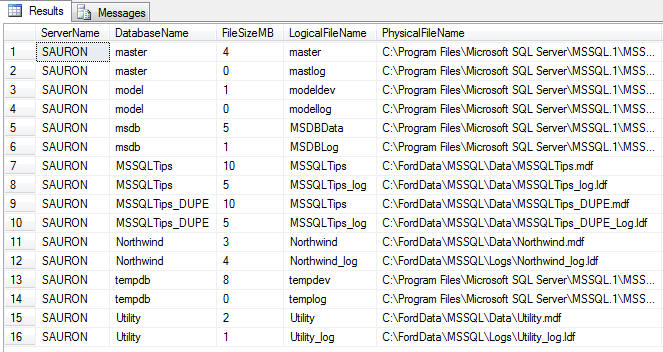
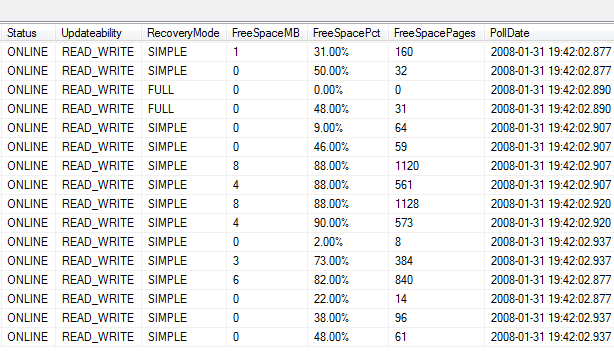
There are quite a few calculations that may need explaining. Let's take a look at them as they appear in the query above:
@@servername
This is the system variable that stores the name of the local SQL Server instance being run.
CAST(sysfiles.size/128.0 AS int) AS FileSize
Database size information is stored as 8Kb pages in sysfiles. If you have a 100Mb data file the value in sysfiles.size would be 12800 (100Mb * 1024) / 8. To reverse-engineer the size in Mb from a value that is stored as 8Kb pages you simply use the following formula:
File Size in Mb = (Pages In Kb) * (Kb per Mb) / (Kb per Page)
Using the information available to us (which is sysfiles.size) we can fill in the formula as thus: File Size in Mb = (sysfiles.size) * 1024/8. Since 1024/8 = 128 I've simplified the formula throughout the query as (sysfiles.size/128).
CONVERT(sysname,DatabasePropertyEx(''?'',''Status'')) AS Status
CONVERT(sysname,DatabasePropertyEx(''?'',''Updateability'')) AS Updateability
CONVERT(sysname,DatabasePropertyEx(''?'',''Recovery'')) AS RecoveryMode
The DatabasePropertyEx() function returns the value for the database property or option specified. In this case we are interested in the Status, Updateability, and Recover database option values. I convert the values to the sysname datatype for compatibility with my metadata repository.
CAST(sysfiles.size/128.0 - CAST(FILEPROPERTY(sysfiles.name, ' + '''' + 'SpaceUsed' + '''' + ' ) AS int)/128.0 AS int) AS FreeSpaceMB
The FreeSpaceMB calculation is simple once you understand what I explained above for the calculations associated with FileSize. To determine free space we need to know how much of the total file space is being consumed. This information is exposed via the FILEPROPERTY() function. FILEPROPERTY() expects the following parameters: file name, and property.
Expect a future tip on the various uses for FILEPROPERTY(), but for now we focus on the SpaceUsed property. This value is also stored in 8Kb pages, so the factor of 1024/8 (or 128) remains constant. Using the same basic rules we discussed above this is what the formula would look like this: Available Space in Mb = (File Size in Mb) - (Space Used in Mb). The formula in the query casts all variables as integer data types and converts the available values from pages to Mb.
I know that one of the major foundations of database normalization is not storing calculated values in a database. However, I like to be able to trend my metadata over time and with the complexity of the formulas I prefer to do all my thinking up-front. That being said, I don't just store the size information in the table and run calculations in my queries after the fact - I do my calculations directly in the query that populates the repository.
CAST(100 * (CAST (((sysfiles.size/128.0 -CAST(FILEPROPERTY(sysfiles.name, ' + '''' + 'SpaceUsed' + '''' + ' ) AS int)/128.0)/(sysfiles.size/128.0)) AS decimal(4,2))) AS varchar(8)) + ' + '''' + '%' + '''' + ' AS FreeSpacePct
Free space as a percentage of total space is a simple variation of the previously stated formulas. It is based off of the following simplified formula and adjusted for Mb from the 8Kb pages value that is available to us: Free Space In Percent = 100 * (Free Space) / Total Space. I then present it as a formatted percentage.
Summary
In this example I am just displaying the results in real time and not storing the results to a permanent table. This could easily be changed by using a permanent table instead of a table variable and therefore you can do trending.
Next Steps
- Tweak T-SQL code provided to fit your environment
- Include this process in an SSIS package that can run against all your instances and dump metadata into a single database that you can report against.
- Create a report that provides you with a listing of databases that are below a certain threshold of available space.
- Stay tuned for more metadata monitoring tips.
- Review previous tip on sp_MSForEachDB to see how to run the same query against multiple databases on a SQL instance.






About the author
 Tim Ford is a Senior Database Administrator with MindBody.
This author pledges the content of this article is based on professional experience and not AI generated.
View all my tips
