By: Jeremy Kadlec | Comments (3) | Related: > Integration Services Configuration Options
Problem
I have seen many of the changes with SQL Server 2005 Integration Services (SSIS) versus SQL Server 2000 Data Transformation Services (DTS). Integration Services certainly has much more functionality out of the box than DTS and I am learning SSIS as my projects move forward. One item that has seemed to be a thorn in my side is deploying an SSIS package. So, I have read your tip (SQL Server Crosswalk - Deploying a SQL 2000 DTS vs. a SQL 2005 SSIS package) related to deploying a package and wanted to find out if any other options are available? Can you shed some light on the situation?
Solution
You are right about SSIS vs. DTS. SSIS certainly has a great deal of functionality out of the box as compared to DTS, but in some respects some of the simpler aspects of DTS Packages have been over shadowed by a standardized development platform (Business Intelligence Management Studio) with SSIS. The net result is for the sake of new technology, new processes are needed. One of those items could be considered the deployment of an SSIS Package with the deployment manifest wizard. In the SQL Server Crosswalk - Deploying a SQL 2000 DTS vs. a SQL 2005 SSIS package tip we talked about creating a deployment manifest file and using that file for deployment purposes. Let's also outline another approach in this tip which is using Management Studio to import or export an SSIS Package.
Deploying an SSIS Package
Although the detailed steps for deploying an SSIS Package are outlined in this tip (SQL Server Crosswalk - Deploying a SQL 2000 DTS vs. a SQL 2005 SSIS package) let's outline the general steps:
- Build the package in Business Intelligence Management Studio (BIDS)
- Change the package configurations to build the deployment utility
- Build the deployment directory with all of the needed files
- Execute the deployment manifest file which launches the wizard
- In the course of the wizard, deploy the SSIS Package to either the file system or the MSDB database
- Execute the SSIS Package via the DTExec utility, a SQL Server Agent Job or a script
As you can tell, this is a much different process as compared to the SQL Server 2000 DTS Packages where all of the development and deployment was directly in Enterprise Manager.
Importing an SSIS Package in Management Studio
As compared to the process above, importing an SSIS package via Management Studio may be considered a much simpler approach. Let's walk through the process of importing the SSIS Package via Management Studio once the package is saved in BIDS.
Import Process - In order to start the SSIS import process follow these steps:
- Open Management Studio
- Login to the SQL Server Integration Services instance where you want to import the SSIS Package
- Expand the 'Stored Packages' folder
- To access the 'Import Packages...' option, right click on either:
- The 'File System' folder
- The 'MSDB' folder
- An individual SSIS Package
- Once the SSIS Import Package interface opens, complete the options
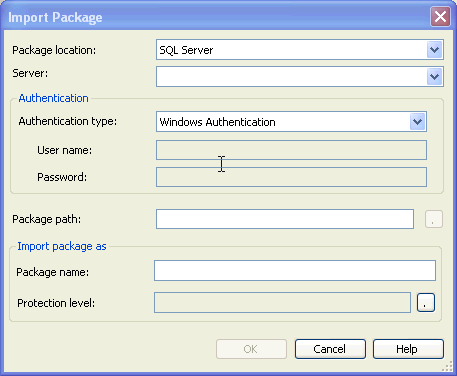
Import Package Options - Below outlines the interface options:
- Package location
- SQL Server - MSDB database
- File System - Directory with the SSIS Package (*.dtsx file)
- SSIS Package Store - Directories related to the SSIS installation i.e. C:\Program Files\Microsoft SQL Server\90\DTS\Packages\
- Server
- SQL Server instance with SSIS installed
- Authentication
- Windows Authentication
- SQL Server
- Package path
- Current directory with the SSIS Package
- Package name
- Rename the SSIS Package name when imported
- Protection level
- Level of security assigned to the SSIS package
- Additional information - Setting the Protection Level of Packages
Exporting an SSIS Package in Management Studio
Since we covered importing an SSIS Package with Management Studio, let's also cover exporting an SSIS package with Management Studio:
Export Process - In order to start the SSIS export process follow these steps:
- Open Management Studio
- Login to the SQL Server Integration Services instance where you want to export the SSIS Package
- Expand the 'Stored Packages' folder
- To access the 'Export Packages...' option, right click on an individual SSIS Package
- Once the SSIS Export Package interface opens, complete the options
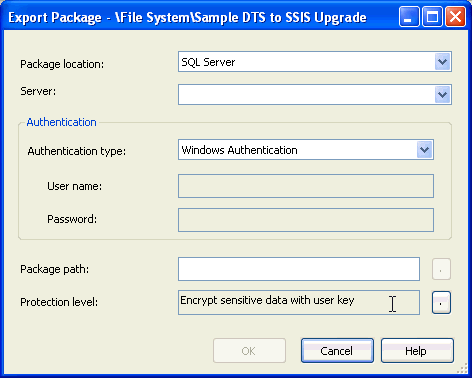
Export Package Options - Below outlines the interface options:
- Package location
- SQL Server - MSDB database
- File System - Directory with the SSIS Package (*.dtsx file)
- SSIS Package Store - Directories related to the SSIS installation i.e. C:\Program Files\Microsoft SQL Server\90\DTS\Packages\
- Server
- SQL Server instance with SSIS installed
- Authentication
- Windows Authentication
- SQL Server
- Package path
- Current directory with the SSIS Package
- Protection level
- Level of security assigned to the SSIS package
- Additional information - Setting the Protection Level of Packages
Delete an SSIS Package in Management Studio
The deletion process in Management Studio is very straight forward. Just right click on the package and select the 'Delete' option.
Save Copy of Package in Business Intelligence Development Studio
Save Copy of Package Process - In order to start the process follow these steps:
- Finish the SSIS Package in BIDS
- Navigate to File | Save Copy of Package
- Once the Save Copy of Package Process interface opens, complete the options
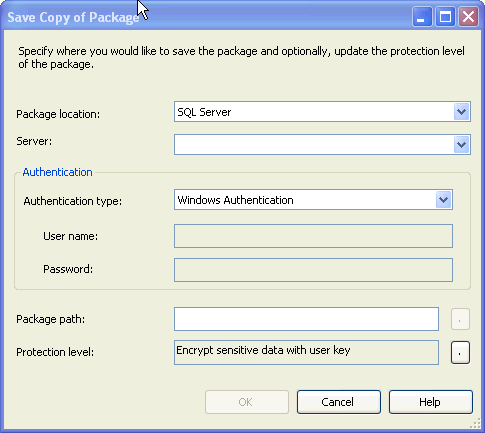
Export Package Options - Below outlines the interface options:
- Package location
- SQL Server - MSDB database
- File System - Directory with the SSIS Package (*.dtsx file)
- SSIS Package Store - Directories related to the SSIS installation i.e. C:\Program Files\Microsoft SQL Server\90\DTS\Packages\
- Server
- SQL Server instance with SSIS installed
- Authentication
- Windows Authentication
- SQL Server
- Package path
- Current directory with the SSIS Package
- Protection level
- Level of security assigned to the SSIS package
- Additional information - Setting the Protection Level of Packages
Command line management with dtutility
Although the Management Studio and Business Intelligence Development Studio offer rich interfaces to manage SSIS Packages, Microsoft also offers the option to copy, move, delete, or verify the existence of an SSIS Package with the dtutil command. This alternative may prove priceless if you are faced with a situation where you need to manage large numbers of SSIS Packages in an automated manner. Here are some simple coding examples with the dtutil command:
Copy and rename the SampleSSISPackage to Export_FlatFile_Daily_CustomerData.dtsx
dtutil /FILE c:\DevSSISPackages\SampleSSISPackage.dtsx /COPY FILE;c:\TestSSISPackages\Export_FlatFile_Daily_CustomerData.dtsx
Move the 'SampleSSISPackage' from Package Store to the MSDB database
dtutil /DTS SampleSSISPackage.dtsx /MOVE SQL;SampleSSISPackage
Delete the SSIS Package named 'SampleSSISPackage' in the MSDB database
dtutil /SQL SampleSSISPackage /DELETE
Verify the SSIS Package named 'SampleSSISPackage' in the MSDB database
dtutil /SQL SampleSSISPackage /EXISTS
The sample code in this tip for the dtutil command is only the tip of the iceberg. For additional information about the dtutil command visit - dtutil Utility.
Next Steps
- With all of the change between DTS and SSIS, be sure to have a standardized deployment process with a consistent location, naming standard, etc. If not, the SSIS Packages can quickly become unwieldy whether they are stored on the file system or in the MSDB database directory structure.
- Make sure the deployment is also included in your standards. You do not want to have SSIS Packages living all over your SQL Servers as well as reading and writing from numerous locations in the file system. Check out the functionality that you need and build a set of standards.
- Since a four primary options (deployment manifest file, Management Studio, BIDS, command line interface) are available, be sure to test out each of these processes and see which one best meets your needs.
- Check out all of the SQL Server Integration Services related tips.
- Have you seen more pros and cons from your work from DTS to SSIS? If so, share your experiences in the forums by clicking on the link below.






About the author
 Jeremy Kadlec is a Co-Founder, Editor and Author at MSSQLTips.com with more than 300 contributions. He is also the CTO @ Edgewood Solutions and a six-time SQL Server MVP. Jeremy brings 20+ years of SQL Server DBA and Developer experience to the community after earning a bachelor's degree from SSU and master's from UMBC.
This author pledges the content of this article is based on professional experience and not AI generated.
View all my tips
