By: Greg Robidoux | Updated: 2021-08-13 | Comments (12) | Related: 1 | 2 | 3 | 4 | 5 | 6 | 7 | > JOIN Tables
Problem
When building database tables you are faced with the decision of whether to allow NULL values or to not allow NULL values in your columns. By default SQL Server sets the column value to allow NULL values when creating new tables, unless other options are set. This is not necessarily a bad thing, but dealing with NULL values especially when joining tables can become a challenge. Let's take a look at this issue and how this can be resolved.
Solution
In most cases your columns in your tables probably allow NULL values unless you consciously changed them when you created a table or changed the default setting for your database by using the SET ANSI_NULL_DEFAULT OFF and SET ANSI_NULL_DFLT_ON OFF option. These settings change the behavior of how a table is created if you do not specify NULL or NOT NULL when creating a table. When a new database is created it will use the setting from the model database to determine the ANSI_NULL_DEFAULT setting unless it is specified when creating the database.
The following examples show you how a table would get created differently with each of these options, but by default SQL Server sets columns to allow nulls.
Example 1
When these two options are OFF the default nullable value is set to no, meaning no null values are acceptable.
CREATE DATABASE TestNulls
GO

USE TestNulls
GO

-- changes the database setting to off
ALTER DATABASE TestNulls SET ANSI_NULL_DEFAULT OFF;
GO

SET ANSI_NULL_DFLT_ON OFF;
GO

CREATE TABLE Table1 (a TINYINT);
GO

sp_help Table1
GO
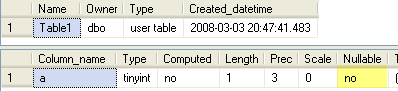
The screen shot below shows that the column does not allow NULLs.
Example 2:
When these two options are ON the default nullable value is set to yes, meaning null values are acceptable.
USE TestNulls
GO

ALTER DATABASE TestNulls SET ANSI_NULL_DEFAULT ON;
GO

SET ANSI_NULL_DFLT_ON ON;
GO

CREATE TABLE Table2 (a TINYINT);
GO

sp_help Table2
GO
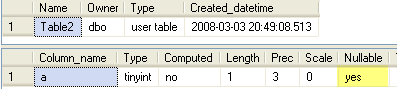
The screen shot below shows that this column allows NULLs.
So now that we have that covered let's get down to the issue at hand. So based on how tables and columns are setup and how data is stored you may run into an issue where you have data stored in tables that have NULL values and you need to join on these values. Sounds pretty easy, but let's see what happens when this occurs.
Setup Test
First let's create two tables and load some sample data. (This is not a very practical example, but it does help illustrate the issue.)
USE TestNulls
GO

CREATE TABLE [dbo].[CarModels](
  [Make] [varchar](50) NULL,
  [Model] [varchar](50) NULL,
  [Trim] [varchar](50) NULL
) ON [PRIMARY]
GO

CREATE TABLE [dbo].[Orders](
  [Make] [varchar](50) NULL,
  [Model] [varchar](50) NULL,
  [Trim] [varchar](50) NULL
) ON [PRIMARY]
GO

INSERT INTO dbo.Orders VALUES ('Nissan','Altima','2-door 2.5 S Coupe')
INSERT INTO dbo.Orders VALUES ('Nissan','Altima','4-door 3.5 SE Sedan')
INSERT INTO dbo.Orders VALUES ('Nissan','Altima','')
INSERT INTO dbo.Orders VALUES ('Nissan','Altima',NULL)
INSERT INTO dbo.CarModels VALUES ('Nissan','Altima','')
INSERT INTO dbo.CarModels VALUES ('Nissan','Altima','2-door 2.5 S Coupe')
INSERT INTO dbo.CarModels VALUES ('Nissan','Altima','2-door 3.5 SE Coupe')
INSERT INTO dbo.CarModels VALUES ('Nissan','Altima','4-door 2.5 S Sedan')
INSERT INTO dbo.CarModels VALUES ('Nissan','Altima','4-door 3.5 SE Sedan')
INSERT INTO dbo.CarModels VALUES ('Nissan','Altima','4-door 3.5 SL Sedan')
INSERT INTO dbo.CarModels VALUES ('Nissan','Altima','4-door HYBRID Sedan')
INSERT INTO dbo.CarModels VALUES ('Nissan','Altima',NULL)
Selecting data
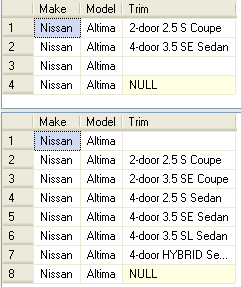
The first thing we will do is show the data in these two tables. The idea here is that we want to join the tables based on Make, Model and Trim. For most of the records there is some value, but there are a few records where the Trim value is NULL.
SELECT * FROM dbo.Orders a
SELECT * FROM dbo.CarModels b
The first query does a straight join of these tables based on all three columns.
SELECT *
FROM dbo.Orders a
INNER JOIN dbo.CarModels b
   ON a.Make = b.Make
   AND a.Model = b.Model
   AND a.Trim = b.Trim
The result of the above query matches only three of the four records from the Orders table. The records that have a NULL value for Trim do not show up in the result set.

This next example introduces the ISNULL function in the join clause. The ISNULL function takes two parameters, the first is the value to interrogate to see if it is NULL and it if is NULL the second parameter specifies what the value should be converted to. So in this example if any value is NULL it will be converted to a space ''.
SELECT *
FROM dbo.Orders a
INNER JOIN dbo.CarModels b
   ON a.Make = b.Make
   AND a.Model = b.Model
   AND isnull(a.Trim,'') = isnull(b.Trim,'')
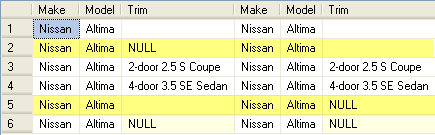
In the results below we can see that we now have more rows, but one of the issues we are facing is that there are also values of space in the table and therefore we are picking up additional joins that we do not want. The rows that should not be included are highlighted below.
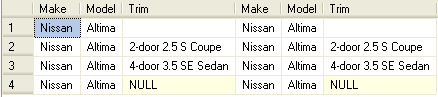
To take this a step further we are using the ISNULL function again, but this time we are converting the NULL values to '999999'. This is a value that we know does not exist in our table and therefore will not cause any unwanted joins.
SELECT *
FROM dbo.Orders a
INNER JOIN dbo.CarModels b
   ON a.Make = b.Make
   AND a.Model = b.Model
   AND isnull(a.Trim,'999999') = isnull(b.Trim,'999999')
Here is our final result with the four rows we are expecting.
Other Options
It has been a while since this article was first written and there have been a few alternative solutions and suggestions in the comments.
Option 1
The first option is to update your NULL values with a default value so you are always joining on a value and you won't have the NULL value issue. We kind of did this in the last query with the 999999, but we didn't actually update the data so we would need to do this each time we ran the query.
Option 2
Here is another query option that returns the same final results.
SELECT *
FROM dbo.Orders AS O
JOIN dbo.CarModels AS CM
  ON CM.Make = O.Make
  AND CM.Model = O.Model
  AND EXISTS (
              SELECT O.Trim
              INTERSECT
              SELECT CM.Trim
              );
Option 3
Here is another query option that returns the same results.
SELECT *
FROM dbo.Orders a
INNER JOIN dbo.CarModels b
   ON a.Make = b.Make
   AND a.Model = b.Model
   AND ( a.Trim = b.Trim OR ( a.Trim IS NULL AND b.Trim IS NULL ) )
Potential Performance Issues
Although the ISNULL function is handy, if you are doing large joins having this function in the join clause will slow down the query. A lot of this will also depend on the indexes you have setup and how the indexes are used for the join.
In general it is not a good idea to use functions in your joins or on the left side of your WHERE clause, because SQL Server needs to interrogate each value and therefore may negate the use of the index. Although in some cases there are no other options, so you need to do what you need to do. But be aware of this potential performance issue.
Summary
As we have seen from the above examples joining NULL values does not work. Even though you have two NULL values SQL Server does not treat these as the same value. Internally a value of NULL is an unknown value and therefore SQL Server does not equate an unknown value being equal to another unknown value.
Another design decision is to not allow NULL values when creating tables and therefore you will not run into these issues.
Next Steps
- When dealing with NULL values don't forget about the ISNULL function.
- Be aware when creating tables whether you want to allow NULL values or not. By allowing NULL values you introduce other issues that you may need to face at a later time.
- Check out these related articles:






About the author
 Greg Robidoux is the President and founder of Edgewood Solutions, a technology services company delivering services and solutions for Microsoft SQL Server. He is also one of the co-founders of MSSQLTips.com. Greg has been working with SQL Server since 1999, has authored numerous database-related articles, and delivered several presentations related to SQL Server. Before SQL Server, he worked on many data platforms such as DB2, Oracle, Sybase, and Informix.
This author pledges the content of this article is based on professional experience and not AI generated.
View all my tips
Article Last Updated: 2021-08-13
