![]() |
|
Improve database development with a bundle of 12 SQL developer tools from Red Gate. The SQL Developer Bundle will help you:
|
|
By: Ken Simmons | Read Comments (34) | Related Tips: More > Functions - System |
Problem
Many times people come across the Coalesce function and think that it is just a more powerful form of ISNULL. In actuality, I have found it to be one of the most useful functions with the least documentation. In this tip, I will show you the basic use of Coalesce and also some features you probably never new existed.
Solution
Let's start with the documented use of coalesce. According to MSDN, coalesce returns the first non-null expression among its arguments.
For example,
SELECT COALESCE(NULL, NULL, NULL, GETDATE()) |
will return the current date. It bypasses the first NULL values and returns the first non-null value.
Using Coalesce to Pivot
If you run the following statement against the AdventureWorks database
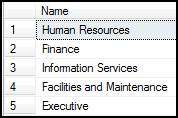
SELECT Name |
you will come up with a standard result set such as this.
If you want to pivot the data you could run the following command.
DECLARE @DepartmentName VARCHAR(1000) |
and get the following result set.
![]()
Using Coalesce to Execute Multiple SQL Statements
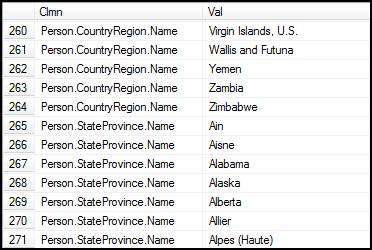
Once you can pivot data using the coalesce statement, it is now possible to run multiple SQL statements by pivoting the data and using a semicolon to separate the operations. Let's say you want to find the values for any column in the Person schema that has the column name “Name”. If you execute the following script it will give you just that.
|
|
here is the result set.

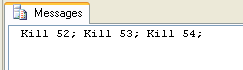
My personal favorite is being able to kill all the transactions in a database using three lines of code. If you have ever tried to restore a database and could not obtain exclusive access, you know how useful this can be.
DECLARE @SQL VARCHAR(8000) |
will give you a result set such as the following.
Next Steps
| Wednesday, June 18, 2008 - 12:09:23 PM - moonreader | Read The Tip |
|
It may be noted that COALESCE is not necessarily what permits some of the tricks you have defined here. You can do some of them without the use of COALESCE. The following code exemplifies the PIVOT technique without COALESE being used: DECLARE @T table (col1 varchar(100))INSERT @T select 'one';INSERT @T select 'two';INSERT @T select 'three';INSERT @T select 'four';DECLARE @Data varchar(1000)SET @Data=''SELECT @data = @data + col1 + ',' FROM @T |
|
| Wednesday, June 18, 2008 - 2:15:39 PM - KenSimmons | Read The Tip |
|
That's correct. Actually ISNULL would have worked in all the cases except the first. I just wanted to raise awareness of the function while showing some tips at the same time. |
|
| Wednesday, July 02, 2008 - 11:15:32 AM - PeggySue | Read The Tip |
|
I was SO happy to come across this function that I didn't know about, and see it work beautifully - that I almost got teary-eyed! I have worked SO hard to try to display multiple rows in one field! To find an answer that works this smoothly and cleanly was GREAT! Thanks! |
|
| Wednesday, July 02, 2008 - 1:05:23 PM - PeggySue | Read The Tip |
|
The query works beautifully as written and on its own. When I try to use it as part of a HUGE stored procedure, with multiple temp tables and select statements, it doesn't work though. I know it's because I'm not using it correctly. Could someone look at it for me and give me some feedback? |
|
| Wednesday, July 02, 2008 - 6:41:25 PM - KenSimmons | Read The Tip |
|
Sure. Post the code that you are having a problem with. |
|
| Thursday, July 03, 2008 - 1:37:01 AM - TheCodeForce | Read The Tip |
|
The method shown does indeed work well, but is limited in that it cannot be used as part of bigger queries or in views. You might find the following more to your taste, which does not has this limitation and seems to produce the same queryplans, so performance wise the methods are a match. set nocount ondeclare @t table (col1 varchar(100))insert @t select 'one';insert @t select 'two';insert @t select 'three';insert @t select 'four'; select substring( (select convert( varchar(max), ',' ) + col1 from @T order by col1 for xml path('') ), 2, 1024000 )
Note the convert to a varchar(max) which works only in SQL Server 2005 and later. It's sole purpose is to force a character datatype that can hold practically any size of string. The comma is put before the column to make sure it has a fixed location, that can later be easily removed with the substring function. The result is a clean comma separated list of whatever is stored in col1.
I use this method quite often to produce comma separated lists of numbers by putting a convert to varchar around col1. Looking inside a comma separated character field can then be done with something like (pseudo code): charindex ( ',' + convert( numeric field to match ) + ',', ',' + the comma separated list of IDs + ',' ) > 0I hope you find this just as useful :) Cheers! |
|
| Thursday, July 03, 2008 - 2:51:58 AM - moot67 | Read The Tip |
|
As mentioned above, ISNULL could have been used for most of the examples, or even just assigning a value to the variable before the select statement ie. DECLARE @DepartmentName VARCHAR(1000) SET @DepartmentName = ''SELECT @DepartmentName = @DepartmentName + Name + ';' So... are there any uses for COALESCE other than just as a longer version of ISNULL ? |
|
| Thursday, July 03, 2008 - 3:52:43 AM - damar123 | Read The Tip |
|
there is at least ONE BIG difference when using ISNULL and COALESCE: Consider the example: DECLARE @tinyint tinyintSELECT COALESCE (@tinyint, 500) -- this is okSELECT ISNULL(@tinyint,500) -- this produces arithmetic overflow error So, be carefull when using those two statements. Damian |
|
| Thursday, July 03, 2008 - 4:22:20 AM - JimR | Read The Tip |
|
Excellent tips in both the original article and comments! (I also thought that the title was misleading, in that coalesce is not critical to doing the neat things done in the examples, but I learned much from them.) |
|
| Thursday, July 03, 2008 - 4:53:54 AM - PeggySue | Read The Tip |
|
I ended up using turning the example into a function and calling it from my stored procedure. Worked great! I will be using this in many variations in the future! Thanks again to all! |
|
| Thursday, July 03, 2008 - 5:46:41 AM - moot67 | Read The Tip |
|
[quote user="damar123"] there is at least ONE BIG difference when using ISNULL and COALESCE: <snip> [/quote] Thanks, that's useful to know. I expanded your example a bit to test what's going on, and if you run this... DECLARE @tinyint tinyint SELECT you end up with this table def... CREATE TABLE [dbo].[TESTTABLE]([col0] [tinyint] NOT NULL, [col1] [tinyint] NULL, [col2] [int] NULL, [col3] [numeric](13, 0) NULL, [col4] [numeric](24, 0) NULL ) ON [PRIMARY] the differences in field defs and the NULL/NOT NULL is quite interesting. |
|
| Thursday, July 03, 2008 - 5:59:21 AM - moonreader | Read The Tip |
|
nice! thanks |
|
| Thursday, July 03, 2008 - 7:25:53 AM - tosscrosby | Read The Tip |
|
What timeliness! I used coalesce for the first time this week. ISNull didn't seem to catch all the nulls in a particular column (still not sure why??) that I was trying to default to a particular value. It left 44 rows out of 250 as still showing null. I used coalesce(field1, field2, 'A') and it worked every time for every row. Wish I had found this years ago. Anyone else experience crazy results using is null or = null? |
|
| Thursday, July 03, 2008 - 7:39:22 AM - aprato | Read The Tip |
|
= null won't work unless you change the ANSI NULL setting to off (ie set ansi_nulls off) NULL equates to unknown in the ANSI standard If I recall correctly, 6.5 allowed = null to work by default
|
|
| Thursday, July 03, 2008 - 8:04:06 AM - toniupstny | Read The Tip | |
|
[quote user="moot67"]([/quote] - Are there other uses for Coalesce vs replacement for ISNULL This is my first post so pardon the formatting (or lack thereof). ISNULL evaluates one item and does a substitution of like type if the value is null. Coalesce allows multiple items to be compared in one statement. Here is a use that might be hard to do with ISNULL, where you are combining data from several tables:
Situation is where you need to combine information based on matches of one column of data in multiple tables.
For this you can use Coaelesce to combine the data even if there is no matching row in one or more of the tables: DECLARE @t1 TABLE (memberid INT,initialjob VARCHAR(50))DECLARE @t2 TABLE (memberid INT,intermediatejob VARCHAR(50)) DECLARE @t3 TABLE (memberid INT,lastjob VARCHAR(50)) INSERT INTO @t1 SELECT 123,'GS' UNION SELECT 124,'PDR' INSERT INTO @t2 SELECT 123,'AAP' UNION SELECT 125,'AV' INSERT INTO @t3 SELECT 123,'TS' UNION SELECT 126,'CS' set statistics io on set statistics time on select coalesce(t1.memberid,t2.memberid,t3.memberid) 'memberid', initialjob, intermediatejob, lastjob from @t1 t1 full outer join @t2 t2 on t1.memberid=t2.memberid full outer join @t3 t3 on t3.memberid=t2.memberid --order by 1 (If you so desire)
Toni... |
||
| Thursday, July 03, 2008 - 9:10:32 AM - moot67 | Read The Tip |
|
[quote user="toniupstny"] ISNULL evaluates one item and does a substitution of like type if the value is null. Coalesce allows multiple items to be compared in one statement. [/quote] I understand the basic usage but the original article said: "Let's start with the documented use of coalesce. According to MSDN, coalesce returns the first non-null expression among its arguments." Which sort of implied that it did something else as well - I just wondered what that might be. interesting bit here: http://blogs.msdn.com/sqltips/archive/2008/06/26/differences-between-isnull-and-coalesce.aspx |
|
| Thursday, July 03, 2008 - 10:32:10 AM - TimothyAWiseman | Read The Tip |
|
I thought this was an excellent article and passed it on to some of my team members, but one statement you made was that Coalesce is more than just a more powerful version of isnull. Everything in the article seemedto fit with the idea of a more powerful version of isnull. |
|
| Thursday, July 03, 2008 - 1:06:45 PM - KenSimmons | Read The Tip |
|
Sorry about the controversy about the article. I see a lot of questions about how to pivot data and I also know a lot of people who have never used the coalesce function. I was just trying to raise awareness of them both. I should have explained that better in the article. Again, sorry if I mislead anyone. That was not my intention. Thanks, |
|
| Thursday, July 03, 2008 - 1:46:51 PM - toniupstny | Read The Tip |
|
Ken, I thought the article was fine and brought up some discussion
which makes people think (almost always a good thing). You are braver
than most to even write an article. Toni |
|
| Thursday, July 03, 2008 - 1:53:49 PM - moonreader | Read The Tip |
|
I agree. Thanks for starting such a lively discussion, with lots of interesting variations on your original theme. |
|
| Friday, July 04, 2008 - 2:42:55 AM - moot67 | Read The Tip |
|
Yes - definitely food for thought. The examples of pivoting data have been particularly useful. Thanks |
|
| Sunday, November 02, 2008 - 12:54:19 PM - mohhosny | Read The Tip |
|
Helpppp please hey i guys i keep searching for the best way to search into table with best performance and easy to write techniqe i tried the Coalesce and it was perfect for me but i found one thing that drive me back and think again about useing it which is Coalesce with Cloumn with null values. for example... create a table with clumn ID,Name,Title,FLow insert (1,MM,Null,BB) insert(2,AA,CC,Null) SELECT Name, Title, Flow
it didn't return anything because of the null values. so what is the best thing we can do to avoid this problem.. thanks in advance |
|
| Sunday, November 02, 2008 - 2:38:41 PM - toniupstny | Read The Tip |
|
Hi Mohhosny. If I follow you correctly you want to be able to show all the rows even if one of the values contains a null? If so, this would do it: Hope this helps. Toni ******************************************************** drop table tbla |
|
| Sunday, November 02, 2008 - 10:08:24 PM - mohhosny | Read The Tip |
|
Thanks Toni for your response.. your idea working if only i want to select but i want to search in table what i need is something like that declare @name nchar(50) so if i pass all parameters with null it returns all rows.and if i set any parameter it returns all the rows contains that parameter even if some other parameter contains null values like the table you have created. |
|
| Monday, November 03, 2008 - 7:09:07 AM - aprato | Read The Tip |
|
You can CASE select *
|
|
| Thursday, July 16, 2009 - 12:19:14 AM - xmetaldetectorx | Read The Tip |
|
Consider these tables 2 - '2222' - 'description text' - 'tagX, tagY, tagZ'
Can i use Coalesce to achieve this? So far I am able to only return one row with this code: declare @DelimitedString varchar(max),
But i need to have all products.. |
|
| Thursday, July 16, 2009 - 4:58:48 AM - toniupstny | Read The Tip |
|
XMetal.... Maybe your data and/or table definitions need tweeking. When I set up and tested your method it returned the results you were looking for: ****************************************************************************** IF Exists (Select tagID from tst_ProductTag)
********************************************************************* Which gives the result:
****************************** ------------------------------
************************************
By the way, I don't think you don't need to use a LEFT Join if there are Foreign Key Constraints ensuring that a tagID in the ProductTag tbl must have a corresponding tagID in the Tag tbl. Also you should combine the queries to yield the results. (I might play with that a bit and post an update later). Please let me know if you get different results. Toni
|
|
| Thursday, July 16, 2009 - 2:55:15 PM - toniupstny | Read The Tip |
|
XM... With the same data/tables as in my prior post, you could build a function to determine the tags then invoke it for each productID. There is probably another way to do it too but this is what I have. Toni **************************** Create the Function *** if exists (select * from dbo.sysobjects where id = object_id(N'[dbo].[gettags]') and xtype in (N'FN', N'IF', N'TF')) create function gettags (@productid varchar(4)) ********************* Now Invoke it for each product in the ProductTag table *** SELECT tst_Product.productID, tst_Product.styleNum, tst_Product.description , dbo.gettags(tst_Product.productID) FROM tst_Product where productID in (select productID from tst_ProductTag) |
|
| Sunday, July 04, 2010 - 2:02:28 PM - troulouth | Read The Tip |
| Hey I'm new. Brilliant forum. Just found it on Google. Thank u 4 the Brilliant community we have here :) | |
| Tuesday, May 01, 2012 - 7:53:40 AM - raj | Read The Tip |
|
hi all, is it possible to retrieve the date which has 'null' and an empty data in a column ... for ex: i had the table cust_table with cid, cname and cmail and in cmail column i had the data like cmail ------ adds@gmail.com adad@ymail.co null empty(which means nothing) ada@redif.com
now i need the data which has to display the null and empty rows i had one solution: select * from cust_table where cmail = '' or cmail is null by execution it retrives two records.... i need another solution.. |
|
| Tuesday, May 22, 2012 - 10:23:53 AM - Faith Sloan | Read The Tip |
|
THANK YOU, Ken for getting this discussion started. You caused me to think outside the box re: some queries I am writing. Thank the community for your valuable insight. I LOVE THE 'NET!
Faith Sloan |
|
| Friday, June 08, 2012 - 10:35:21 PM - Candy | Read The Tip |
| I use COALESCE quite a lot in my applications, and I would rnmocmeed everybody else to as well. It's a quick function, that would become quite messy if left up to your PHP/ASP applications to sort. | |
| Thursday, February 14, 2013 - 2:21:26 AM - Shiv | Read The Tip |
|
These tips helped a lot.. Thanks!! |
|
| Friday, April 26, 2013 - 7:42:51 PM - Arts | Read The Tip |
|
O My God. THANKS! Thanks for explaining so clearly. |
|
|
privacy | disclaimer | copyright | advertise | about authors | contribute | feedback | giveaways | user groups Some names and products listed are the registered trademarks of their respective owners. Edgewood Solutions LLC | MSSharePointTips.com | MSSQLTips.com |