solving sql server problems for millions of dbas and developers since 2006


SQL Server DBA Tips SQL Server Developer Tips SQL Server Business Intelligence Tips SQL Server Career Tips SQL Server Tip Categories SQL Server Tutorials SQL Server Webcasts SQL Server Whitepapers SQL Server Tools SQL Server Questions and Answers MSSQLTips Authors About MSSQLTips SQL Server User Groups MSSLQTips Giveaways MSSQLTips Advertising Options

MSSQLTips Facebook Page MSSQLTips LinkedIn Page MSSQLTips RSS Feed MSSQLTips Twitter Page MSSQLTips Google+ Page

SQL Product Highlight

SQL Sentry, Inc. - SQL Sentry Performance Advisor for SQL Server

SQL Sentry Performance Advisor for SQL Server delivers an advanced performance dashboard with relevant Windows and SQL Server metrics in a single view along with detailed insight of heavy SQL, blocking, deadlocks, and disk bottlenecks. Performance Advisor is packed with ground-breaking features that are not found in any other performance monitoring software, all designed with the singular goal of simplifying the process of optimizing your SQL Server performance.

Learn more!


SQL Server Reporting Services Conditional Formatting

By: | Read Comments (7) | Print

Tim is a Senior Database Administrator and SQL Server MVP. He has been working with SQL Server since 1999.

Related Tips: 1 | 2 | 3 | 4 | 5 | More

Problem
I have a report that lists all databases for which a full database backup has not been applied in the previous 24 hours from the time the report is run.  When I originally created the report I had a manageable number of databases to support and I was the sole DBA.  The environment has grown significantly since then.  Furthermore, I now have a junior Database Administrator that will eventually be responsible for making sure backups are completing as required.  When I was just in the DBA role I knew which databases were important and needed to have backup failures addressed immediately and which databases were test or training versions, or were of lesser importance.  In short, I need to upgrade my report to provide a triage mechanism to responsible staff members that are not as familiar with the SQL Server environment as I am.  How can I do so? 

Solution
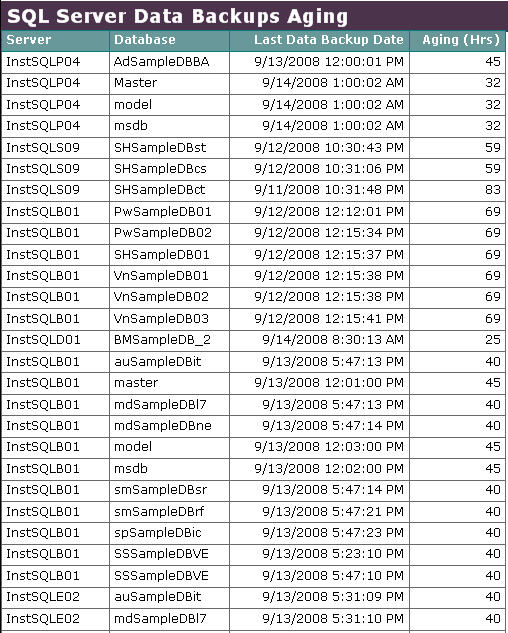
Let's start by taking a look at the initial design of the report as shown below.  As you can see, due to the length of the report it may be difficult to discern which database backup failure I should look into first, unless I have a first-hand understanding of each SQL Server database (server and database names have been changed to protect the innocent - and myself).
To address the need, I came up with the idea of adding a priority field to a couple tables within my SQL Server metadata repository.  I added this field on the tables that contain my job, instance and database metadata.  I could not simply set one priority status at the instance level, since I may (and do) have databases of varying importance on my SQL Server instances.  However, I could not set the priority at only the database level since some SQL Server Agent jobs for a "Very Important" database may not be all that important.  I think of the importance of backing up a database versus a job that posts current connection settings to Reporting Services.  Finally, I could not simply set the priority at the job level, since there are many uses for reports that require a triaging at the database or instance level that have absolutely nothing to do with SQL Server Agent jobs.

That being said, I added this priority field to tables at the three levels of Instance, Database, and Job that persisted between refreshes of the SQL DBA Repository (the SSIS job that feeds this repository runs three times per day and wipes clean most tables).  Once the database table structure was modified to account for importance of a database I incorporated this new field into the data set that serves as the source of the report's data.

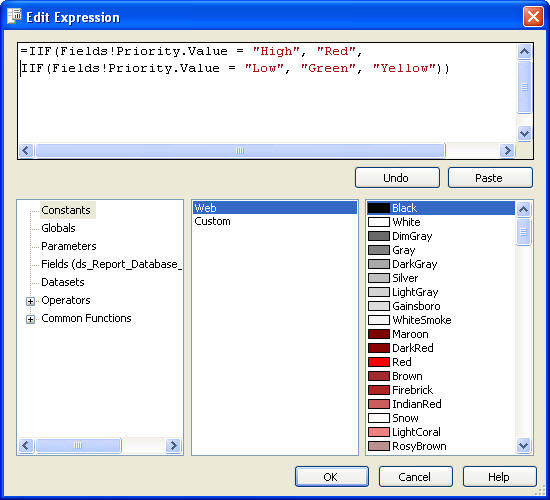
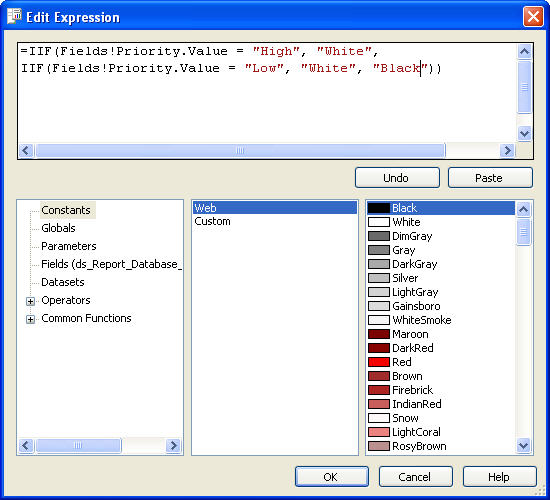
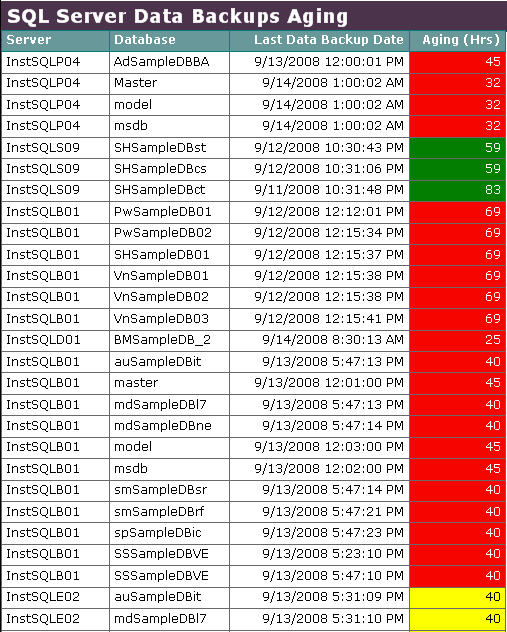
The final step, was to add the conditional formatting code to the BackgroundColor and Color properties for the text box that contains the aging of the last database backup.  This code looks to the value of the Priority field in the report's data set.  Where the value of this field is equal to "High", the text box in the report will show as red with white text for readability.  Where priority is equal to Low, the text box will be green with white lettering.  Finally, all other values for Priority would show as yellow, with black lettering.  Below are two screen shots with the logic.

BackgroundColor Property
 

Color Property
Now that the conditional formatting is in place and the Priority field has been added to the report's data set, the same report provides better insight towards triaging my response for backup assessment as shown below. 
A few commands in Reporting Services goes along way to focus my team on the critical backups that need to be addressed on a daily basis.

Next Steps

  • Review additional tips on Microsoft SQL Server Reporting Services for more ways to improve the efficiency of your reports.
  • MSSQLTips.com also has information on this specific SQL Server DBA Repository.  That information is available here
  • Add reporting to your metadata repository via SQL Server Reporting Services.


Related Tips: 1 | 2 | 3 | 4 | 5 | More | Become a paid author


Last Update: 9/18/2008

Share: Share 


Comments and Feedback:

Wednesday, October 01, 2008 - 6:31:13 PM - zombi Read The Tip

Hi,

This is really nice post. But i am looking for creating report as you have created for backup jobs. I want to create a report that can generate report of the daily backup jobs. some thing similar to you. so can you please provide me the link or suggest me that how can i generate that report. Thanks.

Zombi


Thursday, October 02, 2008 - 6:24:51 PM - timmer26 Read The Tip

Zombi, do you have any sort of metadata repository that collects backup data from across all instances in your SQL environment?


Friday, October 03, 2008 - 3:42:21 AM - zombi Read The Tip

 Hi

i do not have any repository but i want to set up one. can you please help me or provide me some good link. tahnks.


Tuesday, December 09, 2008 - 1:00:02 PM - kbolick Read The Tip

Will this same type of conditional formatting work in SSRS 2005?  We have MS SQL and SSRS 2005.  I am looking to create a heatmap using this conditional formatting technique.  All other articles related to heatmaps reference using a custom dll, but your conditional formatting technique works just fine for me if it works with 2005.  Thanks for your help and the very useful information provided!


Tuesday, December 09, 2008 - 2:22:59 PM - timmer26 Read The Tip

You should be all set then.  This tip was developed against SSRS 2005.


Wednesday, January 07, 2009 - 3:37:54 PM - kbolick Read The Tip

Tim,

I am using the BI Dev Studio report designer for VS 2005 (ver 8.0).  I do not have access to the latest version.  I have seen the steps to create this solution and they appear to be using the latest version of the report designer which has the ability to apply a function to determine the background color.  Do you know how I can set the background color using a function to conditionally format the field's background color in the older version? 

 Thanks.


Friday, February 11, 2011 - 12:51:46 AM - Vikash Kumar Singh Read The Tip

This is a very nice tip. I did a sample with BIDS 2008...thanks.


Post a Comment or Question

Keep it clean and stay on the subject or we may delete your comment.
Your email address is not published. Required fields are marked with an asterisk (*)

*Name   *Email   Notify for updates
Comments
*Enter Code refresh code


Sponsor Information
Find and fix SQL Server problems before they happen - SQL diagnostic manager now with predictive analysis!

It takes just 5 minutes to connect your SQL Databases to source control. Got 5 minutes? Get started now.

What grade do you think your SQL Servers get? Find out with Edgewood's SQL Server Health Check starting at $995.

Find and Fix SQL issues with Foglight Performance Analysis. Get a free copy.

Join the over million SQL Server Professionals who get their issues resolved daily.

Demystify TempDB Performance and Manageability


Copyright (c) 2006-2012 Edgewood Solutions, LLC All rights reserved
privacy | disclaimer | copyright | advertise | about
authors | contribute | feedback | giveaways | user groups
Some names and products listed are the registered trademarks of their respective owners.


Edgewood Solutions LLC | MSSharePointTips.com | MSSQLTips.com