By: Atif Shehzad | Comments (1) | Related: 1 | 2 | 3 | 4 | > Compression
Problem
Although reducing the amount of storage that SQL Server uses is not as high of a priority as it used to be (because disks are cheap and hardware is much faster), but when tables grow to millions of rows a few bytes per row can have significant effect. For very large databases the storage issue gets more critical for backups and restores and also having multiple copies of the same database online for whatever reason. The decimal and numeric data types (functionally equivalent) are typically stored on disk as fixed-length data. Mostly these values are defined with high precision, but precision is not required in most of these cases. In such cases the storage space consumed is unnecessary. The situation becomes even worse when NULL or zero values are also present in numeric or decimal type column. Such issues are required to be addressed for optimization of storage space, but what options are available?
Solution
To optimize the storage of decimal or numeric columns, SQL Server 2005 (SP 2) has introduced the VARDECIMAL storage format. This storage format is available only in SQL Server 2005 Enterprise, Developer, and Evaluation editions. No application changes are required to use it.
This new storage format, stores decimal and numeric data as variable length columns and can be enabled or disabled at the table level. When a table is not using the VARDECIMAL format every numeric or decimal value uses a fixed size (between 5 and 17 bytes) even when the data is 0, NULL or there is not a need for precision. With VARDECIMAL, storage becomes dynamic and optimized for each value. Generally VARDECIMAL values range up to 20 bytes in storage, however when zero or NULL values are used it reduces the values to only 2 bytes, this way it saves valuable storage.
Analyzing the data and tables
As this format is implemented at a table level, first we should analyze the table to see how much storage could be saved by using VARDECIMAL.
To run the analysis command, let's first create a sample table in the pubs or whatever database you want to use and populate it.
--Script to create a table "forTest" in "pubs"

USE pubs
GO
CREATE TABLE [dbo].[forTest](
     [col1] [decimal](18, 0) NULL,
     [col2] [numeric](18, 0) NULL
) ON [PRIMARY]
Now to populate the table run following script
--Script to populate pubs..forTest with sample data

SET NOCOUNT ON
GO
DECLARE @count SMALLINT
SET @count = 1
WHILE (@count < 3000)
BEGIN
IF (@count > 1500)
      INSERT INTO fortest VALUES(@count, 0)
ELSE
      INSERT INTO fortest VALUES(0,@count+15)
      SET @count = @count +1
END
GO

SET NOCOUNT OFF
GO
Now to analyze the difference run the following command
--Command to analyze the table "froTest" for varDecimal format

EXECUTE sp_estimated_rowsize_reduction_for_vardecimal 'fortest'
GO
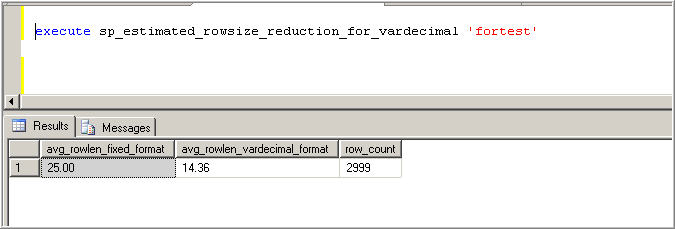
We can see that there may be difference of about (25.00 - 14.6) i.e.11 bytes in each row. So it seems suitable to apply vardecimal storage for this table.
Implementing VARDECIMAL
To use it, first enable it for the database (pubs for our example) as follows
--Command to enable varDecimal format for database "pubs"

EXECUTE sp_db_vardecimal_storage_format 'pubs', 'on'
GO
Make sure that you have exclusive access to the database, otherwise the command will fail. By using the above command the VARDECIMAL format is enabled on a database level and is ready to be enabled on any table in that database. Then you may choose any table to enable this option.
--Command to enable varDecimal format for table "forTest"

EXEC sys.sp_tableoption 'fortest', 'VarDecimal storage format',1
GO
(Note: you may use ‘ON' or 1 to enable it)
Once the command to enable VARDECIMAL on a table is executed, the table will be locked and storage engine will begin to convert the decimal/float types to varDecimal. It consumes resources like creating an index and all non-clustered indexes containing the converted column will be rebuilt.
Getting Status Information
If you want to find out which databases have VarDecimal enabled use the following command.
--Command to find out databases with varDecimal format enabled

EXEC sp_db_vardecimal_storage_format
GO
To list all tables with VarDecimal format enabled, use following command
--Script to list all tables with varDecimal format enabled

SELECT name, OBJECT_ID, type_desc
FROM sys.objects
WHERE OBJECTPROPERTY(OBJECT_ID, N'TableHasVarDecimalStorageFormat') = 1
GO
To get the status of Vardecimal for a single table use the following command
--Command to confirm status of varDecimal format on a table "forTest"

SELECT OBJECTPROPERTY(OBJECT_ID('forTest'),'TableHasVarDecimalStorageFormat')
GO
If result is 1 then vardecimal is enabled if result is zero then it is not enabled.
Disabling VARDECIMAL
At some time you may be required to disable the VARDECIMAL format for your table. You can use the following command
--Command to disable varDecimal format for a table "forTest"

sp_tableoption 'forTest', 'vardecimal storage format', 0
GO
(Note: you may use ‘OFF' or 0 to disable it)
And if you are also required to disable it for your database use the following command, but make sure that no table in that database is still using the VARDECIMAL format.
--Command to disable varDecimal format for database "pubs"

EXEC sp_db_vardecimal_storage_format 'pubs', 'off'
GO
When disabling it you may get this error message:

To get around this you would need to change the database to SIMPLE recovery first and the issue the above command.
Some more things to consider
As it may be an important decision to apply VARDECIMAL format, you should consider some aspects that will help you plan:
- VARDECIMAL reduces the storage size, but may add a CPU overhead.
- The most granular level of VARDECIMAL format is the table, so you can not use VarDecimal for some columns and not others
- Changing the storages format to VARDECIMAL on issuance of enable command is offline process and table is locked during this process
- You may insert values in to a table with VARDECIMAL format enabled from source table having VARDECIMAL format disabled. And same is true if source table has VARDECIMAL format enabled but destination table has disabled.
- To enable VARDECIMAL storage format under database mirroring, remove mirroring, make sure that both the principal and the mirrored instance have SQL Server SP2, enable VARDECIMAL on principal database and re-establish the mirroring.
- A VARDECIMAL-enabled database can not be migrated under any type to an instance of SQL Server 2005 SP1.You have to disable the VARDECIMAL format for such migration.
- Backup/Recovery, log shipping, attaches DB, and mirroring work fine with VARDECIMAL enabled, but make sure that source and destination have SQL Server 2005 with SP2
- Do not try to enable the option for system databases, views, XML indexes and full text indexes; table valued functions, because you cannot
- It is a storage format and should not be confused with a data type.
- If you have an I/O-bound workload, you are likely to see an improvement in the performance of your workload
Next Steps
- This format is provided with great flexibility and roll back options. As you do not require application code changes and also you may enable or disable it if required without any complications. So analyze your tables with the above mentioned commands and apply the feature where beneficial. And for those who will move towards SQL Server 2008 it is relevant to mention that this feature has been deprecated in SQL Server 2008. New concept of "Row Compression" is introduced there. Row compression is not only applied to zero and NULL, but it includes many more data types like money, int, datetime etc.






About the author
 Atif Shehzad is a passionate SQL Server DBA, technical reviewer and article author.
This author pledges the content of this article is based on professional experience and not AI generated.
View all my tips
