By: Atif Shehzad | Comments (11) | Related: > Database Design
Problem
SQL Server provides numerous system data types to store dates, character based data, numeric data, etc. However there are some situations when a customized data type is needed for consistency across an application. Some examples could be phone numbers in a specific format, alpha numeric employee ID's, IP addresses, etc. What options are available to store this data in a unique manner?
Solution
Although a few different design options are available, one option is to create SQL Server user defined data types and bind them to an existing default and rule. In some respects, they can be considered customized SQL Server data types. The SQL Server user defined data types can be created both with SQL Server Management Studio and T-SQL commands. Let's walk through samples of each option to serve as an example of SQL Server user defined data types can be used with defaults and rules.
Creating SQL Server User Defined Data Types in SQL Server Management Studio (SSMS)
- Open SQL Server Management Studio.
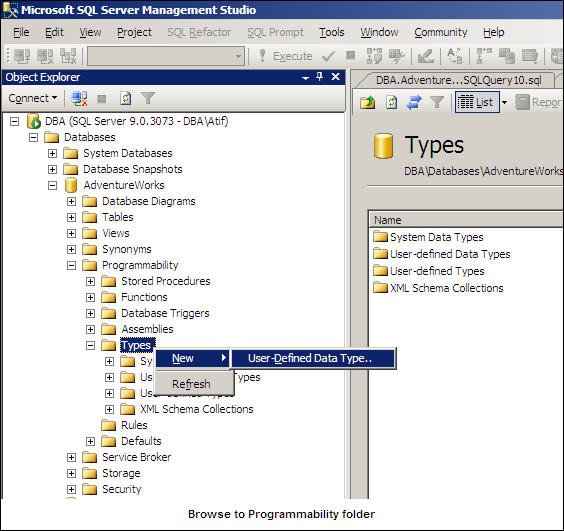
- Navigate to the Databases | AdventureWorks | Programmability | Types folder.
- Right click on the Types folder and select New | User-Defined Data Type.. as shown below:
General page of User-Defined Data Type
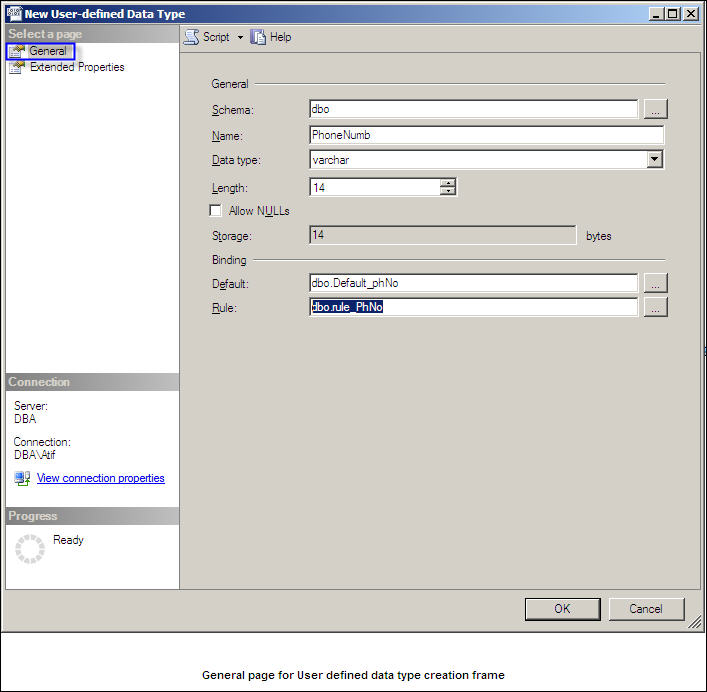
Below is a example view of the General page for a user defined data type creation.
- Default schema for user defined data type as 'dbo'
- Name for user defined data type as 'PhoneNumb'
- Data type for user defined data type as 'varchar'
- Length of user defined data type as 14
- Allow NULLs is unchecked, so NULL will not be allowed for this data type.
- As a default I have browsed a pre created default 'dbo.Default_phNo' which is shown in the T-SQL section below
- As a rule for this user defined data type I have browsed a pre created rule 'dbo.rule_PhNo' which is shown in the T-SQL section below
Extended Properties page of User-Defined Data Type
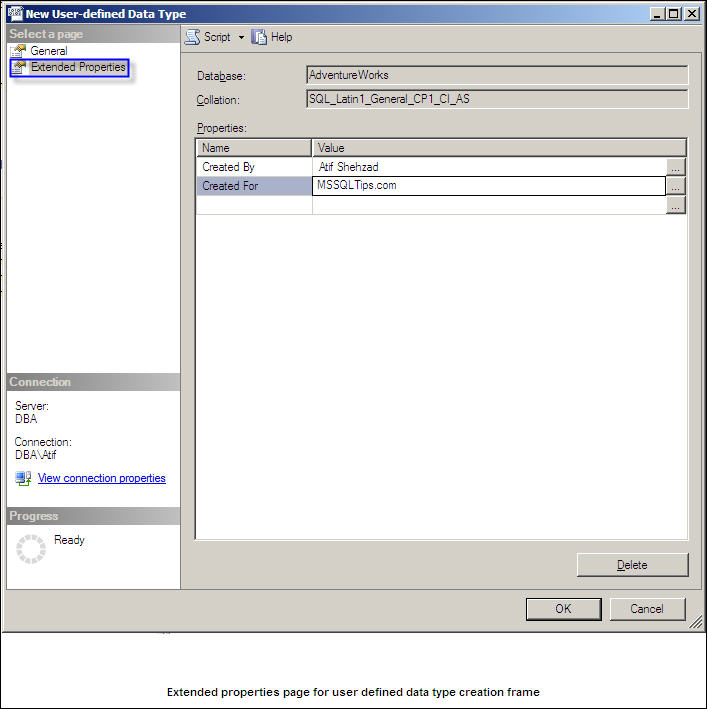
I have added two extended properties for the User-Defined Data Type which can be considered meta data. In this example I have included the author (Created By) and purpose (Created For) as shown below:
T-SQL Implementation of the User Defined Data Types, Rules and Defaults
Below outlines the sample code for the User Defined Data Types, Rules and Defaults:
|
Syntax for creating SQL Server user defined data type |
sp_addtype [ @typename = ] type, |
Here is a basic explanation of the four parameters from the system stored procedure:
| Parameter | Explanation |
| @typename | Name of new user defined data type that is being created |
| @phystype | Base system data type of SQL Server |
| @nulltype | To specify that null values are allowed for this data type or not |
| @owner | Owner of this being created user defined data type |
Below is the example default and rule code used in SSMS above:
|
Example Default and Rule Code |
| -- Create a default value for phone number to be used in example USE AdventureWorks GO CREATE DEFAULT Default_PhNo AS 'UnknownNumber' GO -- Create a rule for phone number to be used in example -- Number will be in format +92-3335409953 or UnknownNumber by default USE AdventureWorks GO CREATE RULE rule_PhNo AS (@phone='UnknownNumber') OR (LEN(@phone)=14 AND SUBSTRING(@phone,1,1)= '+' AND SUBSTRING(@phone,4,1)= '-') GO |
In the final code snippet, we will bind the rules and defaults to the user defined data types:
|
Commands to bind the defaults and rules to user defined data types |
-- To bind a default 'Default_PhNo' to user defined data type 'PhoneNumb' -- To bind a rule 'rule_PhNo' to user defined data type 'PhoneNumb' EXEC sp_bindrule 'rule_PhNo', 'PhoneNumb' GO |
Next Steps
- Creating and using your own defined data types with rules and defaults in SQL Server will provide a powerful mechanism to implement uniformity and consistency in your database design.
- Keep in mind that a user defined data type in SQL Server is only accessible in a single database as such, it could make sense to script out, create the objects in dependent databases and update the database design.
- One trick with new databases is to create the objects in the model database, so as new databases are created the user defined data types, rules, defaults, etc. will automatically be available.






About the author
 Atif Shehzad is a passionate SQL Server DBA, technical reviewer and article author.
This author pledges the content of this article is based on professional experience and not AI generated.
View all my tips
