By: Armando Prato | Comments (2) | Related: More > DBA Best Practices
Problem
I am an application developer and my company doesn't have a database person on staff. Since I have a little bit of database knowledge, it has now become my responsibility to perform the data modeling and development work. What advice can you offer?
Solution
If you find yourself in this situation, don't get overwhelmed. The forums found here at MSSQLTIPS.com as well as the various SQL Server bulletin boards across the web are great places to get answers to any problems that may be stumping you. They are full of experienced SQL Server professionals who have probably "been there, done that" and are eager to help.
If you're relatively inexperienced with databases in general and SQL Server specifically, here are a list of things I'd initially recommend:
1. Don't rely on your logic tier code to perform integrity checking - use constraints!
I can't tell you how many times I find that a customer has hard-coded their "foreign key" and column domain checks within their logic-tier code. Constraints are the database's last line of defense against an error in logic code and are a great way to document your model. A customer I was working with had been coding their database checking right in their logic code. They acquired another company and developed a bulk import process to load data from the acquired company into their database. The developer who created the bulk import process searched through the Visual BASIC code for the relationships but ultimately missed some. The resulting load was riddled with invalid data which was not discovered until the end-users got a hold of the database and started running their reports. Moral of the story: Use Primary Key, Foreign Key, Default, Check, and Unique constraints as a safeguard against invalid data.
2. When you create constraints in your database, name them!
You may be tempted to create your tables without naming your constraints like in the following example:
| CREATE TABLE DBO.CUSTOMER ( CUSTOMERID INT IDENTITY(1,1) PRIMARY KEY, FIRSTNAME VARCHAR(50) NOT NULL, LASTNAME VARCHAR(50) NOT NULL, IS_PREFERRED BIT NOT NULL DEFAULT 0 ) GO |
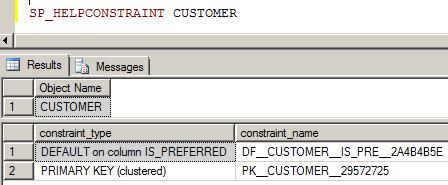
Issuing SP_HELPCONSTRAINT CUSTOMER shows that the SQL Server engine auto-generated the names for the PRIMARY KEY and DEFAULT constraints. What's the big deal, you say? Well, these auto generated names will differ from database to database. If you ever find yourself needing to change a constraint, you will have to create special logic to determine the system generated name before you can redefine the constraint.
3. Normalize to third normal form. De-normalize when necessary.
If you're not familiar with third normal form, you should first read this primer. De-normalization is the process of moving away from third normal form by including redundant or aggregate data in your table to help queries perform faster. Don't automatically create a table de-normalized. Let a specific performance situation dictate using this technique.
4. Use stored procedures for data access.
I think stored procedures are the best way to access data. I have many reasons for strongly preferring stored procedures. They can abstract the database from your logic tier code and they help in reducing the risk of SQL injection attacks. This tip discusses my arguments for stored procedures in greater detail. If you're not comfortable with stored procedure writing, I recommend that you get acquainted. If you're going to embed SQL into your application code, at least prepare your statements. This tip goes over the ramification of not at least preparing your queries.
5. Avoid creating redundant indexes
The indexes you create should be based on the WHERE clauses of your queries. When creating indexes to support these queries, keep in mind that the lead column of an index is the most important since index statistics are based on this lead column. For instance, if you have two separate queries, one searching a table of customers by LASTNAME and FIRSTNAME and the other just by LASTNAME, you may be tempted to create two separate indexes: one based on (LASTNAME, FIRSTNAME) and the 2nd based on (LASTNAME). In reality, you only need the first one on (LASTNAME, FIRSTNAME) since any query on just the LASTNAME will be satisfied by this index. This tip discusses this subject further.
6. Carefully consider whether you should use GUIDs as PRIMARY KEYs in your database.
I don't use GUIDs in my database. For one, they're larger than integers (16 bytes vs 4 bytes) which leads to increased database size. For another, you can't readily get the value of last inserted GUID without special coding. I recommend reading this tip and decide for yourself if a GUID makes sense.
7. Make sure your tables have a clustered index.
If your table doesn't have a clustered index, it is considered a heap table. The data in a heap table is not stored in any specific order whereas the data in a clustered table is sorted in the order of the defined clustered index. This makes the clustered index a great performance tool for queries that use sorting or range finding (i.e. ORDER BY, GROUP BY, BETWEEN). You only get one clustered index per table, so choose it wisely. If none of the columns in your table are a candidate for clustering, make your primary key the clustered index. This tip discusses heap tables vs clustered tables in greater detail.
8. Always stress test your queries BEFORE they go into production.
Your table is up in running production and the queries are running great. A few months later, things are not so great. Users are complaining that reports are taking longer and you're getting heat from management for it. It looks like you're going to have to perform some query tuning. Stress testing your queries before putting them into production is a great way to find potential issues before they come back to bite you. SQL Server MVP Adam Machanic has developed a very nice query stress utility which you can download for free. It's called SQLQueryStress and it allows you to examine query performance under load.
9. Determine a BACKUP strategy
Whether you're a 24x7 shop or you're a 9 to 5 software house, determine what backup strategy makes sense for your organization. Once you decide on one.... TEST IT REGULARLY. Perform monthly fire drills. You don't want to be caught in a pickle if you end up in a critical data recovery situation but don't a valid backup plan in place. I recommend reading this tip and consider the plan that makes the most sense for your situation.
10. Consider creating database unit tests
One of the latest trends in the industry is test driven development. I'd strongly recommend having a unit test framework in place for your database. You'll eventually find yourself needing to re-write a query and unit tests would go a long way to making sure the query manipulates the data as expected. TSQLUnit is a useful unit testing framework that can be downloaded for free from Sourceforge.
There you have some starting guidelines to follow as you try to tackle your company's database development tasks.
Next Steps
- Take the time to read the SQL Server Best Practices White Papers found at the MSDN web site
- Read this Microsoft article that compares heaps to clustered tables
- Read about Analyzing a Query in the SQL Server Books Online
- Bookmark the master MSSQLTIPS category list for future reference






About the author
 Armando Prato has close to 30 years of industry experience and has been working with SQL Server since version 6.5.
This author pledges the content of this article is based on professional experience and not AI generated.
View all my tips
