By: Atif Shehzad | Comments (26) | Related: > Database Design
Problem
In my databases I had some values that were often calculated while generating several reports. Also there were some columns that were dependent on one or more other columns. As one column was updated triggers were being used to synchronize new values in dependent columns. I was required to provide a more efficient and standard approach to handle these types of scenarios. So how could I get rid of the overhead for calculations at report generation time and how could I avoid the use of triggers for synchronizing updated columns?Solution
For such scenarios where calculated values are required or values are generated through manipulation on other columns, we have a powerful feature provided in SQL Server. This feature is "Computed Columns".
A computed column is computed from an expression that can use another column or columns in the same table. Functions, variables, constants, non computed column names or any combination of all these may be used along with operators to create a computed column. In this tip we will go through an example of implementing a computed column.
In the following script we will create a table called CCtest in the AdventureWorks database with three columns [empNumb], [DOBirth] , [DORetirement].
We are required to have the "Date of Retirement" for each employee as (DOBirth + 60 years - 1 day). Instead of calculating it each time in the report or updating the column [DORetirement] each time through a trigger when [DOBirth] is updated, we have a better approach here to create [DORetirement] as a computed column. Since this rule could change at anytime we are implementing it as a computed column instead of a hard coded value.
--Script # 1: Create a table with computed column

USE [AdventureWorks]
GO

-- Create Table with computed column
CREATE TABLE [dbo].[CCtest]
(
[empNumb] [int] NULL,
[DOBirth] [datetime] NULL,
[DORetirement] AS (dateadd(year,(60),[DOBirth])-(1)) PERSISTED
)
GO
The same may be done through SSMS. Create new table by right clicking on the Tables folder in the AdventureWorks database.
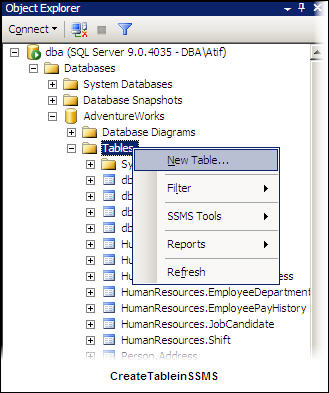
You will be provided a design view for the new table in SSMS. Provide specifications for the calculated column as shown below.
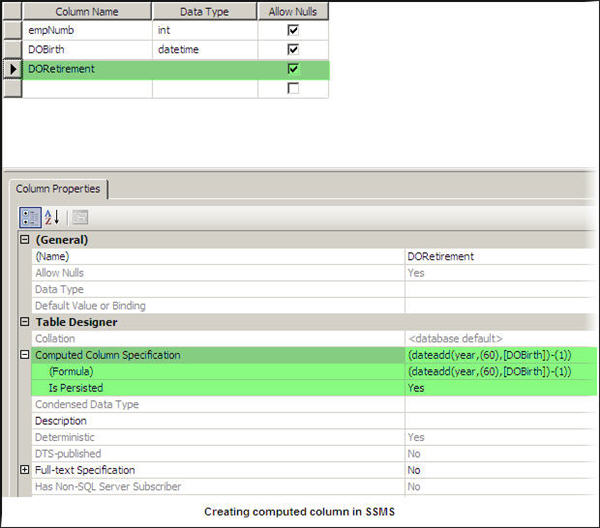
Now we have our table CCtest with a computed column. Similarly we can add a computed column to any existing table using the "ALTER TABLE" command or opening the table in design view using SSMS and making the changes.
Let's insert some data and run a query to test the functionality of the computed column.
--Script # 2: Insert data in table

USE AdventureWorks
GO

INSERT INTO CCTest (empNumb, DOBirth)
SELECT 30 ,'1985-12-13' UNION ALL
SELECT 25 ,'1980-11-18' UNION ALL
SELECT 21 ,'1978-01-19' UNION ALL
SELECT 7 ,'1985-12-13' UNION ALL
SELECT 5 ,'1975-07-23'
GO

SELECT * FROM dbo.CCTest
GO
Here we can see our computed column:
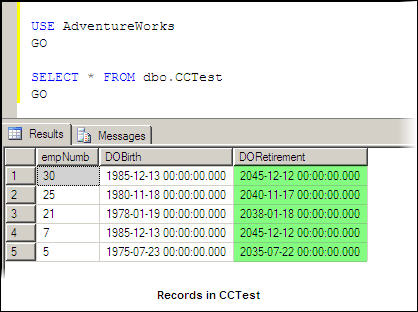
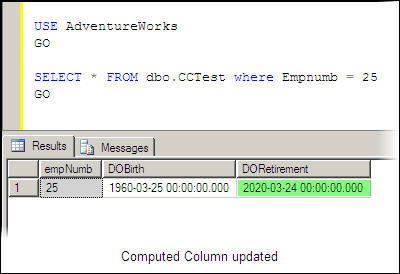
To verify that the computed column will be updated for any updates, we will update [DOBirth] for [empNumb] 25.
--Script # 3: Update DOBirth of empNumb 25

USE AdventureWorks
GO

UPDATE CCtest
SET DOBirth = '1960-03-25'
WHERE empnumb = 25
GO

SELECT * FROM dbo.CCTest
WHERE Empnumb = 25
GO
Here we can see our computed column has been updated.
Persisted
You may have noticed that we also used the property "Persisted" for our computed column. This property for computed columns was introduced in SQL Server 2005 and onwards. It is important for any computed column, because many additional features depend on it. To be able to make a computed column as Persisted it has to be deterministic.
Here are a few rules:
- If Persisted property is off then calculated column will be just a virtual column. No data for this column will be stored on disk and values will be calculated every time when referenced in a script. If this property is set active then data of computed column will be stored on disk.
- Any update in referenced column will be synchronized automatically in computed column if it is Persisted.
- Along with some other conditions Persisted is required to create an index on the computed column.
Nullability
Nullability for a computed column value will be determined by the database engine itself. The result of a non-nullable referenced column may be NULL in certain conditions to avoid possible overflows or underflows. You can provide an alternate value for NULL using the ISNULL(check_expression, constant), if required.
Some Limitations
- You can not reference columns from other tables for a computed column expression directly.
- You can not apply insert or update statements on computed columns.
- If you are combining operators of two different data types in your expression then operator of lower precedence will be converted to that of higher precedence. If implicit conversion is not possible then error will be generated.
- A subquery can not be used as an expression for creating a computed column.
- Computed columns can be used in SELECT lists, WHERE or ORDER BY clauses and as regular expressions , but to use a computed column as CHECK, FOREIGN KEY or NOT NULL constraints you have to set it to Persisted.
- To use a computed column as Primary or Unique Key constraint it should be defined by a deterministic expression and data type of computed column expression should be indexable.
Next Steps
- While planning for any computed column, please keep in mind that although a Persisted computed column will reduce overhead for calculations at run time it will consume more space on disk.
- To get Nullability of any computed column in a table, use the COLUMNPROPERTY function with the AllowsNull property.
- Creating indexes on computed columns requires certain conditions to be fulfilled.






About the author
 Atif Shehzad is a passionate SQL Server DBA, technical reviewer and article author.
This author pledges the content of this article is based on professional experience and not AI generated.
View all my tips
