By: Arshad Ali | Comments (35) | Related: 1 | 2 | More > Integration Services Development
Problem
In part 1 of this tip series, I discussed using the built-in Send Mail Task which is quite simple to use and can be used in a scenario where you need to send plain text email with less development efforts. In this second tip, I am going to discuss the use of the Script Task to overcome the limitations imposed by the Send Mail Task. In this tip, I will show how you can send HTML formatted emails from SSIS using the Script Task or rather sending emails using the .Net capabilities from your SSIS package.
Solution
I will start my discussion on using the Script Task to send email (both non-HTML and HTML formatted) with an example. First I will create a database table (MailsToBeSent) which will hold the information about the emails which are to be sent by the Script Task and then insert a few records in this table. Next I will create a stored procedure to retrieve the records from the above created tables.
So here is the script for creating these database objects.
--Create a table to store mails to be sent details
CREATE TABLE MailsToBeSent
(
[MailID] INT PRIMARY KEY,
[From] VARCHAR(200),
[TO] VARCHAR(200),
[CC] VARCHAR(200),
[BCC] VARCHAR(200),
[Subject] VARCHAR(200),
[Body] VARCHAR(MAX),
[IsHTMLFormat] BIT,
[Priority] CHAR(1)
)
GO

--Insert a non-HTML mail details to be sent
INSERT INTO MailsToBeSent([MailID], [From], [TO], [CC], [BCC], [Subject], [Body], [IsHTMLFormat], [Priority])
VALUES(1, '[email protected]', '[email protected]', '[email protected];[email protected]','',
'Sending Non-HTML Mail Using Script Task', 'This Non-HTML mail has been sent using SSIS Script task.', 0, 'L')
GO

--Insert a HTML formatted mail details to be sent
INSERT INTO MailsToBeSent([MailID], [From], [TO], [CC], [BCC], [Subject], [Body], [IsHTMLFormat], [Priority])
VALUES(2, '[email protected]', '[email protected]', '[email protected];[email protected]','',
'Sending HTML formatted Mail Using Script Task',
'This <strong><span style="font-size:130%;color:#006600;">HTML formatted</span></strong>
mail has been sent using <em><span style="color:#ff6600;">SSIS Script task</span></em>.',
1, 'H')
GO

--Create a procedure to retrieve all the records
--from MailsToBeSent table to send mails
CREATE PROCEDURE GetMailsToBeSent
AS
BEGIN
SELECT [MailID], [From], [TO], [CC], [BCC], [Subject],
[Body], [IsHTMLFormat], [Priority]
FROM MailsToBeSent
END
GO

EXEC GetMailsToBeSent
GO
Once you are done with the database object creation, let's move on to create a package with Script Task to send emails.
Create a new project of Integration Services type in the Business Intelligence Development Studio. Drag a Script Task from the toolbox and drop it onto the Control Flow area of the Designer interface, right click on Script Task component and then select Edit, a screen similar to one as given below will come up. This is a screen shot from SSIS 2008. If you are still using SSIS 2005 it will say "Design Script..." instead of "Edit Script...".
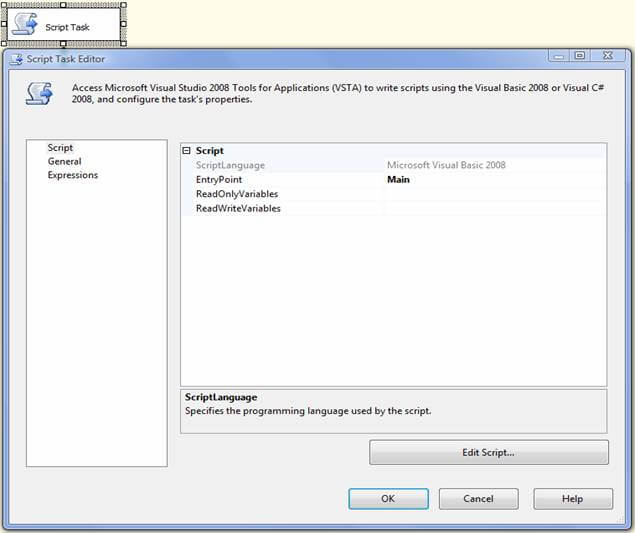
On the Script page of "Script Task Editor" click on "Edit Script" button, it will bring up VSTA environment (On SSIS 2005 it's VSA environment) for writing .Net code for sending emails.
Copy the code from the below tables and paste it in the VSA/VSTA code editor. There are two sets of code one for 2005 and one for 2008, so make sure you use the right version based on your version of Business Intelligence Development Studio, not the version of SQL Server you are connecting to. Because of changes in the scripting environment between SQL Server 2005 and 2008, there would is a slight change in the code that's why I am providing the below separate code to be used on SQL Server 2005 and on SQL Server 2008. If you are running the below code in your Script Task in SSIS 2005 environment, you may need to reference the System.XML.dll. By default it is included and referenced dll in SSIS 2008, so you would not have to worry if you are using it on SSIS 2008.
Here are the objects that are referenced with the System.XML highlighted below.
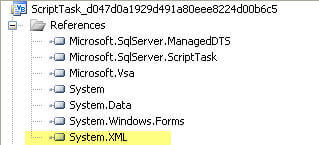
Please note you need to change the connection string in the code pointing to the server and database where you have created the above database objects and also change the SMTP server name which will be used to send emails. The two lines of code are as follows:
ConnString = "Data Source=ARALI-LAPTOP;Initial Catalog=Learning;Integrated Security=True;"
mySmtpClient = New SmtpClient("smtpserver")
Also, I have commented out the section that allows you to send emails using authentication to your mail server. So if you want to use a user and password this can be supplied as well.
Script : VB .Net Code for Script Task for SQL Server 2005
Imports System
Imports System.Data
Imports System.Math
Imports Microsoft.SqlServer.Dts.Runtime
Imports System.Net
Imports System.Net.Mail
Imports System.Data.SqlClient
Imports System.Xml
Public Class ScriptMain
    ' The execution engine calls this method when the task executes.
    ' To access the object model, use the Dts object. Connections, variables, events,
    ' and logging features are available as static members of the Dts class.
    ' Before returning from this method, set the value of Dts.TaskResult to indicate success or failure.
    '
    ' To open Code and Text Editor Help, press F1.
    ' To open Object Browser, press Ctrl+Alt+J.
    Enum ScriptResults
        Success = Microsoft.SqlServer.Dts.Runtime.DTSExecResult.Success
        Failure = Microsoft.SqlServer.Dts.Runtime.DTSExecResult.Failure
    End Enum
    Public Sub Main()
        Dim mySmtpClient As SmtpClient
        Dim ConnString As String
        ConnString = "Data Source=ARALI-LAPTOP;Initial Catalog=Learning;Integrated Security=True;"
        Try
            Dim SqlQuery As String = "GetMailsToBeSent"
            Using conn As New SqlConnection(ConnString)
                conn.Open()
                Dim comm As New SqlCommand(SqlQuery, conn)
                comm.CommandType = CommandType.StoredProcedure
                Dim adap As New SqlDataAdapter(comm)
                Dim ds As New DataSet()
                adap.Fill(ds)
                If ds.Tables(0).Rows.Count > 0 Then
                    Dim intCount As Integer
                    Dim intCCCounter As Integer
                    Dim intBCCCounter As Integer
                    For intCount = 0 To ds.Tables(0).Rows.Count - 1
                        'Create an instance of MailMessage class and pass "From EmailID" and "To EmailID" to the constructor
                        '"To" list can accept multiple email address deliminated by comma
                        Using myMessage As New MailMessage(ds.Tables(0).Rows(intCount).Item("From").ToString(), Replace(ds.Tables(0).Rows(intCount).Item("To").ToString(), ";", ","))
                            'CC List
                            'MailMessage.CC property is a collection of type MailAddressCollection so you need to add one email address at a time in this collection as I am doing it in a loop for multiple address
                            'Also you can create a MailAddressCollection first, add all the CC email address to it and finally assign it to MailMessage.CC property
                            Dim CCAddressList As MailAddress
                            If ds.Tables(0).Rows(intCount).Item("Cc").ToString().Length > 0 Then
                                If ds.Tables(0).Rows(intCount).Item("Cc").ToString().IndexOf(";") > 0 OrElse ds.Tables(0).Rows(intCount).Item("Cc").ToString().IndexOf(",") > 0 Then
                                    Dim strEmails As String()
                                    strEmails = Split(Replace(ds.Tables(0).Rows(intCount).Item("Cc").ToString(), ";", ","), ",")
                                    For intCCCounter = 0 To strEmails.Length - 1
                                        CCAddressList = New MailAddress(strEmails(intCCCounter))
                                        myMessage.CC.Add(CCAddressList)
                                    Next
                                Else
                                    CCAddressList = New MailAddress(Replace(ds.Tables(0).Rows(intCount).Item("Cc").ToString(), ";", ","))
                                    myMessage.CC.Add(CCAddressList)
                                End If
                            End If
                            'BCC List
                            'MailMessage.BCC property is a collection of type MailAddressCollection so you need to add one email address at a time in this collection as I am doing it in a loop below for multiple address
                            'Also you can create a MailAddressCollection first, add all the BCC email address to it and finally assign it to MailMessage.BCC property
                            Dim BCCAddressList As MailAddress
                            If ds.Tables(0).Rows(intCount).Item("Bcc").ToString().Length > 0 Then
                                If ds.Tables(0).Rows(intCount).Item("Bcc").ToString().IndexOf(";") > 0 OrElse ds.Tables(0).Rows(intCount).Item("Bcc").ToString().IndexOf(",") > 0 Then
                                    Dim strEmails As String()
                                    strEmails = Split(Replace(ds.Tables(0).Rows(intCount).Item("Bcc").ToString(), ";", ","), ",")
                                    For intBCCCounter = 0 To strEmails.Length - 1
                                        BCCAddressList = New MailAddress(strEmails(intBCCCounter))
                                        myMessage.Bcc.Add(BCCAddressList)
                                    Next
                                Else
                                    BCCAddressList = New MailAddress(Replace(ds.Tables(0).Rows(intCount).Item("Bcc").ToString(), ";", ","))
                                    myMessage.Bcc.Add(BCCAddressList)
                                End If
                            End If
                            myMessage.Subject = ds.Tables(0).Rows(intCount).Item("Subject").ToString()
                            myMessage.Body = ds.Tables(0).Rows(intCount).Item("Body").ToString()
                            If ds.Tables(0).Rows(intCount).Item("IsHTMLFormat").ToString().ToUpper() = "TRUE" Then
                                myMessage.IsBodyHtml = True
                            Else
                                myMessage.IsBodyHtml = False
                            End If
                            If ds.Tables(0).Rows(intCount).Item("Priority").ToString().ToUpper() = "L" Then
                                myMessage.Priority = Mail.MailPriority.Low
                            ElseIf ds.Tables(0).Rows(intCount).Item("Priority").ToString().ToUpper() = "H" Then
                                myMessage.Priority = Mail.MailPriority.High
                            Else
                                myMessage.Priority = Mail.MailPriority.Normal
                            End If
                            'To be used for sending attachements
                            'myMessage.Attachments.Add(New Attachment("c:\example1.txt"))
                            'myMessage.Attachments.Add(New Attachment("c:\example2.txt"))
                            mySmtpClient = New SmtpClient("smtpserver")
                            'You can set the SMTP port number if it is not listening on default port
                            'mySmtpClient.Port = 26
                            'The credentials returned by DefaultNetworkCredentials represents the authentication credentials for the current security context in which the application is running.
                            mySmtpClient.Credentials = CredentialCache.DefaultNetworkCredentials
                            'If you don't want to use windows authentication to connect to your SMTP host and want to specify a different username and password, you can then use NetworkCredential class as shown below
                            'The NetworkCredential class is a base class that supplies credentials in password-based authentication schemes such as basic, digest, NTLM, and Kerberos.
                            'mySmtpClient.Credentials = New NetworkCredential("arshad", "abcd", "corpnet")
                            mySmtpClient.Send(myMessage)
                        End Using
                    Next
                End If
                conn.Close()
            End Using
        Catch E As Exception
            Dts.Events.FireError(-1, "Failure in Script Task while sending mails.", E.Message.ToString(), "", 0)
            Dts.TaskResult = ScriptResults.Failure
        End Try
        Dts.TaskResult = ScriptResults.Success
    End Sub
End Class
Script : VB .Net Code for Script Task for SQL Server 2008
Imports System
Imports System.Data
Imports System.Math
Imports Microsoft.SqlServer.Dts.Runtime
Imports System.Net
Imports System.Net.Mail
Imports System.Data.SqlClient
Imports System.Xml
<SYSTEM.ADDIN.ADDIN("SCRIPTMAIN", ) Description:="" , Publisher:="" Version:="1.0"> _
<SYSTEM.CLSCOMPLIANTATTRIBUTE(FALSE)> _
Partial Public Class ScriptMain
    Inherits Microsoft.SqlServer.Dts.Tasks.ScriptTask.VSTARTScriptObjectModelBase
    Enum ScriptResults
        Success = Microsoft.SqlServer.Dts.Runtime.DTSExecResult.Success
        Failure = Microsoft.SqlServer.Dts.Runtime.DTSExecResult.Failure
    End Enum
    Public Sub Main()
        Dim mySmtpClient As SmtpClient
        Dim ConnString As String
        ConnString = "Data Source=ARALI-LAPTOP;Initial Catalog=Learning;Integrated Security=True;"
        Try
            Dim SqlQuery As String = "GetMailsToBeSent"
            Using conn As New SqlConnection(ConnString)
                conn.Open()
                Dim comm As New SqlCommand(SqlQuery, conn)
                comm.CommandType = CommandType.StoredProcedure
                Dim adap As New SqlDataAdapter(comm)
                Dim ds As New DataSet()
                adap.Fill(ds)
                If ds.Tables(0).Rows.Count > 0 Then
                    Dim intCount As Integer
                    Dim intCCCounter As Integer
                    Dim intBCCCounter As Integer
                    For intCount = 0 To ds.Tables(0).Rows.Count - 1
                        'Create an instance of MailMessage class and pass "From EmailID" and "To EmailID" to the constructor
                        '"To" list can accept multiple email address deliminated by comma
                        Using myMessage As New MailMessage(ds.Tables(0).Rows(intCount).Item("From").ToString(), Replace(ds.Tables(0).Rows(intCount).Item("To").ToString(), ";", ","))
                            'CC List
                            'MailMessage.CC property is a collection of type MailAddressCollection so you need to add one email address at a time in this collection as I am doing it in a loop for multiple address
                            'Also you can create a MailAddressCollection first, add all the CC email address to it and finally assign it to MailMessage.CC property
                            Dim CCAddressList As MailAddress
                            If ds.Tables(0).Rows(intCount).Item("Cc").ToString().Length > 0 Then
                                If ds.Tables(0).Rows(intCount).Item("Cc").ToString().IndexOf(";") > 0 OrElse ds.Tables(0).Rows(intCount).Item("Cc").ToString().IndexOf(",") > 0 Then
                                    Dim strEmails As String()
                                    strEmails = Split(Replace(ds.Tables(0).Rows(intCount).Item("Cc").ToString(), ";", ","), ",")
                                    For intCCCounter = 0 To strEmails.Length - 1
                                        CCAddressList = New MailAddress(strEmails(intCCCounter))
                                        myMessage.CC.Add(CCAddressList)
                                    Next
                                Else
                                    CCAddressList = New MailAddress(Replace(ds.Tables(0).Rows(intCount).Item("Cc").ToString(), ";", ","))
                                    myMessage.CC.Add(CCAddressList)
                                End If
                            End If
                            'BCC List
                            'MailMessage.BCC property is a collection of type MailAddressCollection so you need to add one email address at a time in this collection as I am doing it in a loop below for multiple address
                            'Also you can create a MailAddressCollection first, add all the BCC email address to it and finally assign it to MailMessage.BCC property
                            Dim BCCAddressList As MailAddress
                            If ds.Tables(0).Rows(intCount).Item("Bcc").ToString().Length > 0 Then
                                If ds.Tables(0).Rows(intCount).Item("Bcc").ToString().IndexOf(";") > 0 OrElse ds.Tables(0).Rows(intCount).Item("Bcc").ToString().IndexOf(",") > 0 Then
                                    Dim strEmails As String()
                                    strEmails = Split(Replace(ds.Tables(0).Rows(intCount).Item("Bcc").ToString(), ";", ","), ",")
                                    For intBCCCounter = 0 To strEmails.Length - 1
                                        BCCAddressList = New MailAddress(strEmails(intBCCCounter))
                                        myMessage.Bcc.Add(BCCAddressList)
                                    Next
                                Else
                                    BCCAddressList = New MailAddress(Replace(ds.Tables(0).Rows(intCount).Item("Bcc").ToString(), ";", ","))
                                    myMessage.Bcc.Add(BCCAddressList)
                                End If
                            End If
                            myMessage.Subject = ds.Tables(0).Rows(intCount).Item("Subject").ToString()
                            myMessage.Body = ds.Tables(0).Rows(intCount).Item("Body").ToString()
                            If ds.Tables(0).Rows(intCount).Item("IsHTMLFormat").ToString().ToUpper() = "TRUE" Then
                                myMessage.IsBodyHtml = True
                            Else
                                myMessage.IsBodyHtml = False
                            End If
                            If ds.Tables(0).Rows(intCount).Item("Priority").ToString().ToUpper() = "L" Then
                                myMessage.Priority = Mail.MailPriority.Low
                            ElseIf ds.Tables(0).Rows(intCount).Item("Priority").ToString().ToUpper() = "H" Then
                                myMessage.Priority = Mail.MailPriority.High
                            Else
                                myMessage.Priority = Mail.MailPriority.Normal
                            End If
                            'To be used for sending attachements
                            'myMessage.Attachments.Add(New Attachment("c:\example1.txt"))
                            'myMessage.Attachments.Add(New Attachment("c:\example2.txt"))
                            mySmtpClient = New SmtpClient("smtpserver")
                            'You can set the SMTP port number if it is not listening on default port
                            'mySmtpClient.Port = 26
                            'The credentials returned by DefaultNetworkCredentials represents the authentication credentials for the current security context in which the application is running.
                            mySmtpClient.Credentials = CredentialCache.DefaultNetworkCredentials
                            'If you don't want to use windows authentication to connect to your SMTP host and want to specify a different username and password, you can then use NetworkCredential class as shown below
                            'The NetworkCredential class is a base class that supplies credentials in password-based authentication schemes such as basic, digest, NTLM, and Kerberos.
                            'mySmtpClient.Credentials = New NetworkCredential("arshad", "abcd", "corpnet")
                            mySmtpClient.Send(myMessage)
                        End Using
                    Next
                End If
                conn.Close()
            End Using
        Catch E As Exception
            Dts.Events.FireError(-1, "Failure in Script Task while sending mails.", E.Message.ToString(), "", 0)
            Dts.TaskResult = ScriptResults.Failure
        End Try
        Dts.TaskResult = ScriptResults.Success
    End Sub
End Class
You should make sure you properly dispose of the instance of MailMessage class especially if you are sending attachments with the email otherwise you will end up having your files locked by Windows OS and you will not be able to delete them. The easiest way to avoid overhead of disposing of the unused objects is to use the USING statement and write your code inside its block, similar to the way it has been done in the above code.
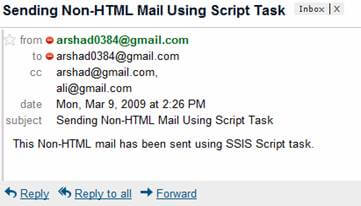
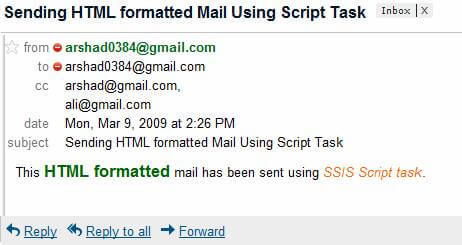
So now for the execution of the above created package, two emails are sent to the intended audience as shown below. As expected the first email (MailMessage.IsBodyHtml = False) is non-HTML email whereas the second email (MailMessage.IsBodyHtml = True) is HTML formatted, look at color in the message body.
Notes
- If you are running the above code in your Script Task in SSIS 2005 environment, you may need to make reference to System.Xml.dll. By default it is included and referenced dll in SSIS 2008, so you would not have to worry if you are using it on SSIS 2008.
- You need to reference System.Net.Mail namespace in your code which contains MailMessage and SmtpClient classes which are required for sending emails.
- There are three differences to note here between SSIS 2005 and SSIS 2008
in terms of the Script Task.
- Now you have two language options to write your code i.e. Visual Basic .Net and C# .Net in SSIS 2008 whereas you had only one language option in SSIS 2005.
- The scripting environment in SSIS 2008 is VSTA and it is VSA in SSIS 2005. It means almost full .Net capabilities in SSIS
- In SSIS 2008, in Script Task Editor Dialog box, the Script page has got preference over other pages and is the first page in list on the left side, it means it saves one more click to reach to your development environment to write your code.
Next Steps
- Review my tip "Sending email from SQL Server Integration Services (SSIS)" if you want to send plain text mail with less development efforts.
- Review http://msdn.microsoft.com/en-us/library/ms142165.aspx for additional information.






About the author
 Arshad Ali is a SQL and BI Developer focusing on Data Warehousing projects for Microsoft.
This author pledges the content of this article is based on professional experience and not AI generated.
View all my tips
