By: Ray Barley | Comments (24) | Related: 1 | 2 | 3 | 4 | > Change Data Capture
Problem
I have a requirement to track all changes to specific tables. The changes need to be stored in an audit table. It looks like the Change Data Capture capability in SQL Server 2008 could be used to get the changes but I need a way of copying the changes to the audit table. How can I do that?
Solution
Change Data Capture (CDC) is a new capability in SQL Server 2008 Enterprise Edition and can be used to track all inserts, updates and deletes to a table. A SQL Server Integration Services (SSIS) package would be a good choice for populating an audit table with the CDC data. Let's discuss a scenario then walk through a solution.
Assume that we want to store all changes to our customer table in a customer_audit table. We'll write an SSIS package to query the CDC data and copy it to the customer_audit table. We would like the option of running the SSIS package on demand and/or on a schedule (e.g. a SQL Agent job). Each time we run the SSIS package we want to pickup whatever changed since the last time we ran the package.
Customer Tables
We will use the following customer table:
create table dbo.customer ( customer_id int identity primary key not null , name nvarchar(50) not null , sales_rep nvarchar(50) not null , region nvarchar(50) not null , credit_limit int not null ) |
We will use the following customer_audit table to store changes to the customer table:
create table dbo.customer_audit ( customer_audit_id int identity primary key not null , customer_id int not null , name nvarchar(50) not null , sales_rep nvarchar(50) not null , region nvarchar(50) not null , credit_limit int not null , effective_date datetime not null , __$start_lsn binary(10) not null , __$seqval binary(10) not null , __$operation int not null , __$update_mask varbinary(128) not null ) |
The customer_audit table has each column from the customer table as well as the following additional columns provided by CDC:
-
effective_date will be populated from the cdc.lsn_time_mapping table (described later). It is the date and time of the transaction that modified the source table.
-
__$start_lsn is the log sequence number from the transaction log.
-
__$seqval provides an ordering of the changes within a transaction.
-
__$operation has one of the following values: 1=delete, 2=insert, 3=update (before values) and 4=update (after values).
-
__$update_mask is a bit mask where every column that was changed is set to 1.
Enabling CDC
CDC needs to be enabled at the database level and for each table that you want to track changes. CDC provides a stored procedure for each. Here is a sample script to enable CDC for our mssqltips database and the customer table:
use mssqltips
go
exec sys.sp_cdc_enable_db exec sys.sp_cdc_enable_table @source_schema = N'dbo' ,@source_name = N'customer' ,@role_name = N'cdc_admin' ,@capture_instance = N'customer_all' ,@supports_net_changes = 1 ,@index_name = NULL ,@captured_column_list = NULL ,@filegroup_name = NULL |
The main points about the above script are:
-
The stored procedure sys.sp_cdc_enable_db enables CDC for the current database.
-
The stored procedure sys.sp_cdc_enable_table enables CDC for a table.
-
A database role is created for the role_name parameter; members of this role have access to the CDC data.
-
The capture_instance parameter is used to identify the CDC data; you can have two per table.
-
Set supports_net_changes to 1 to optionally get the accumulation of changes to a row in a single row.
-
You must specify a unique index if the table does not have a primary key.
-
You can specify a list of columns to track or NULL to track all columns.
-
You can specify a filegroup for the CDC files or NULL to use the default.
For additional details check Books on Line for the sys.sp_cdc_enable_db and sys.sp_cdc_enable_table stored procedures.
Make sure that SQL Agent is running; CDC creates two SQL Agent jobs; one scans the transaction log and copies changes to enabled tables to individual change tables in the cdc schema. A second SQL Agent job clears out the individual change tables in the cdc schema. You can view the default values used in these SQL Agent jobs by executing the sys.sp_cdc_help_jobs stored procedure. You can change the default values by executing the cdc_jobs stored procedure. By default the cleanup job removes change data after it is 3 days old.
If you enable change data capture on a table and SQL Agent is not running, you will see the following warning message:
SQLServerAgent is not currently running so it cannot be notified of this action.
Logging
In order to allow our SSIS package to pickup just the changes since the last time it was run, we'll populate a log table with the data we need. We'll use the following log table:
create table dbo.cdc_capture_log ( cdc_capture_log_id int identity not null , capture_instance nvarchar(50) not null , start_time datetime not null , min_lsn binary(10) not null , max_lsn binary(10) not null , end_time datetime null , insert_count int not null default 0 , update_count int not null default 0 , delete_count int not null default 0 , status_code int not null default 0 ) |
The main points about the log table are:
-
capture_instance is the value specified when enabling CDC on the table.
-
start_time and end_time are recorded to allow us to track how long it takes to copy the CDC data to our audit table.
-
min_lsn and max_lsn represent the range of log sequence numbers (LSN) to copy. LSNs uniquely identify changes in the transaction log. CDC records the LSN with each change. We derive the min_lsn from the max_lsn of the last time our SSIS package was run. CDC provides the function sys.fn_cdc_get_max_lsn to retrieve the maximum LSN.
-
insert_count, update_count and delete_count record the counts each time we run the SSIS package.
-
status_code is set to 1 when the SSIS package completes successfully.
We'll create two stored procedures to maintain the log:
-
init_cdc_capture_log will create a new row.
-
end_cdc_capture_log will update the row.
The init_cdc_capture_log is called at the beginning of our SSIS package. It is shown below:
create procedure dbo.init_cdc_capture_log @capture_instance nvarchar(50) as begin set nocount on; declare @begin_lsn binary(10) , @end_lsn binary(10) , @prev_max_lsn binary(10) -- get the max LSN for the capture instance from -- the last extract select @prev_max_lsn = max(max_lsn) from dbo.cdc_capture_log where capture_instance = @capture_instance -- if no row found in cdc_capture_log get the min lsn -- for the capture instance if @prev_max_lsn is null set @begin_lsn = sys.fn_cdc_get_min_lsn(@capture_instance) else set @begin_lsn = sys.fn_cdc_increment_lsn(@prev_max_lsn) -- get the max lsn set @end_lsn = sys.fn_cdc_get_max_lsn() insert into dbo.cdc_capture_log (capture_instance,start_time,min_lsn,max_lsn) values (@capture_instance,getdate(),@begin_lsn,@end_lsn) select cast(scope_identity() as int) cdc_capture_log_id end |
The main points about the above stored procedure are:
-
We query the log to get the max_lsn from the last time we ran the SSIS package. If we find the row from our previous run we call the CDC function sys.fn.cdc_increment_lsn to increment the LSN, else we call the CDC function sys.fn_cdc_get_min_lsn to get the LSN of the first change record for our table.
-
We call the CDC function sys.fn_cdc_get_max_lsn to get the highest LSN (i.e. the LSN of the latest transaction). We get all CDC data up to and including this LSN on the current run.
-
We insert a new row into the log and return the identity value; we need the identity value to update this row.
The end_cdc_capture_log stored procedure updates the row created by the init_cdc_capture_log stored procedure. It is shown below:
create procedure dbo.end_cdc_capture_log @cdc_capture_log_id int , @insert_count int , @update_count int , @delete_count int as begin set nocount on; update dbo.cdc_capture_log set end_time = getdate() , insert_count = @insert_count , update_count = @update_count , delete_count = @delete_count , status_code = 1 where cdc_capture_log_id = @cdc_capture_log_id end |
The main points about the above stored procedure are:
-
cdc_capture_log_id is the value returned by the init_cdc_capture_log stored procedure.
-
We update the row with the counts, end time, and set the status_code to 1.
Creating the SSIS Package
We will create an SSIS package that has the following control flow:
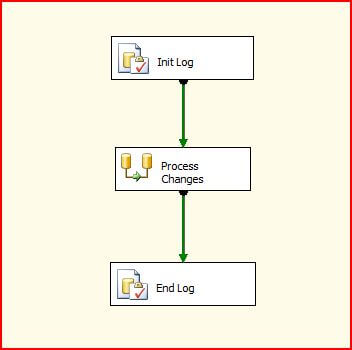
The main points about the above control flow are:
-
Init Log is an Execute SQL task; it calls the init_cdc_capture_log stored procedure (described above) and saves the identity value of the created cdc_capture_log row in a package variable.
-
Process Changes is a Data Flow task that retrieves the latest changes from the CDC table and copies them to our audit table.
-
End Log is an Execute SQL task that calls the end_cdc_capture_log stored procedure (described above) to update the cdc_capture_log row.
The Process Changes Data Flow task is implemented as shown below:
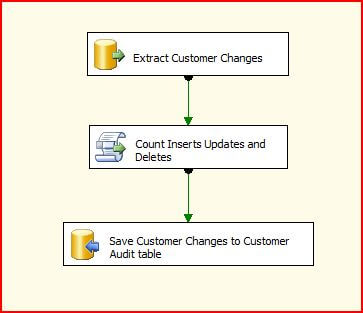
The main points about the above data flow are:
-
Extract Customer Changes is an OLE DB Source that executes the stored procedure extract_customer_capture_log to retrieve the customer changes since the last run.
-
Count Inserts Updates and Deletes is a Script Component Transform task that just counts the number of inserts, updates and deletes in the change data.
-
Save Customer Changes to Custom Audit Table is an OLE DB Destination used to insert each change row into the customer_audit table.
The extract_customer_capture_log stored procedure is shown below:
create procedure dbo.extract_customer_capture_log @cdc_capture_log_id int as begin set nocount on; declare @begin_lsn binary(10) , @end_lsn binary(10) -- get the lsn range to process select @begin_lsn = min_lsn , @end_lsn = max_lsn from dbo.cdc_capture_log where cdc_capture_log_id = @cdc_capture_log_id -- extract and return the changes select m.tran_end_time modified_ts, x.* from cdc.fn_cdc_get_all_changes_customer_all( @begin_lsn, @end_lsn, 'all' ) x join cdc.lsn_time_mapping m on m.start_lsn = x.__$start_lsn ; end |
The main points about the above stored procedure are:
-
The cdc_capture_log_id parameter value is the value returned from the call to the init_cdc_capture_log stored procedure (described above in the Logging section).
-
Retrieve the LSN range from the cdc_capture_log table row. The LSN range represents all changes that have occurred since the last run of the SSIS package.
-
The cdc.fn_cdc_get_all_changes_customer_all function is generated when you enable CDC. The function name includes the capture instance. The function returns the changes that occurred in the LSN range.
-
The cdc.lsn_time_mapping table is populated by CDC with the mapping of transaction times to LSNs. The join retrieves the transaction time. This alleviates the need to manually track this in the source table.
Take a look at cdc.fn_cdc_get_all_changes_<capture_instance> in Books on Line for additional information on retrieving the CDC change data,
Testing the SSIS Package
Before running the SSIS package, we need to execute a script that performs some inserts, updates and deletes. We'll use the following script:
use mssqltips go insert into dbo.customer (name,sales_rep,region,credit_limit) values (N'BGM Systems', N'Cane', N'South', 2500) update dbo.customer set sales_rep = N'Smith' where [name] = N'BGM Systems' update dbo.customer set credit_limit = 3000 where [name] = N'BGM Systems' delete dbo.customer where [name] = N'BGM Systems' |
After running the above script, execute the SSIS package, then check the customer_audit table to see that there are four rows; one for each change made in the script. The partial contents of the customer_audit table are shown below:

The main points about the above table are:
-
effective_date is the date and time of the transaction, as retrieved from the cdc.lsn_time_mapping table.
-
Row 1 shows the insert; __$operation=2 for an insert.
-
Row 2 shows the update of the sales_rep; __$operation=4 for the update showing the values after the update.
-
Row 3 shows the update of the credit_limit.
-
Row 4 shows the delete; __$operation=1 for a delete.
The effective_date column provides the ability to query the customer_audit table and see the customer values at any point in time by filtering on the maximum effective_date that is less than or equal to some value.
Next Steps
- Change Data Capture is a potentially useful feature in SQL Server 2008. It's like a custom replication scheme. CDC captures all of the changes, then you determine what to do with them.
- Download the sample code and experiment with it. The archive includes the SSIS project and the scripts used in this tip.
- Take a look at this Microsoft whitepaper for details on tuning the performance of CDC.






About the author
 Ray Barley is a Principal Architect at IT Resource Partners and a MSSQLTips.com BI Expert.
This author pledges the content of this article is based on professional experience and not AI generated.
View all my tips
