By: Kun Lee | Comments (16) | Related: 1 | 2 | 3 | 4 | More > Central Management Servers
Problem
Managing multiple SQL Servers has its challenges. One of the big challenges is having to collect data from each of the servers you manage and figure out which servers need attention. You can setup a process to connect to each server and collect the data or you can use a third party tool, but starting with SQL 2008 offers a new way of doing this using Central Management Servers. In this tip I show you what this new feature is, how to setup it and how to collect data from all of your servers at the same time. And best of all, once it is setup you can even use it on SQL 2000 and SQL 2005 servers.
Solution
SQL Server introduced a new feature call "Central Management Servers (CMS)" which allows you to administer multiple servers and consolidate the SQL Server registration for all the SQL Server users such as developers, DBAs, etc.
Pre-requisite
- You need at least one SQL 2008 Server or later to setup Central Management Servers
- You also need to setup logins for Administration and General Users
Initial Setup
The setup is very straight forward. You just need to follow the How to: Create a Central Management Server and Server Group (SQL Server Management Studio) process which is outlined below.
- In SQL Server Management Studio, on the View menu, click Registered Servers.
- In Registered Servers, expand Database Engine, right-click Central Management Servers, point to New, and then click Central Management Servers.
- In the New Server Registration dialog box, register the instance of SQL Server that you want to become the Central Management Server. I used "DCKLEE\SQL2008" for this setup
- In Registered Servers, right-click the Central Management Server, point to New, and then click New Server Group. Type a group name and description, and then click OK.
- In Registered Servers, right-click the Central Management Server group, and then click New Server Registration.
- In the New Server Registration dialog box, register one or more instances of SQL Server that you want to become members of the server group.
- After you have registered a server, the Central Management Server will be able to execute queries against all servers in the group at the same time.
General Structure for Server Groups (How I do it) - Setting up Folders and register servers
- I typically start by creating a folder called "All" or "[Company Name] - All" and under that I create a folder for each SQL Server version as shown below. But you can set this up any way you want for your environment.
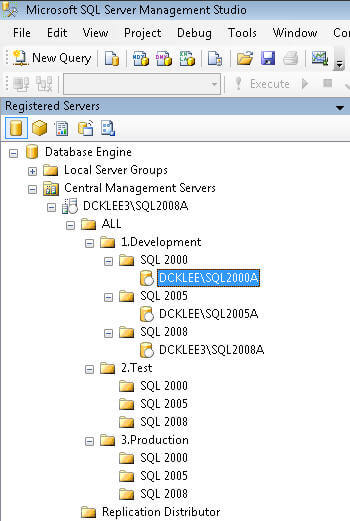
Now, here is one little tip. When you try to register the server that is running "Central Management Server" (for my case, DCKLEE3\SQL8008A), you will get the below error which says you cannot add a shared registered server with the same name as the Configuration Server.
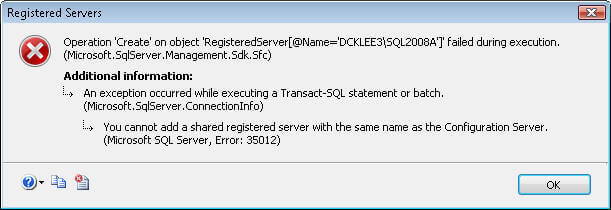
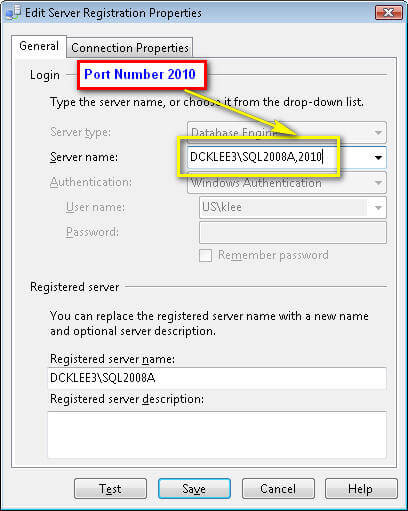
When you get this error here is the work around. First, you need to find what port number the server is using. You can see "Static Port Assignments in SQL 2005" article to check what port is being using.
(If you are using Dynamic Ports, then you need to create an alias (see How to setup and use a SQL Server alias), but I wouldn't recommend using this because now you have to ask all the users to setup the same alias to use it. To make it easier you can deploy it automatically to all desktops by using a script, but again I wouldn't recommend using it unless you have to use dynamic ports.)
Anyway, once you find the port number, you need to put the port number along with the server name like "DCKLEE3\SQL2008A,2010" (i.e, 2010 is the port number for this server) and now you should be able to register it.
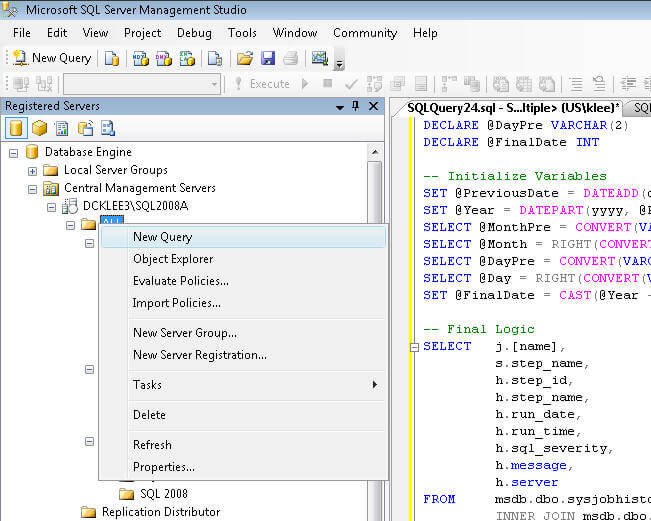
Example1: Pull Failed SQL Server Agent jobs for last 7 days for all SQL Servers
First, right click the "All" folder that you just created and choose "New Query":
Second, run "SELECT @@VERSION" to see version information for all servers that have been registered. If you run the query you will see something like below which will give you this information for all servers in the "All" folder. (Note: for security purposes I hid the beginning part of the server names below, so the output looks a little weird.)
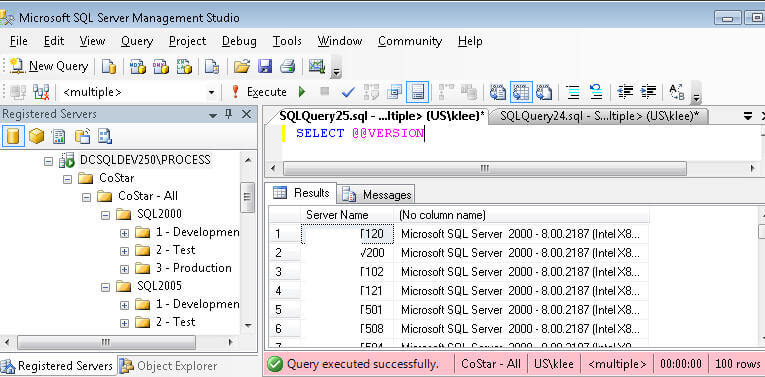
Example 2: Get the query from article "Failed SQL Server Agent Jobs" and try to run it! Pretty slick!
At this point you can execute any query you want and it will return results for each server in the group you selected.
Security Setup
In order to use this, you will need to setup two different permissions for two different users/groups. One will have management rights and the other read rights. There are new database roles in the msdb database, the two roles that will be used are:
- ServerGroupAdministratorRole - management rights
- ServerGroupReaderRole - read rights
- For the general Reader, the login should use the 'ServerGroupReaderRole' role under msdb and here is the script that I used to create the login and give it permissions.
-- Setting up User for General Reader
USE [master]
GO
CREATE LOGIN [ILOVESQL\GroupDeveloper] FROM WINDOWS
 WITH DEFAULT_DATABASE=[msdb]
GO
USE [msdb]
GO
CREATE USER [ILOVESQL\GroupDeveloper] FOR LOGIN [ILOVESQL\GrpDeveloper]
GO
EXEC sp_addrolemember N'ServerGroupReaderRole', N'ILOVESQL\GroupDeveloper'
GO
- For the DBAs, the login should be on 'ServerGroupAdministratorRole' role under msdb and here is the script that I used to create the login and give it permissions.
-- Setting up User for Administrator
USE [master]
GO
CREATE LOGIN [ILOVESQL\GrpDBA] FROM WINDOWS WITH DEFAULT_DATABASE=[msdb]
GO
USE [msdb]
GO
CREATE USER [ILOVESQL\GrpDBA] FOR LOGIN [ILOVESQL\GrpDBA]
GO
EXEC sp_addrolemember N'ServerGroupAdministratorRole', N'ILOVESQL\GrpDBA'
That's all there is to it. Just setup a Central Management Server, register your servers, grant permissions and start executing queries across all of your SQL Servers.
Next Steps
- Now you can have a script to check disk space, locks, usage, etc for all the servers that you are interested in and get results all at the same time.
- You can run "Audit" queries to find out who has permission on what servers
- And there are so many others that you can run across all servers that you manage
References
- Administering Multiple Servers Using Central Management Servers
- How to: Create a Central Management Server and Server Group (SQL Server Management Studio)
- How to: Execute Statements Against Multiple Servers Simultaneously (SQL Server Management Studio






About the author
 Kun Lee is a database administrator and his areas of interest are database administration, architecture, data modeling and development.
This author pledges the content of this article is based on professional experience and not AI generated.
View all my tips
