By: Ray Barley | Comments (9) | Related: 1 | 2 | 3 | 4 | > Express Edition
Problem
I've been taking advantage of the free SQL Server Express edition for some time. I see there is a new release of SQL Server Express 2008 R2. Can you provide an overview of this latest version?
Solution
According to SQL SERVER EXPRESS WEBLOG the final version of SQL Server Express 2008 R2 was made publicly available on April 21, 2010. There are a number of new features that make it just a little more likely that you could find this a useful tool.
In this tip I'll discuss the features, limitations, requirements and installation experience.
Features
You can get the feature details for all editions of SQL Server 2008 R2 (including the Express versions) by taking a look at Features Supported by the Editions of SQL Server 2008 R2. Keep in mind that Express provides only a subset of the features available in the other editions of SQL Server 2008 R2.
The following are the editions of SQL Server Express 2008 R2 and their key features:
- Express with Advanced Services - Database Engine, Full Text Search, Reporting Services, Business Intelligence Development Studio, SQL Server Management Studio
- Express with Tools - Database Engine and SQL Server Management Studio
- SQL Server Express - Database Engine
As you can see Express with Advanced Services has a pretty decent set of features.
Limitations
SQL Server Express 2008 R2 is still free, but there is still a limitation on database size, but the limit has been raised from 4 GB to 10 GB. Although the 10 GB size limitation may still not be enough for your production databases, it's likely to be workable for small application databases as well as your development environments.
Here are what I consider the most important limitations on the Express versions; this may help you to decide if SQL Server Express 2008 R2 could benefit you.
| FEATURE NAME | LIMITATION |
| Number of CPUs | 1 |
| Maximum memory utilized | 1 GB |
| Maximum database size | 10 GB |
| Replication | Subscriber only |
System Requirements
The following are the high level system requirements:
- The supported operating systems are Windows Server 2003, Windows Server 2008, Windows Server 2008 R2, Windows Vista, and Windows XP
- .NET Framework 2.0 SP2
- For 32-bit systems an Intel or compatible processor, 1GHz or faster (2 GHz or faster is recommended)
- For 64-bit systems a 1.4 GHz or faster processor
- 512 MB RAM (2 GB or more recommended)
- 2.2 GB hard disk space
Before running the setup program the following prerequisites must be installed based on the Express edition:
SQL Server Express
- .Net Framework 2.0 SP2
- Windows Installer 4.5
- For Windows Vista SP2 .Net Framework 3.5 SP1
SQL Server Express with Advanced Services
SQL Server Express with Tools
For the complete details on system requirements take a look at Hardware and Software Requirements for Installing SQL Server 2008 R2.
Installation Experience
To download SQL Server 2008 R2 Express navigate to SQL Server 2008 R2 Express Installation Options. You can choose to download x86 or x64 versions of the Database Only, Management Tools, Database with Management Tools, or Database with Advanced Services.
The installation experience is exactly what we have come to expect; it's wizard-based and only asks us to specify a few things. Let's walk through the installation of the SQL Server Express 2008 R2 with Advanced Services since it has the most features.
After launching the installation program you'll see the start page as shown below:
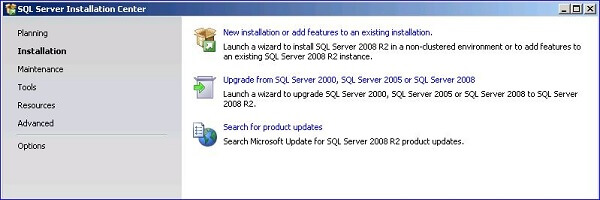
Click New installation or add features to an existing installation and you'll see the License Terms dialog as shown below:
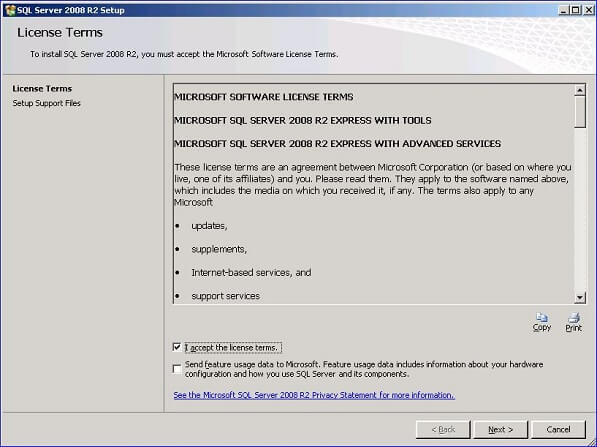
Click the I accept the license terms checkbox then you'll see the Feature Selection dialog as shown below:
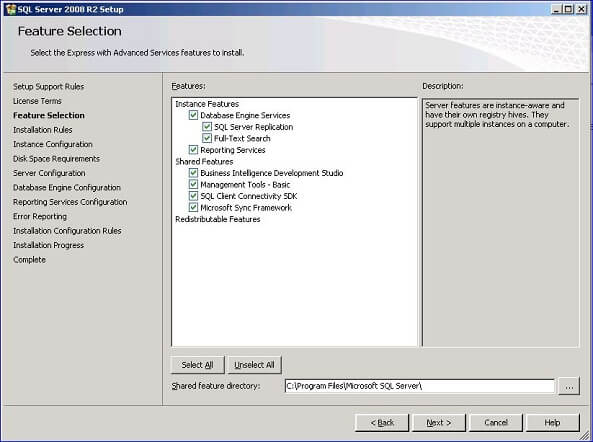
Click the Select All button to install everything; the Instance Configuration dialog will be displayed as shown below:
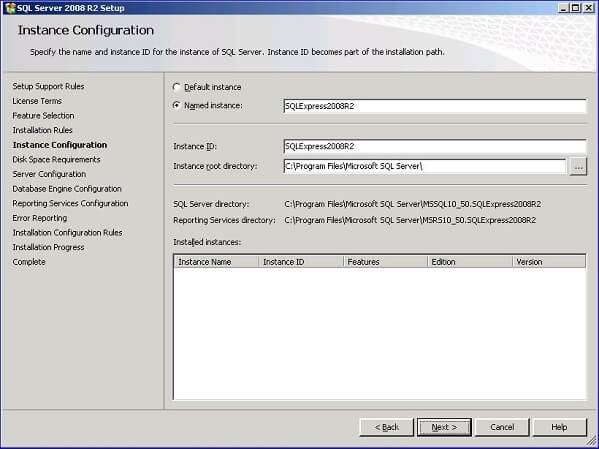
The default is to install as the named instance SQLExpress. I opted to change the instance name to be SQLExpress2008R2; it makes it easy for me to figure out what version I have. Click Next to continue on to the Server Configuration dialog as shown below:
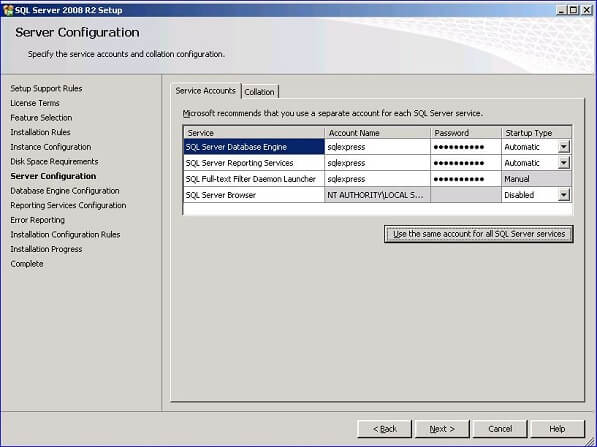
I like to specify my own account for the various services then fine-tune the permissions for that account. For information on setting up service accounts take a look at Setting Up Windows Service Accounts. After entering an account or accepting the defaults click Next to continue on to the Database Engine Configuration dialog as shown below:
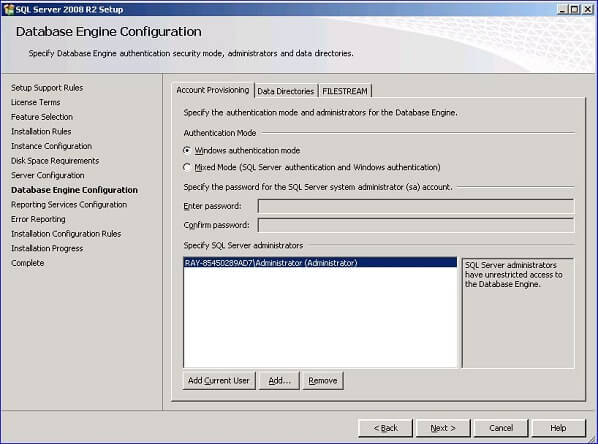
I just accepted the defaults; click Next to continue on to the Reporting Services Configuration dialog as shown below:
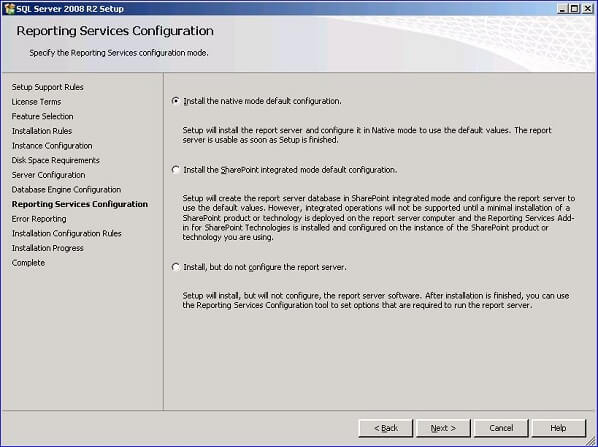
I accepted the default which will setup Reporting Services for you. Click Next to continue on to the Error Reporting dialog as shown below:
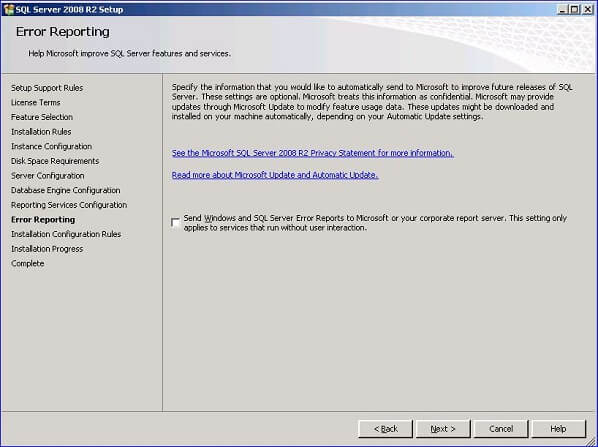
Click Next to complete the wizard and begin the installation.
Next Steps
- SQL Server Express 2008 R2 is something that you should take a look at; it's a way to get a subset of SQL Server 2008 R2 features without additional licensing costs.
- One issue that you may run into with Express is how do you add other users to the sysadmin role. The user who installs Express will get added to the sysadmin role. To add others you must be an administrator and you can run this script to add the current user to the SQL Server sysadmin role.
- One good resource that I have used to get information on the Express editions is SQL SERVER EXPRESS WEBLOG.






About the author
 Ray Barley is a Principal Architect at IT Resource Partners and a MSSQLTips.com BI Expert.
This author pledges the content of this article is based on professional experience and not AI generated.
View all my tips
