By: Jugal Shah | Comments (6) | Related: > Security
Problem
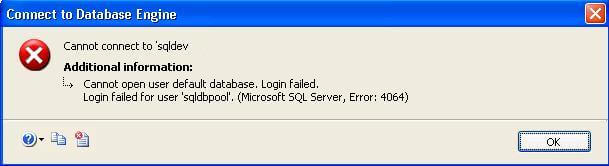
Every once in a while you may run into an issue where a user cannot login to SQL Server, because the logins default database may not be available. This could be for several reason such as that database was dropped, the database may be corrupt, the database is offline, the user no longer has access to the database or even because the database was renamed. When this happens the user will see an error message like the following on SQL Server 2005 and get a 4064 error.
Or this error message for SQL Server 2008 and get a 18456 error.
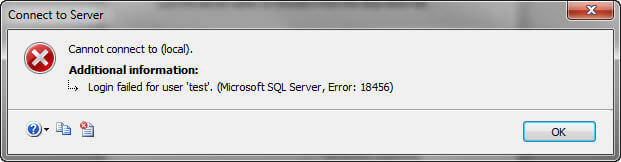
Or if you are using a command line tool, you may see a text error like this: "Error: 18456, Severity: 14, State: 40. Login failed for user 'sqldbpool'. Reason: Failed to open the database specified in the login properties. [CLIENT: 10.10.10.10]".
Solution
This issue may not come up that often, but if it does here is a simple fix. The user can connect to another database, such as the master and then the default database can be changed.
Using SQL Server Management Studio
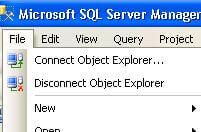
Step 1: Open SSMS and click on "File" and then "Connect Object Explorer..."
Step 2: Enter the server name, select the authentication mode, in this case I am using SQL Server Authentication where I also need to enter a login and password. Then click on the "Options >>" button
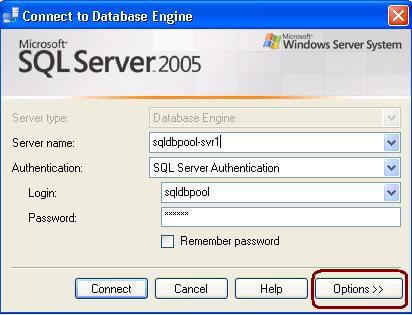
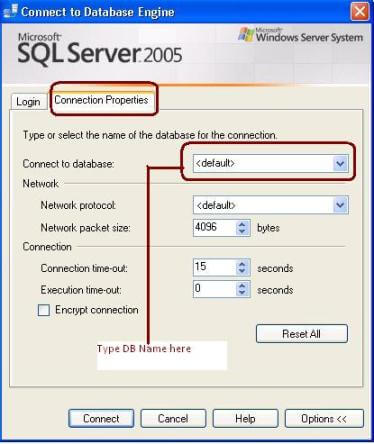
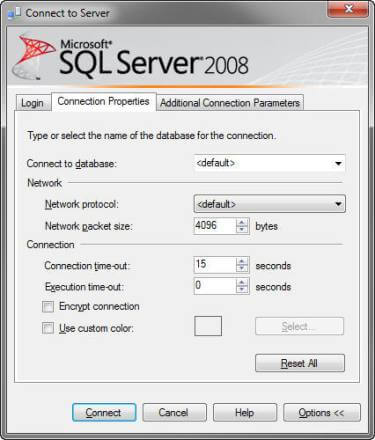
Step 3: On the "Connection Properties" tab, type a different database name into the "Connect to database" drop down. You should be able to just connect to the master database, since all users have access to that database by default or you enter another database that you know the user has access to. Here is what this looks like for both SQL Server 2005 and SQL Server 2008.
Step 4: At this point you can work with SQL Server as normal. If you want to change the default database you can open a query window and execute the below query to change the default database for the login Note: sp_defaultdb will be removed from the future version of SQL Server so you will need to use the ALTER command. Be careful with the database you select. You can pick any database you want as the default database, but if the user does not have access to the database they will get the same error.
EXEC sp_defaultdb 'sqldbpool', 'master'
OR
ALTER LOGIN sqldbpool
with DEFAULT_DATABASE = master
Using SQL CMD
You can use SQLCMD or OSQL to login to SQL Server. You can use the -d switch, as shown below, to specify the database name. In this example I am connecting to the msdb database. Once you are connected you can do the same as Step 4 above to change the default database.

List Default Database for Logins
To get a list of all logins and their default databases you can use this query to retrieve the login, its default database and database status information to see whether the database is online or not.
select name,
       loginname,
       dbname as DefaultDB,
       DATABASEPROPERTYEX(dbname, 'Status') as DBStatus
from sys.syslogins
order by DBstatus
Next Steps
- Develop a script to fix logins with a default database issue
- Use the query above to list all of your logins and their default databases to see if there are any potential issues
- Also, make sure you check that the user login has access to a database if you change their default database.






About the author
 Jugal Shah has 8+ years of extensive SQL Server experience and has worked on SQL Server 2000, 2005, 2008 and 2008 R2.
This author pledges the content of this article is based on professional experience and not AI generated.
View all my tips
