![]() |
|
|
|
By: Aaron Bertrand | Read Comments (30) | Related Tips: More > Security |
Starting with SQL Server 2008, the local Administrators group is no longer added by default during SQL Server setup; you even have to use a manual step to add the current user as a local administrator. This means that it is possible, especially if you don't use mixed authentication (or have forgotten the sa password), that you can be completely locked out of your own SQL Server instance. I've seen cases where an employee has moved on, but their Windows account, being the only one with Administrator privileges for SQL Server, had been completely obliterated from the system. Of course that person was the only one who knew the sa password as well, and being a local admin or even a domain admin might not help you.
The typical workaround I have seen employed is to restart SQL Server in single user mode. However, this approach requires at least some downtime; in some systems, this would be unacceptable. And depending on what needs to be managed on the server, it might not be feasible to wait for a scheduled maintenance window.
A more extreme workaround is to shut down SQL Server, copy all of the MDF/LDF files, install a new instance of SQL Server, and attach all of the user databases. In addition to downtime, the problem here is that you must also re-create all of the logins, linked servers, jobs, and other elements outside of the database in order to have a fully functioning system again. Plus, unless you uninstall the old instance first, the new instance will have a new instance name, and therefore all client applications will need to be updated.
Thanks to Mark Russinovich of Sysinternals fame, there is a very painless way to solve this problem without any downtime: PsExec. While it wasn't one of its primary design goals, PsExec allows you to run programs as the NT AUTHORITY\SYSTEM account, which - unlike "regular" Administrator accounts - has inherent access to SQL Server.
The process to get back up and running is quite simple. Log in to the server where SQL Server is running, as an account with local Administrator privileges. Download and extract PsExec.exe. Start an elevated command prompt (Shift + Right-click, "Run as Administrator"). Run the following command, adjusting for your actual path to Management Studio, which may be different:
This command tells PsExec to run SSMS interactively (-i) and as the system account (-s).
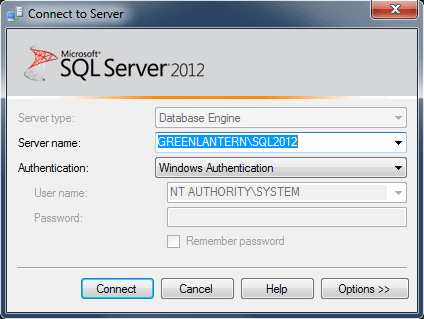
You will get an error message if you are not an Administrator. You will need to agree to the license terms in order to proceed. When Management Studio launches, it will prompt you to connect to a server. You will notice that the authentication mode is Windows Authentication, and the username is hard-coded as NT AUTHORITY\SYSTEM:
Once you connect, in Object Explorer, you will see that you are connected to the server as NT AUTHORITY\SYSTEM:
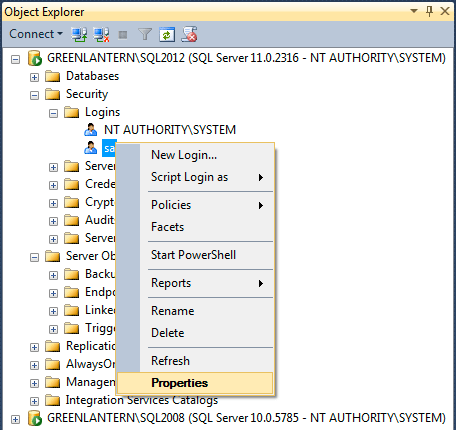
Now, you can go in to Security > Logins and add your account as a sysadmin, add other admin accounts, update the sa password, and do anything else you need to do to make your instance manageable. As you can see, I was able to connect in this way to both SQL Server 2008 and SQL Server 2012 instances from an instance of Management Studio 2012. I also confirmed that this process works when connecting to a SQL Server 2008 instance using the 2008 version of SSMS. In both cases, I was logged in to Windows as a local administrator, but the account had no explicit access to either SQL Server instance.
You can connect to additional instances on the local server using the Connect > Database Engine dropdown in Object Explorer, or by right-clicking a query window and choosing Connection > Change Connection.
It is quite common to get locked out of a SQL Server instance, and having been there, I know it is quite frustrating. PsExec can get you into your systems without a lot of the headache that can be caused by more brute force methods. You should download PsExec and keep it handy; it can prevent you from going to extreme measures, and having it already available can help in cases where the SQL Server machine you're trying to recover does not have ready access to the web.
| Thursday, August 30, 2012 - 8:36:27 AM - K. Brian Kelley | Read The Tip |
|
If you're in an environment where you can't get psexec onto the system, you can use the AT command and schedule it to start a minute or two after you execute the command. By default, task scheduler tasks that are scheduled using the AT command run as System, though that should normally be changed to prevent the AT command from being exploited in this manner.
|
|
| Thursday, August 30, 2012 - 9:36:52 AM - ron | Read The Tip |
|
KBK, please explain "use the AT command" if you have time. tks. |
|
| Thursday, August 30, 2012 - 9:53:56 AM - K. Brian Kelley | Read The Tip |
|
The AT command is a command-line hold-over from the days before Task Scheduler. It allowed you to schedule processes to run on Windows systems. When Task Scheduler was added to the OS, AT wasn't eliminated. Instead, using AT creates a Task Scheduler task, but running with the security account specified for any tasks coming from the AT command. More at TechNet: http://technet.microsoft.com/en-us/library/cc772590(v=ws.10).aspx
|
|
| Thursday, August 30, 2012 - 9:57:10 AM - Aaron Bertrand | Read The Tip |
|
Ron please see: http://support.microsoft.com/kb/313565 The KB article says Windows 2000 (and Microsoft will try to coerce you to use today's GUI equivalents, e.g. task scheduler) but AT is alive and well even in Windows 8. |
|
| Thursday, August 30, 2012 - 10:32:24 AM - ron | Read The Tip |
|
thanks, guys. |
|
| Thursday, August 30, 2012 - 12:20:11 PM - TimothyAWiseman | Read The Tip |
|
Aaron, thank you for posting this. I have had to do this the hard way in other instances and this may save me quite a bit of time when I run into this again. I would reiterate the comment about not using the SA account for other programs though. Generally, a policy of least priveleges is good for security, and it is fairly rare that a program needs admin level priveleges to the SQL Server (though it does come up). Even when a program really must connect to the server with its own admin credentials, I would give the program its own account if only to avoid problems when I change the SA password and to make tracking the source of activity a little bit easier. |
|
| Thursday, August 30, 2012 - 12:56:51 PM - Gene Wirchenko | Read The Tip |
|
Does this mean that if you have administrative access to a system that you can break into SQL Server? Or am I missing a bit here? |
|
| Thursday, August 30, 2012 - 4:41:18 PM - Aaron Bertrand | Read The Tip |
|
Gene, yes, if you give someone local administrator rights, there are many ways they can break into SQL Server, not just the one I showed here. This is just the one that has least impact on a running system. SQL Server tried to make it harder for local IT administrators (but non-SQL administrators) to gain access to SQL Server, but basically a local administrator owns the machine and can take ownership of anything running on it. The security problem this highlights is a different issue altogether. Keys to the castle, and all that. Aaron |
|
| Friday, August 31, 2012 - 1:09:06 PM - TimothyAWiseman | Read The Tip |
|
I am not certain you could call this a security issue. A local admin probably should be able to get into SQL Server, and even if you truly structured it so they couldn't, then that still does not protect the data from them since they can access the files.
You could limit their access to the data through encryption, and there are types of logging that can make it very difficult to make changes without leaving tracks, but a local admin will always be able to cause a vast amount of mischief if they were so inclined and you should never give anyone admin access unless you can trust them.
|
|
| Friday, August 31, 2012 - 2:24:15 PM - K. Brian Kelley | Read The Tip |
|
Tim, it is a security issue because it is a bypass of a security control. Of course, you expect such controls to be a deterrent, not 100% effective. From an audit perspective, if the data is that sensitive, you need to impose other controls, like event auditing to see who is logging on and reporting that accordingly. |
|
| Friday, August 31, 2012 - 3:20:07 PM - Peter Szegedi | Read The Tip |
|
If your client SQL Server is under SQL 2012 you can also (proc)dump the sqlservr.exe process. Then run strings.exe to filter it. Then search in the filtered file for the following string: <instancename>sa (for example if you instance name is TestSQL then you searching for TestSQLsa) Right next to this string you will see the sa password. Watch out the procdump will cause some hanging on the instance while it dumps everything from the memory to the disk. Source: http://sqlblog.com/blogs/argenis_fernandez/archive/2012/01/20/on-the-topic-of-lost-sa-passwords-on-sql-server-2000.aspx |
|
| Friday, August 31, 2012 - 3:57:21 PM - Aaron Bertrand | Read The Tip |
|
@Peter that sounds a lot more invasive and dangerous than using PSExec.exe or even incurring some downtime using he other methods. |
|
| Friday, August 31, 2012 - 3:58:37 PM - K. Brian Kelley | Read The Tip |
|
Peter, note Argenis' caveat: you can only do this if there's a currently established session with the sa login. No session, no password. Basically, the password for an SQL Server-based login is visible in memory on the system if the session is established.
|
|
| Friday, August 31, 2012 - 4:21:07 PM - Peter Szegedi | Read The Tip |
|
Yep, I just mentioned this as an alternative. Impersonating System is a safer way. |
|
| Tuesday, September 04, 2012 - 1:58:15 PM - TimothyAWiseman | Read The Tip |
|
@K Brian Kelly You have a good point; I can see how this could be considered a security issue. With that said, I don't really expect locking my front door to keep someone out if I gave them the key to my garage door.
As Aaron said, Admin on the machine is essentially the keys to the castle. You can put some limitations on an admin, especially through use of cryptography, but they can legitimately override most restrictions and can circumvent many other restrictions if they are willing to be more devious (an admin can likely put in place a key logger to eventually get those encryption keys for instance). |
|
| Tuesday, September 04, 2012 - 4:39:19 PM - Kelly | Read The Tip |
| I was able to use this process on a Windows 2008 R2 server running SQL Server 2008 R2 where the SQL Server services were running as Local System. When I tried this on another server running SQL Server 2012 where the services were running as a local user, I was not able to add a user. After it failed, I checked and found that the SQL Server installation had only granted the public server role to the NT Authority/SYSTEM login. I don't have a SQL Server 2008 R2 system handy where the services are not running as Local System. | |
| Friday, March 01, 2013 - 10:56:23 AM - Jason | Read The Tip |
|
This did not work for me. I have to change my path information to locate the Ssms.exe directory one I did that I excuted the command with the new path information, and recived an error..
PsExec could not start D:\Program on USCLA123A: The system cannot find the file specified. Am I missing something here? |
|
| Friday, March 01, 2013 - 1:51:19 PM - Aaron Bertrand | Read The Tip |
|
Jason, you might have to surround the path to Ssms.exe with double quotes, as I did in the sample code. It looks like it is being truncated at the first space. |
|
| Friday, March 01, 2013 - 9:33:09 PM - Sergiy | Read The Tip |
|
Works like a charm!!!!!
Thank you very much for this topic!!!!!!!!!!!!!!!
You saved my week!!!!!!!!!!!!!!!! |
|
| Tuesday, April 16, 2013 - 10:21:55 AM - Jasper | Read The Tip |
|
Thanks a lot, this saved me a lot of troubles! |
|
| Tuesday, April 23, 2013 - 10:01:57 PM - Prashant Thakwani | Read The Tip |
|
Aaron, good stuff.
However, trying to understand on how it works when the NT AUTHORITY\SYSTEM account is removed from SQL Server 2012 instance (by default)?
Thanls
|
|
| Wednesday, April 24, 2013 - 8:50:15 AM - Aaron Bertrand | Read The Tip |
|
Prashant, this doesn't happen by default (unless you're confusing NT AUTHORITY\SYSTEM with Builtin\Administrators). If you *manually* delete NT AUTHORITY\SYSTEM, *and* haven't added yourself and/or a domain admin as an administrator account, *and* lost the sa password, that seems like a perfect storm to me, and I can't say I have a whole lot of sympathy in that case. Shut down the service, install a new instance somewhere, and restore your latest backups. If you don't have recent backups available, then I have even less sympathy, as even more preventable things have gone horribly wrong. Grab the mdf/ldf files and try to attach them to the new instance. |
|
| Wednesday, April 24, 2013 - 1:25:29 PM - Prashant Thakwani | Read The Tip |
|
Thanks Aaron. I think you answer the question. However, I was talking about the change in SQL Server 2012, which says that BUILTIN\administrators and Local System (NT AUTHORITY\SYSTEM) are not automatically provisioned in the sysadmin fixed server role. http://msdn.microsoft.com/en-us/library/bb500459.aspx
|
|
| Wednesday, April 24, 2013 - 2:25:46 PM - Aaron Bertrand | Read The Tip |
|
Prashant that may be what the documentation states, but every single SQL Server 2012 instance I can currently access has NT AUTHORITY\SYSTEM in the sysadmin role. I did not modify this and these are not upgrades; it is how SQL Server 2012 was installed. Do you have any instances where you have not made a change and this is not the case? |
|
| Wednesday, April 24, 2013 - 2:34:10 PM - Aaron Bertrand | Read The Tip |
|
That said, if you have an installation where NT AUTHORITY\SYSTEM is not in the sysadmin role (whether it has been removed or SQL Server didn't put it there in the first place), then yes, you are out of luck. You'll be able to connect (assuming the login hasn't been removed altogether), but you won't be able to set the password for existing logins, create new logins, etc. |
|
| Wednesday, April 24, 2013 - 2:50:33 PM - Greg Robidoux | Read The Tip |
|
Hi Aaron, I just checked a couple of my servers and the NT AUTHORITY\SYSTEM is in the PUBLIC server role. There are a bunch of NT SERVICE \ logins that have the sysadmin role. Not sure if this a change or not. Both instances I looked at are running 11.0.2100. |
|
| Wednesday, April 24, 2013 - 3:03:40 PM - Aaron Bertrand | Read The Tip |
|
Greg ok, in any case, like I said, you can either add them to the sysadmin role if they're not already and in the future you may want to use this technique, or know that it won't work if you leave it as is. |
|
| Tuesday, April 30, 2013 - 9:08:23 AM - Prashant Thakwani | Read The Tip |
|
Aaron, Yes, I checked with all of my SQL Server 2012 instances (around 8) and none of them is provisioned using NT AUTHORITY\SYSTEM, which is inline with what the Microsoft documentation Says. I am still wondering, how it comes for you and Greg (though with different roles, Sysadmin for you and Public for Greg). I will try to Provision SQL Server 2012 on one for the fresh Windows 2008R2 server and will update here if getting the different result than earlier.
Thanks Prashant T |
|
| Tuesday, April 30, 2013 - 10:30:06 AM - Aaron Bertrand | Read The Tip |
|
Prashant, it doesn't really matter. What it means is if NT AUTHORITY\SYSTEM is not on your system, or is not in the sysadmin role, then yes, you are absolutely correct, this method won't work. If you want it to work, then add NT AUTHORITY\SYSTEM. If you don't want it to work anyway, there's nothing to do. |
|
| Thursday, May 02, 2013 - 8:27:08 AM - Prashant Thakwani | Read The Tip |
|
Thanks Aaron.
|
|
|
privacy | disclaimer | copyright | advertise | about authors | contribute | feedback | giveaways | user groups Some names and products listed are the registered trademarks of their respective owners. Edgewood Solutions LLC | MSSharePointTips.com | MSSQLTips.com |