Problem
This tip contains a list of Frequently Asked Questions (FAQ) about the topic of Integration Services (SSIS). There’s also another set of SSIS questions that have been answered. If possible, we’ll refer to other tips or tutorials that contain more information.
Solution
It depends. SSIS comes bundled with SQL Server. If you have a SQL Server license, you can install SSIS and run SSIS packages on it. This means that if you already have SQL Server on a machine, SSIS is free as the license is already paid for.
Yes. Every feature or service that comes with SQL Server (and is installed through the SQL Server setup) needs to be licensed. You can save on costs by checking if you just need Standard edition instead of Enterprise edition. Most features of SSIS only require Standard edition. You can find an overview in the documentation.
Precedence constraints are the “arrows” that connect the different tasks in a control flow together. In the following screenshot: we see two types of precedence constraints: Success and Failure.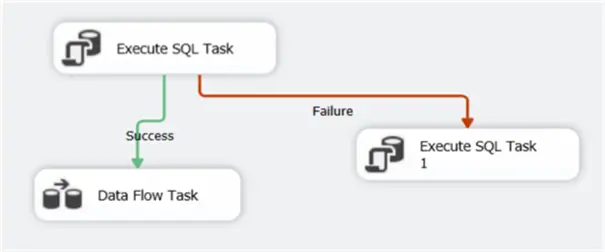
This means that the data flow task will be executed if the first Execute SQL Task was successfully executed. If it fails, the other Execute SQL Task would be executed. The third option is Completion, where it doesn’t matter if the previous task fails or succeeds, as long as it finishes. You can also put expressions on precedence constraints for more dynamic control. If a task has multiple incoming precedence constraints, you can configure them to be a logical AND (the default) or a logical OR. The following screenshot uses the AND constraint: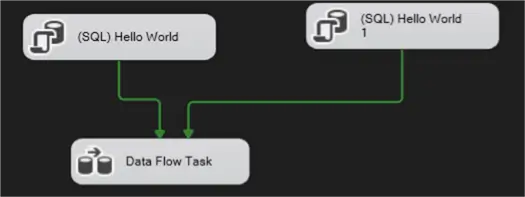
The data flow task will only execute if both previous tasks succeed. In the next screenshot, the data flow task will start if at least one of both tasks succeeds: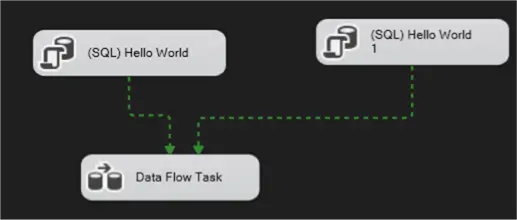
When using an OR constraint, the lines become dashed. You can learn more about precedence constraints in the tip Defining Workflow in SSIS using Precedence Constraints.
There are two ways of deploying SSIS projects to a server: the package deployment model and the project deployment model. The package deployment model was the way of working in SSIS 2005 and 2008. Packages were created in a Visual Studio project, and they were either deployed to the msdb database of a SQL Server instance, or to the file system. There was no concept of an “SSIS project” after deployment.
In SSIS 2012, the project deployment model was introduced, which keeps the notion of a project around after deployment. Projects (and their packages) are deployed to the SSIS catalog, which is hosted by a database in a SQL Server instance. The project deployment model brought many improvements in package configuration and parameterization, logging, monitoring and automatization. When you create a new SSIS project in the latest Visual Studio, the project deployment model is used, but you can still convert to the package deployment model: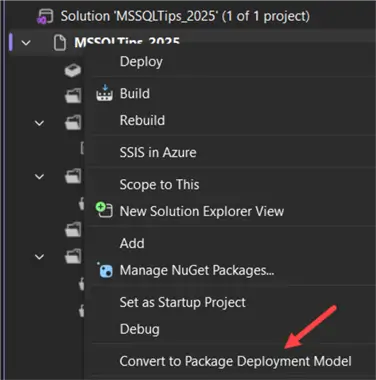
When using the SSIS project deployment model, the SSIS catalog is the hub where the SSIS projects and their packages are stored, configured and executed. It’s a service inside SQL Server, and it uses a database named SSISDB.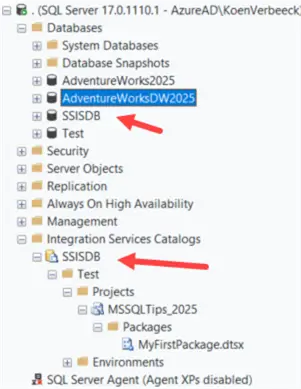
Inside this database you can find “catalog views” that allow you to query the metadata and logging data of your SSIS estate: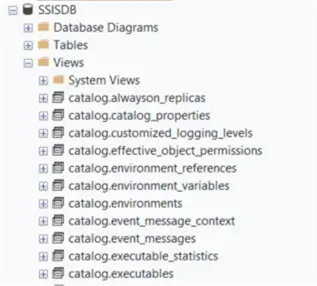
There are also stored procedures you can use to automate SSIS.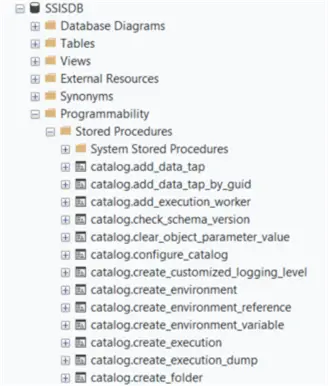
The SSIS catalog also comes with a set of pre-defined reports that you can use in SQL Server Management Studio to monitor your SSIS package executions.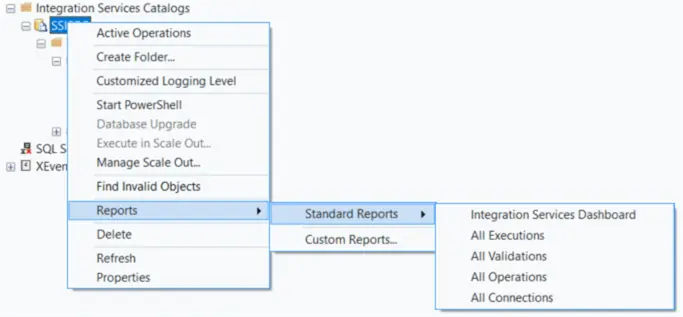
There can only be one SSIS catalog per database instance. Check out the tip SSIS Catalog Best Practices to learn more on how to configure the SSIS catalog.
There can be quite a learning curve when it comes to learning SSIS. This is mainly because SSIS has a quirky expression language (it doesn’t help that some editors only offer one single line to write your expression on) and because SSIS can be quite confusing when it comes to data types. For example, you have variables in the control flow with their own .NET like data types: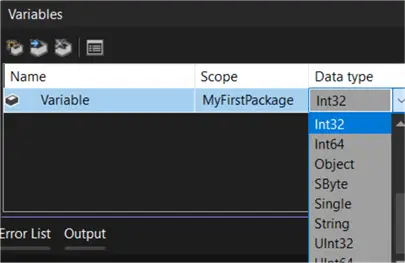
But data types in the data flow are completely different, as they resemble more the data types of a relational database: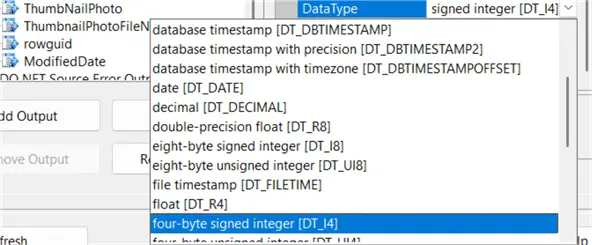
And parameters in the control flow (for example when parameterizing an Execute SQL Task) have yet another set of possible data types: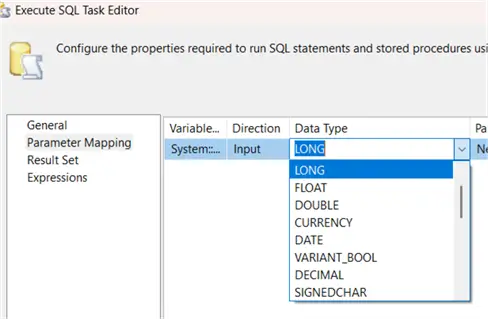
Furthermore, to configure SSIS tasks, transformations and packages you typically need to set a bunch of properties and sometimes they can be hard to locate. Security with the package and project protection levels can be confusing as well, as selecting certain protection levels can cause connections to stop working if another user opens the package. Certain features – like checkpoints and transactions – don’t work really well or they can hide complexity (like event handlers), so you need to know what to use in what situation and which features to avoid.
Luckily there are plenty of free online learning sources for SSIS (such as the tutorial on this website), and because SSIS has been around for quite some time, there are hundreds if not thousands of blog posts, articles, forum questions, conference recordings, books etc. about SSIS.
Not anymore. In the SQL Server 2008/2012/2016 business intelligence certifications there was a big section dedicated to SSIS, but these exams have all been retired. The focus in certification is now on Azure and Microsoft Fabric and SSIS is no longer covered in these exams.
Next Steps
- If you want to learn more about SSIS, check out the tutorial. The content is about SSIS 2016, but there are only minor changes between SSIS 2016 and 2025, the content is still up to date.
- You can find many tips about SSIS development in this overview.
- If you want to learn more about the SSIS catalog, definitely check out these tips:

Koen Verbeeck is a seasoned business intelligence consultant with over a decade of experience with the Microsoft Data Platform. He holds several certifications, including Azure Data Engineer. He’s a prolific writer, with over 375 articles on technologies such as Microsoft Fabric, SSIS, ADF, SSAS, SSRS, MDS, Power BI, Snowflake and Azure services. He has spoken at various events such as PASS, SQLBits, dataMinds Connect and many others. He frequently delivers educational webinars on MSSQLTips.com. For his efforts, Koen has been awarded the Microsoft MVP data platform award for many years.
- MSSQLTips Awards:
- Leadership Award (200+ Tips) – 2021
- Author of the Year – 2014/2020/2022
- Author Contender – 2024/2025