Problem
This tip contains a list of Frequently Asked Questions (FAQ) about the topic of Integration Services (SSIS). If possible, we’ll refer to other tips or tutorials that contain more deep-dive information.
Solution
Below are some common questions and answers related to SQL Server Integration Services.
Integration Services (SSIS) is an on-premises ETL (extract-load-transform) tool and service that allows you to create robust and scalable data integration pipelines. It can connect to a variety of data sources and has many powerful built-in data transformation capabilities. It comes bundled with SQL Server and was first available with the SQL Server 2005 release.
Officially, no. SSIS still has a strong presence in on-premises shops and Microsoft has made no statement that it is planning to discontinue SSIS. On the other hand, investments in the product have been minimal at best for the past years. For example, in the SQL Server 2025 release only superficial improvements were made. For companies working on-premises, SSIS is still a good choice as it’s a very mature product and its performance is still great.
Azure Data Factory (ADF) is not an official replacement as SSIS is still not discontinued. However, it’s clear Microsoft has been advocating for the cloud for the past years. Investments in SSIS are low while ADF has seen more improvements. For companies working in Azure, ADF is probably the better choice, but it lacks data transformation capabilities especially compared with SSIS. ADF does have the option to run SSIS in the Azure cloud using the Azure-SSIS runtime. For more info, check out the tip Insight into Azure Data Factory vs SSIS.
Not officially, but it’s obvious Microsoft is dedicating all their resources to Microsoft Fabric, and almost nothing to SSIS. Fabric has seen more features being released in one month than SSIS in the past 5 years. Check out this tip as an example of the release cycle of Fabric. Customers starting new data analytics projects are probably better off looking at Fabric. Like ADF, Fabric will have the option to run SSIS packages.
Yes. There are three main options. You can create a virtual machine in Azure and do the same as on an on-premises machine: start the SQL Server setup and install SSIS. The second option is to create an Azure-SSIS integration runtime in ADF and store your packages in an Azure SQL DB. The last option is to run an SSIS package in Fabric, without even installing an integration runtime. This option is currently in preview and supports both the project and package deployment model.
The following screenshot is from the official Microsoft blog: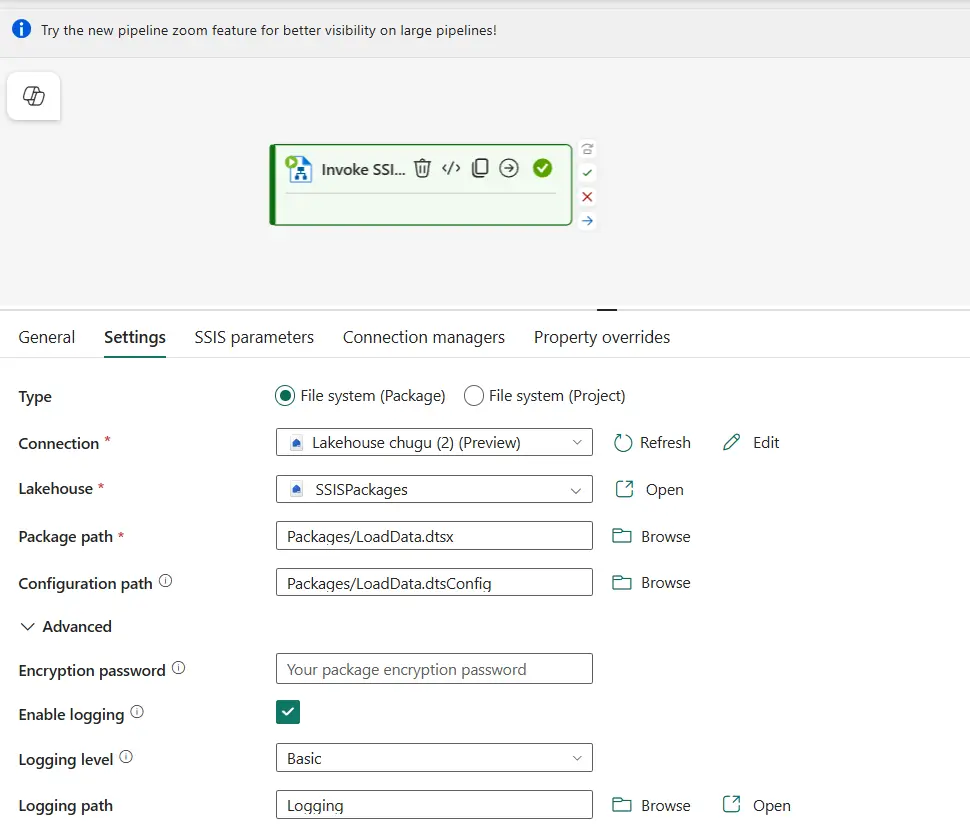
A package in SSIS is your unit of work. It can contain one or more tasks, but ideally a package should be responsible for a single purpose: load a fact table, load a dimension, copy data from a source system to a data warehouse and so on. A usual mistake is to make packages too big and complex, making them hard to maintain and debug.
The tip What is an SSIS Package? gives a good overview of what an SSIS package is and what its purpose is. A package is a file with the .dtsx extension and uses XML behind the scenes to describe its contents.
Packages are created inside an SSIS project: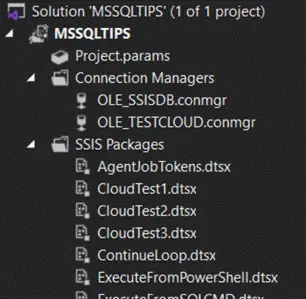
A control flow is the main canvas of your package and it contains the different tasks the package is supposed to execute. The control flow is what makes SSIS the orchestrator of a workflow. You can configure tasks to run after each other (in series) by using precedence constraints, or to run in parallel. You can also make a task only run if another task fails, or only if it succeeds and so on.
Functionality-wise, you can compare the SSIS control flow with an ADF/Fabric pipeline. You can find more information on the control flow here and here.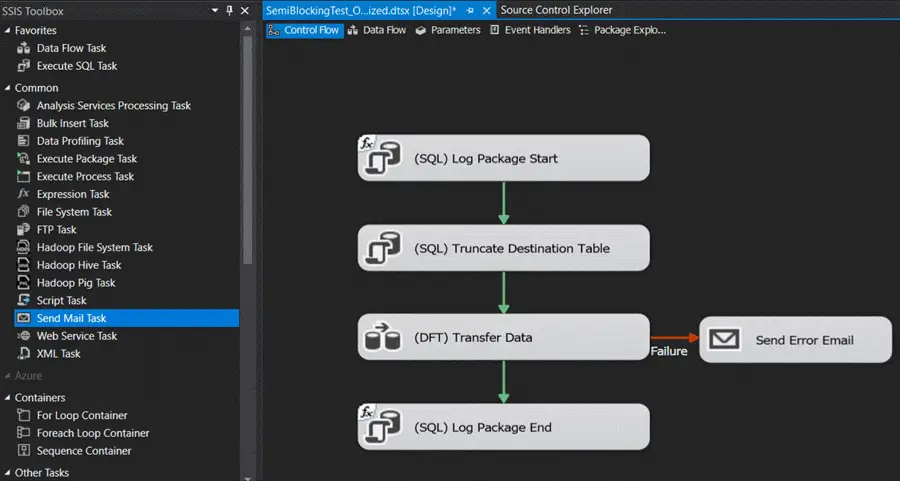
The data flow is a special task on the control flow. When you double click it, another canvas will open. There, you can define data sources and destinations. In between you can use various transformations (called components) to manipulate the data flowing between the sources and destinations. Data is read from the source and stored into memory buffers. These buffers are passed between the various transformations until the data is written to the destination.
You can find more information about the data flow here and here. Functionality-wise, you can compare the SSIS data flow with a (mapping) dataflow in ADF or Synapse Analytics or with Power BI / Fabric dataflows. All these tools use widely different technologies under the covers though.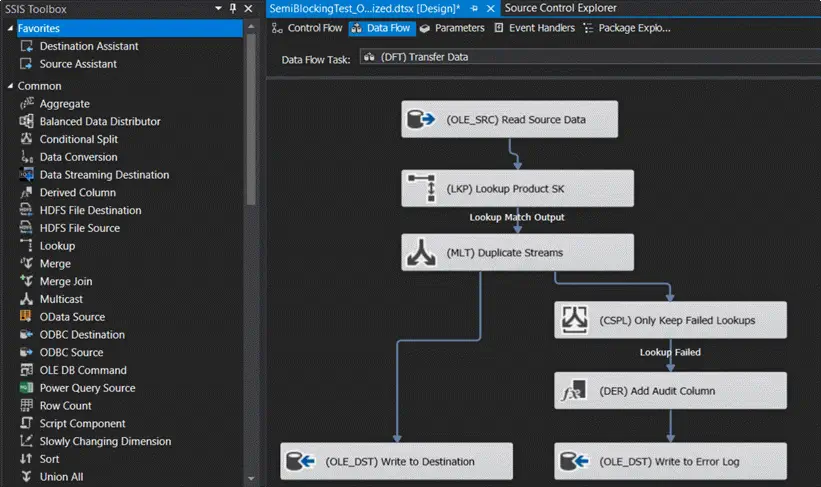
It can be both ETL or ELT, depending on how you create your packages. In ETL scenario, you’ll be using the dataflow task to read data from one or more sources, combine and transform data and write it to one or more destinations. In an ELT setup, you’d rather just use the dataflow to copy data from a source to a destination (most likely a relational database like SQL Server, Azure SQL DB or the Fabric Warehouse) and then orchestrate code that will transform the data (most likely T-SQL statements).
SSIS packages and projects are created in Visual Studio. In recent versions of Visual Studio, SSIS is an extension you can download from the marketplace. There’s also backwards compatibility, allowing you to create SSIS for older versions of SQL Server using the same version of Visual Studio. At the time of writing, the oldest supported version is SQL Server 2017.
Keep in mind that we’re talking about the full Visual Studio product, not Visual Studio Code, which means SSIS development can only be done on Windows machines. You can use the free Visual Studio Community Edition to develop your SSIS projects.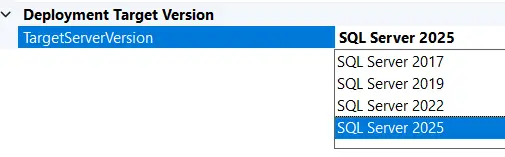
Next Steps
- If you’re starting out and want to learn more about SSIS, check out the tutorial to take your first steps with SSIS.
- You can find many tips about SSIS development in this overview.
- There’s also a tutorial on Azure Data Factory, and many tips about Microsoft Fabric.

Koen Verbeeck is a seasoned business intelligence consultant with over a decade of experience with the Microsoft Data Platform. He holds several certifications, including Azure Data Engineer. He’s a prolific writer, with over 375 articles on technologies such as Microsoft Fabric, SSIS, ADF, SSAS, SSRS, MDS, Power BI, Snowflake and Azure services. He has spoken at various events such as PASS, SQLBits, dataMinds Connect and many others. He frequently delivers educational webinars on MSSQLTips.com. For his efforts, Koen has been awarded the Microsoft MVP data platform award for many years.
- MSSQLTips Awards:
- Leadership Award (200+ Tips) – 2021
- Author of the Year – 2014/2020/2022
- Author Contender – 2024/2025