Problem
Is there a way to use AI with GitHub Copilot and administer SQL Server when using Visual Studio code?
Solution
This article is for professionals who prefer Visual Studio Code for SQL Server work over SSMS. If you are familiar with SSMS, it is strongly recommended to use the GitHub Copilot chat in SSMS rather than the one in Visual Studio Code. GitHub Copilot can now connect to SQL Server and help us with our daily DBA and development tasks. In this tip, we will connect to SQL and use AI to administer our SQL Server.
Requirements and Getting Setup
You will need Visual Studio Code and make sure to have the latest version with these new features. In addition, you will need to have SQL Server installed. For these examples, I used the Adventurewoks2025 database.
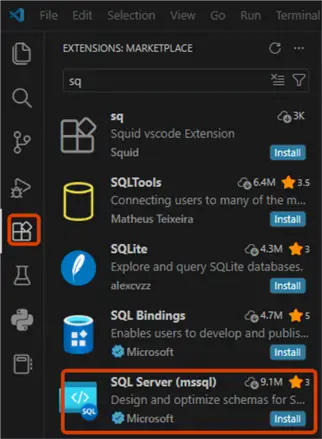
Before getting started, make sure to install the SQL Server (mssql) extension.
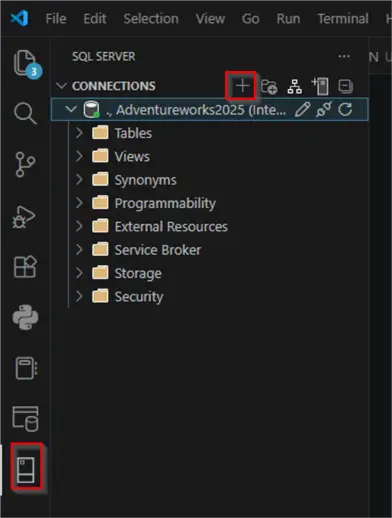
Once installed, select the + icon to create a connection to your SQL Server. Specify the server’s name and authentication (Windows or SQL).
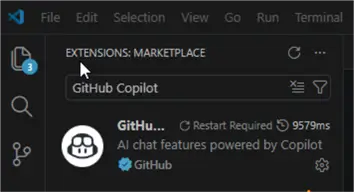
Go to Extensions in Visual Studio Code and make sure that GitHub Copilot is installed.
Finally, a GitHub account is required. For more information on registering for GitHub, refer to this link.
Getting Started
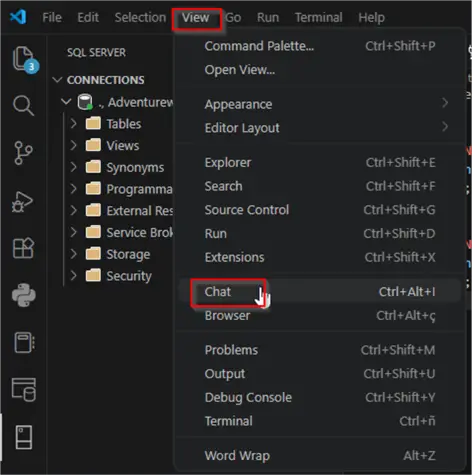
If you do not see the GitHub Copilot chat, go to View > Chat. This will show the GitHub Copilot chat.
First, we will try to connect to SQL Server with GitHub Copilot.
Prompt 1
Me: Can you connect to SQL Server?
GitHub Copilot: Yes, I can connect to SQL Server. I have tools available to:
Connect to SQL Server instances
List databases, tables, views, schemas, and functions
Run SQL queries (SELECT, INSERT, UPDATE, DELETE, etc.)
Design and modify schemas visually
Configure Data API Builder for creating REST/GraphQL APIs
To get started, I can help you:
- List available SQL Server instances on your machine
- Connect to a specific server
- Execute queries
- Explore database structure
What would you like to do?
Prompt 2
Me: Option 1.
GitHub Copilot: Found one SQL Server instance available:
Server: . (local)
Database: Adventureworks2025
Profile ID: 92d49ea9-ca46-4b02-88fc-cf9fe36e0d7a
Would you like me to connect to this server?
Prompt 3
Me: Yes please
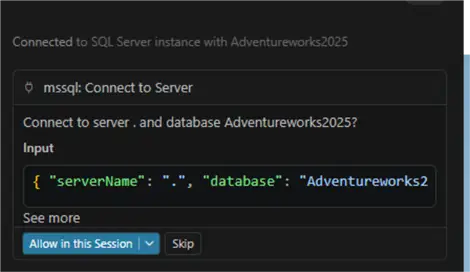
GitHub Copilot: Connected successfully!
Connection ID: ae92c95a-6a7a-4491-9333-0dc1177eff5e
You’re now connected to the Adventureworks2025 database on the local SQL Server. What would you like to do next?
I can:
List tables, views, schemas, or functions
Run SQL queries
Open the schema designer
Show the database structure
Check Fragmentation
We will ask GitHub Copilot if it can detect fragmentation of our tables. I will ask GitHub Copilot to check the table fragmentation.
Me: Does this table have fragmentation? HumanResources.Employee
GitHub Copilot:Yes, the HumanResources.Employee table has some fragmentation:
Index Name Fragmentation Index Type Pages
AK_Employee_NationalIDNumber 50% Nonclustered 2
AK_Employee_LoginID 33.33% Nonclustered 3
Recommendations:
50% fragmentation → Rebuild this index
33.33% fragmentation → Rebuild this index
Both indexes exceed the 30% threshold, where rebuilding is recommended for optimal performance.
Would you like me to generate a rebuild script for these indexes?
Me: Yes, please.
GitHub Copilot: Here’s the rebuild script for the fragmented indexes on HumanResources.Employee:
USE Adventureworks2025;
GO
ALTER INDEX AK_Employee_NationalIDNumber
ON HumanResources.Employee
REBUILD;
GO
ALTER INDEX AK_Employee_LoginID
ON HumanResources.Employee
REBUILD;
You can apply the code suggested in Visual Studio code:
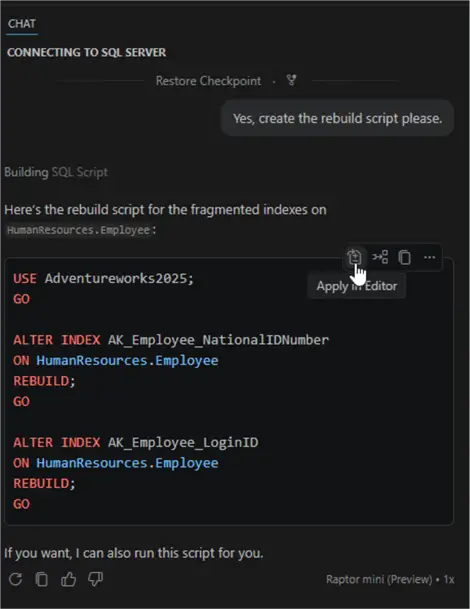
After rebuilding the indexes, the index fragmentation problem is solved.
Querying Tables
You can also query tables with natural language. T-SQL is no longer required with AI. In this example, we will query a table in AdventureWorks using GitHub copilot.
Me: Tell me 5 loginIDs and the vacation hours of a person from table [HumanResources].[Employee] that are married, male.
GitHub Copilot: Checking the HumanResources.Employee table for married male employees, and returning five results.
Here are 5 married male employees from HumanResources.Employee:
adventure-works\roberto0 — VacationHours: 2
adventure-works\jossef0 — VacationHours: 6
adventure-works\dylan0 — VacationHours: 61
adventure-works\michael6 — VacationHours: 16
adventure-works\thierry0 — VacationHours: 9
SQL Server Configuration Information with GitHub Copilot
You can also ask about internal SQL Server information. Here you have some typical questions.
Me: Can you list the users currently logged to the AdventureWorks2025 database?
GitHub Copilot: Found 8 active sessions connected to AdventureWorks2025, all from a single user account. These connections are primarily from VS Code’s MSSQL extension and SQL Server Management Studio tools.
Active User:
Login: DESKTOP-O2\hp23
Host: DESKTOP-CO2
Sessions: 8 total (2 running, 6 sleeping)
Programs: VS Code MSSQL language service, SSMS Query, SSMS IntelliSense, SSMS main
Latest Activity: 2026-04-27 18:48:03 (just now)
Most sessions are idle (sleeping), which is normal for database connections. The running ones are likely from our current queries.
Me: Show me the database size and change my database to bulk logged recovery model, please.
GitHub Copilot:
Database Size: AdventureWorks2025 is 400.00 MB total, with 25.77 MB unallocated space.
Recovery Model Change: Successfully updated to BULK_LOGGED. This model minimizes log space for bulk operations while still allowing point-in-time recovery.
Conclusion
With Visual Studio Code and GitHub Copilot, you can connect to SQL Server and get internal information directly. You can detect fragmentation, query tables, detect configuration information, change database settings, and more.
The way you interact with databases and software programs has been simplified significantly.
Next Steps
- To learn more about AI and Visual Studio Code, check these related links:

Daniel Calbimonte is a Microsoft Most Valuable Professional, Microsoft Certified Trainer and Microsoft Certified IT Professional for SQL Server. He is an accomplished SSIS author, teacher at IT Academies and has over 10 years of experience as a QE and developer for SQL Server related software. He has worked for the government, oil companies, web sites, magazines and universities around the world. Daniel also regularly speaks at SQL Servers conferences and blogs.
- MSSQLTips Awards: Author of the Year Contender – 2015-2018, 2022, 2023 | Champion (100+ tips) – 2018