Problem
Graphs can be used to formulate mathematical models for many different applications and one particular type of problem to be solved deals with networks that transport some kind of resource from one endpoint to another, like water or electricity. Is it possible to create using only SQL Server features?
Solution
The maximum flow problem is the same as when you try to pump as much water as possible through a bunch of connected pipes. The start node or source (S) is where the water comes in, and the destination node or sink (T) is where it needs to go, and every single pipe in between, has a limit on how much water it can handle at once.
Ford-Fulkerson Algorithm
The Ford-Fulkerson algorithm uses the idea of augmenting paths, starting with an initial flow of zero, and interactively finding a path from S to T, with available capacity, increasing the flow, pushing as much water as it is possible, until at least one pipe reaches its limit, repeating this process until you literally cannot find a single open route left.
The same concept used for water can be used to figure out traffic gridlock, routing internet data, or manage supply chains.
Terms and definitions
- Graph nodes (vertices) – Points representing entities.
- Graph edges (links) – Lines connecting pairs of nodes, representing relationships.
SQL Tables
Let’s create a few tables to walk through an example.
The edge table:
CREATE TABLE [dbo].[GraphFlowEdges](
    [EdgeId] [int] IDENTITY(1,1) NOT NULL,
    [NodeFrom] [nvarchar](10) NULL,
    [NodeTo] [nvarchar](10) NULL,
    [X] [int] NULL,
    [Y] [int] NULL,
    [Capacity] [decimal](12, 4) NULL,
    [Residual] [decimal](12, 4) NULL,
 CONSTRAINT [PK_GraphFlowEdges] PRIMARY KEY CLUSTERED
(
    [EdgeId] ASC
)WITH (PAD_INDEX = OFF, STATISTICS_NORECOMPUTE = OFF, IGNORE_DUP_KEY = OFF, ALLOW_ROW_LOCKS = ON, ALLOW_PAGE_LOCKS = ON, OPTIMIZE_FOR_SEQUENTIAL_KEY = OFF) ON [PRIMARY]
) ON [PRIMARY]
GO
The nodes table:
CREATE TABLE [dbo].[GraphFlowNodes](
    [NodeId] [int] NOT NULL,
    [NodeName] [nvarchar](10) NULL,
    [Parent] [int] NULL,
    [Queue] [int] NULL,
    [Visited] [bit] NULL,
 CONSTRAINT [PK_GraphFlowNodes] PRIMARY KEY CLUSTERED
(
    [NodeId] ASC
)WITH (PAD_INDEX = OFF, STATISTICS_NORECOMPUTE = OFF, IGNORE_DUP_KEY = OFF, ALLOW_ROW_LOCKS = ON, ALLOW_PAGE_LOCKS = ON, OPTIMIZE_FOR_SEQUENTIAL_KEY = OFF) ON [PRIMARY]
) ON [PRIMARY]
GO
Stored Procedures
The Breadth-first search (BFS) is an algorithm for searching a tree data structure for a node that satisfies a given property.
-- =============================================
-- Author:      SCP - MSSQLTips
-- Create date: 20250305
-- Description: Breadth-First Search (BFS)
-- =============================================
CREATE OR ALTER PROCEDURE [dbo].[uspGraphBFS]
            (@Source int
            ,@Sink int)
AS
BEGIN
    DECLARE  @Front int = 1
            ,@Rear int = 1
            ,@n int
            ,@u int
            ,@v int;

    UPDATE       [dbo].[GraphFlowNodes]
        SET      [Visited] = 0
                ,[Parent] = NULL
                ,[Queue] = NULL;

    SELECT         @n = COUNT(*)
        FROM     [dbo].[GraphFlowNodes];

    UPDATE       [dbo].[GraphFlowNodes]
        SET      [Visited] = 1
                ,[Parent] = -1
        WHERE    [NodeId] = @Source;

    UPDATE       [dbo].[GraphFlowNodes]
        SET      [Queue] = @Source
        WHERE    [NodeId] = @Rear;

    WHILE @Front <= @Rear BEGIN
        SET @u = (SELECT     [Queue]
                    FROM     [dbo].[GraphFlowNodes]
                    WHERE    [NodeId] = @Front);

        SET @Front += 1;

        SET @v = 1;
        WHILE @v <= @n BEGIN
            IF  (SELECT      [Visited]
                    FROM     [dbo].[GraphFlowNodes]
                    WHERE    [NodeId] = @v) = 0 AND
                (SELECT      [Residual]
                    FROM     [dbo].[GraphFlowEdges]
                    WHERE    [X] = @u AND
                             [Y] = @v) > 0 BEGIN

                UPDATE       [dbo].[GraphFlowNodes]
                    SET      [Queue] = @v
                    WHERE    [NodeId] = @Rear + 1;

                SET @Rear += 1;

                UPDATE       [dbo].[GraphFlowNodes]
                    SET      [Visited] = 1
                            ,[Parent] = @u
                    WHERE    [NodeId] = @v;

                IF @v = @Sink
                    RETURN 1;

            END
             SET @v += 1;
        END
    END

    RETURN 0;
END
GO
The Ford-Fulkerson algorithm to compute the maximum flow.
-- =============================================
-- Author:      SCP - MSSQLTips
-- Create date: 20250305
-- Description: Breadth-First Search (BFS)
-- =============================================
CREATE OR ALTER PROCEDURE [dbo].[uspGraphFordFulkerson]
            (@Source nvarchar(10)
            ,@Sink nvarchar(10))
AS
BEGIN
    SET NOCOUNT ON;
    BEGIN TRY
        IF (SELECT COUNT(*) FROM [dbo].[GraphFlowEdges]) = 0 BEGIN
            PRINT 'No data was entered on the Edges table!'
            RETURN;
        END
        DECLARE         @ini nvarchar(10) = 'S'
                    ,@fin nvarchar(10) = 'T'
                    ,@n int
                    ,@v int
                    ,@Flow decimal(12,4)
                    ,@Inf decimal(12,4) = 999999
                    ,@MaxFlow decimal(12,4)= 0
                    ,@Parent int
                    ,@Residual decimal(12,4)
                    ,@Result bit;


        TRUNCATE TABLE   [dbo].[GraphFlowNodes];

        INSERT INTO         [dbo].[GraphFlowNodes]
            SELECT         DENSE_RANK() OVER (ORDER BY MIN([EdgeId]))
                        ,[NodeFrom]
                        ,NULL
                        ,NULL
                        ,0
                FROM     [dbo].[GraphFlowEdges]
                GROUP BY [NodeFrom]
                ORDER BY MIN([EdgeId]);

        INSERT INTO         [dbo].[GraphFlowNodes]
            SELECT         DENSE_RANK() OVER (ORDER BY MIN([EdgeId])) + @@ROWCOUNT
                        ,[NodeTo]
                        ,NULL
                        ,NULL
                        ,0
                FROM     [dbo].[GraphFlowEdges]
                WHERE     [NodeTo] NOT IN
                        (SELECT         NodeName
                            FROM     [dbo].[GraphFlowNodes])
                GROUP BY [NodeTo]
                ORDER BY MIN([EdgeId]);

        UPDATE         [dbo].[GraphFlowEdges]
            SET         X = [NodeId]
            FROM     [dbo].[GraphFlowNodes]
            WHERE     NodeFrom = NodeName;

        UPDATE         [dbo].[GraphFlowEdges]
            SET         Y = [NodeId]
            FROM     [dbo].[GraphFlowNodes]
            WHERE     NodeTo = NodeName;

        UPDATE         [dbo].[GraphFlowEdges]
            SET         [Residual] = [Capacity];

        SELECT         @Source = NodeId
            FROM     [dbo].[GraphFlowNodes]
            WHERE     [NodeName] = @ini;

        SELECT         @Sink = NodeId
            FROM     [dbo].[GraphFlowNodes]
            WHERE     [NodeName] = @fin;

        SELECT         @n = COUNT(*)
            FROM     [dbo].[GraphFlowNodes];

        EXEC @Result = [dbo].[uspGraphBFS] @Source,@Sink;

        WHILE @Result <> 0 BEGIN
            SET @Flow = @Inf;

            SET @v = @Sink;
            WHILE @v <> @Source BEGIN
                SET @Parent =    (SELECT         [Parent]
                                    FROM     [dbo].[GraphFlowNodes]
                                    WHERE     [NodeId] = @v);

                SET @Residual =    (SELECT         [Residual]
                                    FROM     [dbo].[GraphFlowEdges]
                                    WHERE     [X] = @Parent AND
                                                [Y] = @v);

                IF @Flow > @Residual
                    SET @Flow = @Residual;

                SET @v = @Parent;
            END

            SET @v = @Sink;
            WHILE @v <> @Source BEGIN
                SET @Parent =    (SELECT         [Parent]
                                    FROM     [dbo].[GraphFlowNodes]
                                    WHERE     [NodeId] = @v);

                UPDATE         [dbo].[GraphFlowEdges]
                    SET         [Residual] -= @Flow
                    WHERE     [X] = @Parent AND
                                [Y] = @v;

                UPDATE         [dbo].[GraphFlowEdges]
                    SET         [Residual] += @Flow
                    WHERE     [X] = @v AND
                                [Y] = @Parent;

                SET @v = @Parent;
            END

            SET @MaxFlow += @Flow;

            EXEC @Result = [dbo].[uspGraphBFS] @Source,@Sink;
        END

        SELECT @MaxFlow AS MaxFlow;

    END TRY
    BEGIN CATCH
        IF @@TRANCOUNT > 0
            BEGIN
                ROLLBACK TRANSACTION;
            END

            -- Print error information.
            PRINT      'Error: ' + CONVERT(varchar(50), ERROR_NUMBER()) +
                    ', Severity: ' + CONVERT(varchar(5), ERROR_SEVERITY()) +
                    ', State: ' + CONVERT(varchar(5), ERROR_STATE()) +
                    ', Procedure: ' + ISNULL(ERROR_PROCEDURE(), '-') +
                    ', Line: ' + CONVERT(varchar(5), ERROR_LINE());

            PRINT ERROR_MESSAGE();
    END CATCH;
END
GO
Example of Ford-Fulkerson Algorithm in SQL Server
Let’s suppose that a water distribution has the following shape.
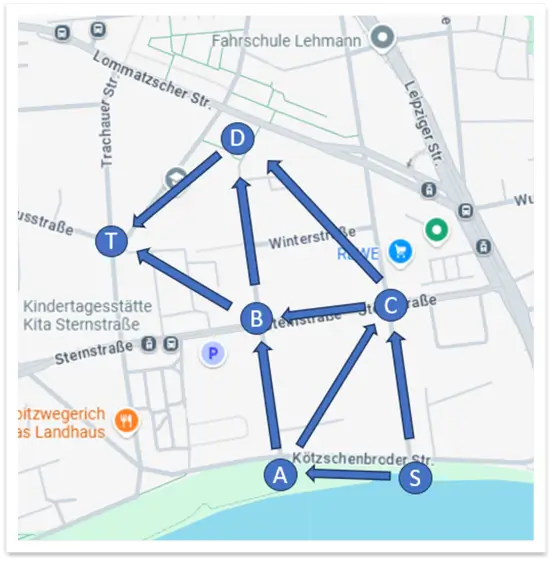
First, we will delete any previous data entered, then enter the values for all edges, and finally, run the store procedure.
You can enter any value for the nodes: like numbers, letters, or words. For this example, I am using random numbers for capacity and I am not pointing out the unit of measure.
TRUNCATE TABLE  [dbo].[GraphFlowEdges];

INSERT INTO     [dbo].[GraphFlowEdges]
                ([NodeFrom],[NodeTo],[Capacity])
    VALUES       ('S','A',80.50)
                ,('S','C',30.50)
                ,('A','B',25.50)
                ,('A','C',55.75)
                ,('B','D',17.25)
                ,('B','T',47.25)
                ,('C','B',29.35)
                ,('C','D',17.00)
                ,('D','T',50.00);
GO

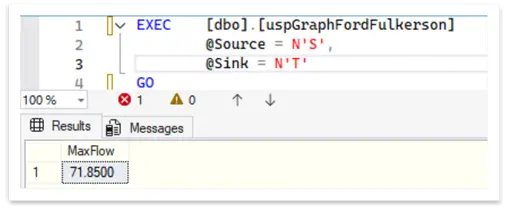
EXEC    [dbo].[uspGraphFordFulkerson]
        @Source = N'S',
        @Sink = N'T'
GO
The result for the maximum flow is 71.85 units of measure at node (T).
There are others algorithms to find maximum flow like Edmonds-Karp which is very similar to this one and it is recommended for large graphs.
Next Steps
- WIKIPEDIA – Network flow
- WIKIPEDIA – Ford-Fulkerson algorithm
- WIKIPEDIA – Breadth-first search
- Here are some related articles:

Sebastião Pereira has over 40 years of experience in database development including T-SQL, algorithm design, machine learning and bringing innovative mathematical formulas to SQL Server. He started his career at a transnational fast-moving consumer goods (FMCG) company as an employee then later transitioning into a consultant role. He eventually founded his own company to develop software solutions for the healthcare industry. Sebastião is a respected award-winning author on MSSQLTips.com extending SQL Server capabilities beyond traditional workloads.
- MSSQLTips Awards
- Author of the Year – 2025
- Trendsetter (25+ tips) – 2025
- Rookie of the Year – 2024