Problem
For a current project, we have been asked to find the minimum spanning tree between multiple locations. A spanning tree is a set of edges that connect all nodes of a graph as efficiently as possible. In this article, we look at how this can be done using TSQL in SQL Server.
Solution
A spanning tree is a set of edges that connect all nodes of a graph without having any superfluous edges, with usually of minimum cost, and is common in communication networks where it is important for every node can communicate with all other nodes but not necessarily directly, like in distribution networks (e.g., water supply, electricity networks, phone cables, etc.).
There are two methods to obtain the Graph MST: PRIM’s Algorithm and KRUSKAL’s Algorithm.
PRIM’s Algorithm
The PRIM algorithm method works by attaching a new edge to a single growing tree at each step, to form a tree of subset of edges, that includes every vertex, and where the total weight of all the edges in the tree are minimized.
It is recommended to be used in graphs with many edges because it uses a priority queue to select the next edge. It needs a root edge as a starting point. This method works well for adjacency matrices and heaps.
KRUSKAL’s Algorithm
The KRUSKAL algorithm method works as a greedy algorithm. In each step, it adds to the forest the lowest-weight edge without forming a cycle.
It is recommended for graphs with sparse edges once it sorts all edges upfront and processes them, ensuring that no cycles are formed. This method works well with edge lists, multiple components, and union-find data structures.
Scripts to Create a Graph Minimum Spanning Tree with SQL
Table to Hold the Edges
-- MSSQLTips (TSQL)
CREATE TABLE [dbo].[GraphMst](
    [VertexStart] [nvarchar](10) NOT NULL,
    [VertexEnd] [nvarchar](10) NOT NULL,
    [EdgeWeight] [decimal](12, 4) NULL,
    [Mst] [int] NULL,
 CONSTRAINT [PK_GraphMst] PRIMARY KEY CLUSTERED
(
    [VertexStart] ASC,
    [VertexEnd] ASC
)WITH (PAD_INDEX = OFF, STATISTICS_NORECOMPUTE = OFF, IGNORE_DUP_KEY = OFF, ALLOW_ROW_LOCKS = ON, ALLOW_PAGE_LOCKS = ON, OPTIMIZE_FOR_SEQUENTIAL_KEY = OFF) ON [PRIMARY]
) ON [PRIMARY]
GO
Table to Hold the Parenthood
-- MSSQLTips (TSQL)
CREATE TABLE [dbo].[GraphMstUnion](
    [Vertex] [nvarchar](10) NOT NULL,
    [Parent] [nvarchar](10) NULL,
    [Distance] [int] NULL,
PRIMARY KEY CLUSTERED
(
    [Vertex] ASC
)WITH (PAD_INDEX = OFF, STATISTICS_NORECOMPUTE = OFF, IGNORE_DUP_KEY = OFF, ALLOW_ROW_LOCKS = ON, ALLOW_PAGE_LOCKS = ON, OPTIMIZE_FOR_SEQUENTIAL_KEY = OFF) ON [PRIMARY]
) ON [PRIMARY]
GO
User-defined Function to Find the Root
-- MSSQLTips (TSQL)
CREATE OR ALTER FUNCTION  [dbo].[ufnGraphMstFindRoot]
                (@vertex nvarchar(10))
RETURNS nvarchar(10)
AS
BEGIN
    DECLARE @parent nvarchar(10) = @vertex;

    WHILE EXISTS
        (SELECT         1
            FROM     GraphMstUnion
            WHERE     Vertex = @parent AND
                     Parent <> @parent) BEGIN
        SELECT         @parent = Parent
            FROM     GraphMstUnion
            WHERE     Vertex = @parent;
    END

    RETURN @parent;
END;
GO
PRIM Algorithm SQL Stored Procedure
-- =============================================
-- Author:      SCP - MSSQLTips
-- Create date: 20250122
-- Description: Graph PRIM's Algorithm
-- =============================================
CREATE OR ALTER PROCEDURE [dbo].[uspGraphPrim]
                (@VertexRoot nvarchar(10))
AS
BEGIN
    SET NOCOUNT ON;
    BEGIN TRY
        IF    NOT EXISTS
            (SELECT 1 FROM [dbo].[GraphMst])
            RETURN;

        DECLARE      @MaxLoop int
                    ,@start nvarchar(10)
                    ,@end nvarchar(10)
                    ,@weight decimal(12,4)
                    ,@rootStart nvarchar(10)
                    ,@rootEnd nvarchar(10)
                    ,@count int = 0;

        DECLARE      @Candidates
            TABLE    (Vertex nvarchar(10));

        INSERT INTO  @Candidates
            SELECT DISTINCT
                     [VertexStart]
                FROM [dbo].[GraphMst]
                UNION
            SELECT DISTINCT
                     [VertexEnd]
                FROM [dbo].[GraphMst];

        SET @MaxLoop = (SELECT COUNT(*) FROM @Candidates) * 2;

        DECLARE      @Visited
            TABLE    (Vertex nvarchar(10)
                    ,Pos int IDENTITY);

        INSERT INTO   @Visited
            VALUES    (@VertexRoot);

        SELECT TOP 1 @start = [VertexStart]
                    ,@end = [VertexEnd]
                    ,@weight = [EdgeWeight]
            FROM     [dbo].[GraphMst]
            WHERE     [VertexStart] = @VertexRoot
            ORDER BY [EdgeWeight];

        INSERT INTO   @Visited
            VALUES    (@end);

        UPDATE        [dbo].[GraphMst]
            SET       [Mst] = 0
            WHERE     [VertexStart] = @start AND
                      [VertexEnd] = @end AND
                      [EdgeWeight] = @weight;

        WHILE EXISTS (SELECT 1 FROM @Candidates) BEGIN
            SET @count += 1;

            SELECT TOP 1 @rootStart = e.VertexStart
                        ,@rootEnd = e.VertexEnd
                        ,@weight = e.EdgeWeight
                FROM     [dbo].[GraphMst] e JOIN
                         @Visited v ON
                        (e.VertexStart = v.Vertex OR
                         e.VertexEnd = v.Vertex)
                WHERE     e.VertexEnd NOT IN
                        (SELECT     Vertex
                            FROM @Visited) OR
                         e.VertexStart NOT IN
                        (SELECT     Vertex
                            FROM @Visited)
                ORDER BY e.EdgeWeight ASC;

            IF @rootStart NOT IN (SELECT Vertex FROM @Visited)
                INSERT INTO @Visited
                    VALUES (@rootStart);

            IF @rootEnd NOT IN (SELECT Vertex FROM @Visited)
                INSERT INTO @Visited
                    VALUES (@rootEnd);

            DELETE FROM   @Candidates
                WHERE     [Vertex] IN
                          (SELECT [Vertex]
                            FROM  @Visited);

            UPDATE       [dbo].[GraphMst]
                SET      [Mst] = @count
                WHERE    [VertexStart] = @rootStart AND
                         [VertexEnd] = @rootEnd AND
                         [EdgeWeight] = @weight;

            IF @count > @MaxLoop BEGIN
                PRINT 'Loop limit reached, please verify!'
                BREAK;
            END
        END

        SELECT       [VertexStart]
                    ,[VertexEnd]
                    ,[EdgeWeight]
                    ,[Mst]
                    ,(SELECT     SUM([EdgeWeight])
                        FROM     [dbo].[GraphMst]
                        WHERE    [Mst] IS NOT NULL) WeightTotal
            FROM     [dbo].[GraphMst]
            WHERE     [Mst] IS NOT NULL
            ORDER BY [Mst];


        RETURN;
    END TRY
    BEGIN CATCH
        IF @@TRANCOUNT > 0
            BEGIN
                ROLLBACK TRANSACTION;
            END

            -- Print error information.
            PRINT      'Error: ' + CONVERT(varchar(50), ERROR_NUMBER()) +
                    ', Severity: ' + CONVERT(varchar(5), ERROR_SEVERITY()) +
                    ', State: ' + CONVERT(varchar(5), ERROR_STATE()) +
                    ', Procedure: ' + ISNULL(ERROR_PROCEDURE(), '-') +
                    ', Line: ' + CONVERT(varchar(5), ERROR_LINE());

            PRINT ERROR_MESSAGE();
    END CATCH;
END
GO
KRUSKAL Algorithm SQL Stored Procedure
-- =============================================
-- Author:      SCP - MSSQLTips
-- Create date: 20250122
-- Description: Graph KRUSKAL's Algorithm
-- =============================================
CREATE OR ALTER PROCEDURE [dbo].[uspGraphKruskal]
AS
BEGIN
    SET NOCOUNT ON;
    BEGIN TRY
        IF    NOT EXISTS
            (SELECT 1 FROM [dbo].[GraphMst])
            RETURN;

        DECLARE      @start nvarchar(10)
                    ,@end nvarchar(10)
                    ,@weight decimal(12,4)
                    ,@rootStart nvarchar(10)
                    ,@rootEnd nvarchar(10)
                    ,@count int = 0;

        TRUNCATE TABLE [dbo].[GraphMstUnion];

        INSERT INTO  [dbo].[GraphMstUnion]
            SELECT DISTINCT
                     VertexStart
                    ,VertexStart
                    ,NULL
                FROM [dbo].[GraphMst]
        UNION
            SELECT DISTINCT
                     VertexEnd
                    ,VertexEnd
                    ,NULL
                FROM [dbo].[GraphMst];

        DECLARE edgeCursor CURSOR FOR
            SELECT       [VertexStart]
                        ,[VertexEnd]
                        ,[EdgeWeight]
                FROM     [dbo].[GraphMst]
                ORDER BY [EdgeWeight];

        OPEN edgeCursor;
        FETCH NEXT FROM edgeCursor
            INTO @start, @end, @weight;

        WHILE @@FETCH_STATUS = 0
        BEGIN
            SET @rootStart = [dbo].[ufnGraphMstFindRoot] (@start);
            SET @rootEnd = [dbo].[ufnGraphMstFindRoot] (@end);

            IF @rootStart <> @rootEnd BEGIN
                SET @count += 1;

                UPDATE       [dbo].[GraphMst]
                    SET      [Mst] = @count
                    WHERE    [VertexStart] = @start AND
                             [VertexEnd] = @end AND
                             [EdgeWeight] = @weight;

                UPDATE       [dbo].[GraphMstUnion]
                    SET      [Parent] = @rootStart
                    WHERE    [Vertex] = @rootEnd;
            END;

            FETCH NEXT FROM edgeCursor INTO @start, @end, @weight;
        END;

        CLOSE edgeCursor;
        DEALLOCATE edgeCursor;

        SELECT       [VertexStart]
                    ,[VertexEnd]
                    ,[EdgeWeight]
                    ,[Mst]
                    ,(SELECT     SUM([EdgeWeight])
                        FROM     [dbo].[GraphMst]
                        WHERE    [Mst] IS NOT NULL) WeightTotal
            FROM     [dbo].[GraphMst]
            WHERE     [Mst] IS NOT NULL
            ORDER BY [Mst];

        RETURN;
    END TRY
    BEGIN CATCH
        IF @@TRANCOUNT > 0
            BEGIN
                ROLLBACK TRANSACTION;
            END

            -- Print error information.
            PRINT      'Error: ' + CONVERT(varchar(50), ERROR_NUMBER()) +
                    ', Severity: ' + CONVERT(varchar(5), ERROR_SEVERITY()) +
                    ', State: ' + CONVERT(varchar(5), ERROR_STATE()) +
                    ', Procedure: ' + ISNULL(ERROR_PROCEDURE(), '-') +
                    ', Line: ' + CONVERT(varchar(5), ERROR_LINE());

            PRINT ERROR_MESSAGE();
    END CATCH;
END
GO
Testing the Graph Minimum Spanning Tree Solution
Suppose you need to find the minimum spanning tree for an electric cable company between the locations below:
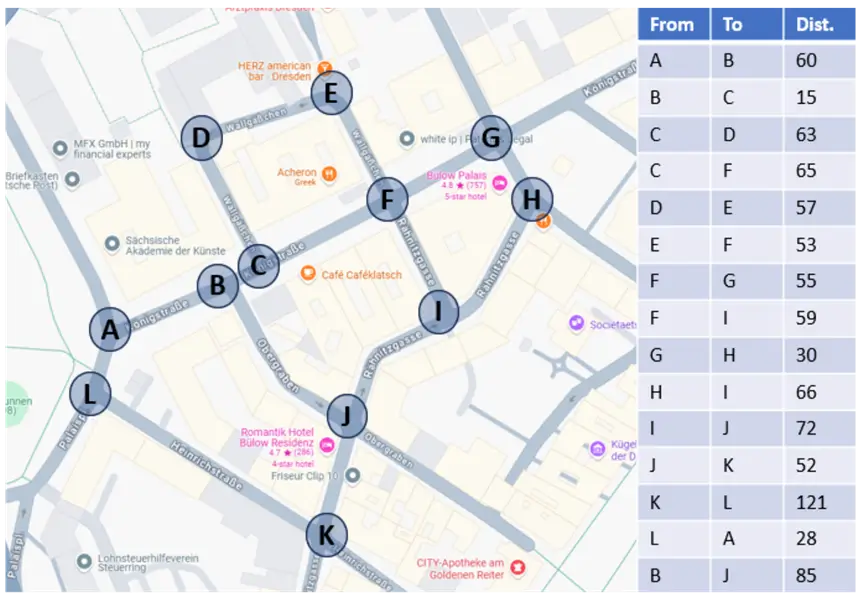
Enter the edges data. This is StartPoint, EndPoint, and Distance for our data from the above table.
TRUNCATE TABLE GraphMst;

INSERT INTO  GraphMst
            (VertexStart
            ,VertexEnd
            ,EdgeWeight)
    VALUES  ('A','B', 60),
            ('B','C', 15),
            ('B','J', 85),
            ('C','D', 63),
            ('C','F', 65),
            ('D','E', 57),
            ('E','F', 53),
            ('F','G', 55),
            ('F','I', 59),
            ('G','H', 30),
            ('H','I', 66),
            ('I','J', 72),
            ('J','K', 52),
            ('K','L',121),
            ('L','A', 28);
Use PRIM’s Algorithm
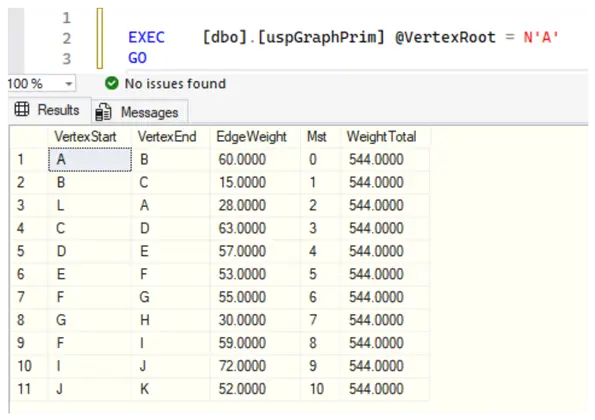
Running the PRIM’s algorithm with a root vertex A (start at point A).
EXEC [dbo].[uspGraphPrim] @VertexRoot = N'A'
GO
Results:
Use KRUSKAL’s Algorithm
Running the KRUSKAL’s algorithm:
EXECUTE [dbo].[uspGraphKruskal]
GO
Results in:

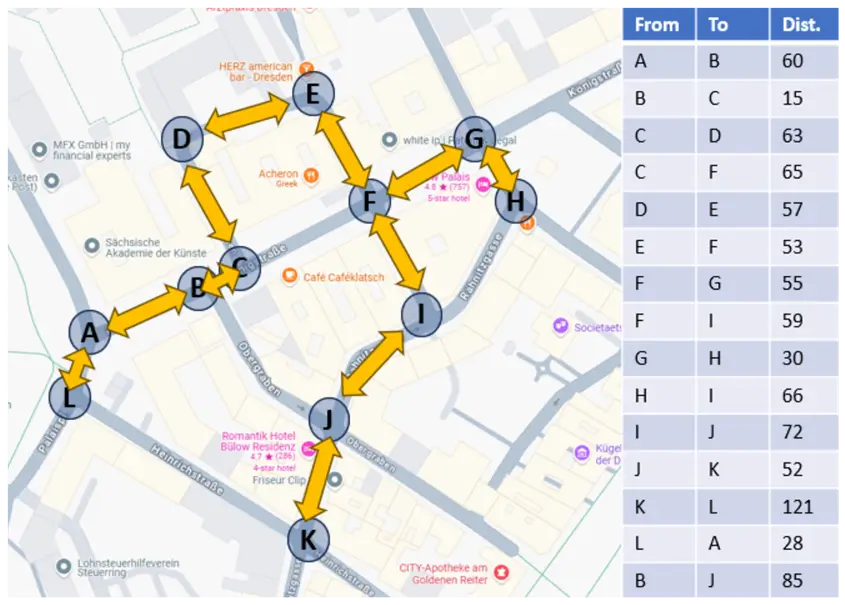
Both methods have the same outcome, with the total cost of 544 meters, as you can see in the final path:
Next Steps
Learn more:
- WIKIPEDIA – Minimum Spanning Tree.
- WIKIPEDIA – Prim’s Algorithm.
- WIKIPEDIA – Kruskal’s Algorithm.
- PRINCETON – Minimum Spanning Trees.

Sebastião Pereira has over 40 years of experience in database development including T-SQL, algorithm design, machine learning and bringing innovative mathematical formulas to SQL Server. He started his career at a transnational fast-moving consumer goods (FMCG) company as an employee then later transitioning into a consultant role. He eventually founded his own company to develop software solutions for the healthcare industry. Sebastião is a respected award-winning author on MSSQLTips.com extending SQL Server capabilities beyond traditional workloads.
- MSSQLTips Awards
- Author of the Year – 2025
- Trendsetter (25+ tips) – 2025
- Rookie of the Year – 2024



Good but a picture at top of article would have been helpful.