Problem
I need a way to roll-up multiple rows into one row and one column value as a means of concatenation in my SQL Server T-SQL code. I know I can roll-up multiple rows into one row using Pivot, but I need all of the data concatenated into a single column in a single row. In this tip we look at two simple approaches to accomplish this.
Solution
To illustrate what is needed, here is some sample data in a table from SQL Server Management Studio (SSMS):

This is an example of rolling up multiple rows into a single row. This is what we want the end result set to look like:

SQL Server T-SQL code to create the above result set by rolling up multiple rows into a single row using FOR XML PATH and the STUFF function:
SELECT
   SS.SEC_NAME,
   STUFF((SELECT '; ' + US.USR_NAME
          FROM USRS US
          WHERE US.SEC_ID = SS.SEC_ID
          FOR XML PATH('')), 1, 1, '') [SECTORS/USERS]
FROM SALES_SECTORS SS
GROUP BY SS.SEC_ID, SS.SEC_NAME
ORDER BY 1
Alternatively, we can also use the T-SQL function STRING_AGG to achieve the same result.
SELECT
     SS.SEC_NAME
    ,STRING_AGG(US.USR_NAME, ',')
FROM SALES_SECTORS SS
JOIN dbo.USRS US ON US.SEC_ID = SS.SEC_ID
GROUP BY SS.SEC_ID, SS.SEC_NAME
ORDER BY 1;
Continue reading this SQL tutorial to learn about additional options and explanations for rolling up multiple rows into a single row.
How to Concatenate Multiple Rows into a Single Row in Microsoft SQL Server
Rolling up data from multiple rows into a single row may be necessary for concatenating data, reporting, exchanging data between systems and more. This can be accomplished by:
- The solution proposed in this tip explores two SQL Server commands that can help us achieve the expected results. The SQL Server T-SQL commands used are STUFF and FOR XML. As mentioned in the introduction, the STRING_AGG function is also a possibility, depending on your version of SQL Server. This will be revisited in a later section
- The T-SQL STUFF command is used to concatenate the results together. In this example, a semi-colon is used as a separator for the results.
- The FOR XML option for the SELECT command has four options (i.e. RAW, AUTO, EXPLICIT or PATH) to return the results. In this example, the PATH parameter is used to retrieve the results as an XML string.
Check out the example below to walk through the code samples and final solution to roll-up multiple rows into a single row in SQL Server.
Preparing Sample Data
Before we begin, we’ll create some tables and sample data which the following script will do for us.
CREATE TABLE SALES_SECTORS(
SEC_ID INT,
SEC_NAME VARCHAR(30))
GO
CREATE TABLE USRS(
USR_ID INT,
USR_NAME VARCHAR(30),
SEC_ID INT
)
GO
CREATE TABLE ADV_CAMPAIGN(
ADV_ID INT,
ADV_NAME VARCHAR(30)
)
GO
CREATE TABLE USR_ADV_CAMPAIGN(
USR_ID INT,
ADV_ID INT
)
GO
CREATE TABLE SEC_ADV_CAMPAIGN(
SEC_ID INT,
ADV_ID INT
)
GO
INSERT INTO SALES_SECTORS( SEC_ID, SEC_NAME ) VALUES ( 1, 'ENTERTAINMENT' )
INSERT INTO SALES_SECTORS( SEC_ID, SEC_NAME ) VALUES ( 2, 'CLOTHES' )
GO
INSERT INTO USRS( USR_ID, USR_NAME, SEC_ID ) VALUES ( 1, 'ANDERSON', 1 )
INSERT INTO USRS( USR_ID, USR_NAME, SEC_ID ) VALUES ( 2, 'CHARLES', 1 )
INSERT INTO USRS( USR_ID, USR_NAME, SEC_ID ) VALUES ( 3, 'DANNY', 1 )
INSERT INTO USRS( USR_ID, USR_NAME, SEC_ID ) VALUES ( 4, 'LUCAS', 1 )
INSERT INTO USRS( USR_ID, USR_NAME, SEC_ID ) VALUES ( 5, 'KEITH', 2 )
INSERT INTO USRS( USR_ID, USR_NAME, SEC_ID ) VALUES ( 6, 'STEFAN', 2 )
INSERT INTO USRS( USR_ID, USR_NAME, SEC_ID ) VALUES ( 7, 'EDUARD', 2 )
INSERT INTO USRS( USR_ID, USR_NAME, SEC_ID ) VALUES ( 8, 'BRAD', 2 )
GO
INSERT INTO ADV_CAMPAIGN( ADV_ID, ADV_NAME ) VALUES ( 1, 'SONY ENTERTAINMENT' )
INSERT INTO ADV_CAMPAIGN( ADV_ID, ADV_NAME ) VALUES ( 2, 'BEATS SOUNDS' )
INSERT INTO ADV_CAMPAIGN( ADV_ID, ADV_NAME ) VALUES ( 3, 'BOOSE' )
INSERT INTO ADV_CAMPAIGN( ADV_ID, ADV_NAME ) VALUES ( 4, 'POLO RALPH LAUREN' )
INSERT INTO ADV_CAMPAIGN( ADV_ID, ADV_NAME ) VALUES ( 5, 'LACOSTE' )
GO
INSERT INTO USR_ADV_CAMPAIGN( USR_ID, ADV_ID ) VALUES ( 1, 1 )
INSERT INTO USR_ADV_CAMPAIGN( USR_ID, ADV_ID ) VALUES ( 1, 2 )
INSERT INTO USR_ADV_CAMPAIGN( USR_ID, ADV_ID ) VALUES ( 2, 2 )
INSERT INTO USR_ADV_CAMPAIGN( USR_ID, ADV_ID ) VALUES ( 2, 3 )
INSERT INTO USR_ADV_CAMPAIGN( USR_ID, ADV_ID ) VALUES ( 3, 3 )
INSERT INTO USR_ADV_CAMPAIGN( USR_ID, ADV_ID ) VALUES ( 4, 2 )
INSERT INTO USR_ADV_CAMPAIGN( USR_ID, ADV_ID ) VALUES ( 5, 4 )
INSERT INTO USR_ADV_CAMPAIGN( USR_ID, ADV_ID ) VALUES ( 6, 5 )
INSERT INTO USR_ADV_CAMPAIGN( USR_ID, ADV_ID ) VALUES ( 7, 4 )
INSERT INTO USR_ADV_CAMPAIGN( USR_ID, ADV_ID ) VALUES ( 8, 5 )
GO
INSERT INTO SEC_ADV_CAMPAIGN( SEC_ID, ADV_ID ) VALUES ( 1, 1 )
INSERT INTO SEC_ADV_CAMPAIGN( SEC_ID, ADV_ID ) VALUES ( 1, 2 )
INSERT INTO SEC_ADV_CAMPAIGN( SEC_ID, ADV_ID ) VALUES ( 1, 3 )
INSERT INTO SEC_ADV_CAMPAIGN( SEC_ID, ADV_ID ) VALUES ( 2, 4 )
INSERT INTO SEC_ADV_CAMPAIGN( SEC_ID, ADV_ID ) VALUES ( 2, 5 )
GO
SQL Server STUFF() Function
Before going to the examples, we need to understand the workings of the commands mentioned above. The STUFF() function puts a string in another string, from an initial position. With this we can insert, replace or remove one or more characters.
This syntax is STUFF(character_expression, start, length, replaceWith_expression):
- character_expression: string to be manipulated
- start: initial position to start
- length: number of characters to be manipulated
- replaceWith_expression: characters to be used
Here is an example of the how to use the STUFF command.
For our example we have a single string that looks like this:
;KEITH;STEFAN;EDUARD;BRADWe want to remove the first ; from the list so we end up with this output:
KEITH;STEFAN;EDUARD;BRADTo do this we can use the STUFF command as follows to replace the first ; in the string with an empty string.
SELECT STUFF(';KEITH;STEFAN;EDUARD;BRAD', 1, 1, '')And this returns this output as a concatenated string:
KEITH;STEFAN;EDUARD;BRADFOR XML Clause for the SQL Server SELECT Statement
The FOR XML clause, will return the results of a SQL query as XML. The FOR XML has four modes which are RAW, AUTO, EXPLICIT or PATH. We will use the PATH option, which generates single elements for each row returned.
If we use a regular query such as the following it will return the result set shown below.
SELECT
   SS.SEC_NAME,
   US.USR_NAME
FROM SALES_SECTORS SS
INNER JOIN USRS US ON US.SEC_ID = SS.SEC_ID
ORDER BY 1, 2
If we take this a step further, we can use the FOR XML PATH option to return the results as an XML string which will put all of the data into one row and one column.
SELECT
   SS.SEC_NAME,
   US.USR_NAME
FROM SALES_SECTORS SS
INNER JOIN USRS US ON US.SEC_ID = SS.SEC_ID
ORDER BY 1, 2
FOR XML PATH('')
SQL STRING_AGG Function to Rollup Data
In SQL Server 2017, the STRING_AGG function was introduced as a new option to rollup data. Check out these tips to learn more:
- Solve old problems with SQL Server’s new STRING_AGG and STRING_SPLIT functions
- SQL Server STRING_AGG Function
- Using FOR XML PATH and STRING_AGG() to denormalize SQL Server data
The following script shows how you can roll up rows using the STRING_AGG function:
-- source: https://www.MSSQLTips.com
SELECT
     SS.SEC_NAME
    ,STRING_AGG(US.USR_NAME, ',')
FROM SALES_SECTORS SS
JOIN dbo.USRS US ON US.SEC_ID = SS.SEC_ID
GROUP BY SS.SEC_ID, SS.SEC_NAME
ORDER BY 1;
The STRING_AGG function is easy to use and the overall solution is more elegant than using STUFF AND FOR XML. You can even add explicit sorting for the row values before they’re concatenated together:
-- source: https://www.MSSQLTips.com
SELECT
     SS.SEC_NAME
    ,STRING_AGG(US.USR_NAME, ',') WITHIN GROUP(ORDER BY US.USR_ID DESC)
FROM SALES_SECTORS SS
JOIN dbo.USRS US ON US.SEC_ID = SS.SEC_ID
GROUP BY SS.SEC_ID, SS.SEC_NAME
ORDER BY 1;
The WITHIN GROUP clause allows you to sort on expressions or columns other than the concatenated row values. In terms of execution plans, both the STUFF and STRING_AGG solutions are practically the same:

So why would you use the FOR XML/STUFF method? As mentioned before, STRING_AGG was introduced in SQL Server 2017. If you are working on an older version of SQL Server (keep in mind SQL Server 2016 is almost at its extended end date of Jul 14, 2026), or if you need backwards compatibility for some reason, you might have no other option. In all other cases, STRING_AGG is preferred as it leads to better readable code. For the remainder of the tip, the XML method is used for the examples. A good exercise would be to convert them to use STRING_AGG.
SQL Server Example to Rolling up Multiple Rows into a Single Row
Example 1
Now that we see what each of these commands does, we can put these together to get our final result.
The example query below uses a subquery where we are returning XML data for the USR_NAME from table USRS and joining this to the outer query by SEC_ID from table SALES_SECTORS. For each value from the inner query, we are concatenating a “;” and then the actual value to have all of the data from all rows concatenated into one column. We are grouping by SEC_NAME to show all USERS within that SECTOR.
SELECT
   SS.SEC_NAME,
   (SELECT '; ' + US.USR_NAME
    FROM USRS US
    WHERE US.SEC_ID = SS.SEC_ID
    FOR XML PATH('')) [SECTORS/USERS]
FROM SALES_SECTORS SS
GROUP BY SS.SEC_ID, SS.SEC_NAME
ORDER BY 1
The below is the output for this query. We can see that we have the leading; in the SECTORS/USERS column which we don’t want.

In this modified example, we are now using the STUFF function to remove the leading ; in the string.
SELECT
   SS.SEC_NAME,
   STUFF((SELECT '; ' + US.USR_NAME
          FROM USRS US
          WHERE US.SEC_ID = SS.SEC_ID
          FOR XML PATH('')), 1, 1, '') [SECTORS/USERS]
FROM SALES_SECTORS SS
GROUP BY SS.SEC_ID, SS.SEC_NAME
ORDER BY 1
And we get this result set:

If we also want to order the SECTORS/USERS data we can modify the query as follows:
SELECT
   SS.SEC_NAME,
   STUFF((SELECT '; ' + US.USR_NAME
          FROM USRS US
          WHERE US.SEC_ID = SS.SEC_ID
          ORDER BY USR_NAME
          FOR XML PATH('')), 1, 1, '') [SECTORS/USERS]
FROM SALES_SECTORS SS
GROUP BY SS.SEC_ID, SS.SEC_NAME
ORDER BY 1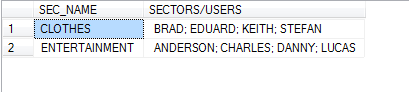
Example 2
If we want this all to be in one column, we can change the query a little as follows:
SELECT
   SS.SEC_NAME + ': ' +
   STUFF((SELECT '; ' + US.USR_NAME
          FROM USRS US
          WHERE US.SEC_ID = SS.SEC_ID
          FOR XML PATH('')), 1, 1, '') [SECTORS/USERS]
FROM SALES_SECTORS SS
GROUP BY SS.SEC_ID, SS.SEC_NAME
ORDER BY 1
And this gives us this result:

Example 3
This example takes it a step further where we have multiple subqueries to give us data based on USERS within CAMPAIGNS within SECTORS.
SELECT
    SS.SEC_ID,
    SS.SEC_NAME,
    STUFF((SELECT '; ' + AC.ADV_NAME + ' (' +
             STUFF((SELECT ',' + US.USR_NAME
                    FROM USR_ADV_CAMPAIGN UAC
                    INNER JOIN USRS US
                          ON US.USR_ID = UAC.USR_ID
                    WHERE UAC.ADV_ID = SAC.ADV_ID
                    FOR XML PATH('')), 1, 1, '') + ')'
           FROM ADV_CAMPAIGN AC
           INNER JOIN SEC_ADV_CAMPAIGN SAC
                 ON SAC.ADV_ID = AC.ADV_ID AND SAC.SEC_ID = SS.SEC_ID
           ORDER BY AC.ADV_NAME
           FOR XML PATH('')), 1, 1, '') [CAMPAIGNS/USERS PER SECTOR]
FROM SALES_SECTORS SS
GROUP BY
     SS.SEC_ID,
     SS.SEC_NAME
Example Rolling Up Index Columns into One Row
Here is an example that will rollup indexes into one row and show the columns that are part of the index as well as included columns if any exist.
SELECT
   SCHEMA_NAME(ss.SCHEMA_id) AS SchemaName,
   ss.name as TableName,
   ss2.name as IndexName,
   ss2.index_id,
   ss2.type_desc,
   STUFF((SELECT ', ' + name
    from sys.index_columns a inner join sys.all_columns b on a.object_id = b.object_id and a.column_id = b.column_id and a.object_id = ss.object_id and a.index_id = ss2.index_id and is_included_column = 0
order by a.key_ordinal
    FOR XML PATH('')), 1, 2, '') IndexColumns,
   STUFF((SELECT ', ' + name
    from sys.index_columns a inner join sys.all_columns b on a.object_id = b.object_id and a.column_id = b.column_id and a.object_id = ss.object_id and a.index_id = ss2.index_id and is_included_column = 1
    FOR XML PATH('')), 1, 2, '') IncludedColumns
FROM sys.objects SS INNER JOIN SYS.INDEXES ss2 ON ss.OBJECT_ID = ss2.OBJECT_ID
WHERE ss.type = 'U'
ORDER BY 1, 2, 3
Conclusion
There are always several options to complete a task within SQL Server and we should take the time to explore the capabilities offered by the database before developing large and complex code. I hope this is one more of those examples that shows there are sometimes easier approaches than you think might be available.
Next Steps
- Take this further and create simple queries and then deepen the complexity of the code.
- Explore the commands used in this tip further to see what other things you might be able to do.
- Some more details about the commands used above can be obtained from MSDN using the links below:
- STUFF (Transact-SQL)
- FOR XML (SQL SERVER)
- Solve old problems with SQL Server’s new STRING_AGG and STRING_SPLIT functions
- CONCAT and CONCAT_WS function in SQL Server
- New FORMAT and CONCAT Functions in SQL Server 2012
- Using SQL Server Concatenation Efficiently
- SQL Server Cursor Example
- COALESCE SQL Function
- How to Use SQL Server Coalesce to Work with NULL Values
- The Many Uses of Coalesce in SQL Server
- Deciding between COALESCE and ISNULL in SQL Server
- SQL Server SUBSTRING
- SQL Server Common Table Expression vs Temp Table
Last updated by Koen Verbeeck on 2025-10-24

Over 12 years working with databases and software industry, started work with SQL Server in version 7.0 and it now examines new techniques with the 2012 version. Specializes in database, focuses on performance tuning, backup/restore, disaster recovery, database mirroring, healthy check, replication, security, query optimization, and code analysis.
With software industry, has experience with ERP, mobile, ETL, Business Intelligence projects, with SQL Server and Oracle databases. Applications developed in Delphi, VB, C#, .NET, C++ and ExtJS Java.
Douglas has some Microsoft certifications, like MCITP in SQL Server DBA-DEV, MCPD in Windows Developer 3.5 and MCTS in .NET Framework 3.5 and Windows Forms Application. On education, has a MBA in Project Management.



Don’t forget to check for nulls, as nulls will concatenate to null, by default.
It might not be essential for this particular example, as name is required to be not null, however, in a real world the concatenated usually is an attribute, and its nullability is unlikely to favor this omission.
And then, whith nullability in mind one might consider to either substitute name with something like an : or completely omit value, in which case sentinel should be a party to concatenated value checked for null.
— cheers
Thanks a bunch! This performed exactly what I needed done and very efficiently. Very, VERY helpful!
Hi Valeriy,
there is another article that talks about STRING_AGG
https://www.mssqltips.com/tutorial/sql-string-agg-function/
https://www.mssqltips.com/sqlservertip/5275/solve-old-problems-with-sql-servers-new-stringagg-and-stringsplit-functions/
-Greg
Why didn’t you include STRING_AGG?
Hello,
I’m trying generate payment advice message into 1 row right now it is showing multiple message lines.
This is code i’m using
%InsertSelect(RADV_DTL_TAO, PMT_INVOICE_TBL,RADVISE_KEY = C.PMT_ID, REFERENCE_FLD = A.INVOICE_ID, DATE1 = A.INVOICE_DT, PROCESS_INSTANCE = B.PROCESS_INSTANCE, CURRENCY_CD = A.PAID_AMT_CURRENCY, AMOUNT_1 = A.GROSS_AMT, AMOUNT_2 = A.PAID_AMT, AMOUNT_3 = A.DISCOUNT_TAKEN ,DESCR254 =substring(A.DESCR254_MIXED +CHAR(10)+D1.PYMNT_MESSAGE,1,254), PAY_DOC_ID = A.PAY_DOC_ID)
FROM PS_PMT_INVOICE_TBL A, ((PS_VOUCHER B1 LEFT OUTER JOIN PS_PYMNT_VCHR_MSG C1 ON B1.BUSINESS_UNIT = C1.BUSINESS_UNIT
AND B1.VOUCHER_ID = C1.VOUCHER_ID ) LEFT OUTER JOIN PS_PYMNT_MSG_LN D1 ON C1.PYMNT_MESSAGE_CD = D1.MESSAGE_CD
AND D1.PYMNT_MESSAGE <> ‘ ‘), %Table(PMT_STL_TAO) B , PS_PMT_DETAIL_TBL C , PS_PMT_SRC_DEFN D
ORDER BY D1.PYMNT_MESSAGE FOR XML PATH (”)
WHERE B.PROCESS_INSTANCE = %ProcessInstance
AND B.PMT_SOURCE = D.PMT_SOURCE
AND D.REMIT_ADVISE_OPT=’Y’
AND A.PMT_ID = B.PMT_ID
AND C.PMT_ID = B.PMT_ID
AND B1.BUSINESS_UNIT = A.BUSINESS_UNIT
AND B1.INVOICE_ID = A.INVOICE_ID
AND B1.INVOICE_DT = A.INVOICE_DT
I’m getting an error
File: e:\pt85525b-retail\peopletools\src\psappeng\aedebug.hSQL error. Stmt #: 1723 Error Position: 0 Return: 8601 – [Microsoft][SQL Server Native Client 11.0][SQL Server]Incorrect syntax near ‘PS_PM T_STL_TAO4’. [Microsoft][SQL Server Native Client 11.0][SQL Server]Statement(s) could not be prepared. (SQLSTATE 37000) 8180 Failed SQL stmt: INSERT INTO PS_RADV_DTL_TAO4 (PROCESS_INSTANCE, RADVISE_KEY, PARTY_ID, REFERENCE_FL D, SEQ_NBR, PAY_DOC_ID, DATE1, DATE2, DATE3, CURRENCY_CD, AMOUNT_1, AMOUNT_2, AMOUNT_3, AMOUNT_4, DE SCR254) SELECT B.PROCESS_INSTANCE, C.PMT_ID, ‘ ‘, A.INVOICE_ID, 0, A.PAY_DOC_ID, A.INVOICE_DT, NULL, NULL, A.PAID_AMT_CURRENCY, A.GROSS_AMT, A.PAID_AMT, A.DISCOUNT_TAKEN , 0, substring(A.DESCR254_MIXE
What i’m missing in the sql?
Thanks
Hi Dana,
you could look at PIOVT and UNPIVOT
https://www.mssqltips.com/sqlservertip/1019/crosstab-queries-using-pivot-in-sql-server/
https://www.mssqltips.com/sqlservertip/2783/script-to-create-dynamic-pivot-queries-in-sql-server/
https://www.mssqltips.com/sqlservertip/3000/use-sql-servers-unpivot-operator-to-help-normalize-output/
https://www.mssqltips.com/sqlservertip/3002/use-sql-servers-unpivot-operator-to-dynamically-normalize-output/
-Greg
Excellent article. But how do you do the opposite? i.e. expand multiple values in a single row/column into multiple rows?
Excellent article, Rolling up multiple rows into a single row and column for SQL Server data.
But how do I then do the opposite further down my data flow (i.e. expand values in a single row/column into multiple rows)?
Excellent article, helped me solve a horrible report query I struggled with. Many thanks.
very good
Thanks so much, exactly what i need. Have previously used a heap of left joins and subqueries to achieve the same outcome, this is so much simpler and is dynamic.
THIS HELPED ME A LOT
Respected Sir
Here’s a query I was trying to solve in mysql
roll subject grade
121 math A
121 phy C
121 eng A
122 math B
122 phy C
122 eng D
The required result is
roll math phy eng
121 A C A
122 B C D
Can you please kindly help me with this Sir?
Hello,
This is the query I am working on, the goal is to have the correct locations for the individual part number but it looks like it is combining all the answers and every outcome is the same no matter the partnumber.
Select Distinct
PartNumber as ‘Part’,
Stuff ((Select distinct ‘, ‘+
Case When (a.Location like ‘IM-%’) then Stuff(a.location,1,3,”) else a.location end
From dbo.sublots as a
left join dbo.lots as b on a.LotNumberId= b.LotNumberId
left join dbo.parts as c on b.PartNumberId=c.PartNumberId
Where a.warehouse in (‘Pr03’)
and a.location is not null
and quantity > 0
For XML PATH(”)), 1,2, ”) as Location
From dbo.sublots as a
left join dbo.lots as b on a.LotNumberId= b.LotNumberId
left join dbo.parts as c on b.PartNumberId=c.PartNumberId
Where a.warehouse in (‘Pr03’)
group by PartNumber
order by PartNumber desc
What am I doing wrong
Hi Paul, see if the concepts in this article would help you: https://www.mssqltips.com/sqlservertip/6315/group-by-in-sql-sever-with-cube-rollup-and-grouping-sets-examples/
-Greg
My last comment did not display correctly.
It should be listed as results:
column 1: Crayons
Column 2:
Red
Yellow
Blue
Each color would be on its own row, and each row in column 1 after Crayons would be empty. Much like an excel spreadsheet would look.
Hello,
I am using Oracle.
This was helpful, in a sense, but I am trying to create a report that lists the data like this:
TABLE_NAME TABLE_NAME
CRAYONS GREEN
RED
YELLOW
BLUE
PAPER BLACK
WHITE
I have not been able to find the answer anywhere and have had some trouble even wording it correctly to ask it…
Any help with that one would be much appreciated.
Thanks,
Paul
Thank you Mr. Castilho, very good!