Problem
The WHERE clause in SQL queries filters data based on a specified expression or condition. We usually define a static condition or value, however, if you need to filter data based on different conditions, this can be done using SQL CASE in the WHERE clause.
Solution
This SQL tutorial will guide you on conditionally filtering using the WHERE clause using a SQL CASE statement.
Key Takeaways
- The article explains how to use sql case in where clause to filter data based on various conditions.
- It describes both simple and searched CASE statement syntax options for different filtering needs.
- It provides multiple examples of using CASE within SQL queries, showcasing conditional filtering and nested CASE statements.
- The tutorial also discusses using CASE statements in subqueries and compares performance implications.
- Next steps include exploring Microsoft documentation for more on CASE statements and related T-SQL articles.
Introduction to SQL CASE Statement
The SQL CASE statement specifies a conditional expression to perform different actions depending on the input expression value. There are two options for the syntax of the CASE statement.
The first one – simple CASE – is when you inspect one single expression and return different results for each possible value of the expression. It has the following syntax:
CASE expression
    WHEN value1 THEN result1
    WHEN value2 THEN result2
    ...
    WHEN valueN THEN resultN
    ELSE defaultValue
END
The other option – searched CASE – is when you evaluate a set of Boolean expressions where each expression leads to a different result:
CASE
    WHEN expression1 THEN result1
    WHEN expression2 THEN result2
    ...
    WHEN expressionN THEN resultN
    ELSE defaultValue
END
In this tip, we’ll use both styles of syntax.
For an example of the simple CASE, in the AdventureWorks2019 sample database, look at the [MaritalStatus] column value from [HumanResources]. It contains the abbreviation “S” for Single and “M” for Married.
SELECT TOP (5)
       [NationalIDNumber]
      ,[LoginID]
      ,[MaritalStatus]
FROM [AdventureWorks2019].[HumanResources].[Employee]
We can use a CASE statement to replace the abbreviation with the custom text, as shown below. It changes the abbreviations “S” and “M” to “Single” and “Married”, respectively.
SELECT TOP (5)
       [NationalIDNumber]
      ,[LoginID]
      ,CASE [MaritalStatus]
          WHEN 'S' THEN 'Single'
          WHEN 'M' THEN 'Married'
          ELSE 'Unknown'
          END as [MaritalStatus]
FROM [AdventureWorks2019].[HumanResources].[Employee]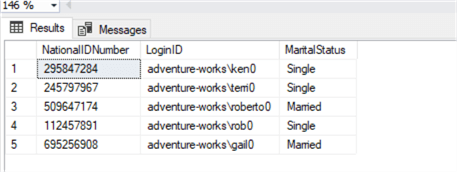
We can use CASE in SQL statements such as SELECT, WHERE, and ORDER BY.
CASE Statement in the WHERE Clause
The CASE statement in the WHERE clause can conditionally filter rows based on defined criteria. The syntax for the CASE statement in the WHERE clause is shown below. The CASE expression matches the condition and returns the value of the first THEN clause. If none of the conditions are true, it returns the value of the ELSE clause.
SELECT Col1,Col2….ColN
FROM ...
WHERE CASE
         WHEN condition1 THEN value1
         WHEN condition2 THEN value2
         ...
         ELSE valueN
      END
Let’s see it used in a few examples.
The following query uses the CASE statement in the WHERE clause to filter single employees.
-- source: https://www.MSSQLTips.com
SELECT NationalIDNumber,MaritalStatus
FROM [AdventureWorks2019].[HumanResources].[Employee]
WHERE CASE
         WHEN [MaritalStatus] = 'S' Then 1
         ELSE 0
      END = 1;
As shown below, it returns only rows where [MaritalStatus] is S.

In another example, the CASE statement in the WHERE clause consists of multiple WHEN conditions. SQL Server evaluates the first condition and checks for records satisfying the given conditions.
-- source: https://www.MSSQLTips.com
SELECT SalesOrderID,TerritoryID,ShipMethodID,BillToAddressID
FROM [AdventureWorks2019].[Sales].[SalesOrderHeader]
WHERE CASE
         WHEN [TerritoryID] = 5 AND [ShipMethodID] = 5 THEN 1
         WHEN BillToAddressID = 947 THEN 1
         ELSE 0
      END = 1;
Here is the output of the CASE statement conditions.
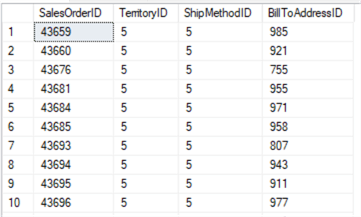
If we want to exclude the records instead of including them, we can change the filter to return records with values set to 0 by the CASE statement.
-- source: https://www.MSSQLTips.com
SELECT SalesOrderID,TerritoryID,ShipMethodID,BillToAddressID
FROM [AdventureWorks2019].[Sales].[SalesOrderHeader]
WHERE CASE
         WHEN [TerritoryID] = 5 AND [ShipMethodID] = 5 THEN 1
         WHEN BillToAddressID = 947 THEN 1
         ELSE 0
      END = 0;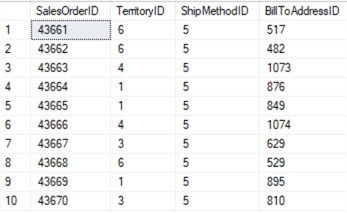
Similarly, you can combine multiple CASE statement conditions with OR and AND operators. For example, the query below returns both Single and Married employees. You can see we combined two CASE statements with the OR operator.
-- source: https://www.MSSQLTips.com
SELECT NationalIDNumber,MaritalStatus
FROM [AdventureWorks2019].[HumanResources].[Employee]
WHERE
   (CASE
       WHEN [MaritalStatus] = 'S' THEN 1
       ELSE 0
    END = 1)
 OR
   (CASE
       WHEN [MaritalStatus] = 'M' THEN 1
       ELSE 0
    END = 1);
We can also use dynamic values or calculate values in the CASE statement in the WHERE condition. For example, suppose we want records with a Total Due amount higher than the average amount of Total Due.
-- source: https://www.MSSQLTips.com
SELECT *
FROM [AdventureWorks2019].[Sales].[SalesOrderHeader]
WHERE
    CASE
        WHEN TotalDue > (SELECT AVG(TotalDue) FROM [Sales].[SalesOrderHeader] ) THEN 1
        ELSE 0
    END = 1;
Let’s look at another example where the CASE statement filters records when the OrderDate is between specified dates.
-- source: https://www.MSSQLTips.com
SELECT *
FROM [AdventureWorks2019].[Sales].[SalesOrderHeader]
WHERE CASE
          WHEN OrderDate BETWEEN '2023-01-01' AND '2023-01-31' THEN 1
          ELSE 0
      END = 1;
Note: some of the queries could be written without the CASE, but sometimes using CASE might make it easier to read the code. However, in some situations it might make the code longer. Here is an example of using CASE versus using OR for the query. These both return the same results and also have the same execution plan.
Since multiple options are available and readability can be quite subjective, it’s up to you to decide which format suits you best.
-- source: https://www.MSSQLTips.com
SELECT SalesOrderID,TerritoryID,ShipMethodID,BillToAddressID
FROM [AdventureWorks2019].[Sales].[SalesOrderHeader]
WHERE CASE
         WHEN [TerritoryID] = 5 AND [ShipMethodID] = 5 THEN 1
         WHEN BillToAddressID = 947 THEN 1
         ELSE 0
      END = 1;
SELECT SalesOrderID, TerritoryID, ShipMethodID, BillToAddressID
FROM [AdventureWorks2019].[Sales].[SalesOrderHeader]
WHERE ([TerritoryID] = 5 AND [ShipMethodID] = 5) OR BillToAddressID = 947;
Here is another example of using CASE.
-- source: https://www.MSSQLTips.com
SELECT
   bom.BillOfMaterialsID,
   bom.ProductAssemblyID,
   u.Name,
   u.UnitMeasureCode,
   bom.PerAssemblyQty
FROM Production.BillOfMaterials bom
INNER JOIN Production.UnitMeasure u on u.UnitMeasureCode = bom.UnitMeasureCode
WHERE
   PerAssemblyQty >= CASE u.UnitMeasureCode
                       WHEN 'EA' THEN 30
                       WHEN 'OZ' THEN 9
                       WHEN 'IN' THEN 40
                       ELSE 0
                   END;
Nested CASE Statement in the WHERE Clause
You can combine multiple conditions with a nested CASE statement in the WHERE clause. For example, we want records from the [SalesOrderHeader] table where the orderdate is between specified dates. If this condition is satisfied, check for orders with a value 1 for column [OnlineOrderFlag]:
-- source: https://www.MSSQLTips.com
SELECT *
FROM [AdventureWorks2019].[Sales].[SalesOrderHeader]
WHERE CASE
          WHEN OrderDate BETWEEN '2023-01-01' AND '2023-12-31' THEN
          CASE
              WHEN OnlineOrderFlag = 1 THEN 1
              ELSE 0
          END
          ELSE 0
      END = 1;
CASE Statement in WHERE Clause as SubQuery
We can use CASE statements in a subquery as well. Here is an example SELECT statement:
-- source: https://www.MSSQLTips.com
SELECT SalesOrderID,SalesOrderNumber,TotalDue,AccountNumber
FROM [AdventureWorks2019].[Sales].[SalesOrderHeader]
WHERE SalesOrderID IN (
          SELECT SalesOrderID
          FROM [AdventureWorks2019].[Sales].[SalesOrderHeader]
          WHERE CASE
                    WHEN TotalDue > 1000 THEN 1
                    ELSE 0
                END = 1
      );
However, it’s not because we can use the CASE statement with a subquery, that we always should. The query from the previous example can be rewritten to avoid the CASE statement and the subquery altogether:
-- source: https://www.MSSQLTips.com
SELECT SalesOrderID,SalesOrderNumber,TotalDue,AccountNumber
FROM [AdventureWorks2019].[Sales].[SalesOrderHeader]
WHERE TotalDue > 1000
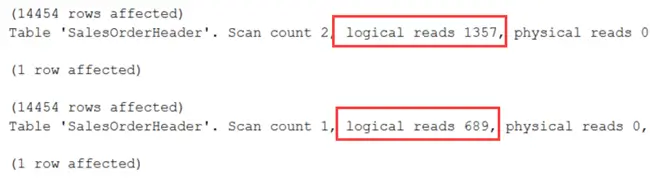
This time, the execution plans are different and the simplified query is faster:

If we look at the pages read, we can see the query without the subquery has about 50% less logical reads:
Next Steps
- Explore Microsoft docs for CASE statement documentation.
- Read more T-SQL related articles
Last updated by Koen Verbeeck on 2025-10-03

Hi! I am Rajendra Gupta, Database Specialist and Architect, helping organizations implement Microsoft SQL Server, Azure, Couchbase, AWS solutions fast and efficiently, fix related issues, and Performance Tuning with over 14 years of experience.
I am the author of the book “DP-300 Administering Relational Database on Microsoft Azure.” I can be reached at: Rajendra.gupta16@gmail.com for any consulting help.
- MSSQLTips Awards:
- Author of the Year – 2022 | Author Contender – 2021/2023/2024 | Champion Award (100+ tips) – 2020

The model code
SELECT Col1,Col2….ColN
FROM …
WHERE CASE
WHEN condition1 THEN value1
WHEN condition2 THEN value2
…
ELSE valueN
END
is missing the value to compare the result of the case expression to, e.g. END=1
SELECT *
FROM [AdventureWorks2019].[Sales].[SalesOrderHeader]
WHERE TotalDue >
CASE
WHEN (SELECT AVG(TotalDue) FROM [Sales].[SalesOrderHeader] ) > 3000 THEN 1
ELSE 0
END = 1;
/* If using MSSQL, you need to remove TotalDue > */
CASE is an expression, not a statement.
Is is possible to use a Case statement to include or exclude a part of the Where statement?
for example:
Select …
FROM …
Where
CASE Parameter1 > 0
THEN
Field 1 = Parameter1
END
I assume this methodology is totally un SARGEable and should only be used when we already will not or (for whatever reason) cannot use the index?
I may be missing it in my quick read but I don’t see anywhere in the article about how this may affect performance when it comes to SARGability. Any information in that area?
Good tutorial for beginners, except for the terminology.
SELECT, INSERT, UPDATE, DELETE, SET are STATEMENTS.
WHERE is a clause.
CASE is an expression.
You can’t write:
CASE WHEN X = 1 THEN UPDATE …
WHEN X = 2 THEN INSERT …
ELSE DELETE …
END
which would be valid if CASE was a statement.