Problem
Sometimes we have numbers in a different format due to cultural differences. For example, in France we use a comma for decimals and in USA we use decimal points. How can we work and change the format of numbers when working with Microsoft SQL Server? In this article, we look at using SQL format number functions to format numbers in various ways.
Solution
We will provide practical examples about different scenarios using different solutions for ways to format numbers in SQL Server using various SQL functions.
SQL Format Number Options
In this tutorial, we will cover how to use the following SQL Server T-SQL functions with the following examples:
- Using CAST – SELECT CAST(5634.6334 as int) as number
- Using CONVERT – SELECT CONVERT( int, 5634.6334) as number
- Using ROUND – SELECT ROUND(5634.6334,2) as number
- Using CEILING – SELECT FLOOR(5634.6334) as number
- Using FLOOR – SELECT CEILING(5634.6334) as number
- Using FORMAT – SELECT FORMAT(5634.6334, ‘N’, ‘en-us’) AS ‘Number’
CAST function to Format Numbers
CAST is an ANSI-compliant function used to convert one data type expression to another. The CAST syntax is:
CAST ( expression AS data_type [ ( length ) ] )Where expression can be a value inside a column to cast and data_type is the target data type. Optionally we can specify length or precision and scale for data types that require it.
Let’s say that we have the following number: 5634.6343
We can use the SQL CAST function to change the format of the number as follows:
| Code | Result |
|---|---|
| SELECT CAST(5634.6334 as int) as number | 5634 |
| SELECT CAST(5634.6334 as numeric) as number | 5635 |
| SELECT CAST(5634.6334 as numeric(10,1)) as number | 5634.6 |
| SELECT CAST(5634.6334 as numeric(10,2)) as number | 5634.63 |
SELECT CAST(5634.6334 as int) as int_
       , CAST(5634.6334 as numeric) as numeric_
       , CAST(5634.6334 as numeric(10,1)) as numeric_s1
       , CAST(5634.6334 as numeric(10,2)) as number_s2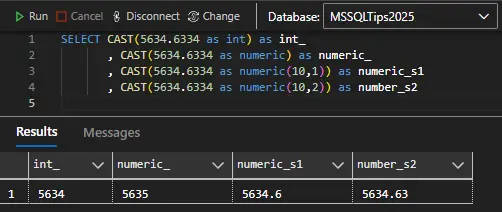
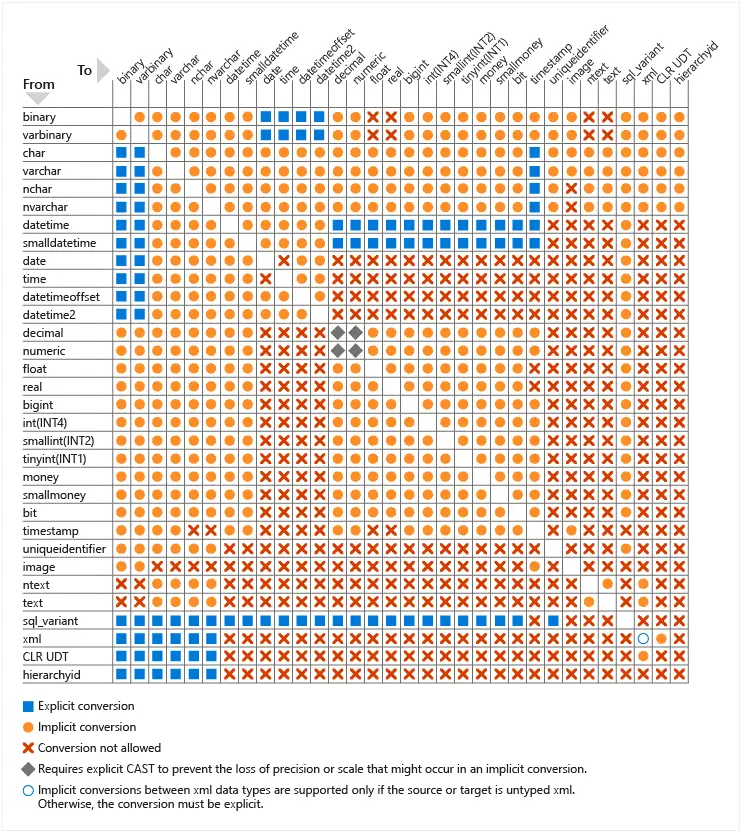
SQL Server Data Type Conversion Charts
While this document focuses on applying CAST to numerical values only, the function supports any SQL Server data type to convert from and to, only if explicit or implicit conversion between them is supported. To find out the possible data type conversion pairs, consult this chart:
TRY_CAST
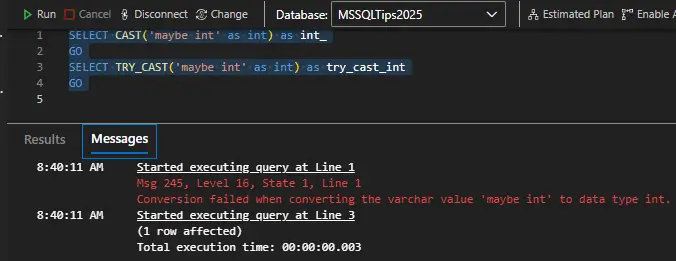
When discussing CAST, it is also worth mentioning its sister function TRY_CAST. The syntax is identical. The difference lies in what the function returns in case the conversion is not possible. In such a case, CAST will return an error that needs to be explicitly handled, while TRY_CAST Will return NULL.
SELECT CAST('maybe int' as int) as int_
GO
SELECT TRY_CAST('maybe int' as int) as try_cast_int
GO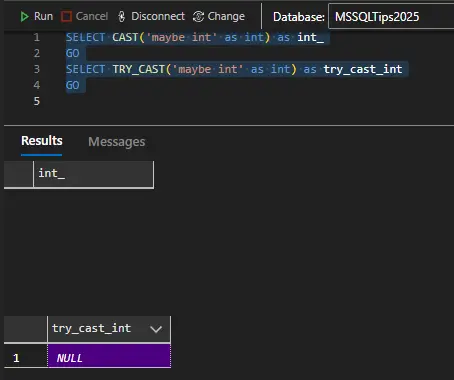
Format a Number in SQL using CONVERT
The SQL CONVERT function can do the same things as CAST. Unlike CAST, CONVERT is SQL Server-specific. It has different syntax, and, in some scenarios, it has additional options. The general syntax is:
CONVERT ( data_type [ ( length ) ] , expression [ , style ] )The following table shows some examples like the ones used for CAST.
| Code | Result |
|---|---|
| SELECT CONVERT( int, 5634.6334) as number | 5634 |
| SELECT CONVERT( numeric, 5634.6334) as number | 5635 |
| SELECT CONVERT( numeric(10,1), 5634.6334) as number | 5634.6 |
| SELECT CONVERT( numeric(10,2), 5634.6334) as number | 5634.63 |
| SELECT (CONVERT( nvarchar(20), 5634.6334))+’€’ as number | 5634.6334€ |
| SELECT REPLACE((CONVERT(nvarchar(20), 5634.6334)),’.’,’,’) as number | 5634,6334 |
| SELECT CONVERT( nvarchar(20), 50) + ‘%’ as number | 50% |
The data type conversion chart shown earlier is fully valid for CONVERT as well. CONVERT is also particularly useful for parsing and formatting VARCHAR into date and time. More examples are available in this document.
TRY_CONVERT
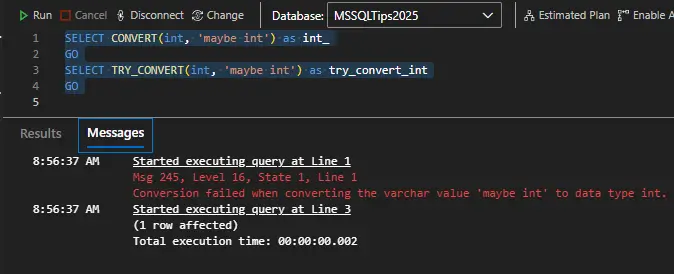
Similarly to TRY_CAST, we also have TRY_CONVERT which also returns NULL in case the conversion fails. The syntax is identical to the original function.
SELECT CONVERT(int, 'maybe int') as int_
GO
SELECT TRY_CONVERT(int, 'maybe int') as try_convert_int
GO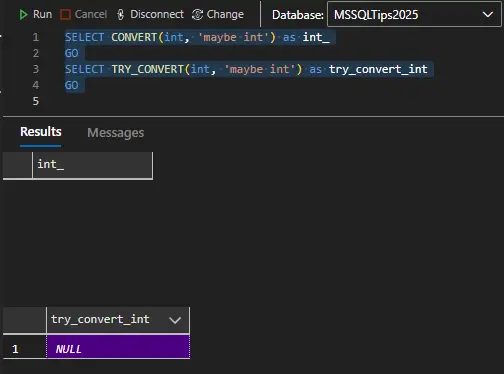
SQL ROUND Function Formatting
The SQL ROUND function may be useful if you want to round the number of decimal places. Here are some common examples:
| Code | Result |
|---|---|
| SELECT ROUND(5634.6334,2) as number | 5634.6300 |
| SELECT ROUND(5634.6334,3) as number | 5634.6330 |
| SELECT ROUND(5634.6334,-1) as number | 5630.0000 |
| SELECT ROUND(5634.6334,-2) as number | 5600.0000 |
SELECT ROUND(5634.6334, 2) as decimal_part_hundreds
    ,  ROUND(5634.6334, 3) as decimal_part_thousands
    ,  ROUND(5634.6334,-1) as whole_part_tens
    ,  ROUND(5634.6334,-2) as whole_part_hundreds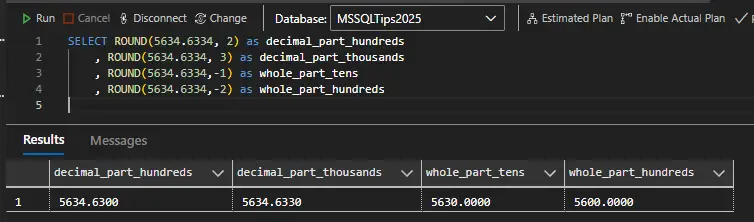
SQL Format Number using FLOOR AND CEILING functions
The FLOOR function returns the largest integer less or equal to the number while the CEILING returns the smallest integer greater or equal to the number. Here are some examples:
| Code | Result |
|---|---|
| SELECT FLOOR(5634.6334) as number | 5634 |
| SELECT CEILING(5634.6334) as number | 5635 |
| SELECT FLOOR(-5634.6334) as number | -5635 |
| SELECT CEILING(-5634.6334) as number | -5634 |
SELECT FLOOR(5634.6334) as smallest_pos_int
    ,  CEILING(5634.6334) as largest_pos_int
    ,  FLOOR(-5634.6334) as smallest_neg_int
    ,  CEILING(-5634.6334) as largest_neg_int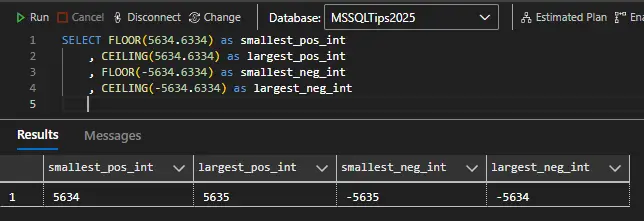
Number Formatting using FORMAT function
The SQL FORMAT option has many different options for formatting a number. The syntax is:
FORMAT( value , format [ , culture ] )The function is particularly useful for any presentation layer formatting of date/time and number values as strings. However, using FORMAT has a serious impact on performance. This document contains a detailed comparison of how much CONVERT is more efficient than FORMAT.
Here are some useful examples to use with performance in mind:
| Format | Code | Result |
|---|---|---|
| Numeric Format | SELECT FORMAT(5634.6334, ‘N’, ‘en-us’) AS ‘Number’ | 5,634.63 |
| Numeric format – 1 decimal | SELECT FORMAT(5634.6334, ‘N1’, ‘en-us’) AS ‘Number’ | 5,634.6 |
| Exponential, Scientific notation | SELECT FORMAT(5634.6334, ‘E’, ‘en-us’) AS ‘Number’ | 5.634633E+003 |
| Exponential, Scientific notation, 2 decimals | SELECT FORMAT(5634.6334, ‘E2’, ‘en-us’) AS ‘Number’ | 5.63E+003 |
| Decimal | SELECT FORMAT(5634, ‘D’, ‘en-us’) AS ‘Number’ | 5634 |
| Decimal-6 digits | SELECT FORMAT(5634, ‘D6’, ‘en-us’) AS ‘Currency Format’ | 005634 |
| General Format | SELECT FORMAT(5634.6334, ‘G’, ‘en-us’) AS ‘Number’ | 5634.6334 |
| General format, 6 digits | SELECT FORMAT(5634.6334, ‘G6’, ‘en-us’) AS ‘Number’ | 5634.63 |
| Currency-England | SELECT FORMAT(200.36, ‘C’, ‘en-GB’) AS ‘Number’ | £5,634.63 |
| Currency-China | SELECT FORMAT(5634.6334, ‘C’, ‘zh-CN’) AS ‘Number’ | ¥5,634.63 |
| Percentage | SELECT FORMAT(0.5, ‘P’, ‘en-us’) AS ‘number’ | 50.00% |
| Percentage 4 decimals | SELECT FORMAT(0.5, ‘P4’, ‘en-us’) AS ‘number’ | 50.0000% |
| Hexadecimal | SELECT FORMAT(56344, ‘X’, ‘en-us’) AS ‘number’ | DC18 |
| Phone number | SELECT FORMAT(123456789,’+###-###-####’) AS ‘number’ | +123-45-6789 |
| Fixed point | SELECT FORMAT(5634.6334, ‘F’, ‘en-us’) AS ‘Number’ | 5634.63 |
| Fixed point – 8 digits | SELECT FORMAT(5634.6334, ‘F8’, ‘en-us’) AS ‘Number’ | 5634.63340000 |
For the full list of the supported number formatting strings visit the .NET standard numeric format strings specification. There are many fine details listed there. For example, using the ‘N’ formatting string defaults to a scale of two, i.e. equals FORMAT(5634.6334, ‘N2’, ‘en-us’).
Conclusion – SQL Server Formatting Numbers
In this tutorial, we saw different examples of using CAST, CONVERT, FORMAT, ROUND, FLOOR and CEILING to convert to format numeric values. Some important caveats to remember:
- CAST and CONVERT produce identical outputs.
- CAST is ANSI-compliant and therefore can be useful for creating more portable scripts.
- FORMAT should be used sparingly because of its performance impact.
- ROUND, FLOOR and CEILING can be used in a standalone manner or in combination with CAST and CONVERT.
Next Steps
For more information refer to the following links:
- SQL Server Rounding Functions – Round, Ceiling and Floor
- Learn how to convert data with SQL CAST and SQL CONVERT
- CAST and CONVERT (Transact-SQL)
Interested in MSSQL String functions? Check out these articles:
- SQL String functions in SQL Server, Oracle and PostgreSQL
- SQL Server 2016 STRING_SPLIT Function
- New FORMAT and CONCAT Functions in SQL Server 2012
- SQL Server SUBSTRING
- SQL Server Substring Function Example with T-SQL, R and Python
Interested in SQL Server date functions? Check out these articles:
- SQL Convert Date to YYYY-MM-DD
- How SQL Server handles the date format YYYY-MM-DD
- Format SQL Server Dates with FORMAT Function
- Date and Time Conversions Using SQL Server with CONVERT
- How to Get Current Date in SQL Server
- SQL Server DateTime Best Practices
Last updated by Hristo Hristov 2025-10-31

Daniel Calbimonte is a Microsoft Most Valuable Professional, Microsoft Certified Trainer and Microsoft Certified IT Professional for SQL Server. He is an accomplished SSIS author, teacher at IT Academies and has over 10 years of experience as a QE and developer for SQL Server related software. He has worked for the government, oil companies, web sites, magazines and universities around the world. Daniel also regularly speaks at SQL Servers conferences and blogs.
- MSSQLTips Awards: Author of the Year Contender – 2015-2018, 2022, 2023 | Champion (100+ tips) – 2018


Great breakdown on the performance trade-offs between FORMAT and CONVERT! I’ve been running some stress tests on a high-volume SQL Server 2025 instance, and while the execution plan for CONVERT is definitely cleaner, I noticed some weird latency spikes when handling localized currency strings for international markets. Has anyone compared how these functions behave when the collation differs significantly from the system default?
SELECT FORMAT(5634.6334, ‘N’, ‘en-us’) AS ‘Number’ returns 5,634.63 (and not 5,634.6334) because the formatting string precision defaults to a scale of two. So FORMAT(5634.6334, ‘N’, ‘en-us’) is equal to FORMAT(5634.6334, ‘N2’, ‘en-us’). To get the full precision in this case: FORMAT(5634.6334, ‘N4’, ‘en-us’)
The result for “SELECT FORMAT(123456789,’+###-###-####’) AS ‘number’” is “+12-345-6789”, instead of “+123-45-6789”.
Best explained
Don’t ever use the FORMAT function in SQL Server. The performance is abysmal. Do some testing… you will find that it is not just a little bit slower. It’s a whole lot slower than anything you can probably imagine doing with CONVERT or using other options.
somehow SELECT FORMAT(5634.6334, ‘N’, ‘en-us’) AS ‘Number’ doesn’t give the same answer, it rounded the decimal