Problem
Since Microsoft SQL Server 2012, we have a new function called FORMAT(), it is very powerful in formatting datetime and numeric values, what are some good uses of this function to be used in daily DBA work?
Solution
The SQL Server T-SQL FORMAT() function is in essence a CLR type system function, and as such, the .Net formatting rules apply to this function. This function returns a nvarchar value (or null value).
In my daily DBA work, this function provides lots of convenience that otherwise need some nasty T-SQL conversion and string manipulation work to get the formats I need.
Using SQL Server FORMAT to return Deterministic Week Day
In one of my DBA alert emails, I need to include the weekday in one column, something like the following:
| EnrollDate | WeekDay | NewMembers |
|---|---|---|
| 2019-01-01 | Thu | 10 |
| 2019-01-03 | Sat | 24 |
| 2019-01-11 | Fri | 12 |
| 2019-02-01 | Fri | 18 |
| 2019-02-04 | Mon | 30 |
Figure 1 – Report
Assume my source table and data is like the following:
-- tested in SQL Server 2016
use TempDB
GO
drop table if exists dbo.NewAccount
create table dbo.NewAccount(EnrollDate date, NewMembers int
go

insert into dbo.NewAccount(EnrollDate, NewMembers)
values('2019-01-01', 10)
,('2019-01-03', 24)
,('2019-01-11', 12)
,('2019-02-01', 18)
,('2019-02-04', 30
go
If we want to get the data displayed as in the [Figure 1-Report], we need to calculate [WeekDay] which is a computed column based on the [EnrollDate] column.
In T-SQL, we have a date function, datepart(), that can tell the weekday, like the following:
declare @dt date = '2019-June-08'
select datepart(dw, @dt) -- returns 7
But the problem with this approach is that the return value of datepart(dw, '<date>') is impacted by the datefirst setting as shown below:
set datefirst <N> -- where N is between 1 and 7
But to get rid of the ambiguity, we can use the FORMAT() function as follows:
declare @dt date='2019-June-08'
select FORMAT(@dt, 'ddd') -- returns Sat
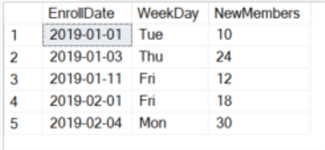
So, for our example mentioned above, we can use the following query to get the desired result:
select EnrollDate, WeekDay=format(EnrollDate, 'ddd'), NewMembers
from tempdb.dbo.NewAccount
The result is:
Use SQL Server FORMAT to get Various Numeric Display Formats
There are many requirements on how a numeric data type is displayed, such as a thousand separator every 3 digits, a percentage sign, a currency prefix or a different format when minus value is encountered. The following table lists some most commonly used numeric value formats.
| ID | Format | Result | Note |
|---|---|---|---|
| 1 | SELECT FORMAT(123456.789, 'C4') | $123,456.7890 | currency |
| 2 | SELECT FORMAT(0.1234, '0.00%') SELECT FORMAT(0.1234, 'P2') | 12.34% 12.34% | Percentage sign % |
| 3 | SELECT FORMAT(0.12345, '0.00‰') | 123.45‰ | Per mille sign ‰ |
| 4 | SELECT FORMAT(123456789, '#,#'); SELECT FORMAT(123456789, '0,#'); | 123,456,789 123,456,789 | Thousand separator |
| 5 | SELECT FORMAT(255, 'X3') ; | 0FF | Convert to HEX string |
| 6 | SELECT FORMAT(123, '#;(#);[zero]') SELECT FORMAT(-123, '#;(#);[zero]') SELECT FORMAT(0, '#;(#);[zero]') | 123 (123) [zero] |
A practical use of format is shown in the following example, i.e. previously when I need to check row counts for tables in a database, I find it is very inconvenient to figure what very high numbers are without the comma separator, especially when you have hundreds of millions of rows or more. The following code lists the rows of each table in database [WideWorldImporter].
use WideWorldImporter
GO
select [table]=schema_name(t.schema_id)+'.'+t.name
, [rows]=sum(p.rows), delimited_rows= format(sum(p.rows), '#,#')
from sys.tables t
inner join sys.partitions p
on t.object_id = p.object_id
and p.index_id < 2
group by schema_name(t.schema_id)+'.'+t.name
orderby [rows]desc

The [delimited_rows] column has a comma for every 3 digits, which makes reading much easier than the [rows] column.
Use SQL Server FORMAT to Display SQL Server Agent Job Run Duration
SQL Server job history table dbo.sysjobhistory has a column named [run_duration] as shown below:

This is an integer column, when I need to generate a report, I really want this to be HH:MM:SS format, for example if run_duration is 1, I want it to be 00:00:01, more examples are as listed in the following table.
| Run_value | Expected Display Format |
|---|---|
| 12 | 00:00:12 |
| 123 | 00:01:23 |
| 1234 | 00:12:34 |
| 12345 | 01:23:45 |
| 123456 | 12:34:56 |
| 251234 | 1d+01:12:34 |
So how can we do achieve this?
The trick here is that I will use a non-documented yet simple function in msdb database, dbo.agent_datetime, to compose a datetime value by inputting a dummy value, like 20000101, for @date parameter and use the [run_duration] column for @time parameter, and then use FORMAT() to return the HH:MM:SS formatted result.

To illustrate, I will create a table and populate it with some data simulating the [run_duration] column in dbo.sysjobhistory table.
use tempdb
GO
drop table if exists dbo.jobhistory -- for sql server 2016 and above version
create table dbo.jobhistory(id int identity primary key, run_duration int
go

insert into dbo.jobhistory(run_duration)
values(1),(12),(123),(1234),(12345),(123456),(253456
go
With the following code, I can convert the [run_duration] from HHMMSS int value to HH:MM:SS string value with the following syntax:
select *
, case when run_duration / 240000 =0
      then format(msdb.dbo.agent_datetime(20000101, run_duration), 'HH:mm:ss')
  else cast(run_duration/240000 as varchar(2))+'d+' + format(msdb.dbo.agent_datetime(20000101, run_duration%240000), 'HH:mm:ss')
end as [formatted_run_duration]
from dbo.jobhistory
The result is as follows, exactly what I want:

Summary
In this tip, we have revisited the FORMAT() function introduced in SQL Server 2012, and listed a few practical examples that otherwise are difficult to implement. The function provides convenience for daily DBA report work and when used properly, the function helps to make code concise, easy to understand and simple to maintain.
I did not discuss about the culture parameter used in the FORMAT() function. This culture parameter can be very useful in some culture related format work, such as currency sign, weekday name, date format (i.e. year/month/day or month/day/year, etc.). In some companies with offices across world, we can build some queries that will generate culture-compatible results.
Next Steps
You can read some other good MSSQL tutorials on MSSQLTips.com talking about the same topic.
Please share your own findings or creative usage of this function.
- Learn how to convert data with SQL CAST and SQL CONVERT
- SQL String functions in SQL Server, Oracle and PostgreSQL
- SQL Server 2016 STRING_SPLIT Function
- New FORMAT and CONCAT Functions in SQL Server 2012
- SQL Server SUBSTRING
- SQL Server Substring Function Example with T-SQL, R and Python
- SQL Convert Date to YYYY-MM-DD
- How SQL Server handles the date format YYYY-MM-DD
- Format SQL Server Dates with FORMAT Function
- Date and Time Conversions Using SQL Server with CONVERT
- How to Get Current Date in SQL Server
- SQL Server DateTime Best Practices
- SQL Server Date and Time Format Functions with Examples including TimeStamp
There is also a very interesting article discussing some shortcomings of the FORMAT() function.

Jeffrey Yao is a senior SQL Server consultant with 15 years of database administration, his current interests are on database administration automation and visualization. He enjoys reading the concise and smart sql tips and loves R&D work in DBA Engineering topics. His blog is at: http://www.sqlservercentral.com/blogs/jeffrey_yao/.


Thanks for shedding light on this! I deal with CSV imports from multiple regions, and inconsistent date formatting was a major issue. Implementing an automated date conversion fixed a lot of my parsing headaches
We never intended SQL to be used this way. This is why we pass the standards, only the ISO 8601 format (yyyy-mm-dd HH:mm:ss.sssssss) is allowed for dates and times. Display formatting is supposed to be done in a presentation layer of the tiered architecture.