Problem
A SQL calendar table can be immensely useful, particularly for reporting purposes, and for determining things like business days between two dates. I often see people struggling with manually populating a calendar or date dimension table; usually there are lots of loops and iterative code constructs being used. In this tip I will show you how to build and use a calendar table using a set-based solution that is powerful and easily customizable.
Solution
I build SQL calendar tables all the time, for a variety of business applications, and have come up with a few ways to handle certain details. Sharing them here will hopefully prevent you from re-inventing any wheels when populating your own tables.
SQL Calendar Table Considerations
One of the biggest objections I hear to calendar tables is that people don’t want to create a table. I can’t stress enough how cheap a table can be in terms of size and memory usage, especially as underlying storage continues to be larger and faster, compared to using all kinds of functions to determine date-related information in every single query. Twenty or thirty years of dates stored in a table takes a few MBs at most, even less with compression, and if you use them often enough, they’ll always be in memory.
I also always explicitly set things like DATEFORMAT, DATEFIRST, and LANGUAGE to avoid ambiguity, default to U.S. English for week starts and for month and day names, and assume that quarters for the fiscal year align with the calendar year. You may need to change some of these specifics depending on your display language, your fiscal year, and other factors.
This is a one-time population, so I’m not worried about speed, even though this specific CTE approach is no slouch. I like to materialize all of the columns to disk, rather than rely on computed columns, since the table becomes read-only after initial population. So I’m going to do a lot of those calculations during the initial series of CTEs. To start, I’ll show the output of each CTE one at a time.
You can change some of these details to experiment on your own. In this example, I’m going to populate the date dimension table with data spanning 30 years, starting from 2010-01-01.
Build Date Series with Recursive CTE
First, we have a recursive CTE that returns a sequence representing the number of days between our start date (2010-01-01) and 30 years later less a day (2039-12-31):
-- prevent set or regional settings from interfering with
-- interpretation of dates / literals
SET DATEFIRST  7, -- 1 = Monday, 7 = Sunday
    DATEFORMAT mdy,
    LANGUAGE   US_ENGLISH;
-- assume the above is here in all subsequent code blocks.
DECLARE @StartDate  date = '20100101';
DECLARE @CutoffDate date = DATEADD(DAY, -1, DATEADD(YEAR, 30, @StartDate));
;WITH seq(n) AS
(
  SELECT 0 UNION ALL SELECT n + 1 FROM seq
  WHERE n < DATEDIFF(DAY, @StartDate, @CutoffDate)
)
SELECT n FROM seq
ORDER BY n
OPTION (MAXRECURSION 0);
This returns the following list of numbers:

Build Date Series for SQL Server 2022 or Azure with GENERATE_SERIES Function
In SQL Server 2022 or Azure SQL Database, that initial CTE could be vastly simplified by using the new GENERATE_SERIES function, which would also eliminate any need for MAXRECURSION in subsequent queries:
DECLARE @StartDate  date = '20100101', @years int = 30;
;WITH seq(n) AS
(
  SELECT n = value FROM GENERATE_SERIES(0,
    DATEDIFF(DAY, @StartDate, DATEADD(YEAR, @years, @StartDate))-1)
)
SELECT n FROM seq
ORDER BY n;
Translate Numbers into Date Range
Next, we can add a second CTE that translates those numbers into all the dates in our range:
DECLARE @StartDate  date = '20100101';
DECLARE @CutoffDate date = DATEADD(DAY, -1, DATEADD(YEAR, 30, @StartDate));
;WITH seq(n) AS
(
  SELECT 0 UNION ALL SELECT n + 1 FROM seq
  WHERE n < DATEDIFF(DAY, @StartDate, @CutoffDate)
),
d(d) AS
(
  SELECT DATEADD(DAY, n, @StartDate) FROM seq
)
SELECT d FROM d
ORDER BY d
OPTION (MAXRECURSION 0);
Which returns the following range of dates:

Extend the Date Meta Data
Now, we can start extending those dates with information commonly vital to calendar tables / date dimensions. Many are bits of information you can extract from the date, but it’s more convenient to have them readily available in a view or table than it is to have every query calculate them inline. I’m working a little backward here, but I’m going to create an intermediate CTE to extract exactly once some computations I’ll later have to make multiple times. This query:
DECLARE @StartDate  date = '20100101';
DECLARE @CutoffDate date = DATEADD(DAY, -1, DATEADD(YEAR, 30, @StartDate));
;WITH seq(n) AS
(
  SELECT 0 UNION ALL SELECT n + 1 FROM seq
  WHERE n < DATEDIFF(DAY, @StartDate, @CutoffDate)
),
d(d) AS
(
  SELECT DATEADD(DAY, n, @StartDate) FROM seq
),
src AS
(
  SELECT
    TheDate         = CONVERT(date, d),
    TheDay          = DATEPART(DAY,       d),
    TheDayName      = DATENAME(WEEKDAY,   d),
    TheWeek         = DATEPART(WEEK,      d),
    TheISOWeek      = DATEPART(ISO_WEEK,  d),
    TheDayOfWeek    = DATEPART(WEEKDAY,   d),
    TheMonth        = DATEPART(MONTH,     d),
    TheMonthName    = DATENAME(MONTH,     d),
    TheQuarter      = DATEPART(Quarter,   d),
    TheYear         = DATEPART(YEAR,      d),
    TheFirstOfMonth = DATEFROMPARTS(YEAR(d), MONTH(d), 1),
    TheLastOfYear   = DATEFROMPARTS(YEAR(d), 12, 31),
    TheDayOfYear    = DATEPART(DAYOFYEAR, d)
  FROM d
)
SELECT * FROM src
  ORDER BY TheDate
  OPTION (MAXRECURSION 0);
Yields this data:

Align Fiscal Year Differently
If you wanted your fiscal year aligned differently, you could change the year and quarter calculations, or add additional columns. Let’s say your fiscal year starts October 1st, then depending on whether that’s 9 months late or 3 months early, you could just substitute d for a DATEADD expression:
;WITH q AS (SELECT d FROM
(
    VALUES('20200101'),
          ('20200401'),
          ('20200701'),
          ('20201001')
    ) AS d(d))
SELECT
  d,
  StandardQuarter        = DATEPART(QUARTER, d),
  LateFiscalQuarter      = DATEPART(QUARTER, DATEADD(MONTH, -9, d)),
  LateFiscalQuarterYear  = YEAR(DATEADD(MONTH, -9, d)),
  EarlyFiscalQuarter     = DATEPART(QUARTER, DATEADD(MONTH,  3, d)),
  EarlyFiscalQuarterYear = YEAR(DATEADD(MONTH,  3, d))
FROM q;
Build Detailed Data for Each Date
Whatever my source data is, I can build on those parts and get much more detail about each date:
DECLARE @StartDate  date = '20100101';
DECLARE @CutoffDate date = DATEADD(DAY, -1, DATEADD(YEAR, 30, @StartDate));
;WITH seq(n) AS
(
  SELECT 0 UNION ALL SELECT n + 1 FROM seq
  WHERE n < DATEDIFF(DAY, @StartDate, @CutoffDate)
),
d(d) AS
(
  SELECT DATEADD(DAY, n, @StartDate) FROM seq
),
src AS
(
  SELECT
    TheDate         = CONVERT(date, d),
    TheDay          = DATEPART(DAY,       d),
    TheDayName      = DATENAME(WEEKDAY,   d),
    TheWeek         = DATEPART(WEEK,      d),
    TheISOWeek      = DATEPART(ISO_WEEK,  d),
    TheDayOfWeek    = DATEPART(WEEKDAY,   d),
    TheMonth        = DATEPART(MONTH,     d),
    TheMonthName    = DATENAME(MONTH,     d),
    TheQuarter      = DATEPART(Quarter,   d),
    TheYear         = DATEPART(YEAR,      d),
    TheFirstOfMonth = DATEFROMPARTS(YEAR(d), MONTH(d), 1),
    TheLastOfYear   = DATEFROMPARTS(YEAR(d), 12, 31),
    TheDayOfYear    = DATEPART(DAYOFYEAR, d)
  FROM d
),
dim AS
(
  SELECT
    TheDate,
    TheDay,
    TheDaySuffix        = CONVERT(char(2), CASE WHEN TheDay / 10 = 1 THEN 'th' ELSE
                            CASE RIGHT(TheDay, 1) WHEN '1' THEN 'st' WHEN '2' THEN 'nd'
                            WHEN '3' THEN 'rd' ELSE 'th' END END),
    TheDayName,
    TheDayOfWeek,
    TheDayOfWeekInMonth = CONVERT(tinyint, ROW_NUMBER() OVER
                            (PARTITION BY TheFirstOfMonth, TheDayOfWeek ORDER BY TheDate)),
    TheDayOfYear,
    IsWeekend           = CASE WHEN TheDayOfWeek IN (CASE @@DATEFIRST WHEN 1 THEN 6 WHEN 7 THEN 1 END,7)
                            THEN 1 ELSE 0 END,
    TheWeek,
    TheISOweek,
    TheFirstOfWeek      = DATEADD(DAY, 1 - TheDayOfWeek, TheDate),
    TheLastOfWeek       = DATEADD(DAY, 6, DATEADD(DAY, 1 - TheDayOfWeek, TheDate)),
    TheWeekOfMonth      = CONVERT(tinyint, DENSE_RANK() OVER
                            (PARTITION BY TheYear, TheMonth ORDER BY TheWeek)),
    TheMonth,
    TheMonthName,
    TheFirstOfMonth,
    TheLastOfMonth      = MAX(TheDate) OVER (PARTITION BY TheYear, TheMonth),
    TheFirstOfNextMonth = DATEADD(MONTH, 1, TheFirstOfMonth),
    TheLastOfNextMonth  = DATEADD(DAY, -1, DATEADD(MONTH, 2, TheFirstOfMonth)),
    TheQuarter,
    TheFirstOfQuarter   = MIN(TheDate) OVER (PARTITION BY TheYear, TheQuarter),
    TheLastOfQuarter    = MAX(TheDate) OVER (PARTITION BY TheYear, TheQuarter),
    TheYear,
    TheISOYear          = TheYear - CASE WHEN TheMonth = 1 AND TheISOWeek > 51 THEN 1
                            WHEN TheMonth = 12 AND TheISOWeek = 1  THEN -1 ELSE 0 END,
    TheFirstOfYear      = DATEFROMPARTS(TheYear, 1,  1),
    TheLastOfYear,
    IsLeapYear          = CONVERT(bit, CASE WHEN (TheYear % 400 = 0)
                            OR (TheYear % 4 = 0 AND TheYear % 100 <> 0)
                            THEN 1 ELSE 0 END),
    Has53Weeks          = CASE WHEN DATEPART(WEEK,     TheLastOfYear) = 53 THEN 1 ELSE 0 END,
    Has53ISOWeeks       = CASE WHEN DATEPART(ISO_WEEK, TheLastOfYear) = 53 THEN 1 ELSE 0 END,
    MMYYYY              = CONVERT(char(2), CONVERT(char(8), TheDate, 101))
                          + CONVERT(char(4), TheYear),
    Style101            = CONVERT(char(10), TheDate, 101),
    Style103            = CONVERT(char(10), TheDate, 103),
    Style112            = CONVERT(char(8),  TheDate, 112),
    Style120            = CONVERT(char(10), TheDate, 120)
  FROM src
)
SELECT * FROM dim
  ORDER BY TheDate
  OPTION (MAXRECURSION 0);
This adds supplemental information about any given date, such as the first of period / last of period the date falls within, whether it is a leap year, a few popular string formats, and some specific ISO 8601 specifics (I’ll talk more about those in another tip). You may only want some of these columns, and you may want others, too.
Create dbo.DateDimension Table and Add Index
When you’re happy with the output, you can change this line:
SELECT * FROM dimTo this:
SELECT * INTO dbo.DateDimension FROM dimThen you can add a clustered primary key (and any other indexes you want to have handy):
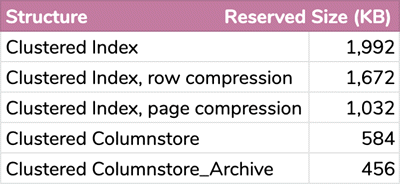
CREATE UNIQUE CLUSTERED INDEX PK_DateDimension ON dbo.DateDimension(TheDate);To give an idea of how much space this table really takes, even with all those columns that you probably don’t need, the max is about 2MB with a regular clustered index defined on the TheDate column, all the way down to 500KB for a clustered columnstore index compressed with COLUMNSTORE_ARCHIVE (not necessarily something you should do, depending on the workload that will work against this table, but since it is effectively read only, the DML overhead isn’t really a consideration):
Add Holidays Dimension
Next, we need to talk about holidays, one of the primary seasons you need to use a SQL calendar table instead of relying on built-in date/time functions. In the original version of this tip, I added an IsHoliday column, but as a comment rightly pointed out, this set is probably best held in a separate table:
CREATE TABLE dbo.HolidayDimension
(
  TheDate date NOT NULL,
  HolidayText nvarchar(255) NOT NULL,
  CONSTRAINT FK_DateDimension FOREIGN KEY(TheDate) REFERENCES dbo.DateDimension(TheDate)
);
CREATE CLUSTERED INDEX CIX_HolidayDimension ON dbo.HolidayDimension(TheDate);
GO
This allows you to have more than one holiday for any given date, and in fact allows for multiple entire calendars each with their own set of holidays (imagine an additional column specifying the CalendarID).
Populating the holiday dimension table can be complex. Since I am in the United States, I’m going to deal with statutory holidays here; of course, if you live in another country, you’ll need to use different logic. You’ll also need to add your own company’s holidays manually, but hopefully if you have things that are deterministic, like bank holidays, Boxing Day, or the third Monday of July is your annual off-site arm-wrestling tournament, you should be able to do most of that without much work by following the same sort of pattern I use below. You may also have to add some logic if your company observes weekend holidays on the previous or following weekday, which gets even more complex if those happen to collide with other company- or industry-specific non-business days. We can add most of the traditional holidays with a single pass and rather simple criteria:
;WITH x AS
(
  SELECT
    TheDate,
    TheFirstOfYear,
    TheDayOfWeekInMonth,
    TheMonth,
    TheDayName,
    TheDay,
    TheLastDayOfWeekInMonth = ROW_NUMBER() OVER
    (
      PARTITION BY TheFirstOfMonth, TheDayOfWeek
      ORDER BY TheDate DESC
    )
  FROM dbo.DateDimension
),
s AS
(
  SELECT TheDate, HolidayText = CASE
  WHEN (TheDate = TheFirstOfYear)
    THEN 'New Year''s Day'
  WHEN (TheDayOfWeekInMonth = 3 AND TheMonth = 1 AND TheDayName = 'Monday')
    THEN 'Martin Luther King Day'    -- (3rd Monday in January)
  WHEN (TheDayOfWeekInMonth = 3 AND TheMonth = 2 AND TheDayName = 'Monday')
    THEN 'President''s Day'          -- (3rd Monday in February)
  WHEN (TheLastDayOfWeekInMonth = 1 AND TheMonth = 5 AND TheDayName = 'Monday')
    THEN 'Memorial Day'              -- (last Monday in May)
  WHEN (TheMonth = 7 AND TheDay = 4)
    THEN 'Independence Day'          -- (July 4th)
  WHEN (TheDayOfWeekInMonth = 1 AND TheMonth = 9 AND TheDayName = 'Monday')
    THEN 'Labour Day'                -- (first Monday in September)
  WHEN (TheDayOfWeekInMonth = 2 AND TheMonth = 10 AND TheDayName = 'Monday')
    THEN 'Columbus Day'              -- Columbus Day (second Monday in October)
  WHEN (TheMonth = 11 AND TheDay = 11)
    THEN 'Veterans'' Day'            -- (November 11th)
  WHEN (TheDayOfWeekInMonth = 4 AND TheMonth = 11 AND TheDayName = 'Thursday')
    THEN 'Thanksgiving Day'          -- (Thanksgiving Day ()fourth Thursday in November)
  WHEN (TheMonth = 12 AND TheDay = 25)
    THEN 'Christmas Day'
  END
  FROM x
  WHERE
    (TheDate = TheFirstOfYear)
    OR (TheDayOfWeekInMonth = 3     AND TheMonth = 1  AND TheDayName = 'Monday')
    OR (TheDayOfWeekInMonth = 3     AND TheMonth = 2  AND TheDayName = 'Monday')
    OR (TheLastDayOfWeekInMonth = 1 AND TheMonth = 5  AND TheDayName = 'Monday')
    OR (TheMonth = 7 AND TheDay = 4)
    OR (TheDayOfWeekInMonth = 1     AND TheMonth = 9  AND TheDayName = 'Monday')
    OR (TheDayOfWeekInMonth = 2     AND TheMonth = 10 AND TheDayName = 'Monday')
    OR (TheMonth = 11 AND TheDay = 11)
    OR (TheDayOfWeekInMonth = 4     AND TheMonth = 11 AND TheDayName = 'Thursday')
    OR (TheMonth = 12 AND TheDay = 25)
)
INSERT dbo.HolidayDimension(TheDate, HolidayText)
SELECT TheDate, HolidayText FROM s
UNION ALL
SELECT DATEADD(DAY, 1, TheDate), 'Black Friday'
  FROM s WHERE HolidayText = 'Thanksgiving Day'
ORDER BY TheDate;
Black Friday is a little trickier, because it’s the Friday after the fourth Thursday in November. Usually that makes it the fourth Friday, but several times a century it is actually the fifth Friday, so the UNION ALL above just grabs the day after each Thanksgiving Day.
And then there’s Easter
This has always been a complicated problem; the rules for calculating the exact date are so convoluted, I suspect most people can only mark those dates where they have physical calendars they can look at to confirm. If your company doesn’t recognize Easter, you can skip ahead; if it does, you can use the following function, which will return the Easter holiday dates for any given year:
CREATE FUNCTION dbo.GetEasterHolidays(@TheYear INT)
RETURNS TABLE
WITH SCHEMABINDING
AS
RETURN
(
  WITH x AS
  (
    SELECT TheDate = DATEFROMPARTS(@TheYear, [Month], [Day])
      FROM (SELECT [Month], [Day] = DaysToSunday + 28 - (31 * ([Month] / 4))
      FROM (SELECT [Month] = 3 + (DaysToSunday + 40) / 44, DaysToSunday
      FROM (SELECT DaysToSunday = paschal - ((@TheYear + (@TheYear / 4) + paschal - 13) % 7)
      FROM (SELECT paschal = epact - (epact / 28)
      FROM (SELECT epact = (24 + 19 * (@TheYear % 19)) % 30)
        AS epact) AS paschal) AS dts) AS m) AS d
  )
  SELECT TheDate, HolidayText = 'Easter Sunday' FROM x
    UNION ALL SELECT DATEADD(DAY, -2, TheDate), 'Good Friday'   FROM x
    UNION ALL SELECT DATEADD(DAY,  1, TheDate), 'Easter Monday' FROM x
);
GO
(You can adjust the function easily, depending on whether they recognize just Easter Sunday or also Good Friday and/or Easter Monday. There is also another tip here that will show you how to determine the date for Mardi Gras, given the date for Easter.)
Now, to use that function to add the Easter holidays to the HolidayDimension table:
INSERT dbo.HolidayDimension(TheDate, HolidayText)
  SELECT d.TheDate, h.HolidayText
    FROM dbo.DateDimension AS d
    CROSS APPLY dbo.GetEasterHolidays(d.TheYear) AS h
    WHERE d.TheDate = h.TheDate;
Create View to Simplify SQL Queries
Finally, you can create a view that bridges these two tables (or multiple views):
CREATE VIEW dbo.TheCalendar
AS
  SELECT
    d.TheDate,
    d.TheDay,
    d.TheDaySuffix,
    d.TheDayName,
    d.TheDayOfWeek,
    d.TheDayOfWeekInMonth,
    d.TheDayOfYear,
    d.IsWeekend,
    d.TheWeek,
    d.TheISOweek,
    d.TheFirstOfWeek,
    d.TheLastOfWeek,
    d.TheWeekOfMonth,
    d.TheMonth,
    d.TheMonthName,
    d.TheFirstOfMonth,
    d.TheLastOfMonth,
    d.TheFirstOfNextMonth,
    d.TheLastOfNextMonth,
    d.TheQuarter,
    d.TheFirstOfQuarter,
    d.TheLastOfQuarter,
    d.TheYear,
    d.TheISOYear,
    d.TheFirstOfYear,
    d.TheLastOfYear,
    d.IsLeapYear,
    d.Has53Weeks,
    d.Has53ISOWeeks,
    d.MMYYYY,
    d.Style101,
    d.Style103,
    d.Style112,
    d.Style120,
    IsHoliday = CASE WHEN h.TheDate IS NOT NULL THEN 1 ELSE 0 END,
    h.HolidayText
  FROM dbo.DateDimension AS d
  LEFT OUTER JOIN dbo.HolidayDimension AS h
  ON d.TheDate = h.TheDate;
And now you have a functional calendar view you can use for all of your reporting or business needs.
Summary
Creating a dimension or SQL calendar table for business dates and fiscal periods might seem intimidating at first, but once you have a solid methodology in line, it can be very worthwhile. There are many ways to do this; some will subscribe to the idea that many of these date-related facts can be derived at query time, or at least be non-persisted computed columns. You will have to decide if the values are calculated often enough to justify the additional space on disk and in the buffer pool.
To further help performance, you could put the calendar table into its own filegroup (or its own database), and mark it as read-only after initial population. This won’t force the table to stay in memory all the time (remember DBCC PINTABLE?), but that will happen naturally if the table is queried enough anyway. What it could potentially help with is reducing other types of contention.
Next Steps
- Build a persisted calendar table to help with reporting queries, business logic, and gathering additional facts about given dates.
- Using a calendar table in SQL Server – Part 1
- Calendar Table in SQL Server to Identify Date Gaps and Islands
- Create a Calendar Table in SQL Server to Optimize Scheduling Problems
- SQL Calendar Table – Use a Table and View to Simplify Generation
- Simplify Date Period Calculations in SQL Server
- SQL Date Calculation Simplifications in SQL Server
- See these related tips and other resources:

Aaron Bertrand (@AaronBertrand) is a passionate technologist with industry experience dating back to Classic ASP and SQL Server 6.5. He also blogs at sqlblog.org.
- MSSQLTips Awards: Author of the Year – 2016, 2023 | Leadership (200+ tips) – 2022


Sure, like I said, it all depends on how _your company_ observes holidays that fall on weekends.
Wonderful script!
I think in HolidayDimension table ‘New Year”s Day’ calculation should include First Monday of the year, not any weekends.
Condition should be
(TheDayOfWeekInMonth = 1 AND TheMonth = 1 AND TheDayName = ‘Monday’)
instead of (TheDate = TheFirstOfYear)
Thank you!!
Answering my own question after a bit of work and figured out a better solution in as few lines as my limited SQL skill allows:
declare @StartDate date
set @StartDate = @DesiredYearMonthDate — Ie: ‘2022/12/01’ — We want to retrieve December 2022 so pull days beforehand.
declare @FirstDate date
set @FirstDate = (
SELECT FirstDate =
CASE TheDayOfWeek
WHEN 1 THEN CAST(DATEADD(DAY, -7, TheDate) AS DATE)
WHEN 2 THEN CAST(DATEADD(DAY, -1, TheDate) AS DATE)
WHEN 3 THEN CAST(DATEADD(DAY, -2, TheDate) AS DATE)
WHEN 4 THEN CAST(DATEADD(DAY, -3, TheDate) AS DATE)
WHEN 5 THEN CAST(DATEADD(DAY, -4, TheDate) AS DATE)
WHEN 6 THEN CAST(DATEADD(DAY, -5, TheDate) AS DATE)
WHEN 7 THEN CAST(DATEADD(DAY, -6, TheDate) AS DATE)
END
FROM dbo.CalendarDimension
WHERE TheDate = @StartDate )
Returning the single date @FirstDate would then become the retrieve argument from the “CalendarDimension” table I had built.
To get the 42 cells I then just do this:
select top 42 * from dbo.CalendarDimension where TheDate >= @FirstDate
Notes:
The first CASE condition “WHEN 1 THEN CAST(DATEADD(DAY, -7, TheDate) AS DATE)” is set purposely to retrieve 7 days before the date because when you look at how the microsoft date control normally works it does a week before and the remaining days afterwards VS using just “TheDate” and not having that leading week to display. If you use TheDate i found that there would be a large “POST” month number of days after the months that start on day 1 such as January 2023 does. So its personal choice.
Works like a charm. I wrapped this up into a SQL Function and then I just execute it to get the FirstDate value based on the YEAR/MONTH i am targeting to display and it worked out.
Open to further ideas of improvement.
Hi Aaron,
Thanks for the great DateDimension calendar building script, its wonderful, I built a table to populate 110 years of data starting @ 2020-01-01
Trying to build a simple SQL to give me a 42 day sliding “Window” of records where it will always return exactly 42 records at a time.
Basically I always want the full month of a YEAR-MONTH date provided, plus the days leading up and days afterwards as needed to fill out a 42 day calendar view.
I came up with a long drawn out SQL and I was sure there must have been an easier way to do it with a simple case statement maybe?
Can you or someone help.
Joe
Thank you for this. I am beginner and was haunted by the code before.
I’m a beginner, and I must admit this is scary. Thanks for all the complex queries
Love it! Where is your “tip jar” or “buy me a coffee” button?
Brilliant… thank you!
Hi Donna,
DATEFIRST <> TheDayOfWeek. Try this:
https://dbfiddle.uk/?rdbms=sqlserver_2019&fiddle=a98a704b723cb638231db6c35114f5da
It’s confusing, but in order to make Sunday the first day of the week, you actually say `SET DATEFIRST 7`. So the comment next to the SET DATEFIRST command reflects what argument you need to pass in order to get the desired weekday to be day of the week 1, not what day of the week those weekdays show. In my calendar table, I want Sunday to be 1 and Monday to be 2 regardless of the DATEFIRST setting I have when populating it or any user might have when querying it (which is why I store it instead of rely on computations later).
The following document explains it probably better than I could.
https://docs.microsoft.com/en-us/sql/t-sql/statements/set-datefirst-transact-sql?view=sql-server-ver15
Hi Aaron,
I noticed in the beginning of the samples you put “SET DATEFIRST 7, — 1 = Monday, 7 = Sunday”, but in the date table field TheDayOfWeek, Sunday is 1 and Monday is 2. Something changed between the statement and the table output?
Thank you for this, it was a great help and just saved me TONS of work.
Thank you Aaron. Great post and amazing effort.
Greatly appreciated, very well described and great in detail. Thank you for such a great effort. I got a clear idea about this subject.
There is an Independence Day obsewrved that was omitted. If July 4 is a Saturday, Friday is a holiday if it falls on a Sunday Monday is observed as the holiday.
I added some SQL in the HolidayDimension code below this line:
INSERT dbo.HolidayDimension(TheDate, HolidayText)
SELECT TheDate, HolidayText FROM s
UNION ALL
SELECT DATEADD(DAY, 1, TheDate), ‘Black Friday’
FROM s WHERE HolidayText = ‘Thanksgiving Day’
ORDER BY TheDate;
to take care of it, these will insert the observed July 4th holidays into HolidayDimension:
— Independence Day is a federal holiday. If July 4 is a Saturday, it is observed on Friday, July 3.
INSERT dbo.HolidayDimension(TheDate, HolidayText)
SELECT TheDate, ‘Independence Day (observed)’
FROM dbo.DateDimension WHERE TheMonth = 7 AND TheDay = 3 AND TheDayName = ‘Friday’;
— Independence Day is a federal holiday. If July 4 is a Sunday, it is observed on Monday, July 5.
INSERT dbo.HolidayDimension(TheDate, HolidayText)
SELECT TheDate, ‘Independence Day (observed)’
FROM dbo.DateDimension WHERE TheMonth = 7 AND TheDay = 5 AND TheDayName = ‘Monday’;
Hope this helps someone.
How can I make The Week Column incremental i.e. it should not renew after completion of year and just continue adding up till last.
Aaron, thanks so much! I was able to modify this script to get it to do exactly what I needed! Cheers!
Absolutely fantastic article and advice, I did this years ago and lost the scripts, thank you so much, this information and advice are priceless.
Thank you! This worked like a charm! I really appreciate all of the detail
Thanks – that absolutely worked! Thought I had tried that approach, but must have had a brain cramp!
Hey Kurt, it would just be the other way, right?
SELECT TOP (1) … FROM
(
SELECT TOP (180) …
WHERE TheDate <= TargetEndDate …
ORDER BY TheDate DESC
) as BusinessDays
ORDER BY TheDate;
You could make it a little tidier by using window functions instead of 2 nested TOPs, but I tried to make as few changes to your logic as possible.
This article is incredible! I created both of the recommended tables, and a view called “USCalendar” for my queries.
This query calculates the end date, given a start date (03/01/21) and number of business days (180):
select Top 1 TheDate as EndDate
from (select Top 180 TheDate from USCalendar
Where TheDate>=’03/01/2021′
And IsWeekend=0 and IsHoliday=0
Order By TheDate) as BusinessDays
Order By TheDate DESC
My only challenge is coming up with a way to reverse it – how do I find the start date if I know the target end date and number of business days?
Agree with all the other comments, this is amazing and has helped me so much with the working day calculations I have to do in my work, with a row number column that numbers all the non-working days I can calculate the number of days between 2 dates or add the required number or days to a date to give the due date. As I don’t have admin rights to our database I am not able to create functions in my working role but I found a formula for Easter dates that someone had posted on another site having adapted it from an Excel formula and this seems to work (adjust the last number for Easter Sunday or Good Friday:
EasterMonday = DATEADD(dd, ROUND(DATEDIFF(dd, ‘1899-12-30’, DATEFROMPARTS(DATEPART(YEAR, d), 4, 1)) / 7.0 + ((19.0 * (DATEPART(YEAR, d) % 19) – 7) % 30) * 0.14, 0) * 7.0 – 6, -1)