Problem
I’ve seen the SQL EXISTS keyword in Microsoft SQL Server T-SQL code and don’t understand it well. What does it do? How do I use it? Are there best practices around SQL IF EXISTS?
This SQL tutorial will explain what the keyword EXISTS does and show several different use cases.
Solution
The EXISTS keyword is a Boolean function that returns either true or false. Since it is a function, it expects a parameter within a set of parentheses (…). The general syntax is: EXISTS ( subquery ).
The subquery can be a restricted SELECT statement, where the INTO keyword is not allowed. The single parameter accepted by EXISTS is a SELECT statement. The function returns TRUE if the SELECT statement parameter returns at least 1 row and FALSE if exactly 0 rows are returned.
EXISTS is used as an argument in IF statements, WHILE loops, and WHERE clauses. While it can be used in JOIN predicates, this is exceedingly rare.
The demos in this tip utilize the WideWorldImporters sample SQL database, which can be downloaded for free from Github. All demos are shown using SQL Server Management Studio (SSMS) and SQL Server 2022, but the information in this tip is valid going back multiple versions of SQL Server as well as Azure SQL Database and Managed Instance, Azure Synapse Analytics, SQL analytics endpoint in Microsoft Fabric, Warehouse in Microsoft Fabric, and SQL database in Microsoft Fabric.
Calling the EXISTS Function
Consider this SELECT statement. It should return at least four rows on most SQL Server installations and perhaps two rows on Azure DBaaS instances. It should never return 0 rows.
SELECT * FROM sys.databasesSQL EXISTS Logic
Since we know that statement contains several rows, what happens if we paste that query within the parameter section of an EXISTS function? Notice that since the EXISTS function naturally returns a Boolean value (true or false), there is no need for a comparison operator. There is no reason to include an “= 1” or “= TRUE” in the argument.
IF EXISTS(SELECT 1 FROM sys.databases)
  PRINT 'EXISTS evaluated to true'
ELSE
  PRINT 'EXISTS evaluated to false'
We would expect the output to be something like this in every SQL query.

What if the SELECT statement returned exactly one row? This script should return the same as above since the EXISTS function considers one row or 1 million rows as TRUE. Only queries that produce 0 rows produce a FALSE.
IF EXISTS(SELECT 1 FROM sys.databases WHERE name = 'master')
  PRINT 'EXISTS evaluated to true'
ELSE
  PRINT 'EXISTS evaluated to false'
This is an example of EXISTS with a query that returns 0 rows. It is a perfectly valid query that produces an empty result set. For the first time, we see the FALSE output.
IF EXISTS(SELECT 1 FROM sys.databases WHERE database_id = -1)
  PRINT 'EXISTS evaluated to true'
ELSE
  PRINT 'EXISTS evaluated to false'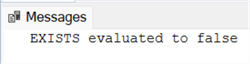
SQL EXISTS in a Query
Now consider this query. On my system, this returns exactly one row and exactly one column that has a NULL value.
SELECT source_database_id FROM sys.databases WHERE name = 'master';What will SQL IF EXISTS do with this? SQL IF EXISTS is not concerned with the number of columns or the value of any column. It is only interested in the existence or lack thereof of any rows. As such, this will also be evaluated to be true.
IF EXISTS(SELECT 1 FROM sys.databases WHERE name = 'master')
  PRINT 'EXISTS evaluated to true'
ELSE
  PRINT 'EXISTS evaluated to false'
EXISTS makes it possible to use the following query to return customers who have at least one order:
SELECT CustomerID, CustomerName
FROM Sales.Customers c
WHERE EXISTS (
    SELECT 1
    FROM Sales.Orders o
    WHERE o.CustomerID = c.CustomerID
);
Therefore, these queries in the WHERE clause are equivalent to one another and will produce the same result:
WHERE EXISTS (SELECT 1 FROM Sales.Orders o WHERE o.CustomerID = c.CustomerID)
WHERE EXISTS (SELECT NULL FROM Sales.Orders o WHERE o.CustomerID = c.CustomerID)
WHERE EXISTS (SELECT * FROM Sales.Orders o WHERE o.CustomerID = c.CustomerID)
The SELECT 1 variant is most common because it clearly represents the intent of checking for general existence, not so much return specifics rows and/or columns.
Next, we will look at a stored procedure. This may not evaluate on Azure DBaaS but should work on any full instance of SQL Server.
exec msdb.dbo.sp_help_job;This returns a long list of SQL Server Agent jobs on my laptop.

What will SQL IF EXISTS think of this? In short, it won’t like this at all. Attempting to run this query will result in a syntax error. EXISTS expects a SELECT statement, not just a T-SQL statement, that could potentially return rows.

Finally, what about a variable? Once again, this produces a syntax error. You cannot simply send a variable to the SQL IF EXISTS function.

I’m not sure what the use case would be here, but putting SELECT in front of the variable returns a single-row result set and causes this script to return TRUE.
DECLARE @MSSQLTips INT;
IF EXISTS(SELECT @MSSQLTips)
  PRINT 'EXISTS evaluated to true'
ELSE
  PRINT 'EXISTS evaluated to false'
Using EXISTS instead of INNER JOIN
One of the great benefits of EXISTS is using it for existence checks, which is often more efficient than using JOIN. Let us consider these couple of queries that will produce an identical result set:
SET STATISTICS IO ON;
SET STATISTICS TIME ON;
SELECT
       SI.InvoiceID
     , SI.CustomerID
FROM Sales.Invoices SI
WHERE EXISTS (
    SELECT 1
      FROM Sales.Customers SC
     WHERE SC.CustomerID = SI.CustomerID
       AND SC.CustomerCategoryID = 4
);
SELECT DISTINCT
           SI.InvoiceID
           , SI.CustomerID
      FROM Sales.Invoices SI
INNER JOIN Sales.Customers SC ON SI.CustomerID = SC.CustomerID
     WHERE SC.CustomerCategoryID = 4;
Running the queries together with the execution plan enabled, we can see the difference clearly. The first query with EXISTS is more efficient having a query cost of 46% vs 54 % for the JOIN query:

If you examine the execution plans in detail you will also see a heavier index utilization from the EXISTS subquery. Therefore, it is important to have your tables properly indexed to fully benefit from the EXISTS statement.
Using NOT EXISTS instead of LEFT JOIN
In a typical LEFT JOIN scenario, we want to find records where the related records don’t exist. Therefore, using NOT EXISTS is a particularly suitable alternative in cases where we are not interested in showing the non-existing records. Let us consider the following couple of queries. We are interested in customers without invoices:
SET STATISTICS IO ON;
SET STATISTICS TIME ON;
SELECT
        C.CustomerID
      , C.CustomerName
      , C.PhoneNumber
      , C.CreditLimit
 FROM Sales.Customers C
WHERE NOT EXISTS (
   SELECT 1
     FROM Sales.Invoices I
    WHERE I.CustomerID = C.CustomerID
);
SELECT
          C.CustomerID
        , C.CustomerName
        , C.PhoneNumber
        , C.CreditLimit
     FROM Sales.Customers C
LEFT JOIN Sales.Invoices I ON I.CustomerID = C.CustomerID
    WHERE I.CustomerID IS NULL;
While both queries produce an empty result set, the performance gain from is noticeable: 26% relative query cost for NOT EXISTS vs 74% relative query cost for LEFT JOIN:

In both cases when comparing (NOT) EXISTS to (LEFT) JOIN the EXISTS clause wins. In general, that happens because the evaluation stops as soon as a match is found. The JOIN should be used mainly for cases when aggregation results with zero must be shown, or data from all joined tables must be shown.
SQL EXISTS in WHILE Loops
Each of the prior examples shows EXISTS as part of an IF statement. It is also common to use them in WHILE loops. This method is an easy way to perform one task per row in a query without using a cursor. While this code is easy to follow and understand, it should not replace set-based coding. If the action to be completed per row can be done with an insert/update/delete statement, then that would be preferred.
This example calls a stored procedure, sp_send_dbmail, from MSDB once per row.
--!!!! Be careful running this script!!!!
-- It does attempt to call sp_send_dbmail. --

--From MSSQLTips.com
DECLARE @CustomerID INT;
DECLARE @Email NVARCHAR(256);

WHILE EXISTS(SELECT 1
             FROM Sales.Customers
             WHERE IsStatementSent = 0)

BEGIN
  SELECT TOP 1
    @CustomerID = CustomerID
  , @Email = EmailAddress
  FROM
    Sales.Customers SC
      INNER JOIN [Application].People P -- SQL JOIN
    ON SC.PrimaryContactPersonID = P.PersonID
  WHERE
    IsStatementSent = 0;

  EXEC msdb.dbo.sp_send_dbmail @recipients = @Email, @subject = 'Please pay us';

  UPDATE Sales.Customers -- UPDATE statement
  SET IsStatementSent = 1
  WHERE CustomerID = @CustomerID;

END;
EXISTS in a WHERE Clause
Using an EXISTS function call in a WHERE clause is probably the most common use case. The function will work exactly the same as in each earlier example, but there is one noticeable change. The subquery will almost always reference a column in a table that is otherwise out of the scope of the subquery. This can be difficult to understand, so we will jump right into an example.
SELECT *
FROM Sales.Invoices SI
WHERE EXISTS(SELECT 1
             FROM Sales.Customers SC
             WHERE SC.CustomerCategoryID = 4
              AND SC.CustomerID = SI.CustomerID);
In this example, the subquery has only one table listed in the FROM clause, Sales.Customers, aliased as SC. Yet the WHERE clause of that subquery references a column, SI.CustomerID, that could only come from the main query outside of the parentheses. This can initially seem counter-intuitive, but this is exactly how it should work.
While the optimizer treats it differently, you can think of it as calling that subquery repeatedly — once for every row in the main query. An EXISTS function call in a WHERE clause that did not include a reference to the primary query would only have to run once and would either evaluate as true or false for the entire rowset of the primary query.
When to use EXISTS in WHERE Clauses
The example query above could easily have been written with an IN statement, as seen below. In fact, modern SQL Server engines will usually compile a query like this (with IN) and the one above (with EXISTS) exactly the same way. Deciding between the two is largely a style-based decision.
SELECT *
FROM Sales.Invoices SI
WHERE SI.CustomerID IN (SELECT SC.CustomerID
             FROM Sales.Customers SC
             WHERE SC.CustomerCategoryID = 4);
In that demo query, there is only one matching column between the primary and subqueries, so replacing EXISTS with an IN statement is pretty easy. However, if the comparison includes more than one shared column, the IN statement won’t work, as seen in the following query.
SELECT *
FROM Sales.Invoices SI
WHERE EXISTS(SELECT *
             FROM Sales.Customers SC
             WHERE SC.CustomerCategoryID = 4
              AND SC.CustomerID = SI.CustomerID
              AND SC.DeliveryMethodID = SI.DeliveryMethodID);
A query such as this is a great example where EXISTS makes sense.
Additionally, we would prefer using EXISTS over COUNT(*) for straightforward existence checks:
SET STATISTICS IO ON;
SET STATISTICS TIME ON;
SELECT
        C.CustomerID
      , C.CustomerName
 FROM Sales.Customers C
WHERE (
    SELECT COUNT(*)
      FROM Sales.Orders O
     WHERE O.CustomerID = C.CustomerID) > 0;
SELECT
     C.CustomerID
     , C.CustomerName
FROM Sales.Customers C
WHERE EXISTS (
   SELECT 1
     FROM Sales.Orders O
    WHERE O.CustomerID = C.CustomerID
);
However, closely examining the query plan will indicate an equal cost of both queries, as well as identical query plans:
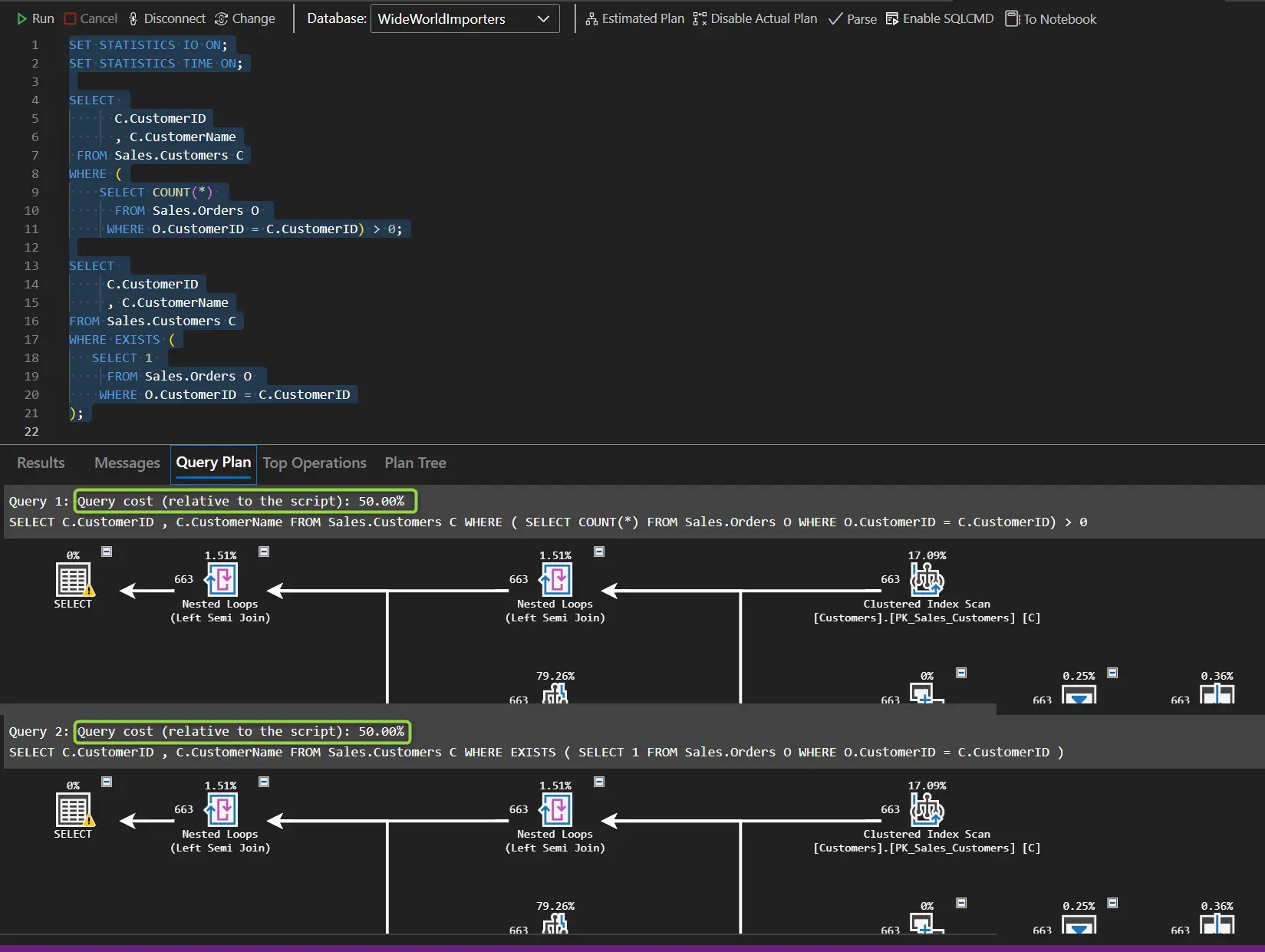
What happens is that the query optimizer is smart enough to prevent the COUNT operation in this case. While the “Stream Aggregate” operation associated with the COUNT clause exists in the plan, its cost is zero percent. Therefore, the benefit of using EXISTS over COUNT(*) may be more apparent with tables containing more data (the Sales.Orders table contains only around seventy thousand rows).
Good practices when using (NOT) EXISTS
To wrap it up, here are some good practices to keep in mind when using EXISTS:
- Use SELECT 1 or SELECT NULL in the subquery. The actual selected value is irrelevant because we are doing an existence check and do not want any specific result set retrieved.
- Ensure proper indexing on the correlated columns. The columns in your WHERE clause that correlate the outer and inner queries (e.g., WHERE o.CustomerID = c.CustomerID) should be indexed. Without proper indexes, EXISTS queries can perform full table scans, and you will forego any performance benefits.
- Prefer EXISTS/NOT EXISTS over IN/NOT IN for correlated subqueries. EXISTS stops the evaluation at the first match and often generates better execution plans.
- Use NOT EXISTS instead of LEFT JOIN…IS NULL for anti-joins when you only need to filter rows, not retrieve data from both tables.
- Avoid chaining too many EXISTS statements. While there is no explicit limit, code readability should be a priority.
- Consider using EXISTS instead of COUNT in scenarios where the result from COUNT is irrelevant and you are only checking if there exists more than one row matching a condition.
Frequently Asked Questions
Yes! The EXISTS function will stop searching when a row is found (Learn how to get read counts for SQL Server queries). You can prove that to yourself by running this query. On my laptop, the first query takes 44 reads. When that identical query is run again as part of an EXISTS, it takes only 2 reads – indicating that SQL Server stopped looking for data after the first row was returned.
SET STATISTICS IO ON;
SELECT CustomerID FROM Sales.Orders WHERE CustomerID > 900;
IF EXISTS (SELECT CustomerID FROM Sales.Orders WHERE CustomerID > 900)
BEGIN
SELECT ‘EXISTS RETURNS TRUE’;
END;
Yes. EXISTS is a standard function in all of these platforms.
Exists only cares if there is a row, not the value(s) in that row. Even if the only value returned is NULL, that will still evaluate to true. This very simple query will prove that point.
IF EXISTS (SELECT NULL)
BEGIN
SELECT ‘EXISTS RETURNS TRUE’;
END;
Yes. This is a very common use case. In fact, most of your EXISTS function calls that are part of a query will use this pattern. There are several examples of this in the tip above. The concept of a subquery referencing columns from outside of the parentheses can be difficult for new SQL professionals to understand.
Learn more about subqueries on MSSQLTips.com!
SQL Server Subquery Examples
SQL Server Subquery Use Cases
SQL Server will still run this query but expect poor performance – especially if the table is sizable.
Learn more about how to determine if this is happening by reviewing the query plan.
How to view your query plan
How to read your query plan
How to use a plan to tune a query
The most common method is to declare a counter variable and increment it with every execution. Then change the WHILE statement to break when either the EXISTS fails to find a row or the counter hits a maximum number of executions. Here is an example.
DECLARE @Counter INT = 0;
WHILE EXISTS (SELECT 1 FROM dbo.MyQueue WHERE ProcessedFlag = 0) AND @Counter < 50
BEGIN
SELECT ‘Do Some Work’;
SET @Counter += 1;
END;
Upon determining the existence of the first row, the EXISTS function will stop looking for more rows and return a TRUE value. It doesn’t matter if the query would eventually return only that 1 row or 1,000,000 rows.
Final Thoughts
EXISTS is a more advanced function that not every T-SQL writer uses. But knowing what it is and how it works is still an important step in the journey to becoming an expert in the field.
Next Steps
- SQL Server WHERE Clause Basics
- SQL Server IN Operator
- Performance Comparison of IN vs EXISTS
- Replace a WHILE Loop with Set Based Logic
- JOINs – SQL Joins Example, SQL LEFT JOIN Examples and SQL RIGHT JOIN Examples
- NULLs – What does SQL NULL mean and SQL WHERE IS NOT NULL
- SQL Server Uncorrelated and Correlated Subquery
Updates also added by Hristo Hristov.

Eric has been a SQL Server DBA and Architect in the legal, software, transportation, and insurance industries for over 10 years. Currently he is the Sr Data Architect for Squire Patton Boggs, a leading provider of legal services with 47 offices in 20 countries.
Eric is a 2018-2019 Idera Ace and has co-authored 2 Idera Whitepapers.
He has been a presenter at PASS Summit, IT/DevConnections, SQLSaturdays, the in.sight transportation conference, and the Ohio North SQL Server User’s Group.
- MSSQLTips Awards: Author of the Year Contender – 2021, 2022 | Trendsetter (25+ tips) – 2021

![SQL IS [NOT] DISTINCT FROM predicate in SQL Server 2022](https://www.mssqltips.com/wp-content/uploads/8195_s.webp)