Problem
A NULL represents missing or unknown data. Handling NULLs is challenging as they affect query behavior and output. For example, the AVG, SUM, and COUNT functions ignore NULL values (except if you use COUNT(*)). Similarly, comparing two NULL values does not return TRUE; the result is UNKNOWN. SQL Server provides functions such as ISNULL() and COALESCE() to handle NULLs. In this article, we look at a new option in SQL Server 2022, IS DISTINCT FROM and IS [NOT] DISTINCT FROM to further improve working with NULL values.
Solution
SQL Server 2022 introduced IS DISTINCT FROM and IS [NOT] DISTINCT FROM for handling NULL value comparison. Let’s explore this with examples and how this can make working with NULL values simpler.
Setup Test Data
To start, let’s insert data into a sample table #emp:
CREATE TABLE #emp (
    empid INT IDENTITY(1,1) PRIMARY KEY,
    firstname VARCHAR(50),
    lastname VARCHAR(50),
    department VARCHAR(20)
);

INSERT INTO #emp (firstname, lastname, department)
VALUES
    ('John', 'Smith', 'HR'),
    ('Jane', 'Doe', NULL),
    (NULL, 'Brown', 'Finance'),
    (NULL, 'Brown', NULL);

Select * from #emp
Notice that we have NULL values in the firstname and department columns.
Query Using = NULL
Let’s say we need data all employees whose department is NULL.
If we directly try to filter the value using the WHERE clause, the query does not return any output and does not give any error.
Select * from #emp where department = NULL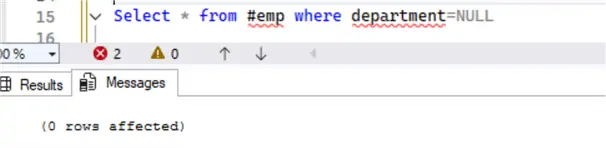
Not Equal Query
In another case, suppose we need to get all employees except for those in the HR department.
Select * from #emp where department != 'HR'
This only returns one row. If we look at the data, we see that the following is based on the department:
- HR department: 1
- Finance: 1
- NULL: 2
The query should return three employees because only one employee belongs to the HR department. The query returned only one record because it excluded the rows with NULL. After all, NULL != HR also evaluates to NULL.
Using IS NULL in the Query
To get all the rows we expect, we can include the IS NULL conditional operator.
Select * from #emp where department != 'HR' or department IS NULL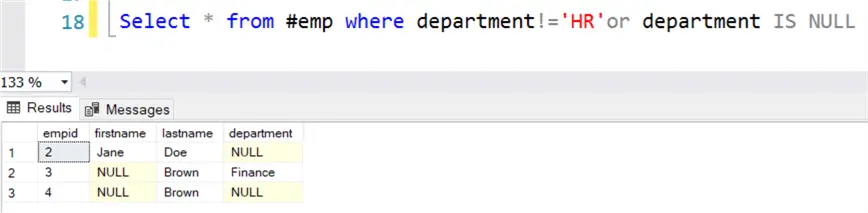
This returns the 3 rows.
IS DISTINCT FROM and IS NOT DISTINCT FROM in SQL Server
The IS DISTINCT FROM and IS NOT DISTINCT FROM clauses compare the two expressions for equality. It returns the values as shown in the table below. The result indicates that the values can be compared with NULLs and return True or False.
If both values are NULL, the function returns a true or false result based on the specified IS DISTINCT FROM or IS NOT DISTINCT FROM clause.
The following table depicts the query output using direct comparison (x=y) and using the IS [NOT] DISTINCT FROM predicate.
| X | Y | X=Y | X IS NOT DISTINCT FROM Y | X IS DISTINCT FROM Y |
|---|---|---|---|---|
| 0 | 0 | True | True | False |
| 0 | 1 | False | False | True |
| 0 | NULL | Unknown | False | True |
| NULL | NULL | Unknown | True | False |
Let’s look at a few use cases of the IS [NOT] DISTINCT FROM clause.
Exclude Any Rows with NULL using IS DISTINCT FROM
Suppose we do not want any employee data whose department is unavailable. The following query excludes the NULLs using IS DISTINCT FROM NULL:
Select * from #emp where department IS DISTINCT FROM NULL
Display Records Only Having NULLs using IS NOT DISTINCT FROM
The following will only return NULL value rows.
Select * from #emp where department IS DISTINCT FROM NULL
Return All Records not in HR using IS DISTINCT FROM
In the earlier query, we tried to fetch the results where the employee department was not equal to HR, but the output did not include any row with a NULL department. Let’s rewrite the query with the IS DISTINCT [NOT] FROM predicate:
Select * from #emp where the department IS DISTINCT FROM 'HR'Look at the output. This time, we get all records (including NULLs) except for the employee whose department is HR.

Performance Impact of IS DISTINCT FROM or IS [NOT] DISTINCT FROM
We have explored the use cases of the IS DISTINCT FROM or IS [NOT] DISTINCT FROM clause, but does it have any performance impact?
We will use the [AdventureWorks2022] sample database. You can download it from the Microsoft docs – AdventureWorksDatabase.
Execute the below query, which filters records for the ProductSubcategoryID using the variable @id. This variable’s value is set to NULL. The query returns zero rows.
DECLARE @id int = NULL;

SELECT COUNT(*)
FROM Production.Product p
WHERE p.ProductSubcategoryID = @id;
The query uses a clustered index scan on the [Production].[Product] table.
![Performance Impact of IS DISTINCT FROM or IS [NOT] DISTINCT FROM Clause](/wp-content/images-tips-8/8195_sql-is-not-distinct-from-predicate-8.webp)
The Product table does not have an index on the ProductSubcategoryID column of the [Production].[Product] table, so let’s add a new index.
USE [AdventureWorks2022]
GO

CREATE NONCLUSTERED INDEX [NC_IX_ProductSubcategoryID_Product] ON [Production].[Product]
(
   [ProductSubcategoryID] ASC
)WITH (PAD_INDEX = OFF, STATISTICS_NORECOMPUTE = OFF, SORT_IN_TEMPDB = OFF, DROP_EXISTING = OFF, ONLINE = OFF, ALLOW_ROW_LOCKS = ON, ALLOW_PAGE_LOCKS = ON, OPTIMIZE_FOR_SEQUENTIAL_KEY = OFF)
GO
Using ISNULL
We can use the ISNULL() function to replace the NULL value. This time, the query returns 209 rows and uses the non-clustered index we created on the ProductSubCategoryID column. This query uses OR as well as and clauses to retrieve the desired result.
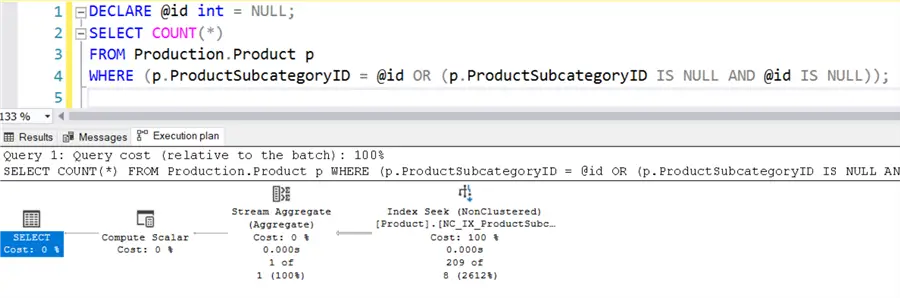
The query syntax could become complicated with multiple OR and/or AND clauses.
Using IS NOT DISTINCT FROM
With SQL Server 2022, we can easily use IS [NOT] DISTINCT FROM to get the required output without any complexity.
DECLARE @id int = NULL;

SELECT COUNT(*)
FROM Production.Product p
WHERE p.ProductSubcategoryID IS NOT DISTINCT FROM @id;
This query returns the exact 209 rows and uses the non-clustered index seek, as seen below.
![IS [NOT] DISTINCT FROM](/wp-content/images-tips-8/8195_sql-is-not-distinct-from-predicate-10.webp)
The performance impact of IS [NOT] DISTINCT FROM clauses is not significant; however, this can help write complex logic quickly and more straightforward.
IS NOT DISTINCT FROM in Where Clause
We can use the IS [NOT] DISTINCT FROM clause directly in a SQL Join. For example, the code below uses join on the ABC and XYZ tables on the condition that abc.val and xyz.val are considered “equal” – including NULLs.
CREATE TABLE ABC (
    id INT,
    val INT
);

CREATE TABLE XYZ (
    id INT,
    val INT
);

INSERT INTO ABC (id, val) VALUES
(1, 10),
(2, NULL),
(3, 30),
(4, 40);

INSERT INTO XYZ (id, val) VALUES
(100, 10),
(200, NULL),
(300, 50),
(400, NULL);

SELECT abc.val ,xyz.val
FROM ABC
JOIN XYZ
  ON abc.val IS NOT DISTINCT FROM XYZ.val;
Here is the output.

We get these rows in the output because:
- 10 IS NOT DISTINCT FROM 10
- NULL IS NOT DISTINCT FROM NULL.
IS DISTINCT FROM in CASE Statement
Suppose we have an e-commerce website that targets orders to ship on the same date as the order date. We can use the IS NOT DISTINCT FROM clause to compare the order and ship dates and print the status, as required. For the records whose ship date is NULL, it means they have not shipped, and the query also gets those records.
SELECT SalesOrderID,
       CASE
           WHEN OrderDate IS NOT DISTINCT FROM ShipDate THEN 'Order Shipped'
           ELSE 'Order not Shipped'
       END AS ShippingStatus
FROM [AdventureWorks2022].[Sales].[SalesOrderHeader];
Use of IS [NOT] DISTINCT FROM for a Constraint
Suppose we have a table [TransactionCheck] that stores transaction IDS and debit and credit amounts. In a valid transaction, the debit and credit amounts must be equal — for example, if $100 is deducted from one account, it should be credited to another.
We can enforce this using a CHECK constraint in SQL Server. It should allow data insertion only if the debit amount is NOT DISTINCT FROM the credit amount. It will treat NULL in both debit and credit as valid values.
Debit IS NOT DISTINCT FROM CREDIT. If there is a mismatch in the debit and credit amounts, the check constraint condition will fail, and data will not be inserted.
CREATE TABLE TransactionCheck (
    id int identity(1,1) PRIMARY KEY,
    debit NUMERIC,
    credit NUMERIC
   );

ALTER TABLE TransactionCheck
ADD CONSTRAINT chk_transactionCheck
CHECK (
    debit IS NOT DISTINCT FROM credit
);
After creating the constraint using the IS NOT DISTINCT FROM clause, insert a few records in the table. The first two inserts are successful because the debit and credit are equal, including NULLs. However, the last three insert statements fail due to a mismatch in debit and credit amounts.
INSERT INTO TransactionCheck ( debit, credit) VALUES (100, 100); -- SUCCESS
INSERT INTO TransactionCheck ( debit, credit) VALUES (NULL, NULL); -- SUCCESS
INSERT INTO TransactionCheck ( debit, credit)VALUES (200, 150); -- FAIL
INSERT INTO TransactionCheck ( debit, credit)VALUES (-50.00, 200.00); -- FAIL
INSERT INTO TransactionCheck ( debit, credit)VALUES (0, NULL); -- FAIL
Here is the error message:
The INSERT statement conflicted with the CHECK constraint “chk_transactionCheck”. The conflict occurred in database “AdventureWorks2022”, table “dbo.TransactionCheck”.
If we also try to perform an update, the check constraint would fail due to a mismatch in the debit and credit amounts.
update TransactionCheck set debit = 200 where credit = 100
update TransactionCheck set debit = NULL where credit = 100
Here is the error message:
The UPDATE statement conflicted with the CHECK constraint “chk_transactionCheck”. The conflict occurred in database “AdventureWorks2022”, table “dbo.TransactionCheck”. The statement has been terminated.
Next Steps
- Be familiar with the IS[NOT] DISTINCT FROM predicate and start using it in your development work from SQL Server 2022 and forward.
- Explore the Microsoft doc for the IS [NOT] DISTINCT FROM clause in SQL Server 2022.
- Go through existing SQL Server 2022 tips.

Hi! I am Rajendra Gupta, Database Specialist and Architect, helping organizations implement Microsoft SQL Server, Azure, Couchbase, AWS solutions fast and efficiently, fix related issues, and Performance Tuning with over 14 years of experience.
I am the author of the book “DP-300 Administering Relational Database on Microsoft Azure.” I can be reached at: Rajendra.gupta16@gmail.com for any consulting help.
- MSSQLTips Awards:
- Author of the Year – 2022 | Author Contender – 2021/2023/2024 | Champion Award (100+ tips) – 2020


