Problem
During our development cycle, it is common to restore a production database to a development/test environment. This environment is used by developers to create and test application changes. At particular stages, the developers showcase the application to potential customers. Most of the time, these databases are a subset of production data, in order to have some meaningful data for testing. Unfortunately, having sensitive data in a non-production environment without proper protection creates a security risk. This problem is compounded when potential customers access an application containing sensitive data. This is potentially a breach of many privacy laws such as GDPR in Europe. How can we build our applications in development and test environments with production-like data while protecting sensitive data?
Solution
The solution is to use a data masking product able to retain the meaning of the sensitive data. This should be achieved without revealing or allowing reverse engineering of the production data. In these development and test environments, a static data masking solution is needed to protect the data.
DataVeil is a solution that offers multiple advantages over bigger and very complex products. DataVeil is a Static Data Masking tool that stands out for its simplicity and its approach to protecting sensitive information. While many enterprise tools may have massive platforms that require significant infrastructure, DataVeil is designed as a lightweight, high-performance client that interacts directly with your RDBMS.
So, the trick is to have production-like data in test and development databases for a realistic experience and data distribution. This will prevent potential theft of sensitive data in non-production environments. This also helps ensure compliance with legal requirements, such as GDPR in Europe. For example, GDPR clearly states that all sensitive data such as date of birth, medical or any information regarding religion, political or trade unions enrollment must be properly protected and should not be shared. With DataVeil, we can share these environments, even with external consultants, without the risk of exposing confidential or sensitive data.
DataVeil has many interesting features to help us meet compliance requirements and prevent data leakage. First, DataVeil supports multiple RDBMS platforms: PostgreSQL, SQL Server, Oracle and MySQL. As I mentioned above, it is a Static Data Masking product. DataVeil permanently overwrites the sensitive data instead of just encrypting it with TDE (Transparent Data Encryption). Let me put some emphasis on this point: all the data will be overwritten in the development or test environment. Another important feature of DataVeil is that it ensures that all foreign keys in the masked tables are respected. This means the masking cascades the masked values to all referencing tables, preserving referential integrity.
DataVeil Value
Let me point out these key technical DataVeil features that makes it really stand out:
- Discovery Engine: DataVeil can scan your database schemas to find suspected sensitive data (names, emails, SSN, National ID, credit cards, etc.). It uses pattern matching and checksum validation (like Luhn for credit cards) to minimize false positives.
- Format-Preserving Masking: This is a major strong point. It doesn’t just replace “John Smith” with “XXXXX.” It replaces it with another realistic name like “David Stirling,” ensuring that your test applications don’t crash due to invalid data formats.
- Referential Integrity: In every application database, you likely have complex foreign key relationships. DataVeil ensures that if, for example, “User ID 123” is masked to “User ID 999″ in one table, it is also changed to ” User ID 999″ in the other related tables automatically to maintain the proper relationship.
- Deterministic Masking: This is one of the best features. DataVeil supports both Deterministic and Non-Deterministic masking in a single project. Deterministic masking ensures that “John Smith” always masks to a value such as “David Stirling” across every database and table in your environment by using a shared seed key. Non-Deterministic instead does not provide this consistency across the database. It can be more secure because there is no repeatable relationship between the original and masked data.
- Projects: DataVeil offers the ability to encapsulate all logic in a single entity and the ability to reuse it. Also, an important point is that the whole project is stored in XML format, with an encrypted seed. The seed is the key for deterministic data masking.
- Scripting and Automation: In DataVeil we can add SQL scripts in order to perform actions before and after the data masking process. Also, macro scripting is available that can be used for repetitive masking needs for a significant time savings.
- Custom Masks: In terms of customization and reusability of components, DataVeil also offers custom masks. This enables each organization to create its own personalized masks for its particular types of sensitive data that can be reused in different projects.
- Reusability: A masking project can be reused on other databases or copies of the same or similar database. For example, the same schema may be used for multiple clients, or a similar schema may be stored on another database platform.
Enough said, let’s jump into a practical example to show how easy it is to set up DataVeil. We will use PostgreSQL for our example, but the steps are the same for other database platforms
DataVeil Discovery Engine
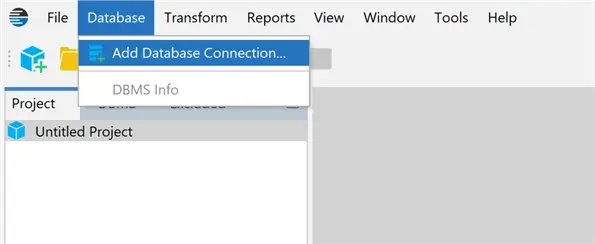
An easy way to set up DataVeil is to let it do the hard work for you. The Discovery feature can be a great help. First, we define a connection to the database that we need to mask using the Database menu and choosing Add Database Connection:
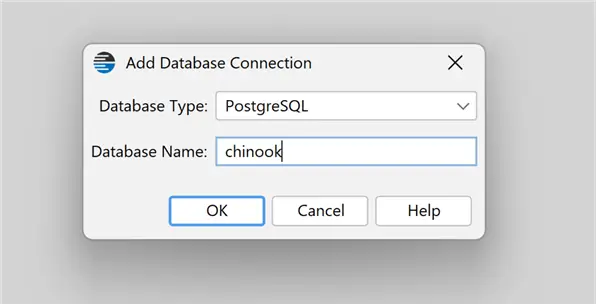
We setup our connection using the postgres superuser, as we need a login with admin privileges. As always, I am using the chinook test database that is open source and available for most RDBMS platforms.
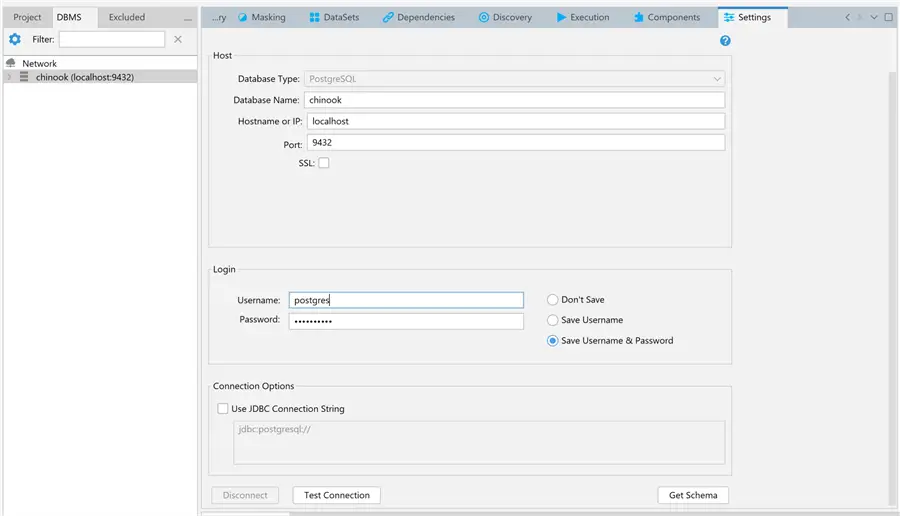
We test the connection to ensure it is correct, then we click on Get Schema to connect to our database and retrieve the schema.
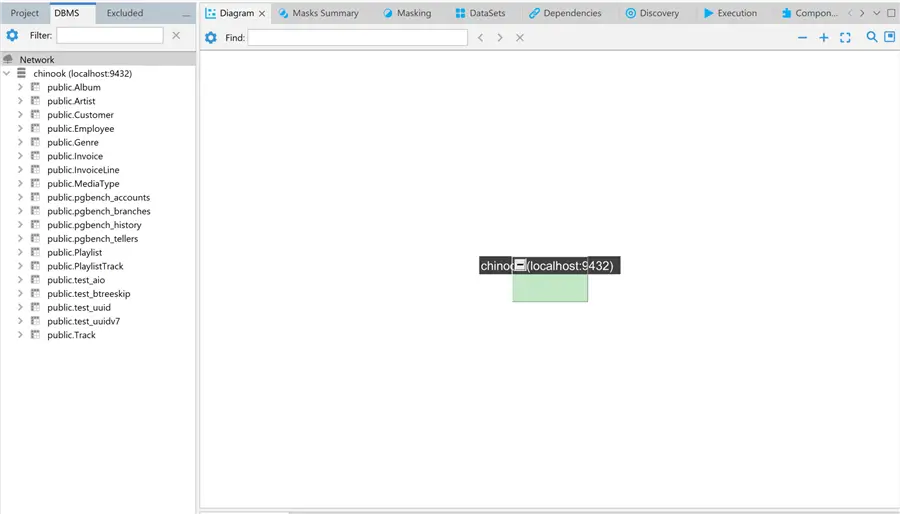
At this point, we can click on the Discovery tab.
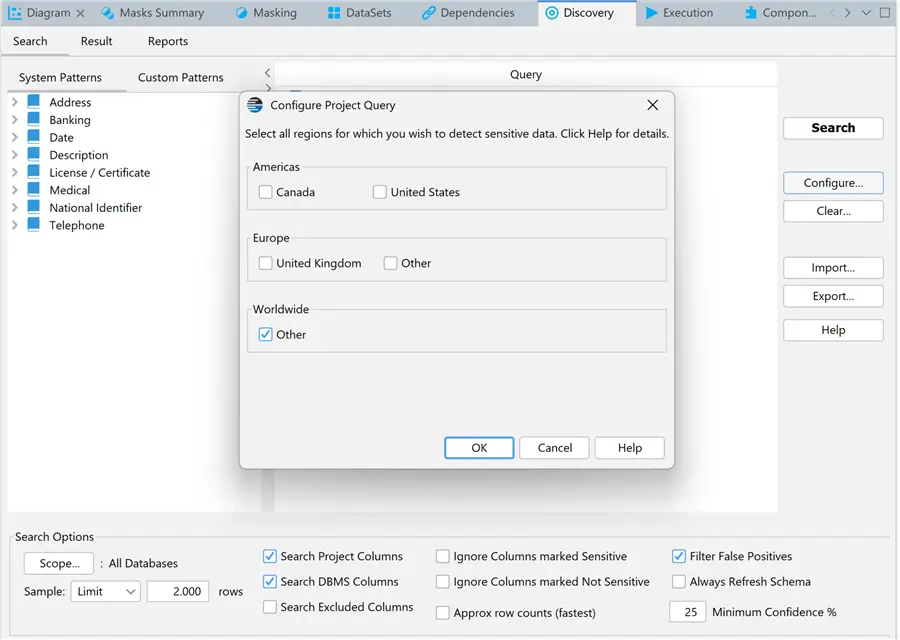
Next, we can click on Configure on the right of the interface to use some of the search patterns for sensitive data. We can also adjust the default parameters based on our needs. For example, I changed the sample limit from 1000 to 2000 rows. Since I know that I have only a few tables I also raised the Minimum Confidence % to 25.
If we notice that a search pattern is missing, we can add some patterns to the actual search query:
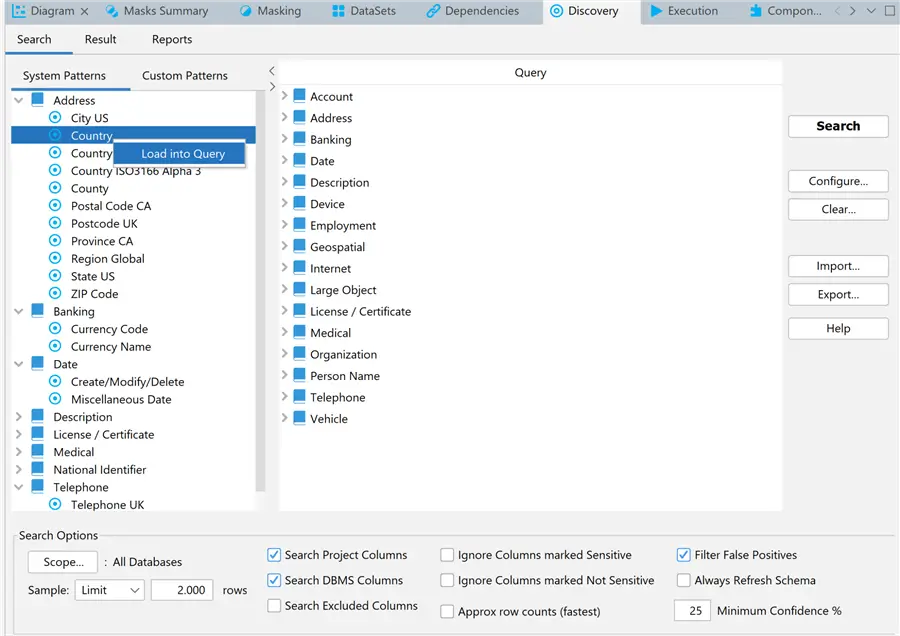
If you have specific search needs that are not covered by the built-in search patterns, then you can click on the Custom Patterns tab. There, you can define your own search patterns that will best search your specific data and you can also define a default mask for each search pattern.
DataVeil Discovery Assessment
We are now ready to press the Search button and see what DataVeil finds:
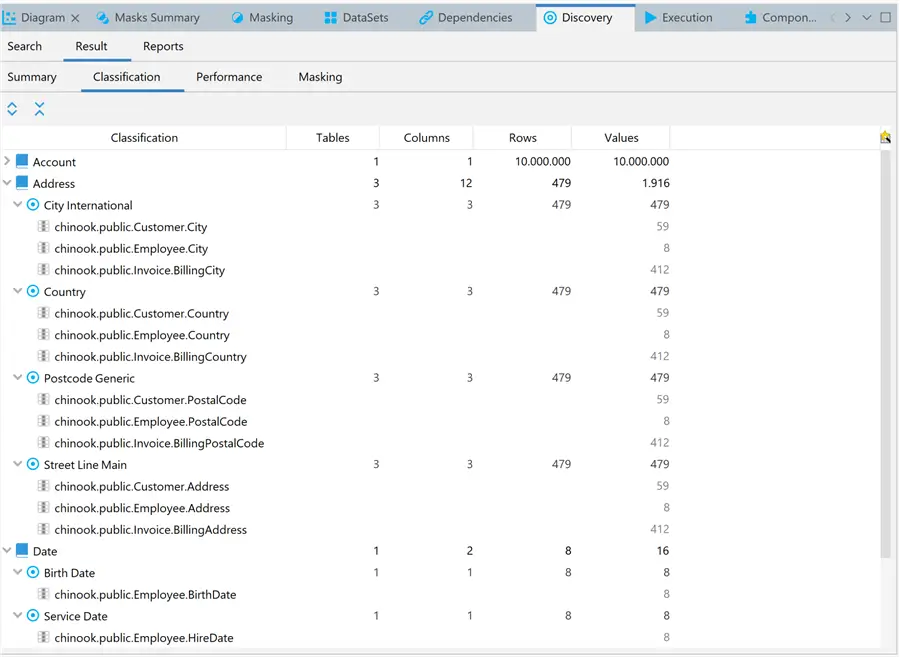
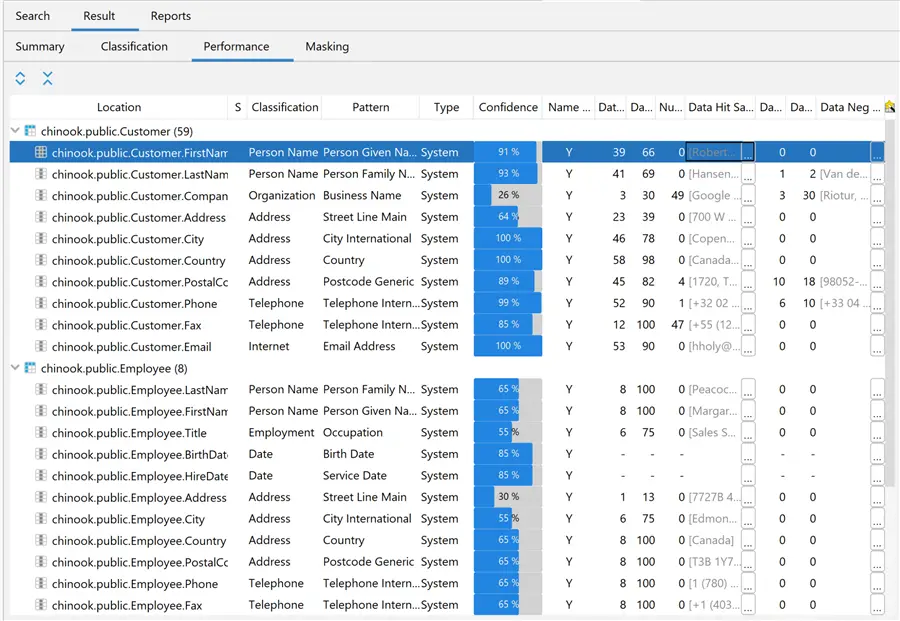
What we can see from these two DataVeil screenshots is that it was able to automatically discover and classify all columns with sensitive data in our database. Particularly interesting are the Confidence % column and the Data Hit and Data Negative values. These show examples of data that conform to the pattern classification rules and those that do not. Not too bad and all in a matter of seconds! Yes, it’s a small database, but it is very representative of what DataVeil can do!
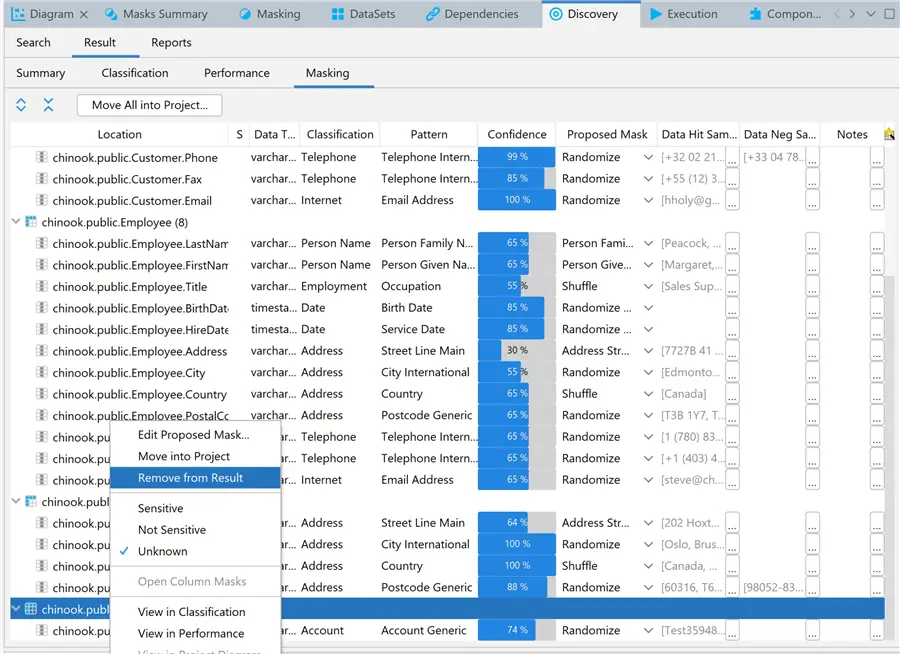
We can now check the proposed masking in the Masking tab. If there are any false positives, we can remove them before pushing the masks to the project. In fact, DataVeil marked a table with a list of consecutive IDs that I used for previous tests as account numbers. This can be easily resolved by right-clicking on the table and selecting Remove from Result:
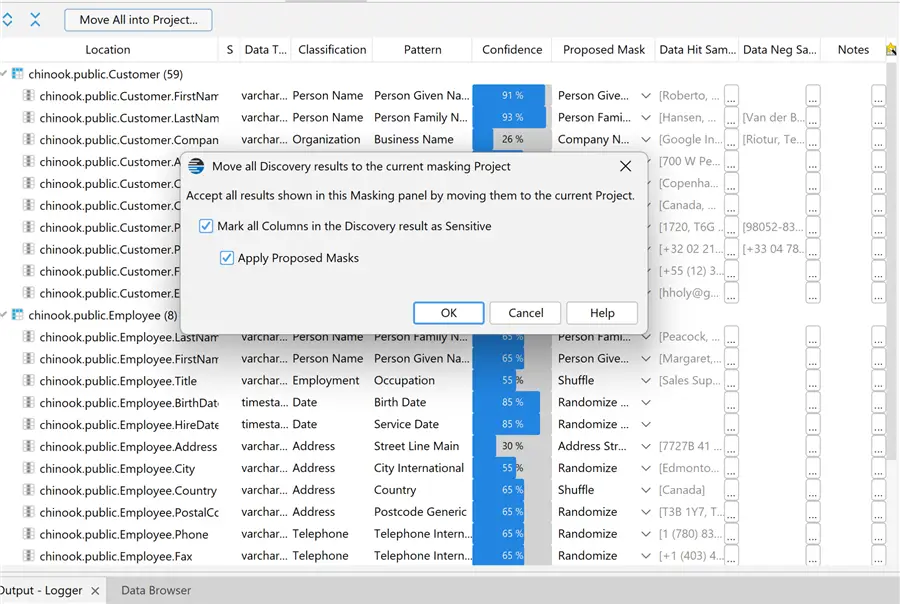
Finally, add the masking configuration to the project:
Let’s now save the project. When we click the Save icon, we need to specify a Project Key to encrypt the seed and password:
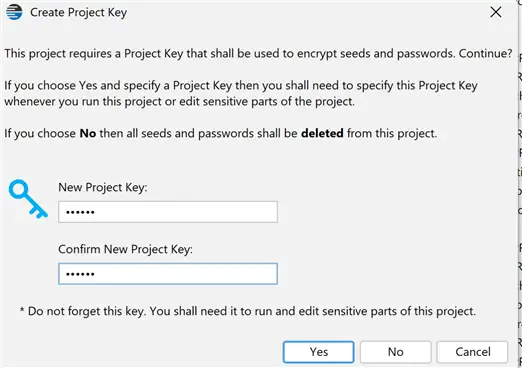
As I said above, the project concept is another strong point of DataVeil. As we have seen, it gives us the ability to encapsulate all logic in a single entity.
DataVeil Project Review and Configuration
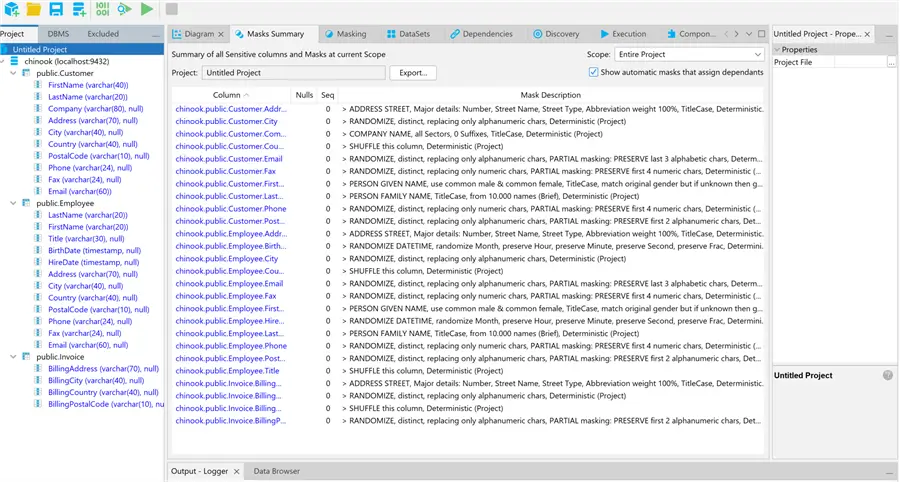
We can now review our masking project in the Diagram and Masks Summary tabs and make any changes if needed:
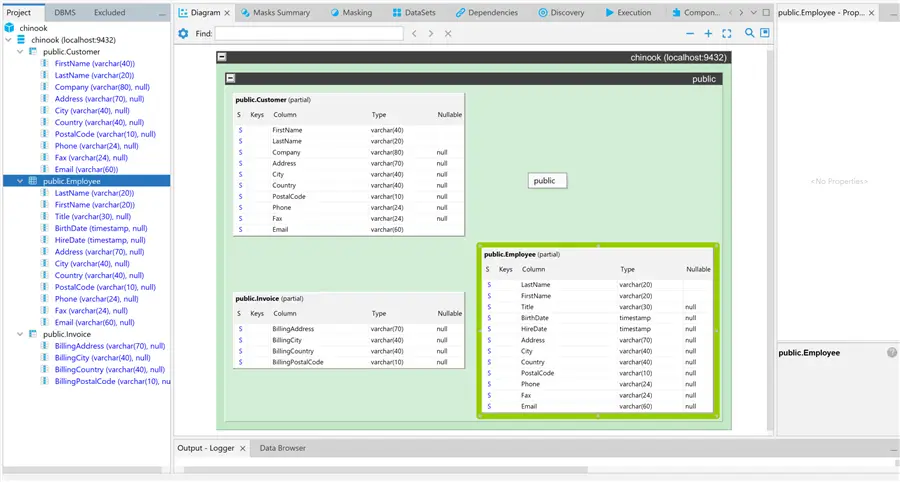
Column Level Masking
We can override project-level masking settings at the column level. For example, if the project default is for Deterministic masking, we can choose to override the LastName column setting to use Non-Deterministic masking:
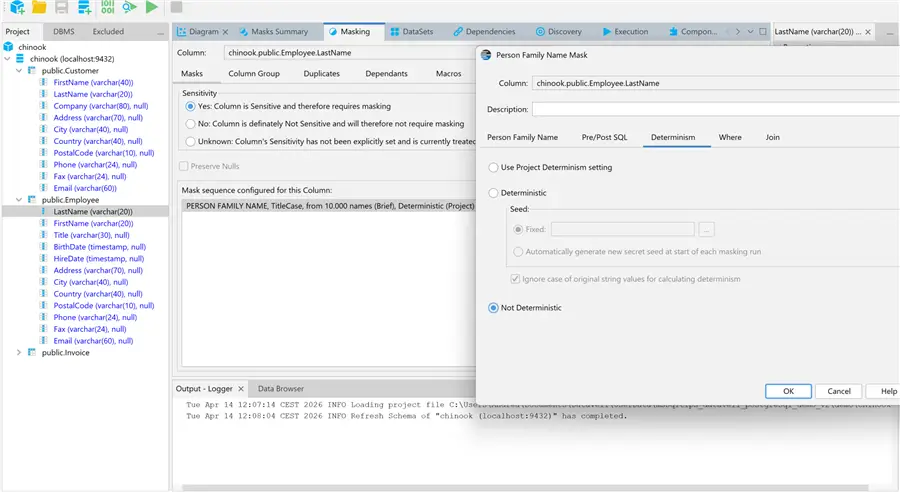
Or we can customize the Deterministic setting for the column, if needed:
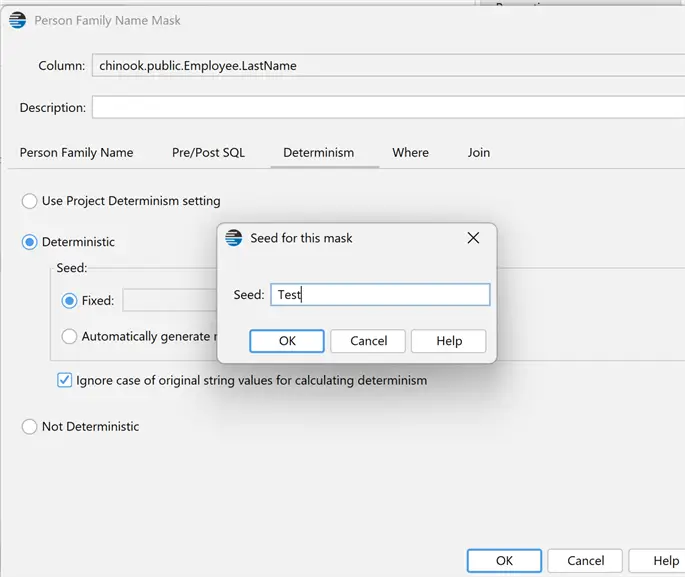
As I described above, the deterministic approach ensures that the masking will be consistent across all tables in the database. This same seed can also be used across multiple databases to maintain consistency. In this case Smith will be always masked as Stirling.
Each mask can be adjusted to suit its column’s data. For example, let’s look at the FirstName column:
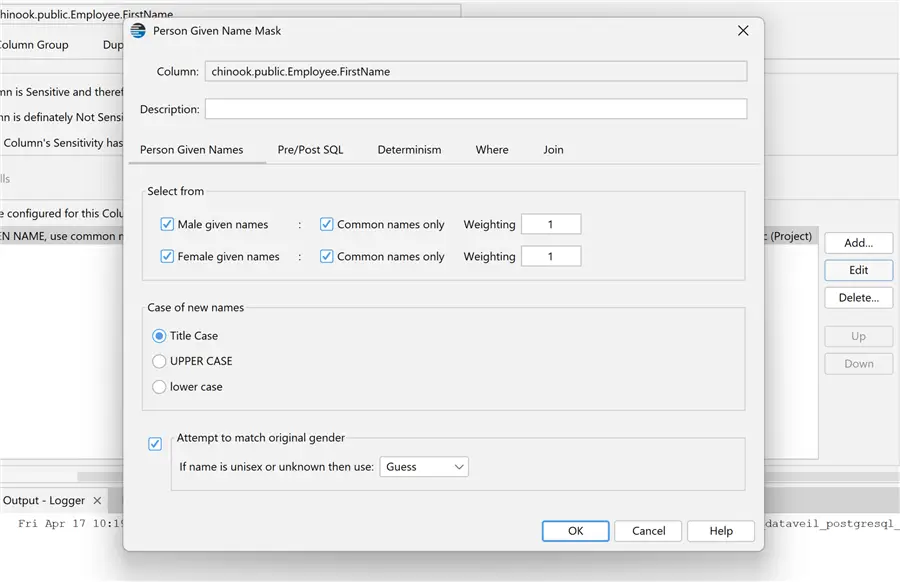
This column was identified as a Person Given Name and it was configured with the appropriate mask. We can also modify the parameters, which is very powerful!
But that is not all we can do. We can add SQL to be executed before or after masking each value. We can also specify a Where condition to narrow down the data to the range that we want to mask.
We also have the Components tab where we can create masks, macros and datasets that can be reused in other projects. This extends DataVeil with our own custom features.
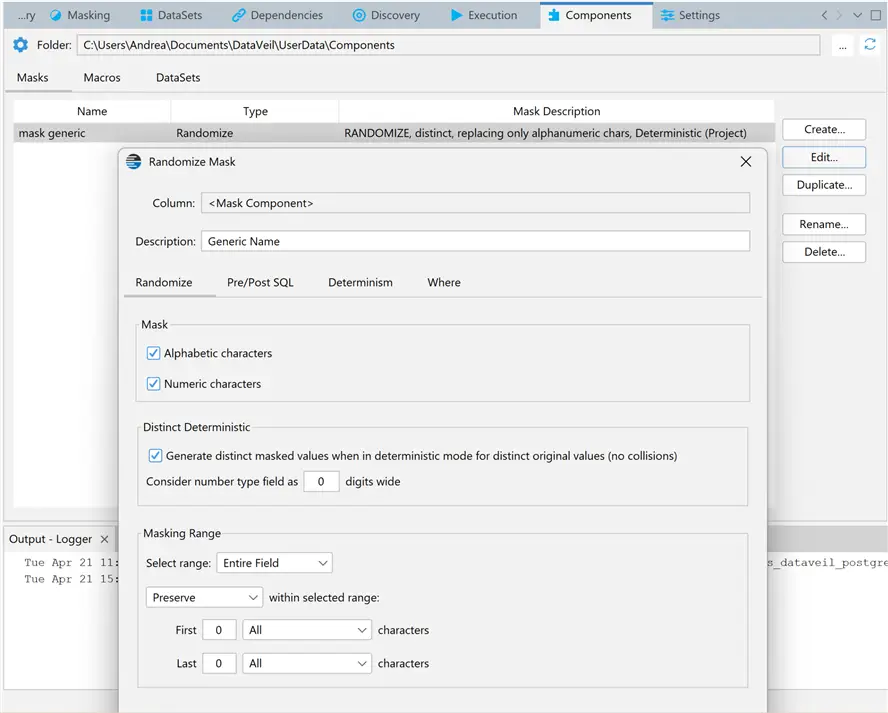
Manually Adding a Mask
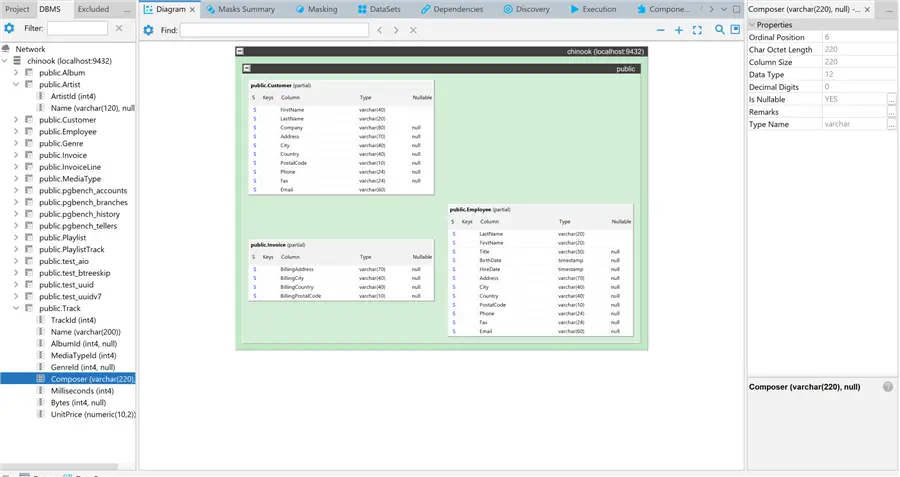
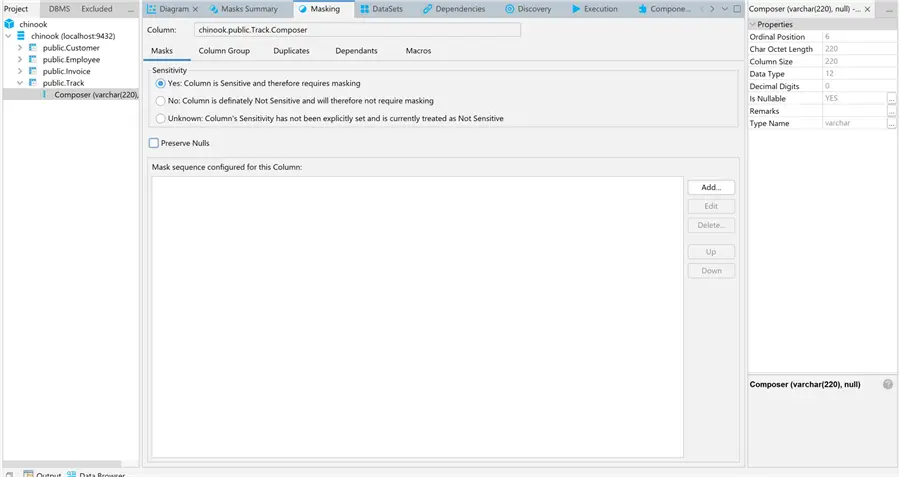
I mentioned above that it is possible to manually configure masking for columns. Suppose we need to mask the Composer column in our database. We can manually add it to the project, mark the column as sensitive and use the proper data mask:
Run the DataVeil Project
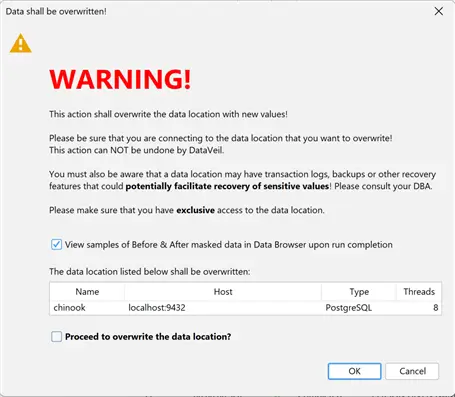
Finally, we are ready to perform the actual data masking in our development or test environment. I just want to repeat that DataVeil is a static data masking tool. Once you run the project, all the data in columns marked as sensitive data with a mask will be permanently overwritten based on the masking logic. DataVeil projects should never be run in a production environment.
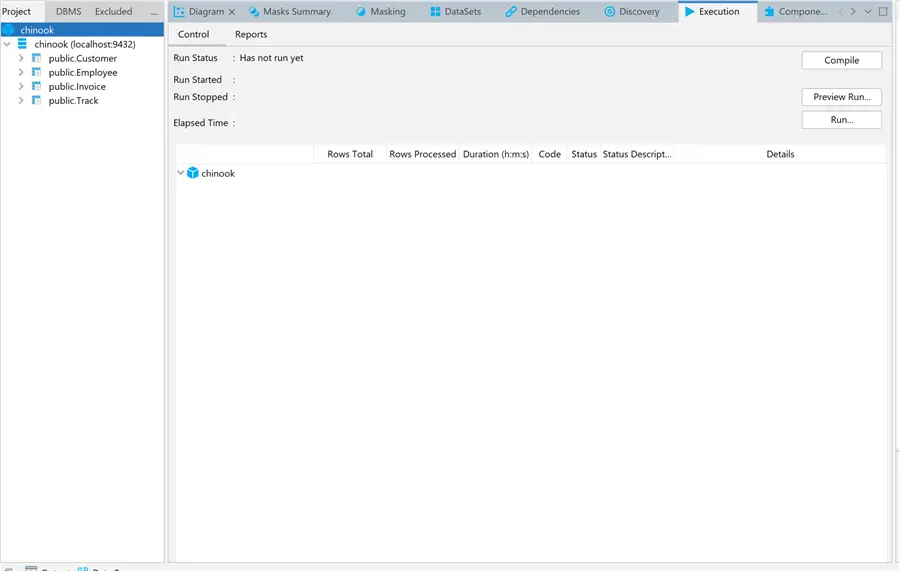
Notice the Compile button on the top right of the screen? This is an option to verify the project is ready to run. If you are confident the project is set up correctly, we can skip it and go straight to the preview run:
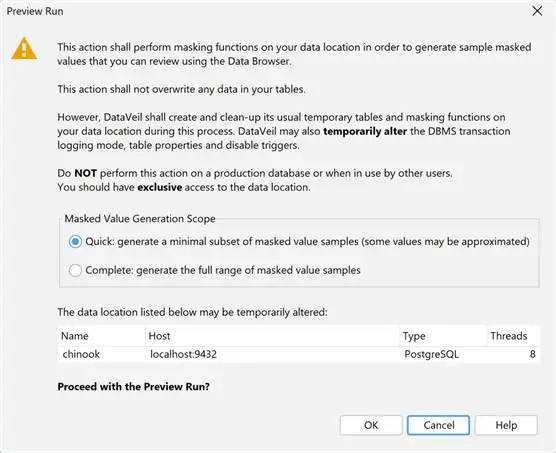
After being prompted for the project key, we have this reminder, and we can proceed with a quick preview:
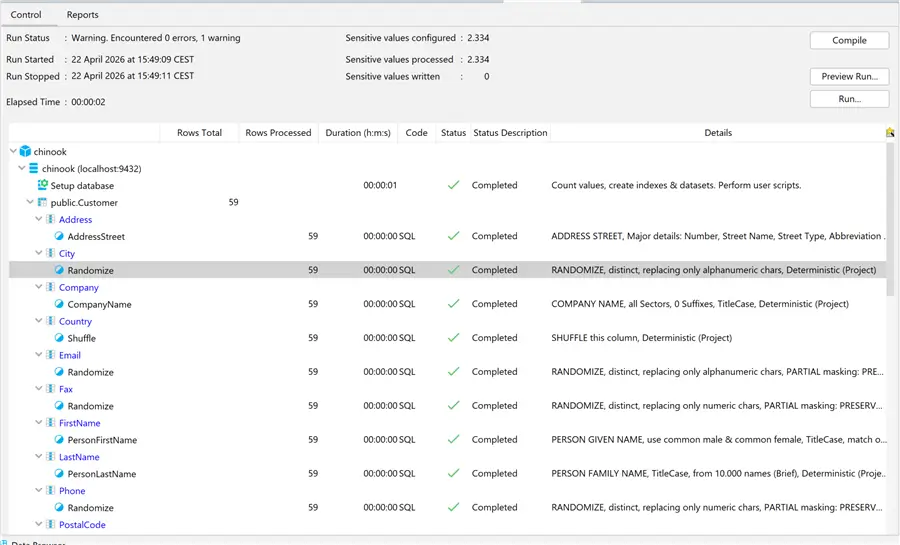
We can see a preview of all the masking that will be applied with just a few sample rows. When we are finally ready, we can begin the run. If you need to keep a copy of the original development or test database, please run a database backup before proceeding.
Review Masked Data
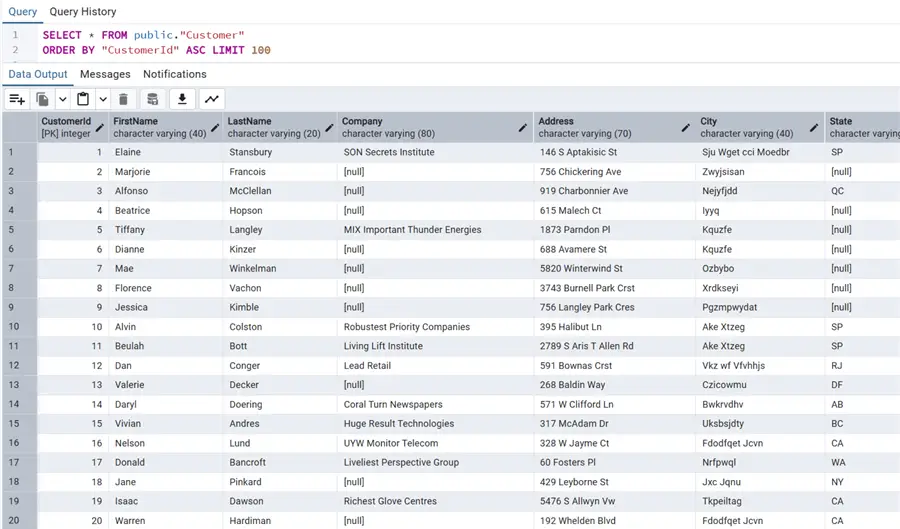
After the masking completes, we can review the masked data. For example, let’s take a look at the masked values in the Customer table:
And compare it to the original values:
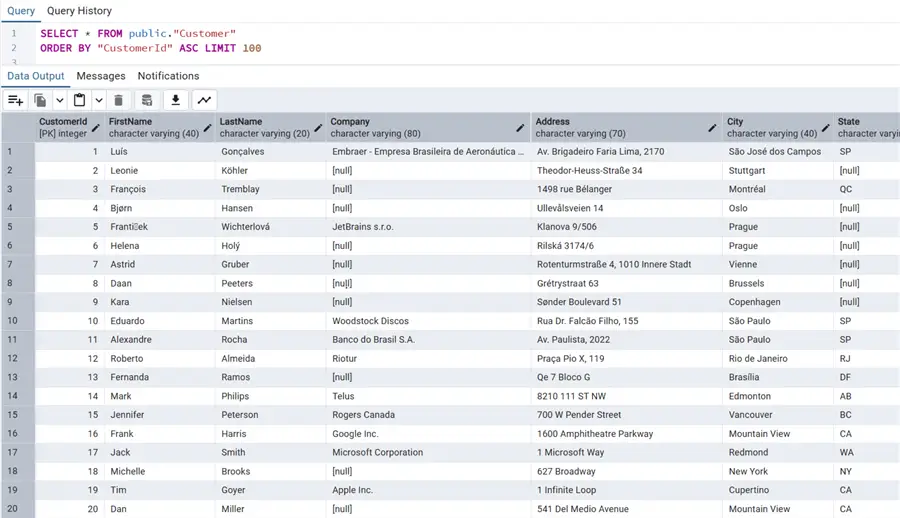
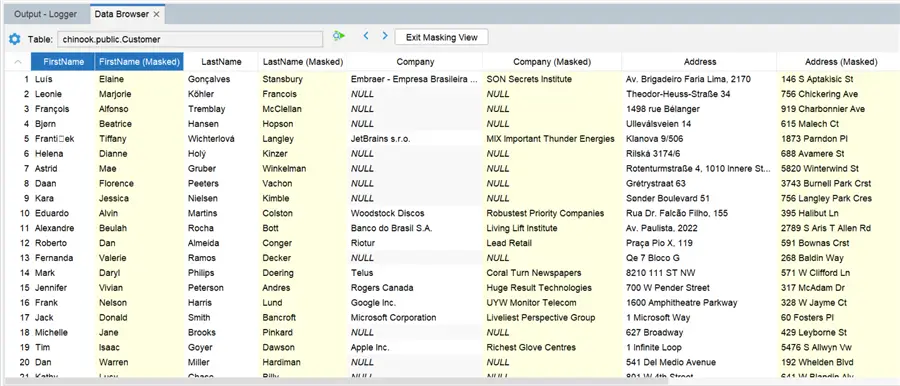
I showed the original and masked data above as you would normally expect to view it using a third-party data browser. This has the obvious downside of having to go back and forth to view the corresponding original and masked data separately. Furthermore, you won’t see the masked data until you actually commit the masking to the database.
This is where DataVeil provides another very useful productivity feature: an integrated Data Browser. This has the advantage of immediately showing the original and masked data side-by-side for easy comparison. It is configurable so you can include or omit specific columns in the view, and you can also specify which rows or ranges are displayed. It also lets you review the masking in preview mode, before actually committing the changes to the database.
So that’s it. We performed our static data masking with DataVeil and we are now protecting our sensitive data in development and test environments.
Reusability
One final item I would like to cover is reusability. DataVeil projects are reusable. The projects are saved as XML and can be run multiple times against different databases. If the database schema is the same, simply modify the connection settings and you can run the project.
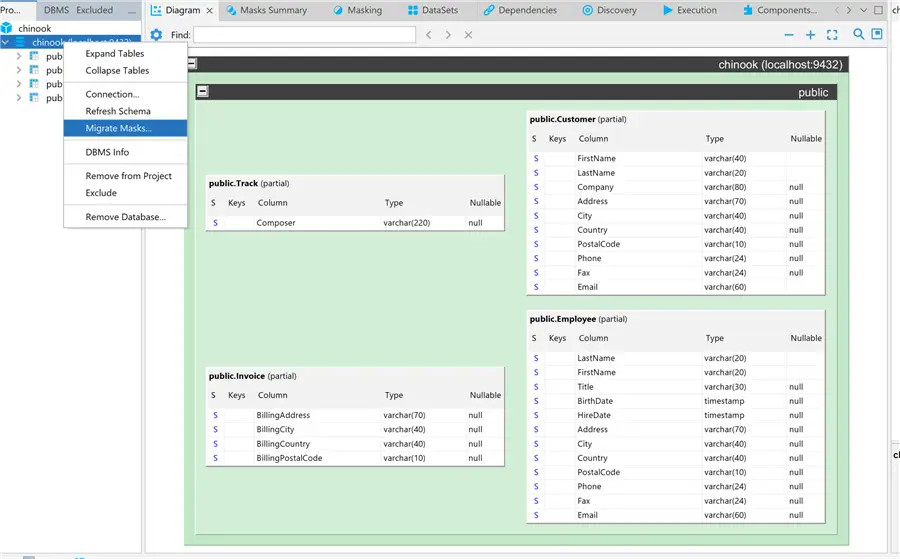
Let’s work through an example using the Migrate Masks feature. Right-click the database icon in the project explorer tree and select the Migrate Masks option:
At this point, we can define a new database connection for our project. Please note that the database platform can be different as long as the schema is the same or similar. For example, we can reuse our project on a SQL Server or Oracle database. For this example, we will use PostgreSQL version 17 instead of version 18 that I have been using thus far:
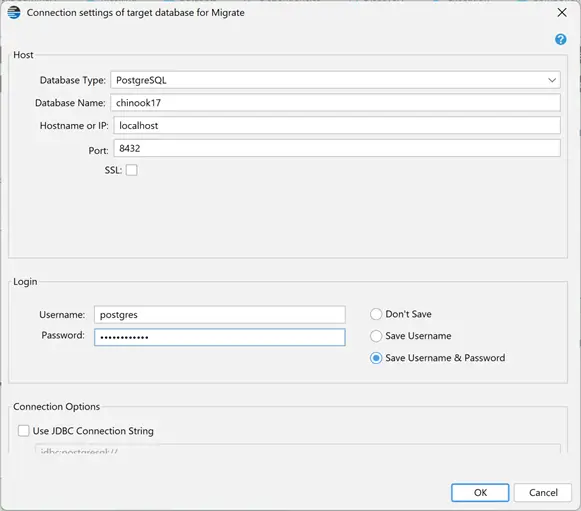
We are presented with a list of all the sensitive columns and their corresponding columns in the new database:
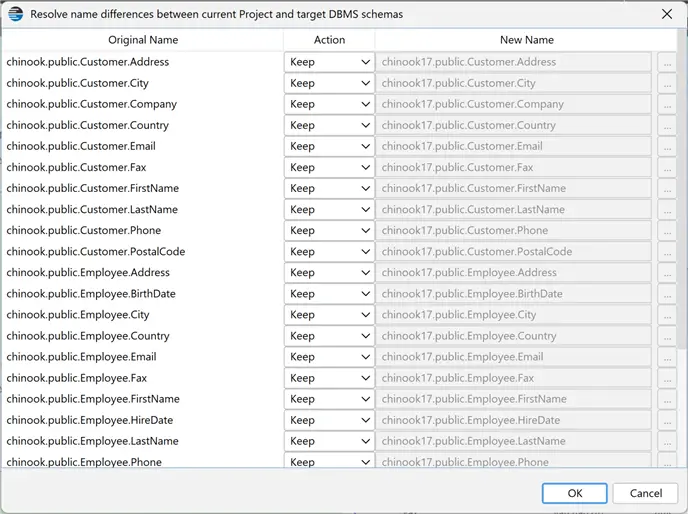
We can choose to keep, change or ignore a column if there are schema differences. Once reviewed, we can press the OK button to deploy the DataVeil masks to the new database as shown below:
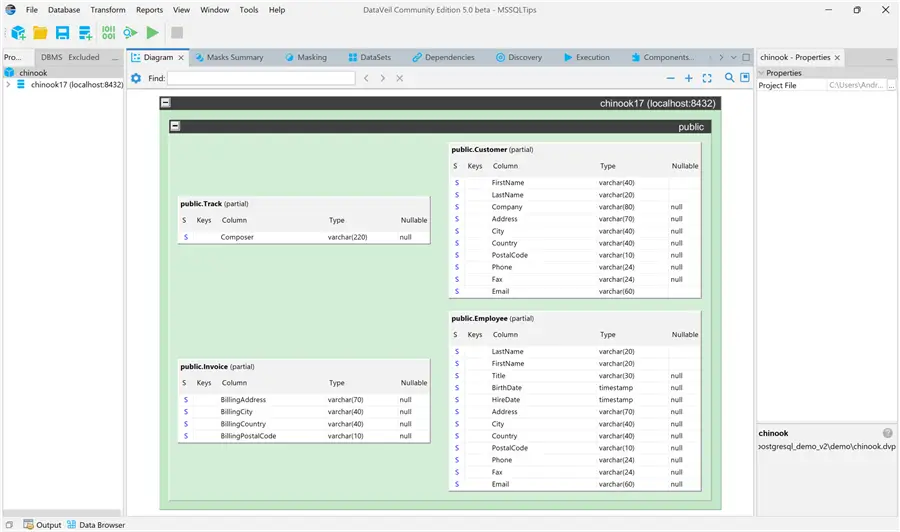
Masking another database on another version or platform is so easy and powerful!
Summary
DataVeil is a lightweight enterprise-grade static data masking tool designed to secure sensitive information by replacing it with realistic, functional, but fictitious data. Unlike dynamic masking, DataVeil permanently alters the data of your database, making it safe for use in non-production environments or for sharing with third parties.
DataVeil offers a centralized GUI and better performance for massive datasets compared to other PostgreSQL extensions used for data anonymization. Furthermore, DataVeil offers robust auditing and compliance that is critical for GDPR, HIPAA, and PCI-DSS.
In my opinion what really makes DataVeil stand out are:
- The Deterministic masking approach, yielding consistent masking across projects and deployments
- A streamlined GUI to build and manage projects across mainstream database platforms
- Time savings with the Discovery engine to identify sensitive data and suggest suitable masks
- Project reusability, custom masks and mask reuse on additional platforms
- Maintaining foreign key relationships and statistical cardinality consistent with the original database
Next Steps
The obvious next step is to download DataVeil and try it. A free Community license is available, so here are all the links to the product site and documentation:
Here are some additional articles about DataVeil for Microsoft SQL Server:
- SQL Server Static Data Masking with DataVeil
- Capital on Tap Meeting Regulatory Compliance and Explosive Growth with DataVeil Data Masking

Andrea Gnemmi is a Database and Data Warehouse professional with almost 20 years of experience, having started his career in Database Administration with SQL Server 2000.
His expertise ranges from SQL Server to Oracle and Postgres for database administration and from SAP BO to SSIS, SSRS and Power BI regarding BI and ETL.
He has worked both in SQL Server and Oracle mostly in multinational environments with very high transaction volumes and large datasets. Performance tuning, indexing techniques and in general Database administration are his hot topics. Ensuring a 24/7 uptime of the various databases in shop is his main responsibility, as well as the best possible performances of all queries run on the databases. He has started working with PostgreSQL two years ago loving many of the features of this RDBMS.
- MSSQLTips Awards: Trendsetter (25+ tips) – 2024 | Rookie of the Year – 2021