Problem
This tip contains a list of Frequently Asked Questions (FAQ) about the topic of Azure Data Factory. There’s already a bunch of Q&A answered in part 1. Most Q&A are applicable to Azure Synapse Analytics as well, and to some extent Fabric Data Factory. Where needed, differences between the different instances of Data Factory are pointed out.
Solution
No. Unlike SSIS where you can execute VB.NET or C# .NET code (in a script task or script component) or even create your own custom tasks, ADF doesn’t support executing custom code. You can execute SQL code on a database, or you can trigger a notebook (containing Python or Spark code for example), but there’s no option to execute .NET or PowerShell code inside ADF itself. If you want to execute code scripts because some functionality is missing, you need to use other Azure resources like Azure Functions or Azure Logic Apps.
Yes. In ADF, you can create triggers to orchestrate your pipelines. You have schedule-based triggers (much like the schedules of a SQL Server Agent job), but you can also have event-based triggers (for example when a new blob file is created in Azure Blob Storage) or tumbling window triggers. See first image.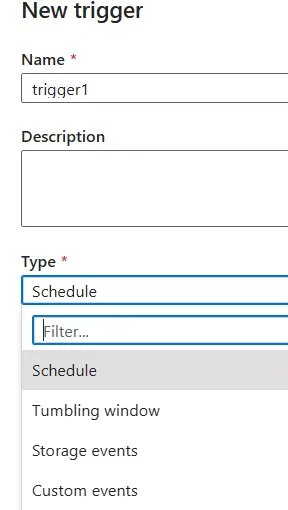
In Fabric, pipelines can be scheduled as well.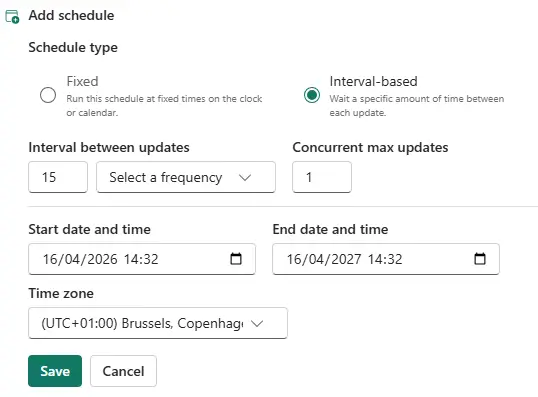
Yes, there’s also the option to trigger a pipeline through a data activator rule.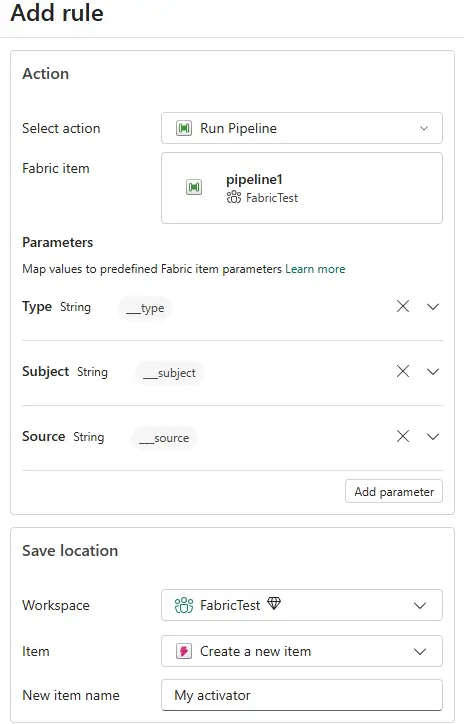
Infrastructure-as-Code (IaC) allows you to deploy cloud resources with code that describes the desired state of your cloud infrastructure. At the moment, there are two popular IaC languages: Terraform (which is open source and works in multiple cloud environments) and Bicep (which is developed by Microsoft and is available for Azure only). Both support deploying ADF instances and artefacts. You can find more information in the Terraform or Bicep docs.
Yes, but they’re not 100% the same. Like in SSIS, you can connect different tasks (activities) with each other. In ADF, you have the Success, Failure and Completion constraints just like in SSIS. But there’s also the extra Skipped constraint, which can be used when you’re rerunning a failed pipeline.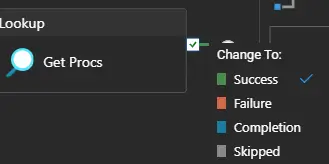
Unlike SSIS, there’s no option to put an expression on the precedence constraint, and all precedence constraints use the AND logic (while in SSIS you can also use OR logic). To illustrate with an example, in the following set-up the “Send Error” pipeline will never be executed as it’s not possible for both the Stored Procedure and the Web activity to fail at the same time (since the Web activity will only be executed if the stored proc was successful).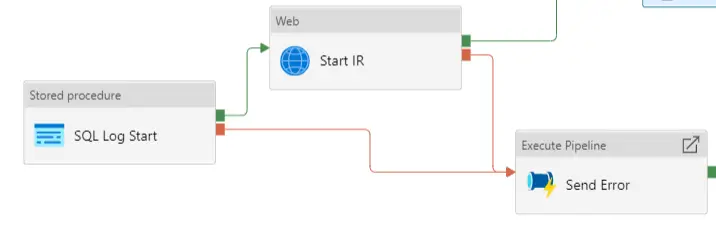
Yes. Azure Data Factory has a REST API that allows you to programmatically interact with ADF. One of the endpoints is Create Run, which allows you to start a pipeline. Azure Logic Apps also have the possibility to trigger an ADF pipeline.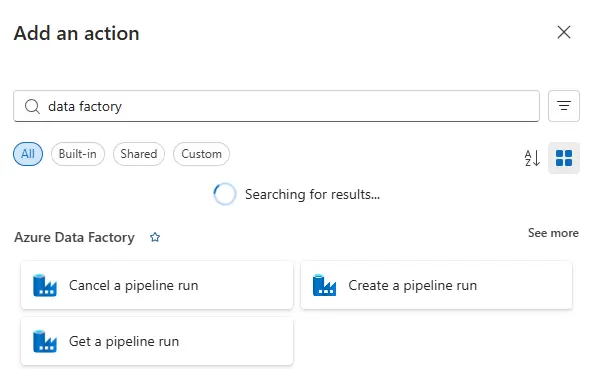
It can be. Cost is calculated on a variety of factors, such as (but not limited to) the number of times a pipeline is run, the number of activities, the duration of activities, the type of activity and the type of integration runtime used to run an activity. Microsoft MVP Cathrine Wilhelmsen has a very good short video on YouTube where she explains the details. A recommended watch if you want to learn how cost is calculated. In short, Copy Activities are usually the most expensive. The longer and the more frequently they run, the more expensive a pipeline gets. If you stick to a couple of best practices (outlined in this tip) and you don’t treat ADF as a real-time ETL tool, ADF costs can be controlled.
In Fabric, cost is calculated a bit different since running pipelines use the Fabric capacity for compute. But generally the same best practices apply as Copy Activities consume the most capacity units.
Not really. ADF is a low-code to no-code ELT orchestration tool. Configuring linked services, datasets and activities is usually straightforward. Some activities might be more difficult to configure properly (such as pagination when dealing with a REST API source), and expressions can be tricky to get right. But there are plenty of free online learning resources, such as the ADF tutorial, and AI is getting better at helping you write correct ADF expressions.
Not directly. There is no certification for ADF alone, but this tool is rather included in certain certifications as required knowledge. On a high level, you need to know about ADF and its pipelines in the Azure Data Fundamentals exam. ADF used to be included in the Azure Data Engineer exam, but this certification was retired in 2025. Fabric Data Pipelines are a big part of the Fabric Data Engineer certification though.
No, it cannot. At least not directly as there’s no “send mail task” like in SSIS. This means you need an external tool to send the e-mail, such as database mail in SQL Server, an Azure Function, an Azure Logic App or a REST API call to a service that can send mail like Azure Communication Services. In Fabric on the other hand, there’s an Office 365 Outlook activity that allows you to send e-mails. However, it needs a connection where a user signs in (and this account will be used to send the mails), it doesn’t support service principals or managed identities.
Next Steps
- If you want to get started with ADF, definitely check out the tutorial.
- A bunch of best practices and need-to-knows are bundled in these two tips:
- There’s also a free recording of a webinar on how to migrate your SSIS skills to ADF.
- You can find all tips about ADF in this overview.

Koen Verbeeck is a seasoned business intelligence consultant with over a decade of experience with the Microsoft Data Platform. He holds several certifications, including Azure Data Engineer. He’s a prolific writer, with over 375 articles on technologies such as Microsoft Fabric, SSIS, ADF, SSAS, SSRS, MDS, Power BI, Snowflake and Azure services. He has spoken at various events such as PASS, SQLBits, dataMinds Connect and many others. He frequently delivers educational webinars on MSSQLTips.com. For his efforts, Koen has been awarded the Microsoft MVP data platform award for many years.
- MSSQLTips Awards:
- Leadership Award (200+ Tips) – 2021
- Author of the Year – 2014/2020/2022
- Author Contender – 2024/2025